HTTP协议和TCP协议
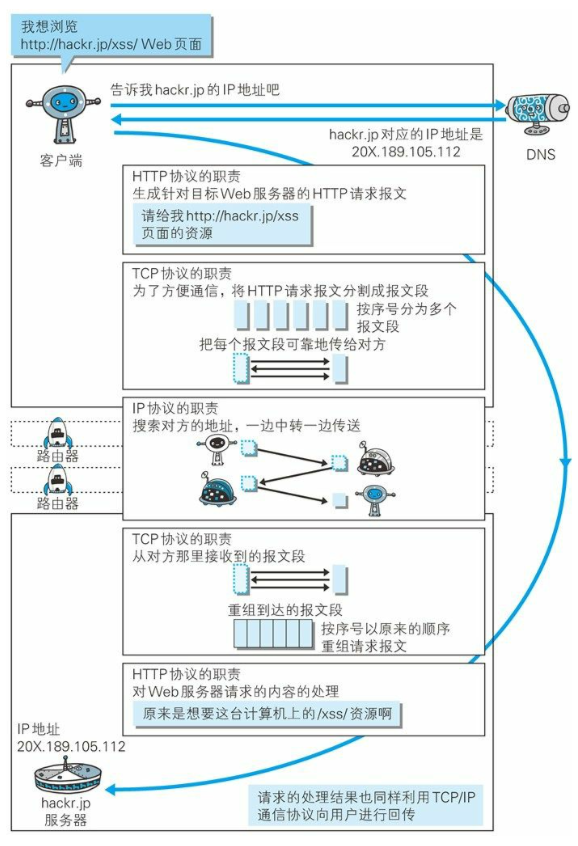
长链接

管线化
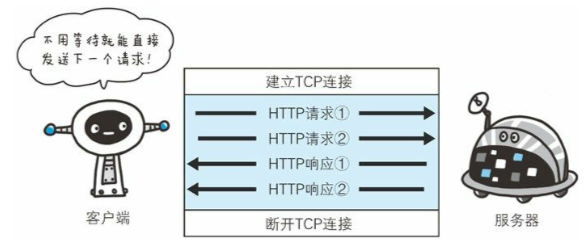
URI和URL
URI
URI(Uniform Resource Identifier)是统一资源标识符,在某个规则下能把这个资源独一无二标示出来,比如人的身份证号
- Uniform 不用根据上下文来识别资源指定的访问方式
- Resource 可以标识的任何东西
- Identifier 表示可标识的对象
URL
统一资源定位符,表示资源的地点,URL时使用浏览器访问WEB页面时需要输入的网页地址
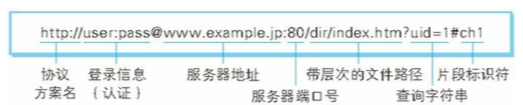
HTTP
- 请求的一方叫客户端,响应的一方叫服务器端
- 通过请求和响应达成通信
- HTTP是一种不保存状态的协议
请求报文
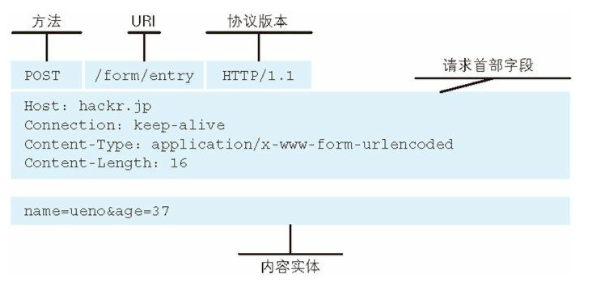
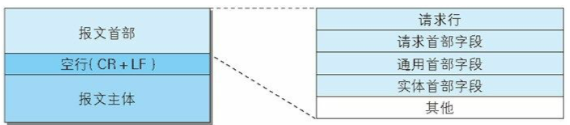
- 请求行
- 方法
- GET 获取资源
- POST 向服务器端发送数据,传输实体主体
- PUT 传输文件
- HEAD 获取报文首部
- DELETE 删除文件
- OPTIONS 询问支持的方法
- TRACE 追踪路径
- 协议/版本号
- URL
- 方法
- 请求头
- 通用首部(General Header)
- 请求首部(Request Header)
- 响应首部(Response Header)
- 实体首部(Entity Header Fields)
- 请求体(报文主体)
响应报文
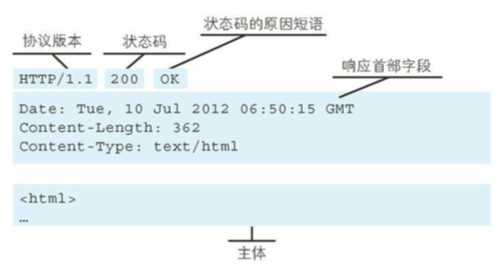
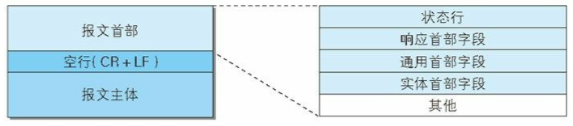
编码
HTTP可以在传输的过程中通过编码提升传输效率,但是会消耗更多的CPU时间。
编码压缩
发送文件时可以先用ZIP压缩功能后再发送文件
- gzip
- compress
- deflate
-
分割发送的分块传输编码
请求的实体在尚未传输完成前浏览器不能显示。所以在传输大容量数据时,通过把数据分割成多块,能让浏览器逐步显示页面。
多部分对象集合
一份报文主体中可以包含多类型实体。
- 使用boundary字符串来划分多部分对象指明的各类实体。在各个实体起始行之前插入—标记,多部分对象集合最后插入—标记
multiparty/form-data
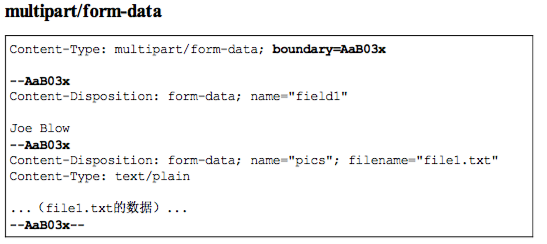
multipart/byteranges 206(Particial Content)
状态码(Partical Content)响应报文中包含多个范围时使用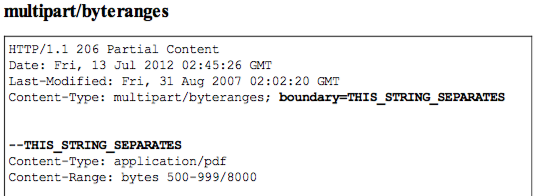
获取部分内容的范围请求
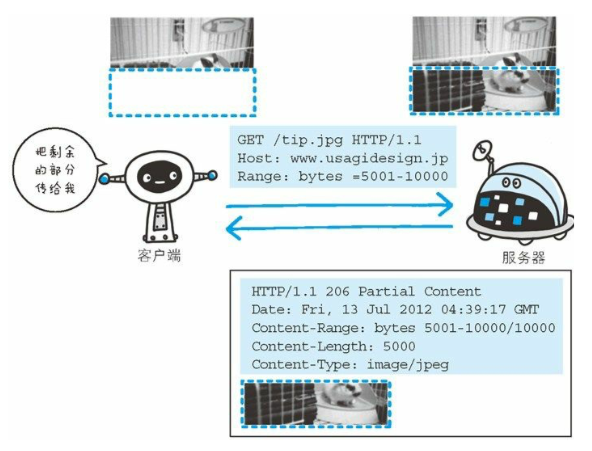
为了实现中断恢复下载的需求,需要能下载指定下载的实体范围
- 请求头中的Range来指定 资源的byte范围
- 响应会返回状态码206响应报文
- 对于多重范围的范围请求,响应会在首部字段
Content-Type中标明multipart/byteranges

内容协商
- 首部字段
- Accept
- Accept-Charset
- Accept-Encoding
- Accept-Language
- Content-Language
- 协商类型
- 服务器驱动
- 客户端驱动协商
- 透明协商
状态码
状态码负责表示客户端请求的返回结果、标记服务器端是否正常、通知出现的错误
状态码类别
| 类别 | 类别 | 原因短语 |
|---|---|---|
| 1XX | Informational(信息性状态码) | |
| 2XX | Success(成功状态码) | |
| 3XX | Redirection(重定向) | |
| 4XX | Client Error(客户端错误状态码) | |
| 5XX | Server Error(服务器错误状态吗) |
2XX 成功
- 200(OK 客户端发过来的数据被正常处理
- 204(Not Content 正常响应,没有实体
206(Partial Content 范围请求,返回部分数据,响应报文中由Content-Range指定实体内容
3XX 重定向
301(Moved Permanently) 永久重定向
- 302(Found) 临时重定向,规范要求 方法名不变,但是都会改变
- 303(See Other) 和302类似,但必须用GET方法
- 304(Not Modified) 状态未改变 配合(If-Match、If-Modified-Since、If-None_Match、If-Range、If-Unmodified-Since)
307(Temporary Redirect) 临时重定向,不该改变请求方法
4XX 客户端错误
400(Bad Request) 请求报文语法错误
- 401 (unauthorized) 需要认证
- 403(Forbidden) 服务器拒绝访问对应的资源
-
5XX 服务器端错误
500(Internal Server Error)服务器故障
- 503(Service Unavailable) 服务器处于超负载或正在停机维护
首部
通用首部字段
| 首部字段名 | 说明 |
|---|---|
| Cache-Control | 控制缓存行为 |
| Connection | 链接的管理 |
| Date | 报文日期 |
| Pragma | 报文指令 |
| Trailer | 报文尾部的首部 |
| Trasfer-Encoding | 指定报文主体的传输编码方式 |
| Upgrade | 升级为其他协议 |
| Via | 代理服务器信息 |
| Warning | 错误通知 |
请求首部字段
| 首部字段名 | 说明 |
|---|---|
| Accept | 用户代理可处理的媒体类型 |
| Accept-Charset | 优先的字符集 |
| Accept-Encoding | 优先的编码 |
| Accept-Langulage | 优先的语言 |
| Authorization | Web认证信息 |
| Expect | 期待服务器的特定行为 |
| From | 用户的电子邮箱地址 |
| Host | 请求资源所在的服务器 |
| If-Match | 比较实体标记 |
| If-Modified-Since | 比较资源的更新时间 |
| If-None-Match | 比较实体标记 |
| If-Range | 资源未更新时发送实体Byte的范围请求 |
| If-Unmodified-Since | 比较资源的更新时间(和If-Modified-Since相反) |
| Max-Forwards | 最大传输跳数 |
| Proxy-Authorization | 代理服务器需要客户端认证 |
| Range | 实体字节范围请求 |
| Referer | 请求中的URI的原始获取方 |
| TE | 传输编码的优先级 |
| User-Agent | HTTP客户端程序的信息 |
响应首部字段
| 首部字段名 | 说明 | | Accept-Ranges | 是否接受字节范围 | | :—- | :—- | | Age | 资源的创建时间 | | ETag | 资源的匹配信息 | | Location | 客户端重定向至指定的URI | | Proxy-Authenticate | 代理服务器对客户端的认证信息 | | Retry-After | 再次发送请求的时机 | | Server | 服务器的信息 | | Vary | 代理服务器缓存的管理信息 | | www-Authenticate | |
实体首部字段
| 首部字段名 | 说明 |
|---|---|
| Allow | 资源可支持的HTTP方法 |
| Content-Encoding | 实体的编码方式 |
| Content-Language | 实体的自然语言 |
| Content-Length | 实体的内容大小(字节为单位) |
| Content-Location | 替代对应资源的URI |
| Content-MD5 | 实体的报文摘要 |
| Content-Range | 实体的位置范围 |
| Content-Type | 实体主体的媒体类型 |
| Expires | 实体过期时间 |
| Last-Modified | 资源的最后修改时间 |
Node实战
创建HTTP服务器
let server = http.createServer([requestListener]);server.on('request',requestListener);
启动HTTP服务器
server.listen(port,[host],[backlog],[callback]);server.on('listening',callback);
- port 监听的端口号
- host 监听的地址
- backlog 指定位于等待队列中的客户端连接数
let http = require('http');let server = http.createServer(function(req,res){}).listen(8080,'127.0.0.1',function(){console.log('服务器端开始监听!')});
关闭HTTP服务器
let http = require('http');let server = http.createServer(function(req,res){});server.on('close',function(){console.log('服务器关闭');});server.listen(8080,'127.0.0.1',function(){console.log('服务器端开始监听!')server.close();});
监听服务器错误
server.on('error',function(){if(e.code == 'EADDRINUSE'){console.log('端口号已经被占用!);}});
connection
server.on('connection',function(){console.log(客户端连接已经建立);});
setTimeout
设置超时时间,超时后不可再复用已经建立的连接,需要发请求需要重新建立连接。默认超时时间时2分钟 ```javascript server.setTimeout(msecs,callback); server.on(‘timeout’,function(){ console.log(‘连接已经超时’); });
<a name="bBjIO"></a>## 获取客户端请求信息**request**- method 请求的方法- url 请求的路径- headers 请求头对象- httpVersion 客户端的http版本- socket 监听客户端请求的socket对象```javascriptlet http = require('http');let fs = require('fs');let server = http.createServer(function(req,res){let body = [];req.on('data',function(data){body.push(data);});req.on('end',function(){let result = Buffer.concat(body);console.log(result.toString());});}).listen(8080,'127.0.0.1);
querystring
querystring模块用来转换URL字符串和URL中的查询字符串
发送服务器响应流
writeHead
response.writeHead(statusCode,[reasonPhrase],[headers]);
- content-type 内容类型
- location 将客户端重定向到另外一个URL地址
- content-disposition 指定一个被下载的文件名
- content-length 服务器响应内容的字节数
- set-cookie 在客户端创建Cookie
- content-encoding 指定服务器响应内容的编码方式
- cache-cache 开启缓存机制
- expires 用于制定缓存过期时间
- etag 指定当服务器响应内容没有变化不重新下载数据
Header
设置、获取和删除Headerresponse.setHeader('Content-Type','text/html;charset=utf-8'); response.getHeader('Content-Type'); response.removeHeader('Content-Type'); response.headersSent 判断响应头是否已经发送sendDate
res.sendDate = false;
write
response.write(chunk,[encoding]);
response.end([chunk],[encoding]);
timeout
可以使用setTimeout方法设置响应让超时时间,如果在指定时间内不响应,则触发timeout事件
response.setTimeout(msecs,[callback]);
response.on('timeout',callback);
close
response.on('close',callback);
HTTP客户端
向其他网站请求数据
let req = http.request(options,callback);
req.on('request',callback);
request.write(chunk,[encoding]);
request.end([chunk],[encoding]);
- host 指定目标域名或主机名
- hostname 指定目标域名或主机名,如果和host都指定了,优先使用hostname
- port 指定目标服务器的端口号
- localAddress 本地接口
- socketPath 指定Unix域端口
- method 指定HTTP请求的方式
- path 指定请求路径和查询字符串
- headers 指定客户端请求头对象
- auth 指定认证部分
- agent 用于指定HTTP代理,在Node.js中,使用http.Agent类代表一个HTTP代理,默认使用keep-alive连接,同时使用http.Agent对象来实现所有的HTTP客户端请求
let http = require('http');
let options = {
  hostname: 'localhost',
  port: 8080,
  path: '/',
  method: 'GET'
}
let req = http.request(options, function (res) {
  console.log('状态吗:' + res.statusCode);
  console.log('响应头:' + JSON.stringify(res.headers));
  res.setEncoding('utf8');
  res.on('data', function (chunk) {
      console.log('响应内容', chunk);
  });
});
req.end();
取消请求
req.abort();监听error事件
request.on('error',function(err){});socket
req.on('socket',function(socket){
socket.setTimeout(1000);
socket.on('timeout',function(){req.abort()});
});
get
http.get(options,callback);addTrailers
可以使用response对象的addTrailers方法在服务器响应尾部追加一个头信息 ```javascript let http = require(‘http’); let path = require(‘path’); let crypto = require(‘crypto’);
let server = http.createServer(function (req, res) { res.writeHead(200, { ‘Transfer-Encoding’: ‘chunked’, ‘Trailer’: ‘Content-MD5’ }); let rs = require(‘fs’).createReadStream(path.join(__dirname, ‘msg.txt’), { highWaterMark: 2 }); let md5 = crypto.createHash(‘md5’); rs.on(‘data’, function (data) { console.log(data); res.write(data); md5.update(data); }); rs.on(‘end’, function () { res.addTrailers({ ‘Content-MD5’: md5.digest(‘hex’) }); res.end(); }); }).listen(8080);
```javascript
let http = require('http');
let options = {
    hostname: 'localhost',
    port: 8080,
    path: '/',
    method: 'GET'
}
let req = http.request(options, function (res) {
    console.log('状态吗:' + res.statusCode);
    console.log('响应头:' + JSON.stringify(res.headers));
    res.setEncoding('utf8');
    res.on('data', function (chunk) {
        console.log('响应内容', chunk);
    });
    res.on('end', function () {
        console.log('trailer', res.trailers);
    });
});
req.end();
制作代理服务器
let http = require('http');
let url = require('url');
let server = http.createServer(function (request, response) {
    let {
        path
    } = url.parse(request.url);
    let options = {
        host: 'localhost',
        port: 9090,
        path: path,
        headers: request.headers
    }
    let req = http.get(options, function (res) {
        console.log(res);
        response.writeHead(res.statusCode, res.headers);
        res.pipe(response);
    });
    req.on('error', function (err) {
        console.log(err);
    });
    request.pipe(req);
}).listen(8080);

若有收获,就点个赞吧
0 人点赞


