一、继承性
1.继承性的理解

2.继承性的使用
/*** 继承性格式:class B extends A{}* A:父类、超类、基类、superclass* B:子类、派生类、subclass* extends:延展、扩展* 子类可以在拥有父类的功能后,再进行功能的扩展:一代更比一代强!*/public class Test {public static void main(String[] args) {Student s = new Student();//实例化学生类s.name = "小明"; //子类调用(拥有)父类的属性s.eat(); //子类调用(拥有)父类的方法}}//简简单单定义一个人类class Person{String name;int age;public void eat(){System.out.println("吃饭");}public void sleep(){System.out.println("睡觉");}}//学生也是人的一种,故尝试继承Person类class Student extends Person{String major;}
3.继承性的规定
/*** 继承性的规定:* 1.一个父类可以拥有多个子类。* 2.单继承性:一个子类类不可以拥有多个父类。* 3.支持多层继承,分别称为直接父类、间接父类...*/public class Test {public static void main(String[] args) {Student s = new Student();//以下为多层继承s.breath();s.say();s.book();}}//简简单单定义一个生物类class Creature{int age;public void breath(){System.out.println("呼吸");}}//定一个人类class Person extends Creature{String name;public void say(){System.out.println("说话");}}//定一个学生类class Student extends Person{String school;public void book(){System.out.println("看书");}}
4.Object类的简单理解
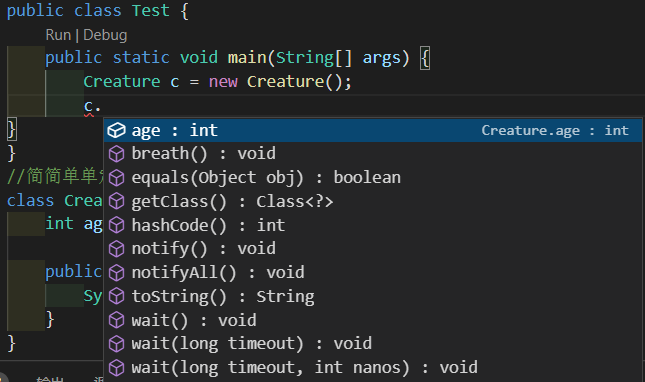
引入:我们在Creature类中只定义了breath()方法为什么会有这么多方法捏?
/*** Object类:* 1.如果我们没有显式的声明一个类的父类的话,则此类继承于java.lang.Object类* 2.所有定义的类都会直接或间接的继承Object类(Object生万物)*/public class Test {public static void main(String[] args) {Creature c = new Creature();//这个方法并没有定义,但却提供了c.equals(obj);}}//简简单单定义一个生物类class Creature{int age;public void breath(){System.out.println("呼吸");}}
5.继承性的练习
/*** 在CylinderTest类中创建Cylinder类的对象,设置圆柱的底面半径和高,并输出圆柱的体积。* 分开:圆柱类继承底面圆类*/public class Test {public static void main(String[] args) {Cylinder c = new Cylinder();c.setRadius(3.0);c.setHeight(3.0);double volume = c.getVolume();System.out.println(volume);}}//定义圆类class Circle{private double radius;public void setRadius(double radius) {this.radius = radius;}public double getRadius() {return radius;}public double getArea(){return Math.PI * radius * radius;}}//定义圆柱类class Cylinder extends Circle{private double height;public void setHeight(double height) {this.height = height;}public double getHeight() {return height;}public double getVolume(){return getArea() * getHeight();}}
二、方法重写
1.方法重写的理解及使用
/*** 方法重写(overwrite):* 1.重写:子类继承父类以后,可以对父类中同名同参数的方法,进行覆盖操作* 2.应用:当发现父类的方法有点不太符合子类功能可以重写* 3.子类重写的方法的权限修饰符不小于父类被重写的方法的权限修饰符* >特殊情况:子类不能重写父类中声明为private权限的方法* 4.返回值类型:* >父类被重写的方法的返回值类型是void,则子类重写的方法的返回值类型只能是void* >父类被重写的方法的返回值类型是A类型,则子类重写的方法的返回值类型可以是A类或A类的子* >父类被重写的方法的返回值类型是基本数据类型(比如:double),则子类重写的方法的返回值类型必须是相同的*/public class Test {public static void main(String[] args) {Student s = new Student();s.eat(); // 仍是子类方法s.eat("苹果"); // 仍是父类方法s.sleep(); // 覆盖父类方法}}//简简单单定义一个人类class Person{String name;int age;public Person(){}public Person(String name,int age){this.name = name;this.age = age;}public void eat(String fruit){System.out.println("人吃" + fruit);}public void sleep(){System.out.println("睡觉");}}//定义学生类class Student extends Person{String major;public Student(){}public void eat(){ //此方法并没有重写父类的eat方法,因为参数不同System.out.println("学生吃饭");}public void sleep(){ // 此方法覆盖父类方法,因为方法名和参数相同System.out.println("学生睡觉");}}
2.方法重写的练习
(1)、方法重载和方法重写的区别
1、方法重载(overload):
在同一个类中,允许存在一个以上的同名方法,只要它们的参数个数或者参数类型不同即可。
2、方法重写(overwrite):
子类继承父类以后,可以对父类中同名同参数的方法,进行覆盖操作。
(2)、定义的类Kid,在Kid中重新定义employeed()方法覆盖父类ManKind中定义的employeed()方法,输出”Kid should study and no job.”
/*** 题解*/public class Test {public static void main(String[] args) {Kid k = new Kid();k.employeed();}}//定义一个人类class Mankind{String name;int age;public Mankind(){}public Mankind(String name,int age){this.name = name;this.age = age;}public void employeed(){System.out.println("人类应该干活");}}//学生也是人的一种,故尝试继承Person类class Kid extends Mankind{String school;public Kid(){}public void employeed(){ // 此方法覆盖父类方法,因为方法名和参数相同System.out.println("Kid should study and no job.");}}
三、super关键字
1.super调用属性、方法及构造器
/*** 3.super调用属性和方法* 3.1我们可以在子类的方法或构造器中。通过使用"super.属性"或"super.方法"的方式,显式的调用父类中声明的属性或方法。但是,通常情况下,我们习惯省略"super."* 3.2特殊情况:当子类和父类中定义了同名的属性时,我们要想在子类中调用父类中声明的属性,则必须显式的使用"super.属性"的方式,表明调用的是父类中声明的属性。* 3.3特殊情况:当子类重写了父类中的方法以后,我们想在子类的方法中调用父类中被重写的方法时,则必须显式的使用"super.方法"的方式,表明调用的是父类中被重写的方法。* 4.super调用构造器* 4.1 我们可以在子类的构造器中显式的使用"super(形参列表)"的方式,调用父类中声明的指定的构造器* 4.2 "super(形参列表)"的使用,必须声明在子类构造器的首行!* 4.3 我们在类的构造器中,针对于"this(形参列表)"或"super(形参列表)"只能二选一,不能同时出现。* 4.4 在构造器的首行,既没有显式的声明"this(形参列表)"或"super(形参列表)",则默认的调用的是父类中的空参构造器。super()* 4.5 在类的多个构造器中,至少有一个类的构造器使用了"super(形参列表)",调用父类中的构造器。*/public class Test {public static void main(String[] args) {Student s = new Student(); // 调用了父类空参构造器s.show();}}//简简单单定义一个人类class Person {String name;int age;int id = 1001; //身份证号public Person(){System.out.println("一会子类得调用我");}public Person(String name){this.name = name;}public Person(String name,int age){this(name); // 调用前面的构造器this.age = age;}public void eat(){System.out.println("人,吃饭");}}class Student extends Person{String major;int id = 1002; // 学号public Student(){//看似空构造器其实隐含着super();调用父类空参构造器}public void eat(){System.out.println("学生吃健康的");}public void show(){System.out.println("id = " + id); // 子类System.out.println("id = " + super.id); // 调用父类属性super.eat(); //调用父类方法}}
2.子类对象的实例化过程
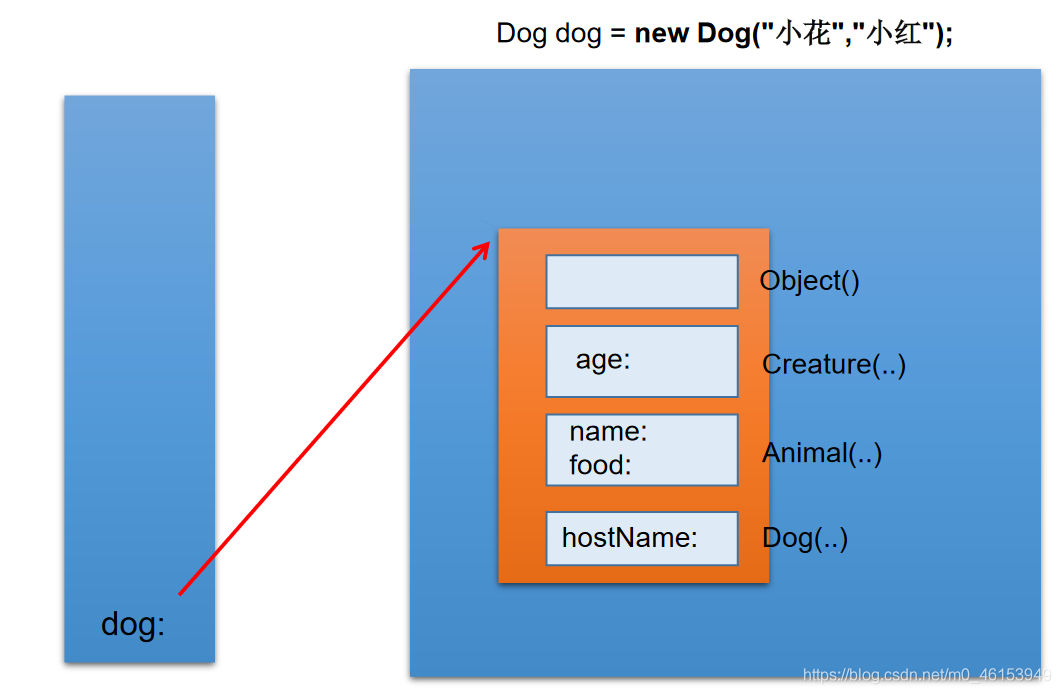
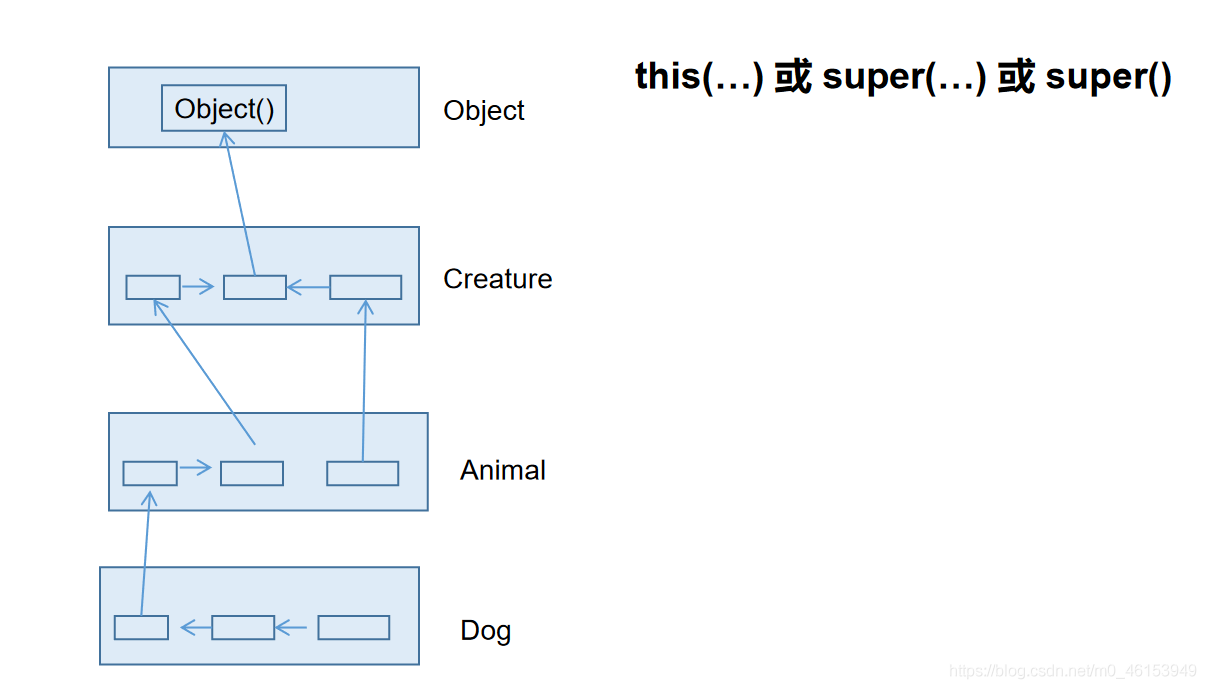
/** 子类对象实例化的全过程** 1.从结果上看:* 子类继承父类以后,就获取了父类中声明的属性或方法。* 创建子类的对象中,在堆空间中,就会加载所有父类中声明的属性。** 2.从过程上看:* 当我们通过子类的构造器创建子类对象时,我们一定会直接或间接的调用其父类构造器,* 直到调用了java.lang.Object类中空参的构造器为止。正因为加载过所有的父类结构,所以才可以看到内存中有* 父类中的结构,子类对象可以考虑进行调用。** 明确:虽然创建子类对象时,调用了父类的构造器,但自始至终就创建过一个对象,即为new的子类对象。*/public class InstanceTest {}
3.继承性和super的练习
Account类
/** 写一个名为Account的类模拟账户。该类的属性和方法如下图所示。* 该类包括的属性:账号id,余额balance,年利率annualInterestRate;* 包含的方法:访问器方法(getter和setter方法),* 返回月利率的方法getMonthlyInterest(),* 取款方法withdraw(),存款方法deposit()。**/public class Account {private int id; //账号private double balance; //余额private double annualInterestRate; //年利率public Account(int id, double balance, double annualInterestRate) {super();this.id = id;this.balance = balance;this.annualInterestRate = annualInterestRate;}public int getId() {return id;}public void setId(int id) {this.id = id;}public double getBalance() {return balance;}public void setBalance(double balance) {this.balance = balance;}public double getAnnualInterestRate() {return annualInterestRate;}public void setAnnualInterestRate(double annualInterestRate) {this.annualInterestRate = annualInterestRate;}public double getMonthlyInterest(){ //返回月利率的方法return annualInterestRate / 12;}public void withdraw (double amount){ //取款方法if(balance >= amount){balance -= amount;return;}System.out.println("余额不足");}public void deposit (double amount){ //存款方法if(amount > 0){balance += amount;}}}
AccountTest类
/** 写一个用户程序测试Account类。在用户程序中,* 创建一个账号为1122、余额为20000、年利率4.5%的Account对象。* 使用withdraw方法提款30000元,并打印余额。再使用withdraw方法提款2500元,* 使用deposit方法存款3000元,然后打印余额和月利率。*/public class AccountTest {public static void main(String[] args) {Account acct = new Account(1122,20000,0.045);acct.withdraw(30000);System.out.println("你的账户余额为:" + acct.getBalance());acct.withdraw(2500);System.out.println("你的账户余额为:" + acct.getBalance());acct.deposit(3000);System.out.println("你的账户余额为:" + acct.getBalance());System.out.println("月利率为: " + (acct.getAnnualInterestRate() * 100) + "%");}}
CheckAccount类
/** 创建Account类的一个子类CheckAccount代表可透支的账户,该账户中定义一个属性overdraft代表可透支限额。* 在CheckAccount类中重写withdraw方法,其算法如下:* 如果(取款金额<账户余额),* 可直接取款* 如果(取款金额>账户余额),* 计算需要透支的额度* 判断可透支额overdraft是否足够支付本次透支需要,如果可以* 将账户余额修改为0,冲减可透支金额* 如果不可以* 提示用户超过可透支额的限额**/public class CheckAccount extends Account{private double overdraft; //代表可透支限额public CheckAccount(int id, double balance, double annualInterestRate,double overdraft){super(id, balance, annualInterestRate);this.overdraft = overdraft;}public double getOverdraft() {return overdraft;}public void setOverdraft(double overdraft) {this.overdraft = overdraft;}@Overridepublic void withdraw(double amount) {if(getBalance() >= amount){ //余额足够消费//方式一// setBalance(getBalance() - amount);//方式二super.withdraw(amount);}else if(overdraft >= amount - getBalance()){ //余额不够overdraft -= (amount - getBalance());// setBalance(0);//或super.withdraw(getBalance());}else{ //超过可透支限额System.out.println("超过可透支限额!");}}}
CheckAccountTest类
/** 写一个用户程序测试CheckAccount类。在用户程序中,* 创建一个账号为1122、余额为20000、年利率4.5%,* 可透支限额为5000元的CheckAccount对象。* 使用withdraw方法提款5000元,并打印账户余额和可透支额。* 再使用withdraw方法提款18000元,并打印账户余额和可透支额。* 再使用withdraw方法提款3000元,并打印账户余额和可透支额。**/public class CheckAccountTest {public static void main(String[] args) {CheckAccount cat = new CheckAccount(1122,20000,0.045,5000);cat.withdraw(5000);System.out.println("您的账户余额为: " + cat.getBalance());System.out.println("您的可透支额度为: " + cat.getOverdraft());cat.withdraw(18000);System.out.println("您的账户余额为: " + cat.getBalance());System.out.println("您的可透支额度为: " + cat.getOverdraft());cat.withdraw(3000);System.out.println("您的账户余额为: " + cat.getBalance());System.out.println("您的可透支额度为: " + cat.getOverdraft());}}
四、多态性
1.多态性的使用
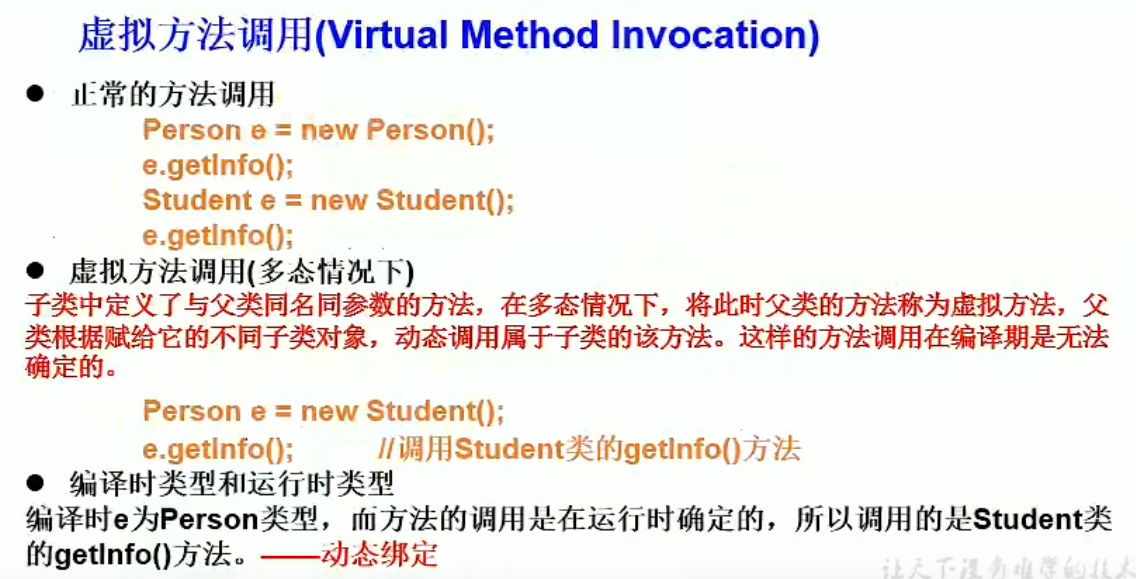
/*** 多态性:* 1.理解多态性:可以理解为一个事物的多种形态。* 2.何为多态性:对象的多态性:父类的引用指向子类的对象* 3.多态的使用:虚拟方法调用* 有了对象的多态性以后,我们在编译期,只能调用父类中声明的方法,但在运行期,我们实际执行的是子类重写父类的方法。* 总结:编译,看左边;运行,看右边。*/public class Test {public static void main(String[] args) {Person p1 = new Person();p1.eat();Man m1 = new Man();m1.eat();m1.age = 25;m1.earnMoney();//对象的多态性:父类的引用指向子类的对象//Person p2为父类 new Man()为子类的对象Person p2 = new Man();//Person w1 = new Woman(); 同理//多态的使用:当调用子父类同名同参数的方法时,实际执行的是子类重写父类的方法---虚拟方法调用p2.eat();//输出为Man类中的同名方法//p2.earnMoney();此方法并不能调用//3.多态的使用:虚拟方法调用,有了对象的多态性以后,我们在编译期,只能调用父类中声明的方法,但在运行期,我们实际执行的是子类重写父类的方法。总结:编译,看左边;运行,看右边。}}//简简单单定义一个人类class Person {String name;int age;public void eat(){System.out.println("人,吃饭");}}class Man extends Person{boolean isSmoking;public void earnMoney(){System.out.println("挣钱");}public void eat(){System.out.println("男人吃饭长肌肉");}public void walk(){System.out.println("男人走路");}}class Woman extends Person{boolean isBeauy;public void goShopping(){System.out.println("女人购物");}public void eat(){System.out.println("女人吃饭");}public void walk(){System.out.println("女人窈窕走路");}}
2.多态性使用举例
/*** 多态性:* 1.理解多态性:可以理解为一个事物的多种形态。* 2.何为多态性:对象的多态性:父类的引用指向子类的对象* 3.多态的使用:虚拟方法调用* 有了对象的多态性以后,我们在编译期,只能调用父类中声明的方法,但在运行期,我们实际执行的是子类重写父类的方法。* 总结:编译,看左边;运行,看右边。*/public class Test {public static void main(String[] args) {Test t = new Test();Animal a1 = new Dog();t.func(a1);}public void func(Animal animal){ //此处声明的是一个Animal对象但是new的是一个Doganimal.eat();animal.shout();}//如果没有多态会发生以下这种情况重载无数方法...public void func(Dog dog){}public void func(Cat cat){}}//举例一class Animal{public void shout(){System.out.println("动物叫了");}public void eat(){System.out.println("动物吃饭");}}class Dog extends Animal{public void eat(){System.out.println("狗吃骨头");}public void shout(){System.out.println("汪汪汪");}}class Cat extends Animal{public void eat(){System.out.println("猫吃鱼");}public void shout(){System.out.println("喵喵喵");}}//举例二class Order{public void method(Object obj){//Object类传入所有对象,通用性巨大}}
3.虚拟方法调用
4.向下转型的理解+instanceof操作符+练习
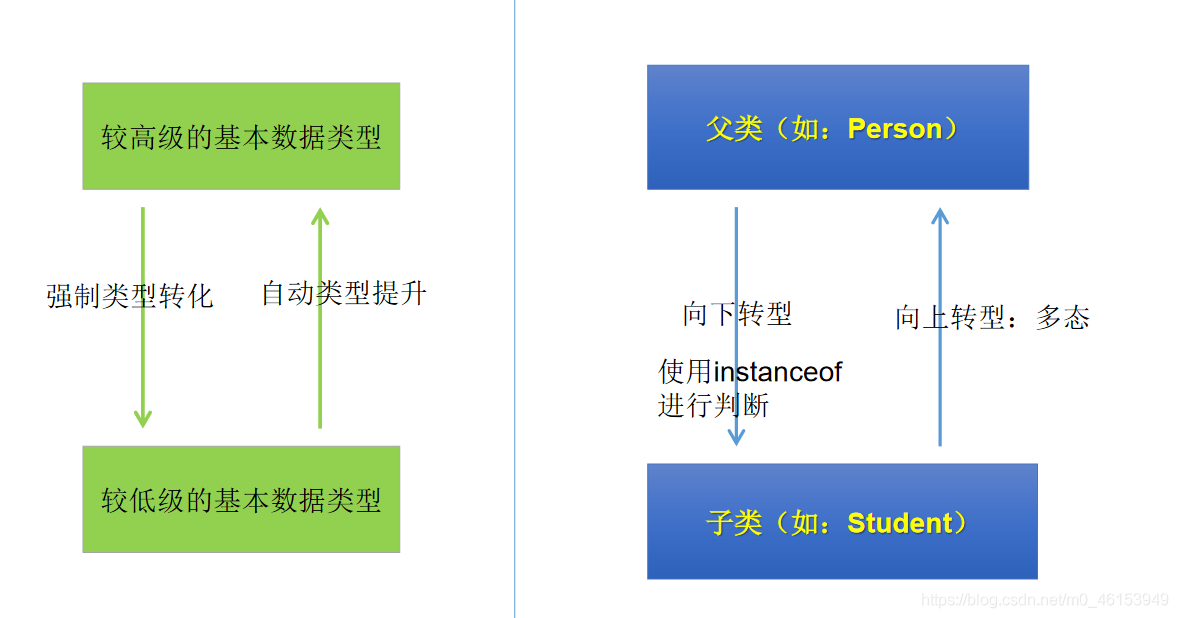
x instanceof A:检验x是否为类A的对象,返回值为boolean型。
/*** 看下面的注释*/public class Test {public static void main(String[] args) {//声明生物父类但new一个人类子类Creature c1 = new Human();//发现子类特有的方法无法调用c1.say();//此方法无法使用//这里使用向下转型:也即使用强制转换符Human h1 = (Human)c1;h1.say();//此时子类特有方法可以使用了//因为new的是一个Human对象,所以以下方法无法使用并抛出异常Monkey m1 = (Monkey)c1;m1.eat();//此方法无法使用//为了避免上述异常问题引入instanceof关键字:x instanceof A:检验x是否为类A的对象,返回值为boolean型if(c1 instanceof Monkey){System.out.println("是猴子");}if(c1 instanceof Human){System.out.println("是人类");}//根据继承性,下面的表达式返回的依然是Trueif(c1 instanceof Creature){System.out.println("是人类");}//练习//问题一:编译时通过,运行时不通过Creature c2 = new Human();Monkey m2 = (Monkey)c2;//编译不报错但是运行时会抛出异常,这时候就要加个instanceof了//问题二:编译通过,运行也通过Object o1 = new Human();Creature c3 = (Creature)o1;//问题三:编译不通过Human h2 = new Monkey();//很明显这两个类是平行关系...编译直接标红Type mismatch(类型不匹配)}}class Creature{int age;public void not(){System.out.println("生物大类没啥方法好定义的");}}class Human extends Creature{String name;public void say(){System.out.println("人会说话");}}class Monkey extends Creature{boolean isBanana;public void eat(){System.out.println("猴子吃香蕉");}}
5.多态性的练习
练习一
/*** 练习一:子类继承父类** 1.若子类重写了父类方法,就意味着子类里定义的方法彻底覆盖了父类里的同名方法,* 系统将不可能把父类里的方法转移到子类中。** 2.对于实例变量则不存在这样的现象,即使子类里定义了与父类完全相同的实例变量,* 这个实例变量依然不可能覆盖父类中定义的实例变量*/public class FieldMethodTest {public static void main(String[] args){Sub s= new Sub();System.out.println(s.count);//重名属性直接在子类中可以找到为:20s.display();//在子类中已重写的父类方法,故输出20//把 子类对象s 赋给 父类引用bBase b = s;//==:对于引用数据类型来讲,比较的是两个引用数据类型变量的地址值是否一样。System.out.println(b == s); //trueSystem.out.println(b.count);//此为多态性,因为引用为父类所以输出父类的属性:10b.display();//此为多态性,虽然引用为父类,但是子类中重写了该方法,输出为:20}}class Base {int count= 10;public void display() {System.out.println(this.count);}}class Sub extends Base {int count= 20;public void display() {System.out.println(this.count);}}
练习二
/*** 练习二:* 建立InstanceTest 类,在类中定义方法method(Person e);** 在method中:* (1)根据e的类型调用相应类的getInfo()方法。* (2)根据e的类型执行:* 如果e为Person类的对象,输出:“a person”;* 如果e为Student类的对象,输出:“a student”* 如果e为Graduate类的对象,输出:“a graduated student”* “a student” “a person”*/public class InstanceTest {//这里的形参传入体现了多态性public void method(Person e) {//虚拟方法调用e.getInfo();//instanceof关键字使用//方式一if(e instanceof Graduate){System.out.println("a graduated student");}if(e instanceof Student){System.out.println("a student");}if(e instanceof Person){System.out.println("a person");}//方式二:if(e instanceof Graduate){System.out.println("a graduated student");System.out.println("a student");System.out.println("a person");}else if(e instanceof Student){System.out.println("a student");System.out.println("a person");}else{System.out.println("a person");}}}class Person {protected String name = "person";protected int age = 50;public String getInfo() {return "Name: " + name + "\n" + "age: " + age;}}class Student extends Person {protected String school = "pku";public String getInfo() {return "Name: " + name + "\nage: " + age + "\nschool: " + school;}}class Graduate extends Student {public String major = "IT";public String getInfo() {return "Name: " + name + "\nage: " + age + "\nschool: " + school + "\nmajor:" + major;}}
练习三
GeometricObject类
/** 定义三个类,父类GeometricObject代表几何形状,子类Circle代表圆形,MyRectangle代表矩形。*/public class GeometricObject {protected String color;protected double weight;public String getColor() {return color;}public void setColor(String color) {this.color = color;}public double getWeight() {return weight;}public void setWeight(double weight) {this.weight = weight;}public GeometricObject(String color, double weight) {super();this.color = color;this.weight = weight;}public double findArea(){return 0.0;}}
Circle类
public class Circle extends GeometricObject {private double radius;public Circle(double weight,String color, double radius) {super(color,weight);this.radius = radius;}public double getRadius() {return radius;}public void setRadius(double radius) {this.radius = radius;}@Overridepublic double findArea() {return 3.14 * radius * radius;}}
MyRectangle类
public class MyRectangle extends GeometricObject {private double width;private double height;public MyRectangle(double width, double height,String color,double weight) {super(color, weight);this.height = height;this.width = width;}public double getWidth() {return width;}public void setWidth(double width) {this.width = width;}public double getHeight() {return height;}public void setHeight(double height) {this.height = height;}@Overridepublic double findArea() {return width * height;}}
GeometricTest类
/** 定义一个测试类GeometricTest,编写equalsArea方法测试两个对象的面积是否相等(注意方法的参数类型,利用动态绑定技术),* 编写displayGeometricObject方法显示对象的面积(注意方法的参数类型,利用动态绑定技术)。**/public class GeometricTest {public static void main(String[] args) {GeometricTest test = new GeometricTest();Circle c1 = new Circle(2.3,"white",1.0);test.displayGeometricObject(c1);Circle c2 = new Circle(3.3,"white",1.0);test.displayGeometricObject(c2);boolean isEqual = test.equalsArea(c1, c2);System.out.println("面积是否相等: " + isEqual);MyRectangle rect = new MyRectangle(2.1, 3.4,"red",1.0);test.displayGeometricObject(rect);}public void displayGeometricObject(GeometricObject o){System.out.println("面积为: " + o.findArea());}//测试两个对象的面积是否相等public boolean equalsArea(GeometricObject o1,GeometricObject o2){return o1.findArea() == o2.findArea();}}
五、Object类的使用
1.Object类的进阶
/** java.lang.Object类* 1.Object类是所有Java类的根父类;* 2.如果在类的声明中未使用extends关键字指明其父类,则默认父类为java.lang.Object类* 3.Object类中的功能(属性、方法)就具有通用性。* 属性:无* 方法:equals() / toString() / getClass() / hashCode() / clone() / finalize()* wait() 、notify()、notifyAll()* 方法具体用法,后面再说* 4.Object类只声明了一个空参的构造器。**/public class ObjectTest {public static void main(String[] args) {}}
2.Object类中的主要结构

3.==操作符和equals方法
/*** 小试牛刀:== 和 equals() 区别* 一、回顾 == 的使用:* 1.可以使用在 基本数据类型变量 和 引用数据类型变量 中* 2.(1).如果比较的是基本数据类型变量:比较两个变量保存的数据是否相等。*** 不一定类型要相同 **** (2).如果比较的是引用数据类型变量:比较两个对象的地址值是否相同,即两个引用是否指向同一个对象实体* 补充:==符号使用时保证两遍变量类型相同**** 二、equals()方法的使用:* 1.是一个 方法 而非 运算符* 2.只适用于 引用数据类型* 3.Object类中equals()的定义:* public boolean equals(Object obj){* return (this == obj);* }* 说明:比较的是地址值* 4.像String、Date、File、包装类等都重写了Object类中的equals()方法.* 两个引用的地址是否相同,而是比较两个对象的“实体内容”是否相同。* 5.通常情况下,我们自定义的类如果使用equals()的话,也通常是比较两个对象的"实体内容"是否相同。那么,我们就需要对Object类中的equals()进行重写。* 重写的原则:比较两个对象的实体内容是否相同。* 可以自动生成,没必要自己写哈*/public class EqualsTest {public static void main(String[] args) {//以下是 == 运算符int j = 10;int k = 10;System.out.println(j == k);//true//类型不同时double d = 10.0;System.out.println(j == d);//true。此时,int型自动类型提升为double型也即从10变成了10.0int m = 65;char n = 'A';System.out.println(m == n);//true。ASCII表: A --> 65, a --> 97//比较对象为引用数据类型变量Person p1 = new Person("Jiaran", 21);Person p2 = new Person("Jiaran", 21);System.out.println(p1 == p2);//false。比较的是引用数据类型变量,比较的是地址值,很明显不相同//以下是equals()方法System.out.println(p1.equals(p2));//false。equals比较的也是地址值,故返回false//那么当引用数据类型变量是String呢?String str1 = new String("关注嘉然,顿顿解馋");String str2 = new String("关注嘉然,顿顿解馋");System.out.println(str1.equals(str2));//true!因为String类中重写了equals()方法比较的是实体内容System.out.println(str1 == str2);//false!因为这个可没有什么重写,单纯的比较地址值}}class Person{String name;int age;Person(String name,int age){this.name = name;this.age = age;}//尝试手动重写一个比较name和age的equals()方法public boolean equals(Object obj){//判断两个引用是否相同if(this == obj){return true;}if(obj instanceof Person){//判断传入对象是不是Person类中的Person p = (Person)obj;if(this.age == p.age && this.name.equals(p.name)){return true;}else{return false;}}return false;}}
4.== 和 equals 总结
对称性:如果x.equals(y)返回是“true”,那么y.equals(x)也应该返回是“true”。
>自反性:x.equals(x)必须返回是“true”。
>传递性:如果x.equals(y)返回是“true”,而且y.equals(z)返回是“true”,那么z.equals(x)也应该返回是 “true”。
>一致性:如果x.equals(y)返回是“true”,只要x和y内容一直不变,不管你重复x.equals(y)多少次,返回都是 “true”。
>任何情况下,x.equals(null),永远返回是“false”;x.equals(和x不同类型的对象)永远返回是“false”。
int it = 65;float fl= 65.0f;System.out.println("65和65.0f是否相等?" + (it == fl)); //truechar ch1 = 'A';char ch2 = 12;System.out.println("65和'A'是否相等?" + (it == ch1));//trueSystem.out.println("12和ch2是否相等?" + (12 == ch2));//trueString str1 = new String("hello");String str2 = new String("hello");System.out.println("str1和str2是否相等?"+ (str1 == str2));//falseSystem.out.println("str1是否equals str2?"+(str1.equals(str2)));//trueSystem.out.println("hello" == new java.util.Date()); //编译不通过,补充:==符号使用时保证两遍变量类型相同5.equals方法的练习
练习一 ```java /*
- 编写Order类,有int型的orderId,String型的orderName,
- 相应的getter()和setter()方法,两个参数的构造器,重写父类的equals()方法:public boolean equals(Object obj){}
- 并判断测试类中创建的两个对象是否相等。 */ public class OrderTest { public static void main(String[] args) {
Order order1 = new Order(1001,"AA");Order order2 = new Order(1001,"BB");
System.out.println(order1.equals(order2)); //falseOrder order3 = new Order(1001,"BB");System.out.println(order2.equals(order3)); //true}
}
class Order{
private int orderId;
private String orderName;
public int getOrderId() {
return orderId;
}
public void setOrderId(int orderId) {
this.orderId = orderId;
}
public String getOrderName() {
return orderName;
}
public void setOrderName(String orderName) {
this.orderName = orderName;
}
public Order(int orderId, String orderName) {
super();
this.orderId = orderId;
this.orderName = orderName;
}
//尝试重写equals方法
public boolean equals(Object obj){
//判断是否是一个对象
if(this == obj){
return true;
}
//判断是不是子类(该类)的一个实例
if(obj instanceof Order){
Order order = (Order)obj;
//正确的
return this.orderId == order.orderId && this.orderName.equals(order.orderName);
//错误的,因为orderName为String
//return this.orderId == order.orderId && this.orderName == order.orderName;
}
return false;
}
}
**练习二**```java/** 请根据以下代码自行定义能满足需要的MyDate类,在MyDate类中覆盖equals方法,* 使其判断当两个MyDate类型对象的年月日都相同时,结果为true,否则为false。* public boolean equals(Object o)*/public class MyDateTest {public static void main(String[] args) {MyDate m1= new MyDate(14, 3, 1976);MyDate m2= new MyDate(14, 3, 1976);if(m1== m2) {System.out.println("m1==m2");} else{System.out.println("m1!=m2"); // m1 != m2}if(m1.equals(m2)) {System.out.println("m1 is equal to m2");// m1 is equal to m2} else{System.out.println("m1 is not equal to m2");}}}class MyDate {private int year;private int month;private int day;public MyDate(int year,int month,int day){this.year = year;this.month =month;this.day =day;}public int getDay() {return day;}public void setDay(int day) {this.day = day;}public int getMonth() {return month;}public void setMonth(int month) {this.month = month;}public int getYear() {return year;}public void setYear(int year) {this.year = year;}@Overridepublic boolean equals(Object obj) {if(this == obj){return true;}if(obj instanceof MyDate){MyDate myDate = (MyDate)obj;return this.day == myDate.day && this.month == myDate.month && this.year == myDate.year;}return false;}//自动生成的// @Override// public boolean equals(Object obj) {// if (this == obj)// return true;// if (obj == null)// return false;// if (getClass() != obj.getClass())// return false;// MyDate other = (MyDate) obj;// if (day != other.day)// return false;// if (month != other.month)// return false;// if (year != other.year)// return false;// return true;// }}
6.toString()的使用
import java.util.Date;/*** Object类中toString()方法使用:* 1.当我们输出一个对象的引用时就是默认调用当前对象的toString()方法* 2.Object类中toString()方法的定义:* public String toString() {* return getClass().getName() + "@" + Integer.toHexString(hashCode());* }* 3.像String、Date、File、包装类等都重写了Object类中的toString()方法。* 使得在调用toString()时,返回"***实体内容***"信息.* 4.自定义类如果重写toString()方法,当调用此方法时,返回对象的"实体内容".*/public class ToStringTest {public static void main(String[] args) {//普通Customer c1 = new Customer("Tom", 21);System.out.println(c1.toString());//打印类名+地址System.out.println(c1);//两者输出相同,即只单独打印对象的引用时,默认调用toString()方法//对 String 和 DateString str = new String("嘉然");System.out.println(str);//这里不输出地址,而输出嘉然!因为String重写了toString()方法Date date = new java.util.Date(45645646564654L);System.out.println(date);//不输出地址,而输出具体日期!Date也重写了!}}class Customer{String name;int age;public Customer(String name,int age){this.name = name;this.age = age;}//手动重写toString()方法@Overridepublic String toString() {return "这个人的名字为" + this.name + "年龄为" + this.age;}}
7.Object类综合练习
GeometricObject类
public class GeometricObject {protected String color;protected double weight;public GeometricObject() {super();this.color = "white";this.weight = 1.0;}public GeometricObject(String color, double weight) {super();this.color = color;this.weight = weight;}public String getColor() {return color;}public void setColor(String color) {this.color = color;}public double getWeight() {return weight;}public void setWeight(double weight) {this.weight = weight;}}
Circle类
public class Circle extends GeometricObject{private double radius;public Circle() { //初始化对象的color属性为“white”,weight属性为1.0,radius属性为1.0。super(); //super自带,不需再写// this.color = "white";// this.weight = 1.0;this.radius = 1.0;}//初始化对象的color属性为“white”,weight属性为1.0,radius根据参数构造器确定。public Circle(double radius) {super(); //super自带,不需再写// this.color = "white";// this.weight = 1.0;this.radius = radius;}public Circle(double radius,String color,double weight) {super(color,weight);this.radius = radius;}public double getRadius() {return radius;}public void setRadius(double radius) {this.radius = radius;}//计算圆的面积public double findArea(){return Math.PI * radius * radius;}@Override //重写equals方法,比较两个圆的半径是否相等,如相等,返回true。public boolean equals(Object obj) {if(this == obj){return true;}//判断是不是Circle的实例if(obj instanceof Circle){Circle c = (Circle)obj;return this.radius == c.radius;}return false;}@Overridepublic String toString() { //重写toString方法,输出圆的半径。return "Circle [radius=" + radius + "]";}}
测试类
/** 写一个测试类,创建两个Circle对象,判断其颜色是否相等;* 利用equals方法判断其半径是否相等;利用toString()方法输出其半径。**/public class CircleTest {public static void main(String[] args) {Circle circle1 = new Circle(2.3);Circle circle2 = new Circle(3.3,"white",2.0);//这里调用的equals方法,非前面Circle类中重写的,而是String中的重写equals!System.out.println("颜色是否相等: " + circle1.getColor().equals(circle2.color));System.out.println("半径是否相等: " + circle1.equals(circle2));System.out.println(circle1);System.out.println(circle2.toString());}}
六、包装类(Wrapper)的使用
1.单元测试方法的使用
import java.util.Date;import org.junit.Test;/** java中的JUnit单元测试** 步骤:* 1.选中当前项目工程 --》 右键:build path --》 add libraries --》 JUnit 4 --》 下一步* 2.创建一个Java类进行单元测试。* 此时的Java类要求:①此类是公共的 ②此类提供一个公共的无参构造器* 3.此类中声明单元测试方法。* 此时的单元测试方法:方法的权限是public,没有返回值,没有形参。** 4.此单元测试方法上需要声明注解:@Test并在单元测试类中调用:import org.junit.Test;* 5.声明好单元测试方法以后,就可以在方法体内测试代码。* 6.写好代码后,左键双击单元测试方法名:右键 --》 run as --》 JUnit Test** 说明:如果执行结果无错误,则显示是一个绿色进度条,反之,错误即为红色进度条。*/public class JUnit {int num = 10;//第一个单元测试方法@Testpublic void testEquals(){String s1 = "MM";String s2 = "MM";System.out.println(s1.equals(s2));//ClassCastException的异常// Object obj = new String("GG");// Date date = (Date)obj;System.out.println(num);show();}public void show(){num = 20;System.out.println("show()...");}//第二个单元测试方法@Testpublic void testToString(){String s2 = "MM";System.out.println(s2.toString());}}
2.包装类的使用
/** 包装类的使用* 1.java提供了8种基本数据类型对应的包装类,使得基本数据类型的变量具有类的特征* 基本数据类型 包装类* byte Byte* short Short* int Integer* long Long* float Float* double Double* boolean Boolean* char Character* 注意:其中Byte、Short、Integer、Long、Float、Double的父类是:Number* /
3.包装类与基本数据类型相互转换
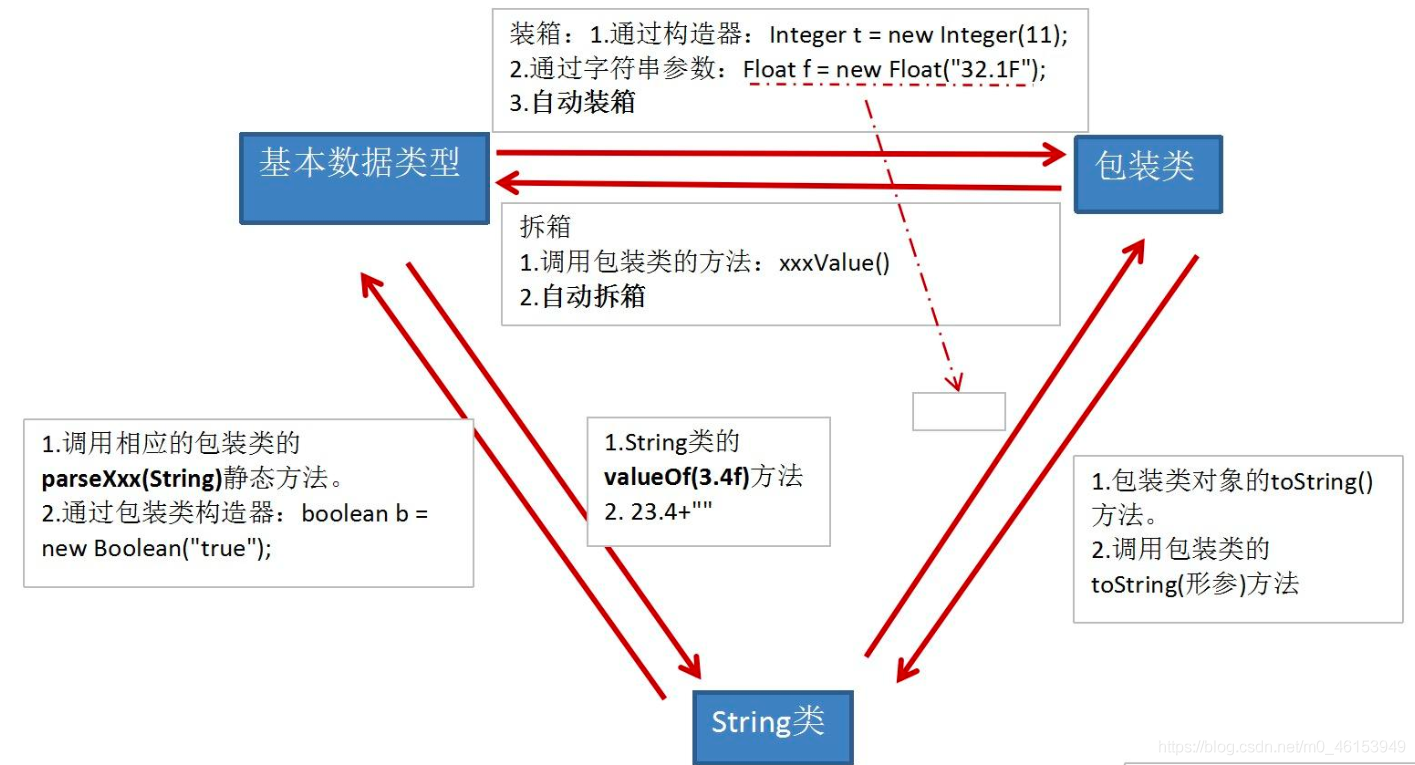
/*** 包装类的使用:* 1.Java中提供了八种数据类型的包装类,使基本数据类型具有类的特征* 2.掌握 基本数据类型 包装类 String 三者之间的转换*/public class WrapperTest{public static void main(String[] args) {//基本数据类型 --> 包装类//Integerint num1 = 10;Integer n1 = new Integer(num1);System.out.println(n1.toString());//构造器中为String是必须要为一个数,否则会报错Integer n2 = new Integer("123");System.out.println(n2.toString());//FloatFloat f1 = new Float(12.3f);System.out.println(f1);Float f2 = new Float("12.3");System.out.println(f2);//BooleanBoolean b1 = new Boolean(true);Boolean b2 = new Boolean("true");Boolean b3 = new Boolean("true123");//false//特殊的包装类order o = new order();System.out.println(o.isMale);//false;基本数据类型,默认值falseSystem.out.println(o.isFemale);//null;这时是类了地位高了,默认值变成null了//包装类 --> 基本数据类型Integer in1 = new Integer(12);int num1 = in1.intValue();System.out.println(num1 + 1);//13Float f1 = new Float(12.3);float f2 = f1.floatValue();System.out.println(f2 + 1)//12.3}}class order{boolean isMale;Boolean isFemale;}
4.JDK5.0新特性:自动装箱与拆箱
public class WrapperTest{public static void main(String[] args) {//自动装箱int i1 = 233;Integer in1 = i1;System.out.println(in1.toString());//233//自动拆箱Integer in2 = new Integer(12);int i2 = in2;System.out.println(i2);//12}}
5.String和基本数据类型、包装类相互转换
/*** 包装类的使用:* 1.Java中提供了八种数据类型的包装类,使基本数据类型具有类的特征* 2.掌握 基本数据类型 包装类 String 三者之间的转换*/public class WrapperTest{public static void main(String[] args) {//基本数据类型、包装类 --> Stringint num = 10;//方式一:连接运算String str1 = num + "";//方式二:调用String重载的valueOf(Xxx xxx)某一个类型的某一个变量String str2 = String.valueOf(num);//基本数据类型可以做参数Integer in = 10;String str3 = String.valueOf(in);//包装类也行//基本数据类型、String --> 基本数据类型、包装类String str4 = "123";String str5 = "true";//调用包装类中parseInt()int num2 = Integer.parseInt(str4);System.out.println(num2 + 1);//124Boolean b1 = Boolean.parseBoolean(str5);System.out.println(b1); //true}}
6.练习
public class InterViewTest {//细细品味@Testpublic void test(){Object o1= true? new Integer(1) : new Double(2.0);System.out.println(o1);// 1.0}@Testpublic void test2(){Object o2;if(true)o2 = new Integer(1);elseo2 = new Double(2.0);System.out.println(o2);// 1

若有收获,就点个赞吧
0 人点赞


