1.String类
1.1 String类的概述
package com.test.java;import org.junit.Test;/*** String的使用* String:字符串,使用一对""引起来的* 1.String声明为final的,不可被继承* 2.String实现了Serializable接口:表示字符串是支持序列化的* 实现了Comparable接口:表示String可以比较大小* 3.String内部定义了final char[] value用于存储字符串数据* 4.String代表一个不可变字符序列。即:不可变性* 4.1.当对字符串重新赋值时,需要重写指定内存区域赋值,不能使用原有的value进行赋值。* 4.2.当对现有的字符串进行连接操作时,也需要重新指定内存区域赋值,不能使用原有的value进行赋值。* 4.3.当调用String的 replace() 方法修改指定字符或字符串时,也需要重新指定内存区域赋值,不能使用原有的value进行赋值。* 5.通过字面量的方式(区别于new给一个字符串赋值,此时的字符串值声明在字符串常量池中)。* 6.字符串常量池中是不会存储相同内容(使用String类的equals()比较,返回true)的字符串的)。*/public class StringTest {@Testpublic void test1(){String s1 = "abc";//字面量的定义方式String s2 = "abc";s1 = "hello";System.out.println(s1 == s2);System.out.println(s1);System.out.println(s2);String s3 = "abc";s3+="def";System.out.println(s3);String s4 = s3.replace('a','b');System.out.println(s3);System.out.println(s4);}}
1.2 String不同实例化方式的对比
@Testpublic void test2(){/*** String的实例化方式* 方式一:通过字面量定义的方式* 方式二:通过new + 构造器的方式** 面试题:String s = new String("abc");方式创建对象,在内存中创建了几个对象?* 两个:一个是堆空间中new结构,另一个是char[]对应的常量池中的数据:"abc"**///通过字面量定义的方式:此时的s1和s2的数据javaEE声明在方法区中的字符串常量池中。String s1 = "JavaEE";String s2 = "JavaEE";//通过new + 构造器的方式:此时的s3和s4保存的地址值,是数据在堆空间中开辟空间以后对应的地址值。String s3 = new String("javaEE");String s4 = new String("javaEE");System.out.println(s1 == s2);//trueSystem.out.println(s3 == s4);//falseSystem.out.println("************");Person p1 = new Person("Tom",12);Person p2 = new Person("Tom",12);System.out.println(p1.name.equals(p2.name));//trueSystem.out.println(p1.name == p2.name);//truep1.name = "Jerry";System.out.println(p2.name);}public class Person {String name;int age;public Person(String name, int age) {this.name = name;this.age = age;}public Person(){}}
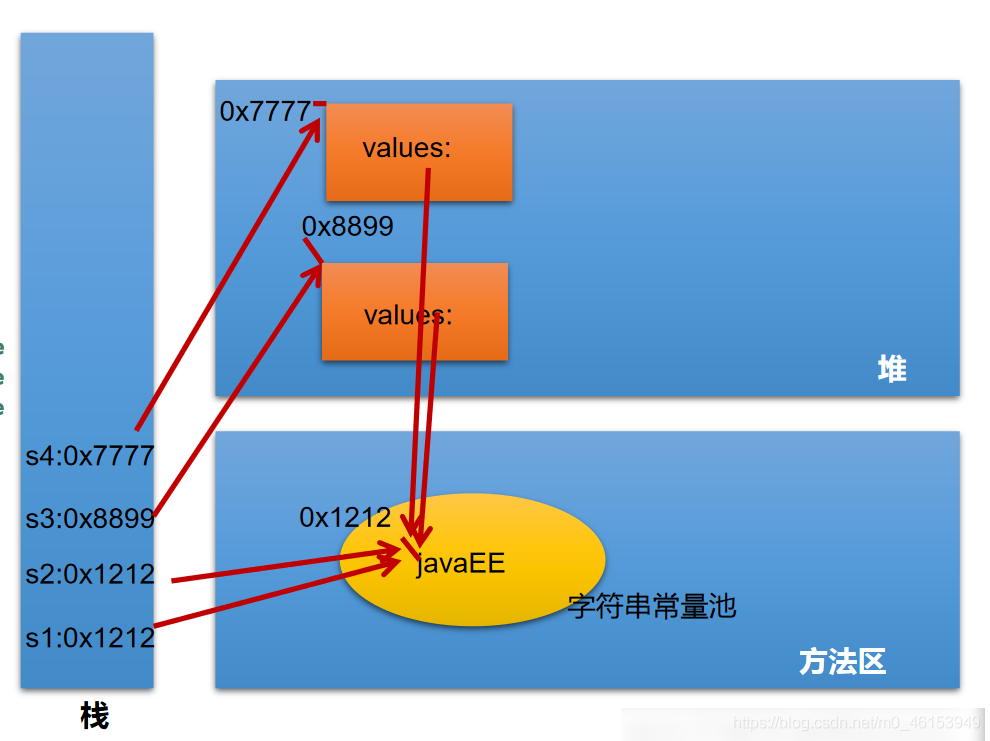
1.3 String不同实例化方式的对比
@Testpublic void test3(){/** 结论* 1.常量与常量的拼接结果在常量池。且常量池中不会存在相同内容的常量。* 2.只要其中有一个是变量,结果就在堆中* 3.如果拼接的结果调用intern()方法,返回值就在常量池中**/String s1 = "javaEE";String s2 = "hadoop";String s3 = "javaEEhadoop";String s4 = "javaEE" + "hadoop";String s5 = s1 + "hadoop";String s6 = "javaEE" + s2;String s7 = s1 + s2;System.out.println(s3 == s4);//trueSystem.out.println(s3 == s5);//falseSystem.out.println(s3 == s6);//falseSystem.out.println(s5 == s6);//falseSystem.out.println(s3 == s7);//falseSystem.out.println(s5 == s6);//falseSystem.out.println(s5 == s7);//falseSystem.out.println(s6 == s7);//falseString s8 = s5.intern();//返回值得到的s8使用的常量值中已经存在的“javaEEhadoop”System.out.println(s3 == s8);//true}

1.3 String的常用方法
package com.test.java;import org.junit.Test;public class StringMethodTest {/*** int length():返回字符串的长度:return value.length* char charAt(int index):返回某索引处的字符return value[index]* boolean isEmpty():判断是否是空字符串:return value.length==0* String toLowerCase():使用默认语言环境,将String中的所有字符转换为小写* String toUpperCase():使用默认语言环境,将String中的所有字符转换为大写* String trim():返回字符串的副本,忽略前导空白和尾部空白* boolean equals(Object obj):比较字符串的内容是否相同* boolean equals IgnoreCase(String anotherString):与equals方法类似,忽略大小写* String concat(String str):将指定字符串连接到此字符串的结尾。等价于用“+”* int compareTo(String anotherString):比较两个字符串的大小* String substring(int beginIndex):返回一个新的字符串,它是此字符串的从beginIndex开始截取到最后的一个子字符串。* String substring(int beginIndex,int endIndex):返回一个新字符串,它是此字符串从beginIndex开始截取到endIndex(不包含)的一个子字符串。*/@Testpublic void test1(){String s1 = "HelloWorld";System.out.println(s1.length());//取字符串长度System.out.println(s1.charAt(0));//返回索引处字符从0开始System.out.println(s1.charAt(9));// String s = "";// System.out.println(s.isEmpty());//trueSystem.out.println(s1.toLowerCase());//全部转成小写System.out.println(s1.toUpperCase());//全部转成大写String s2 = " Hello World ";System.out.println(s2.trim());//去除前后空格}@Testpublic void test2(){String s1 = "HelloWorld";String s2 = "helloworld";System.out.println(s1.equals(s2));//比较字符串*内容*是否相同System.out.println(s1.equalsIgnoreCase(s2));//比较字符串内容是否相同(这个忽略大小写)String s3 = "abc";String s4 = s3.concat("def");//连接字符串,等价"+="System.out.println(s4);String s5 = "abc";String s6 = "abe";System.out.println(s5.compareTo(s6));//比较两个字符串,其实就是用ASCII表减,可应用于字符排序String s7 = "关注嘉然,顿顿解馋";System.out.println(s7.substring(2));//截取字符串,经典左闭右开原则System.out.println(s7.substring(1, 5));}/** boolean endsWith(String suffix):测试此字符串是否以指定的后缀结束* boolean startsWith(String prefix):测试此字符串是否以指定的前缀开始* boolean startsWith(String prefix, int toffset):测试此字符串从指定索引开始的子字符串是否以指定前缀开始* boolean contains(CharSequence s):当且仅当此字符串包含指定的 char 值序列时,返回 true* int indexOf(String str):返回指定子字符串在此字符串中第一次出现处的索引* int indexOf(String str, int fromIndex):返回指定子字符串在此字符串中第一次出现处的索引,从指定的索引开始* int lastIndexOf(String str):返回指定子字符串在此字符串中最右边出现处的索引* int lastIndexOf(String str, int fromIndex):返回指定子字符串在此字符串中最后一次出现处的索引,从指定的索引开始反向搜索** 注:indexOf和lastIndexOf方法如果未找到都是返回-1*/@Testpublic void test3(){String str1 = "HelloWorld";System.out.println(str1.endsWith("ld"));//判断是不是指定字符串结尾System.out.println(str1.startsWith("He"));//判断是不是指定字符串开头System.out.println(str1.startsWith("ll",2));//从指定索引开始判断是不是指定字符串String str2 = "Wo";System.out.println(str1.contains(str2));//判断某字符串是不是该字符串的子串System.out.println(str1.indexOf("Wo"));//首次出现的索引,没有就-1System.out.println(str1.lastIndexOf("Wo"));//从后往前找出现的索引,没有就-1}/** 替换:* String replace(char oldChar, char newChar):返回一个新的字符串,它是通过用 newChar 替换此字符串中出现的所有 oldChar 得到的。* String replace(CharSequence target, CharSequence replacement):使用指定的字面值替换序列替换此字符串所有匹配字面值目标序列的子字符串。* String replaceAll(String regex, String replacement):使用给定的 replacement 替换此字符串所有匹配给定的正则表达式的子字符串。* String replaceFirst(String regex, String replacement):使用给定的 replacement 替换此字符串匹配给定的正则表达式的第一个子字符串。** 匹配:* boolean matches(String regex):告知此字符串是否匹配给定的正则表达式。** 切片:* String[] split(String regex):根据给定正则表达式的匹配拆分此字符串。* String[] split(String regex, int limit):根据匹配给定的正则表达式来拆分此字符串,最多不超过limit个,如果超过了,剩下的全部都放到最后一个元素中。**/@Testpublic void test4(){String str1 = "关注嘉然";System.out.println(str1.replace('注','住'));System.out.println(str1.replace("嘉然", "乃琳"));//替换字符串}}
1.4 String与基本数据类型、包装类之间的转换
package com.test.java;import org.junit.Test;/*** 涉及到String类与其他结构之间的转换*/public class StringTest1 {/*** 复习* String与基本数据类型、包装类之间的转换** String --> 基本数据类型、包装类:调用包装类的静态方法:parseXxx(str)* 基本数据类型、包装类 --> String:调用String重载的valueOf(xxx)*/@Testpublic void test1(){//String --> int :Integer.parseInt()String str1 = "123";int num = Integer.parseInt(str1);//123//int --> String :String.valueOf()String str2 = String.valueOf(num); //"123"String str3 = num + "";}}
1.5 String与char[]之间的转换
package com.test.java;import org.junit.Test;/*** 涉及到String类与其他结构之间的转换*/public class StringTest1 {/** String 与 char[]之间的转换** String --> char[]:调用String的toCharArray()* char[] --> String:调用String的构造器*/@Testpublic void test2() {String str1 = "abc123";char[] charArray = str1.toCharArray();for (int i = 0; i < charArray.length; i++) {System.out.println(charArray[i]);}char[] arr = new char[]{'h', 'e', 'l', 'l', 'o'};String str2 = new String(arr);System.out.println(str2);}}
1.6 String与byte[]之间的转换
/** String 与 byte[]之间的转换** 编码:String --> byte[]:调用String的getBytes()* 解码:byte[] --> String:调用String的构造器** 编码:字符串 -->字节 (看得懂 --->看不懂的二进制数据)* 解码:编码的逆过程,字节 --> 字符串 (看不懂的二进制数据 ---> 看得懂)** 说明:解码时,要求解码使用的字符集必须与编码时使用的字符集一致,否则会出现乱码。**/@Testpublic void test3() throws UnsupportedEncodingException {String str1 = "abc123重工";byte[] bytes = str1.getBytes();//使用默认的字符编码集,进行转换System.out.println(Arrays.toString(bytes));byte[] gbks = str1.getBytes("gbk");//使用gbk字符集进行编码。System.out.println(Arrays.toString(gbks));System.out.println("*****************************");String str2 = new String(bytes);//使用默认的字符集,进行解码。System.out.println(str2);String str3 = new String(gbks);System.out.println(str3);//出现乱码。原因:编码集和解码集不一致!String str4 = new String(gbks,"gbk");System.out.println(str4);//没有出现乱码。原因:编码集和解码集一致!}}
1.7 StringBuffer和StringBuilder
package com.test.java;import org.junit.Test;/*** String、StringBuffer、StringBuilder区别:* String:不可变的字符序列* StringBuffer:可变的字符序列:线程安全的,效率低* StringBuilder:可变的字符序列:JDK5.0新增 线程不安全,效率高* 源码分析:* String str = new String();//char[] value = new char[0];* String str1 = new String("abc");//char[] value = new char[]{'a','b','c'};* <p>* StringBuffer sb1 = new StringBuffer();//char[] value = new char[16];底层创建了一个长度是16的数组。* System.out.println(sb1.length());//* sb1.append('a');//value[0] = 'a';* sb1.append('b');//value[1] = 'b';* <p>* StringBuffer sb2 = new StringBuffer("abc");//char[] value = new char["abc".length() + 16];* <p>* //问题1.System.out.println(sb2.length());//3* //问题2.扩容问题:如果要添加的数据底层数组盛不下了,那就需要扩容底层的数组。* 默认情况下,扩容为原来容量的2倍 + 2,同时将原有数组中的元素复制到新的数组中。* <p>* 意义:开发中建议大家使用:StringBuffer(int capacity) 或 StringBuilder(int capacity)*/public class StringBufferBuilderTest {@Testpublic void test1(){StringBuffer sb1 = new StringBuffer("abc");sb1.setCharAt(0,'m');System.out.println(sb1);StringBuffer sb2 = new StringBuffer();System.out.println(sb2.length()); //0}}
1.8 StringBuffer常用方法
package com.test.java;import org.junit.Test;/*** StringBuffer的常用方法:** StringBuffer append(xxx):提供了很多的append()方法,用于进行字符串拼接* StringBuffer delete(int start,int end):删除指定位置的内容* StringBuffer replace(int start, int end, String str):把[start,end)位置替换为str* StringBuffer insert(int offset, xxx):在指定位置插入xxx* StringBuffer reverse() :把当前字符序列逆转* public int indexOf(String str)* public String substring(int start,int end):返回一个从start开始到end索引结束的左闭右开区间的子字符串* public int length()* public char charAt(int n )* public void setCharAt(int n ,char ch)** 总结:* 增:append(xxx)* 删:delete(int start,int end)* 改:setCharAt(int n ,char ch) / replace(int start, int end, String str)* 查:charAt(int n )* 插:insert(int offset, xxx)* 长度:length();* 遍历:for() + charAt() / toString()**/public class BufferBuilderTest {@Testpublic void test(){StringBuffer str1 = new StringBuffer("abc");str1.append(1);str1.append('1');//增System.out.println(str1);str1.delete(2,3);//删,左闭右开System.out.println(str1);str1.replace(2,3,"hello");//改System.out.println(str1);System.out.println(str1.charAt(2));//查str1.insert(2,"pa");//插System.out.println(str1);System.out.println(str1.length());//长度}}
2.日期时间类
2.1 JDK8之前的API
Date 和java.sql.Date
package com.test.java;import org.junit.Test;import java.util.Date;/*** JDK8之前的日期和时间API测试*/public class DateTimeTest {@Testpublic void test1(){//1.System类中currentTimeMillis(),返回当前时间戳long time = System.currentTimeMillis();System.out.println(time);}@Testpublic void test2(){//2.Date类//构造器一:Date():创建当前时间的Date对象Date date1 = new Date();//toString():显示当前的年 月 日 时 分 秒System.out.println(date1.toString());//getTime():返回当前时间戳System.out.println(date1.getTime());//构造器二:Date():创建指定时间的Date对象Date date2 = new Date(1652062235296L);System.out.println(date2.toString());//java.sql.Date类java.sql.Date date3 = new java.sql.Date(1652062235296L);System.out.println(date3.toString());//只打印2022-05-09//如何将java.util.Date对象转换为java.sql.Date对象Date date6 = new Date();java.sql.Date date7 = new java.sql.Date(date6.getTime());System.out.println(date7);}}
SimpleFormatDate类
package com.test.java;import org.junit.Test;import java.text.ParseException;import java.text.SimpleDateFormat;import java.util.Date;public class DateTimeTest {@Testpublic void test1() throws ParseException {SimpleDateFormat sdf = new SimpleDateFormat();Date d = new Date();System.out.println(d);//format():格式化String format = sdf.format(d);System.out.println(format);//parse():解析String date = "22-5-9 上午10:50";System.out.println(sdf.parse(date));//*************按照指定的方式格式化和解析:调用带参的构造器*****************//特定格式SimpleDateFormat sdf1 = new SimpleDateFormat("yyyy-MM-dd hh:mm:ss");System.out.println(sdf1.format(d));System.out.println(sdf1.parse("2022-05-09 10:54:38"));}}
Calendar类
package com.test.java;import org.junit.Test;import java.util.Calendar;import java.util.Date;public class CalendarTest {@Testpublic void test(){//1.实例化:调用静态方法getInstanceCalendar c = Calendar.getInstance();//2.常用方法//get():获取int day = c.get(Calendar.DAY_OF_MONTH);System.out.println(day);//set():手动设置c.set(Calendar.DAY_OF_MONTH,10);System.out.println(c.get(Calendar.DAY_OF_MONTH));//add():加几天c.add(Calendar.DAY_OF_MONTH,10);System.out.println(c.get(Calendar.DAY_OF_MONTH));//getTime():返回DateDate d = c.getTime();System.out.println(d);//setTime():设置DateDate d1 = new Date();c.setTime(d1);System.out.println(c.getTime());}}
2.2 JDK8中的新日期时间API
LocalDateTime类
package com.test.java;import org.junit.Test;import java.time.LocalDate;import java.time.LocalDateTime;import java.time.LocalTime;public class JDK8DateTimeTest {@Testpublic void test(){//now()当前时间LocalDate localDate = LocalDate.now();LocalTime localTime = LocalTime.now();LocalDateTime localDateTime = LocalDateTime.now();System.out.println(localDate);System.out.println(localTime);System.out.println(localDateTime);//of()设置时间LocalDateTime localDateTime1 = LocalDateTime.of(2020,5,1,3,3,3);System.out.println(localDateTime1);//getXxx():获取相关的属性System.out.println(localDateTime.getDayOfMonth());System.out.println(localDateTime.getDayOfWeek());System.out.println(localDateTime.getMonth());System.out.println(localDateTime.getMonthValue());System.out.println(localDateTime.getMinute());}}
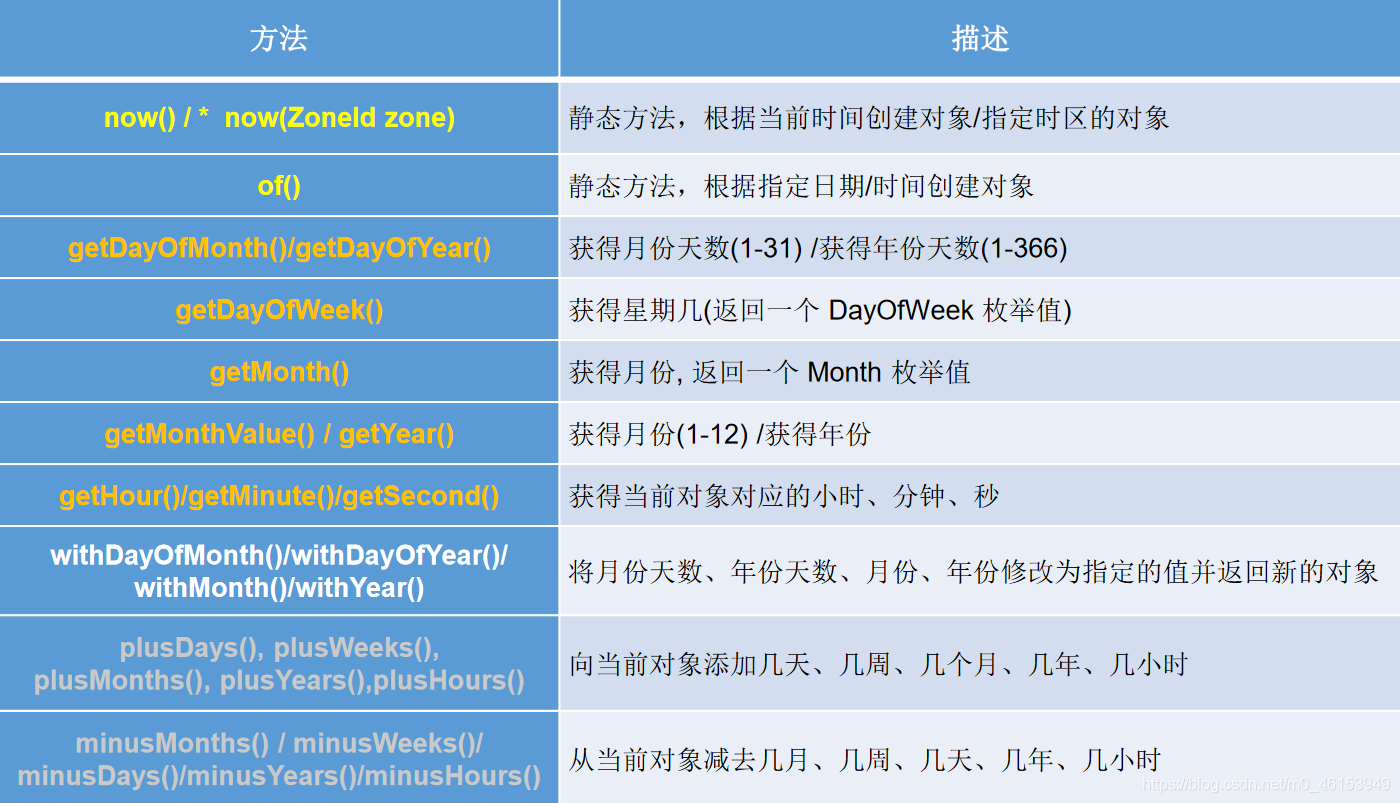
Instant类
@Testpublic void test2(){Instant instant = Instant.now();System.out.println(instant);OffsetDateTime offsetDateTime = instant.atOffset(ZoneOffset.ofHours(8));System.out.println(offsetDateTime);long l = instant.toEpochMilli();System.out.println(l);Instant instant1 = Instant.ofEpochMilli(1652074145059L);}
3.Java比较器
3.1概述及使用
5.1、概述
Java中的对象,正常情况下,只能进行比较:==或 != 。不能使用 >或<的,但是在开发场景中,我们需要对多个对象进行排序,言外之意,就需要比较对象的大小。 如何实现?使用两个接口中的任何一个:Comparable或 Comparator
Java实现对象排序的方式有两种:
自然排序:java.lang.Comparable
定制排序:java.util.Comparator
package com.test.java;import org.junit.Test;import java.util.Arrays;/*** Java中的对象,正常情况下,只能进行比较:==或 != 。不能使用 >或<的,* 但是在开发场景中,我们需要对多个对象进行排序,言外之意,就需要比较对象的大小。 如何实现?* 使用两个接口中的任何一个:Comparable或 Comparator* <p>* Java实现对象排序的方式有两种:* 自然排序:java.lang.Comparable* 定制排序:java.util.Comparator*/public class CompareTest {@Testpublic void test1() {String[] arr = new String[]{"AA", "CC", "BB", "DD", "EE"};Arrays.sort(arr);System.out.println(Arrays.toString(arr));}// 排序对象@Testpublic void test2() {Goods[] arr = new Goods[4];arr[0] = new Goods("lenovoMouse", 34);arr[1] = new Goods("xiaomiMouse", 35);arr[2] = new Goods("huaweiMouse", 27);arr[3] = new Goods("dellMouse", 30);Arrays.sort(arr);System.out.println(Arrays.toString(arr));}}
package com.test.java;public class Goods implements Comparable{private String name;private double price;public Goods(){}public Goods(String name, double price) {this.name = name;this.price = price;}public String getName() {return name;}public void setName(String name) {this.name = name;}public double getPrice() {return price;}public void setPrice(double price) {this.price = price;}@Overridepublic String toString() {return "Goods{" +"name='" + name + '\'' +", price=" + price +'}';}// 指明商品比较大小的方式@Overridepublic int compareTo(Object o) {if (o instanceof Goods) {Goods goods = (Goods) o;if (this.price > goods.price) {return 1;} else if (this.price < goods.price) {return -1;} else {return 0;}}throw new RuntimeException("传入类型不一致");}@Testpublic void test3() {Goods[] arr = new Goods[4];arr[0] = new Goods("lenovoMouse", 34);arr[1] = new Goods("xiaomiMouse", 35);arr[2] = new Goods("huaweiMouse", 27);arr[3] = new Goods("dellMouse", 30);Arrays.sort(arr, new Comparator() {@Overridepublic int compare(Object o1, Object o2) {if (o1 instanceof Goods && o2 instanceof Goods) {Goods g1 = (Goods) o1;Goods g2 = (Goods) o2;return Double.compare(g1.getPrice(), g2.getPrice());}throw new RuntimeException("传入类型错误");}});System.out.println(Arrays.toString(arr));}}
4.System类、Math类、BigInteger与BigDecimal
6.1、System类
System类代表系统,系统级的很多属性和控制方法都放置在该类的内部。该类位于java.lang包。
由于该类的构造器是private的,所以无法创建该类的对象,也就是无法实例化该类。其内部的成员变量和成员方法都是static的,所以也可以很方便的进行调用。
成员变量
System类内部包含in、out和err三个成员变量,分别代表标准输入流(键盘输入),标准输出流(显示器)和标准错误输出流(显示器)。
成员方法
native long currentTimeMillis():
该方法的作用是返回当前的计算机时间,时间的表达格式为当前计算机时间和GMT时间(格林威治时间)1970年1月1号0时0分0秒所差的毫秒数。
void exit(int status):
该方法的作用是退出程序。其中status的值为0代表正常退出,非零代表异常退出。使用该方法可以在图形界面编程中实现程序的退出功能等。
void gc():
该方法的作用是请求系统进行垃圾回收。至于系统是否立刻回收,则取决于系统中垃圾回收算法的实现以及系统执行时的情况。
getProperty(String key):
该方法的作用是获得系统中属性名为key的属性对应的值。系统中常见的属性名以及属性的作用如下表所示:
6.2、Math类
java.lang.Math提供了一系列静态方法用于科学计算。其方法的参数和返回值类型一般为double型。
abs 绝对值
acos,asin,atan,cos,sin,tan 三角函数
sqrt 平方根
pow(double a,doble b) a的b次幂
log 自然对数
exp e为底指数
max(double a,double b)
min(double a,double b)
random() 返回0.0到1.0的随机数
long round(double a) double型数据a转换为long型(四舍五入)
toDegrees(double angrad) 弧度—>角度
toRadians(double angdeg) 角度—>弧度
6.3、BigInteger与BigDecimal
Integer类作为int的包装类,能存储的最大整型值为2^31 -1,Long类也是有限的,最大为2^63 -1。如果要表示再大的整数,不管是基本数据类型还是他们的包装类都无能为力,更不用说进行运算了。
java.math包的BigInteger可以表示不可变的任意精度的整数。BigInteger提供所有Java 的基本整数操作符的对应物,并提供java.lang.Math 的所有相关方法。另外,BigInteger还提供以下运算:模算术、GCD 计算、质数测试、素数生成、位操作以及一些其他操作。
import org.junit.Test;import java.math.BigDecimal;import java.math.BigInteger;/*** 其他常用类的使用* 1.System* 2.Math* 3.BigInteger 和 BigDecimal*/public class OtherClassTest {@Testpublic void test2() {BigInteger bi = new BigInteger("1243324112234324324325235245346567657653");BigDecimal bd = new BigDecimal("12435.351");BigDecimal bd2 = new BigDecimal("11");System.out.println(bi);// System.out.println(bd.divide(bd2));System.out.println(bd.divide(bd2, BigDecimal.ROUND_HALF_UP));System.out.println(bd.divide(bd2, 25, BigDecimal.ROUND_HALF_UP));}}

若有收获,就点个赞吧
0 人点赞


