3.15 恢复施工🚧
- 晚风依旧很温柔,一个人慢慢走
一、导论
1.何谓“面向对象”的编程思想?首先解释一下“思想”
先问你个问题:你想做个怎样的人?
可能你会回答:我想做个好人,孝敬父母,尊重长辈,关爱亲朋……
你看,这就是思想。这是你做人的思想,或者说,是你做人的原则。
做人有做人的原则,编程也有编程的原则。这些编程的原则呢,就是编程思想。2.面向过程(POP)和面向对象(OOP)
二者都是一种思想,面向对象是相对于面向过程而言的。面向过程,强调的是功能行为,以函数为最小单位,考虑怎么做。面向对象,将功能封装进对象,强调具备了功能的对象,以类/对象为最小单位,考虑谁来做。
eg.如何把大象放冰箱里?
>面向过程:1.把冰箱门打开 2.把大象抬起来塞冰箱去 3.关上冰箱门
>面向对象: ```java 人{ 打开(冰箱){
} 抬起(大象){冰箱.开开();
} 关闭(冰箱){大象.进入(冰箱);
} }冰箱.闭合();
冰箱{ 开开(){} 闭合(){} }
大象{ 进入(冰箱){} }
<a name="aBseT"></a>### 3.面向对象的两个要素>类:对一类事物的描述,是抽象的,概念上的定义<br />>对象:实际存在的该类事物的每个个体,因而也称为实例<br />>名言警句:“万事万物皆对象。”<br />>原理图:<br />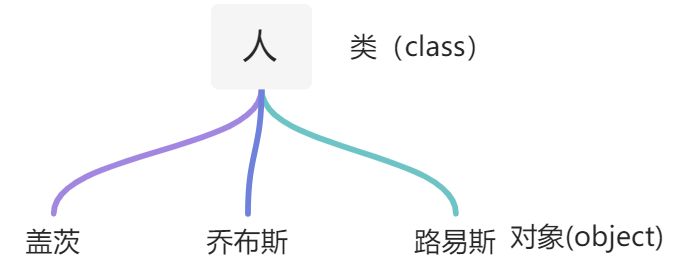<a name="SRvtf"></a>### 4.面向对象的三个特性>封装性<br />>继承性<br />>多态性<a name="YDiiR"></a>### 5.小结1.面向对象思想编程内容的三条主线分别是什么<br />①类及类的成员:属性、方法、构造器、代码块、内部类<br />②面向对象的三大特征:封装、继承、多态<br />2.谈谈你对面向对象中类和对象的理解,并指出二者的关系?<br />类:抽象的、概念上的内容<br />对象:实实在在存在的一个个体。<br />3.面向对象思想落地实现的规则一<br />*1.仓建类,设计类的成员<br />*2.创建类的对象<br />*3.通过“对象.属性”或“对象.方法”调用对象的结构<a name="Ag9DW"></a>## 二、类、对象、属性、方法<a name="md51F"></a>### 1.类中属性与方法及类和对象的创建```java/**一、设计类其实就是设计类的成员*属性 = 成员变量 = field = 域、字段*方法 = 成员方法 = 函数 = method*创建类的对象 = 类的实例化 = 实例化类*二、类和对象的使用(面向对象思想落地的实现)*1.创建类,设计类的成员*2.创建类的对象*3.通过“对象﹒属性或"对象.方法"调用对象的结构*三、体会类与多个对象的关系*如果创建了一个类的多个对象,则每个对象都独立的拥有一套类的属性。(非static的)*意味着:如果我们修改一个对象的属性a,则不影响另外一个对象属性a的值。*特殊的:Person p3 = p1; 理解为指向同一个对象会发生相互影响*/// 测试类public class Test {public static void main(String[] args) {// 创建Person类对象Person p1 = new Person();// 调用对象结构:属性、方法// 调用属性:对象.属性p1.age = 18;p1.name = "嘉然";p1.isMale = false;// 调用方法p1.eat();p1.sleep();p1.talk("中文");}}// 设计人类class Person{// 属性String name;int age;boolean isMale;// 方法public void eat(){System.out.println(name + "可以吃饭");}public void sleep(){System.out.println(name + "可以睡觉");}public void talk(String language){System.out.println(name + "可以说话,使用" + language);}}
2.体会类和多个对象的关系
/**>体会类与多个对象的关系:*如果创建了一个类的多个对象,则每个对象都独立的拥有一套类的属性。(非static的)*意味着:如果我们修改一个对象的属性a,则不影响另外一个对象属性a的值。*特殊的:Person p3 = p1; 理解为指向同一个对象会发生相互影响*/// 测试类public class Test {public static void main(String[] args) {// 创建Person类对象Person p1 = new Person();// 调用对象结构:属性、方法// 调用属性:对象.属性p1.age = 18;p1.name = "嘉然";p1.isMale = false;// 调用方法p1.eat();p1.sleep();p1.talk("中文");// 创建第二个Person类对象 **************Person p2 = new Person();System.out.println(p2.name); // 输出不是嘉然 而是null 表明对象之间互不影响// 将p1变量保存的对象地址赋给p3使p3同时指向一个对象实体 **************Person p3 = p1;System.out.println(p3.name); // 输出嘉然}}// 设计人类class Person{// 属性String name;int age;boolean isMale;// 方法public void eat(){System.out.println(name + "可以吃饭");}public void sleep(){System.out.println(name + "可以睡觉");}public void talk(String language){System.out.println(name + "可以说话,使用" + language);}}
3.对象的内存解析
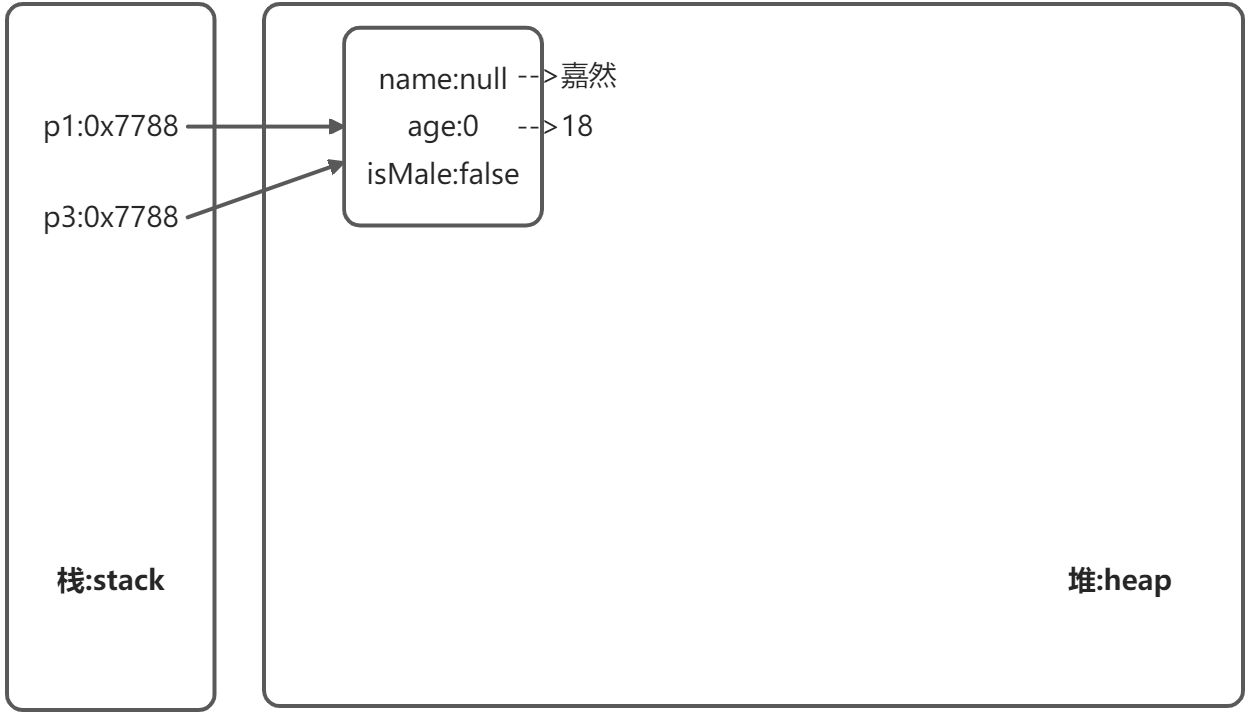
4.属性与局部变量的对比
/**属性(成员变量) VS 局部变量*相同点:*>1. 定义变量格式:数据类型 变量名 = 变量值*>2.先声明,后使用*>3.变量都有其作用域*不同点:*>1.声明位置不同:* 属性:直接定义在类的一对{ }里* 局部变量:声明在方法内、方法形参、代码块内、构造器形参、构造器内部的变量*>2.关于权限修饰符的不同* 属性:可以在声明属性时,指明其权限* 常用的权限修饰符:private、public、缺省、protected --->封装性 再说* 局部变量:不可以加*>3.默认初始化值* 类的属性根据数据类型都有默认的初始化值* 而局部变量可没有*>4.在内存中的加载位置* 属性加载到堆空间中(非static)* 局部变量加载到堆空间*/// 测试类public class Test {public static void main(String[] args) {}}class User{// 属性或成员变量String name;int age;boolean isMale;public static void talk(String language) { // language 形参 也是局部变量System.out.println("使用" + language + "语言");}public static void eat(){String food = "烧饼"; // 局部变量System.out.println("嘉然爱吃" + food);}}
5.类中方法的声明和使用
/** 方法:描述类该具有的功能* 比如:* Math类:sqrt() \ random() ...* Scanner类:nextXxx() ...* Arrays:sort() \ binarySearch() \ toString() \ equals() ...** 1.举例* public void eat(){}* public void sleep(int hour){}* public String getName(){}* public String getNation(String nation){}* 2.方法的声明* 权限修饰符 返回值类型 方法名(形参列表){* 方法体* }* 注意:static、final、abstract 来修饰方法 以后再说* 3.说明* >权限修饰符:private、public、缺省、protected* >有返回值的记得别忘了返回值类型,void没有返回值的话只能写return;可以直接结束方法**4.return关键字的使用,*>使用范围:使用在方法体中*>作用:结束方法针对于有返回值类型的方法,使用"return数据"方法返回所要的数据。*>注意点:return关键字后面不可以声明执行语句。**5.方法的使用中,可以调用当前类的属性或方法* 特殊的:方法A中又调用了方法A:递归方法。**/public class Test {}class Customer{// 属性String name;int age;boolean isMale;// 方法public void eat(){System.out.println("客户吃饭");return;System.out.println("此处无法到达"); // 前方为return; 无法到达对应3.2}public void sleep(int hour) {System.out.println("睡了" + hour + "小时");}public String getName(){ // 注意此处返回值设置将 void 改为 Stringreturn name;}public String getNation(String nation) {String info = "国籍是" + nation;return info;}}
6.练习1-类的设计
要求:
(1)创建Perlson类的对象,设置该对象的name.age和sex属性,调用study方法,输出字符串
“studying”,调用showAge()方法显示age值,调用addAge()方法给对象的age属性值增加2岁。
(2)创建第二个对象,执行上述操作,体会同一个类的不同对象之间的关系。
/*** Test*/public class Test {public static void main(String[] args) {Person p1 = new Person();p1.name = "嘉然";p1.age = 3;p1.sex = "female";p1.study();p1.showAge();p1.addAge();p1.showAge();// 完全独立互不影响Person p2 = new Person();p2.name = "珈乐";p2.age = 20;p2.sex = "female";p2.study();p2.showAge();p2.addAge();p2.showAge();}}class Person{String name;int age;String sex;public void study() {System.out.println("studying");}public void showAge() {System.out.println(age);}public void addAge() {age += 2;}}
7.练习2-算圆的面积类
利用面向对象的编程方法,设计类Cirlcle计算圆的面积
/*** Test*/public class Test {public static void main(String[] args) {Circle c1 = new Circle();c1.r = 3;double area = c1.getArea();System.out.println(area);}}class Circle{double r;public double getArea(){return Math.PI * r * r;}}
8.练习3-对象数组*
对象数组题目:
定义类Student,包含三个属性:学号number(int),年级state(int),成绩
score(int)。创建20个学生对象,学号为1到20,年级和成绩都由随机数确定。
问题一:打印出3年级(state值为3)的学生信息。
,问题二:使用冒泡排序按学生成绩排序,并遍历所有学生信息
提示:
1)生成随机数: Math.random(),返回值类型double;
2)四舍五入取整:Math.round(double d),返回值类型long.
public class Test{public static void main(String[] args) {// 声明Student数组Student[] students = new Student[20];// 为每个元素赋值for(int i = 0;i < students.length;i++){students[i] = new Student();students[i].number = i + 1;// [1,6]students[i].state = (int)(Math.random()*(6-1+1)+1);// [0,100]students[i].score = (int)(Math.random()*(100-0+1)+0);}// 问题一:带条件的循环遍历for(int i = 0;i < students.length;i++){if(students[i].state == 3){System.out.println("学号:"+ students[i].number + "年纪:" + students[i].state + "分数:"+ students[i].score);}}// 问题二:冒泡排序Student temp;for(int i = 0;i < students.length - 1;i++){for(int j = 0;j < students.length - 1 - i;j++){if(students[j].score < students[j+1].score){temp = students[j];students[j] = students[j+1];students[j+1] = temp;}}}for(int i = 0;i < students.length;i++){System.out.println("学号:"+ students[i].number + "年纪:" + students[i].state + "分数:"+ students[i].score);}}}class Student{int number;int state;int score;}
9.对象数组的内存解析
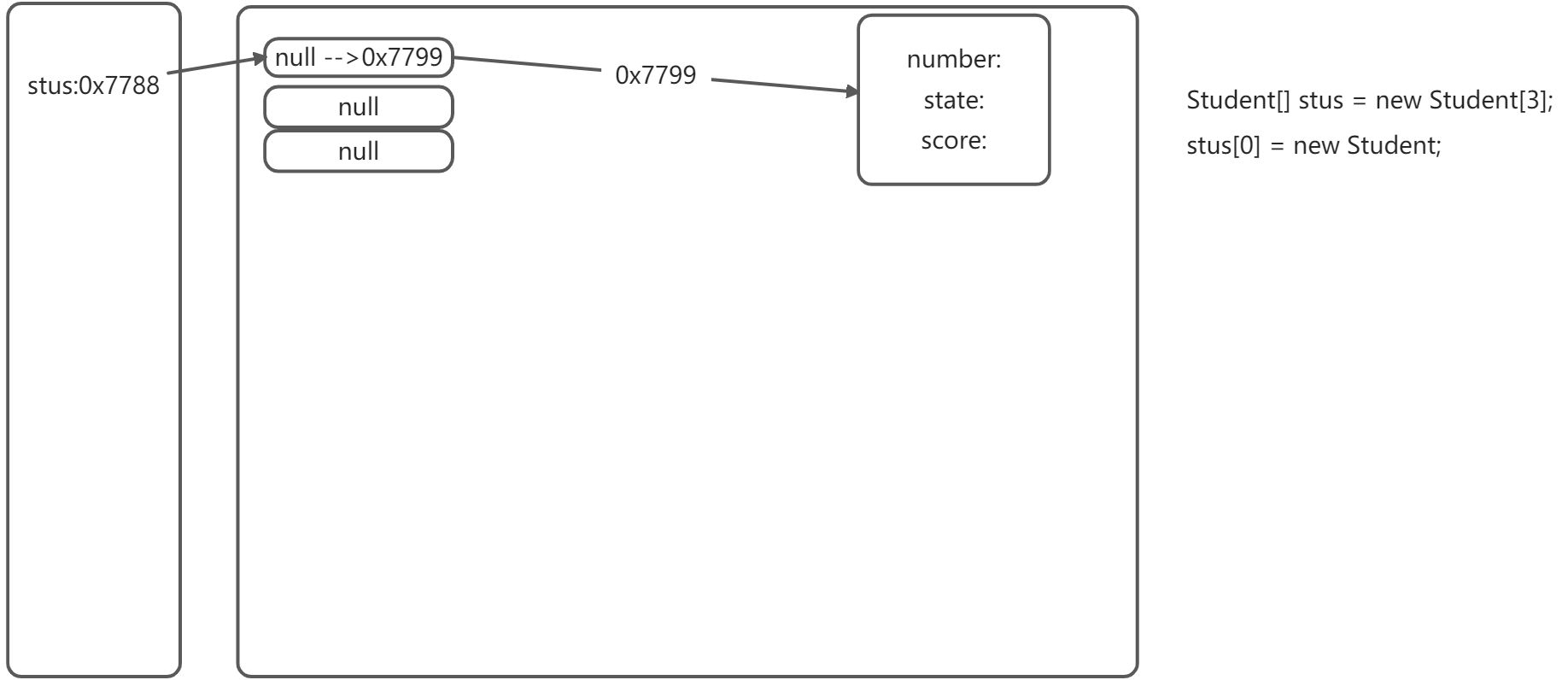
10.匿名对象
/*匿名对象的使用1.理解:我们创建的对象,没有显式的赋给一个变量名。即为匿名对象2.特征:匿名对象只能调用一次。*/public class Test {public static void main(String[] args) {new Phone.price = 1999;new Phone.showPrice(); // 0 互不影响 用后即销毁}}class Phone{int price;public double showPrice(){System.out.println(price);}}
11.自定义数组工具类
/*** Test*/public class Test {public static void main(String[] args) {int[] arr = new int[]{1,2,3};ArrayUtil arraytool = new ArrayUtil();arraytool.getReversal(arr);}}class ArrayUtil{public void getMax(int[] arr){// 求数组的最大值int max = arr[0];for(int i = 1;i < arr.length;i++){if(max < arr[i]){max = arr[i];}}System.out.println(max);}public void getMin(int[] arr){// 求数组的最小值int min = arr[0];for(int i = 1;i < arr.length;i++){if(min > arr[i]){min = arr[i];}}System.out.println(min);}public void getSum(int[] arr){// 求数组的总和int sum = arr[0];for(int i = 1;i < arr.length;i++){sum += arr[i];}System.out.println(sum);}public void getAver(int[] arr){// 求平均值int sum = arr[0];for(int i = 1;i < arr.length;i++){sum += arr[i];}int aver = sum / arr.length;System.out.println(aver);}public void getReversal(int[] arr){// 反转数组for(int i = 0, j = arr.length-1;i < j;i++, j--){int temp = arr[i];arr[i] = arr[j];arr[j] = temp;}for(int i = 0;i < arr.length;i++){System.out.println(arr[i]);}}public int[] getCopy(int[] arr){// 创建备份数组,且长度相等int[] beifen = new int[arr.length];// 遍历原数组并赋给备份数组for(int i = 0;i < arr.length;i++){beifen[i] = arr[i];}// 遍历备份数组for(int i = 0;i < beifen.length;i++){System.out.print(beifen[i]);}return beifen;}public void getOrder(int[] arr){// 数组排序for(int i = 0;i < arr.length - 1;i++){for(int j = 0;j < arr.length - 1 -i;j++){if(arr[j] > arr[j+1]){int temp = arr[j];arr[j] = arr[j+1];arr[j+1] = temp;}}}for(int i = 0;i < arr.length;i++){System.out.println(arr[i]);}}public void getSerch(int[] arr, int desitination){// 查找指定元素for(int i = 0;i < arr.length;i++){if(desitination == arr[i]){System.out.println("找到了索引为" + i);}}}}
12.方法的重载
/*** 方法的重载(overload)* 定义:在同一个类中,允许存在一个以上的同名方法,只要它们的参数个数或者参数类型不同即可。*/public class Test{public static void main(String[] args) {String name = "嘉然";String behavior = "喂我";Eat chi = new Eat();chi.eatApple(name, behavior);}}class Eat{public void eatApple(String name){System.out.println(name + "吃苹果");}public void eatApple(String name, String behavior){System.out.println(name + behavior +"吃苹果");}}
13.新特性:可变个数的形参方法
/*** 具体使用:* 2.1 可变个数形参的格式:数据类型...变量名* 2.2当调用可变个数形参的方法时,传入的参数个数可以是:0个,1个,2个,。。。* 2.3 可变个数形参的方法与本类中方法名相同,形参不同的方法之间构成重载* 2.4 可变个数形参的方法与本类中方法名相同,形参类型也相同的数组之间不构成重载。* 2.5 可变个数形参在方法的形参中,必须声明在末尾 **** 2.6 可变个数形参在方法的形参中,最多只能声明一个可变形参。****/public class Test{public static void main(String[] args) {Mutable test = new Mutable();test.show("嘉", "然", "我", "真", "的", "好", "喜", "欢", "你", "啊");}}class Mutable{public void show(String... str){System.out.println("可变参数测试用例");for(int i = 0;i < str.length;i++){System.out.println(str[i]);}}}
三、底层小机制(bushi
1.理解变量的赋值
/**** 关于变量的赋值***/public class Test{public static void main(String[] args) {int m = 10;int n = m;System.out.println("m = "+ m +",n = "+ n); //m = 10,n = 10n = 20;System.out.println("m = "+ m +",n = "+ n); //m = 10,n = 20//以上说明*基本数据类型*变量赋值并不是地址传递,而是实实在在的存在两份Order o1 = new Order();o1.Orderid = 1001;Order o2 = o1;System.out.println("o1.orderid = " + o1.Orderid + ",o2.orderid = " + o2.Orderid);//o1.orderid = 1001,o2.orderid = 1001o2.Orderid = 1002;System.out.println("o1.orderid = " + o1.Orderid + ",o2.orderid = " + o2.Orderid);//o1.orderid = 1002,o2.orderid = 1002//以上说明*引用数据类型*变量赋值是*地址传递*,指向堆中的同一个对象实体}}class Order{int Orderid;}
2.值传递机制
值传递机制:
如果参数是基本数据类型,此时实参赋给形参的是实参真实存储的数据值。如果参数是引用数据类型,此时实参赋给形参的是实参存储数据的地址值。
…
3.值传递机制练习
/** 尝试从堆和栈分析分析*/public class Test{public static void main( String args[]) {Test test = new Test();test.first();}public void first(){int i = 5;Value v = new Value();v.i = 25;second(v, i);System.out.println(v.i);}public void second(Value v, int i){i = 0;v.i = 20;Value val = new Value();v = val;System.out.println(v.i + " " + i);}}class Value{int i = 15;}
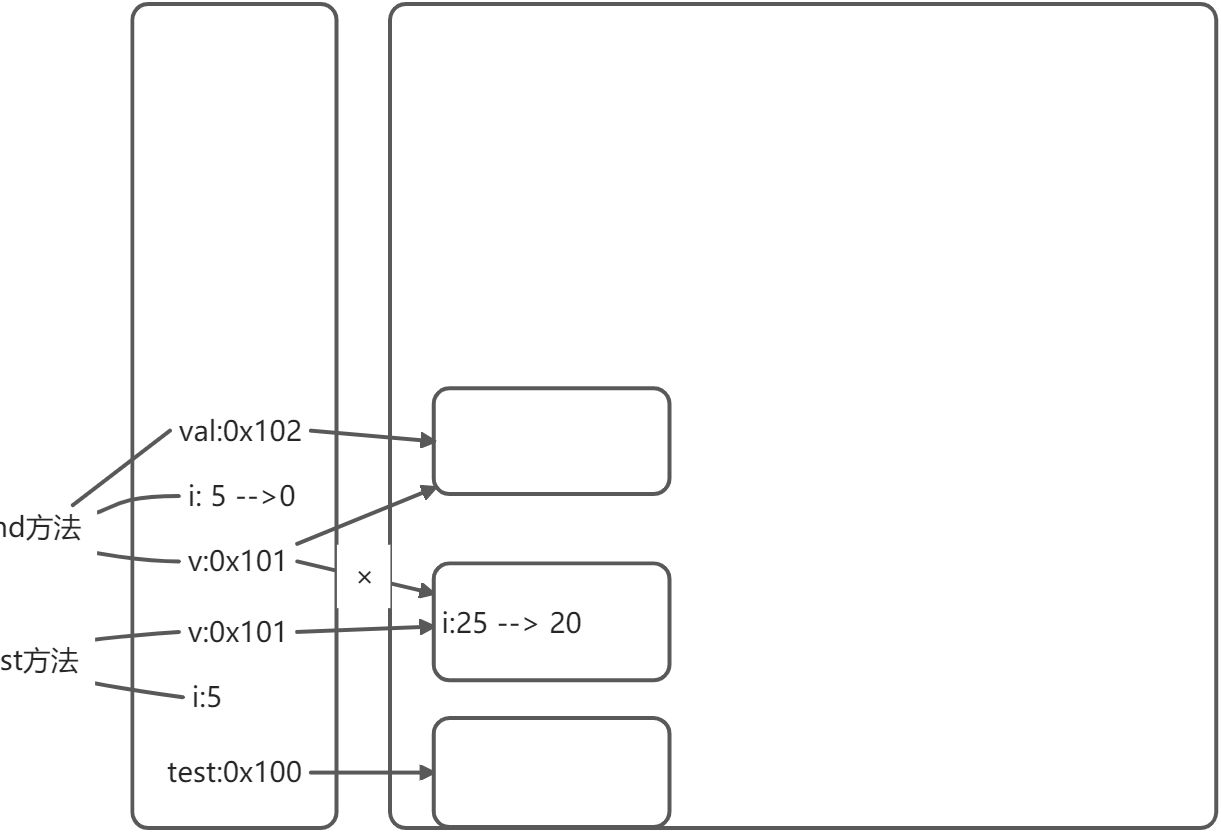
4.递归大练习
/** 递归*/public class Test{public static void main( String args[]) {//计算1-100的和//法1int sum = 0;for(int i = 1;i <= 100;i++){sum += i;}System.out.println(sum);//法2Test test = new Test();int sum1 = test.getSum(100);System.out.println(sum1);//已知有一个数列:f(0) = 1,f(1) = 4,f(n+2)=2*f(n+1) + f(n) 求f(10)int f10 = test.getFunction(10);System.out.println(f10);// 1 1 2 3 5 8 13 求斐波那契的第7个数int num = test.getFibonacii(7);System.out.println(num);}public int getSum(int n){if(n == 1){return 1;}else{return n + getSum(n - 1);}}public int getFunction(int n){if(n == 0){return 1;}else if(n == 1){return 4;}else{return 2 * getFunction(n-1) + getFunction(n-2);}}public int getFibonacii(int n){if(n == 1){return 1;}else if(n == 2){return 1;}else{return getFibonacii(n - 1) + getFibonacii(n-2);}}}
四、封装性
1.封装性引入
为什么要封装?
用洗衣机不用了解内部结构,用就行
开小车不用了解发动机结构,开就行
>程序设计追求“高内聚,低耦合”
高内聚:类的内部数据操作细节自己完成,不允许外部干涉。
低耦合:仅对外暴露少量的方法用于使用。
>作用和意义
隐藏对象内部的复杂性,只对外公开简单的接口。便于外界调用,从而提高系统的可扩展性、可维护性。通俗的说,把该隐藏的隐藏起来,该暴露的暴露出来。这就是封装性的设计思想。2.封装性的体现
```java /*
- 面向对象的特征一:
- 封装与隐藏
- 一。问题的引入:
- 当我们创建一个类的对象以后,我们可以通过”对象.属性”的方式,对对象的属性进行赋值。
- 这里,赋值操作要受属性的数据类型和存储范围的制约。
- 除此之外,没有其他制约条件。
- 但是,在实际问题中,我们往往需要给属性赋加入额外的限制条件。
- 这个条件就不能在属性声明时体现,我们只能通过方法进行限制条件的添加。(比如: set方法)
- 同时,我们需要避免用户再使用”对象.属性”的方式对属性进行赋值。则需要将属性声明为私有的(private)
- *此时针对属性就体现了封装性*
- 二、封装性的体现
- 我们将类的属性xxx私有化(private),同时提供公共的(public)方法来获取(getXxx)和设置(setXxx)来设置此属性的值
- but 这并不等同于封装性的全部,前方的路依旧孤单漫长…
- 拓展:1.如上 2.不对外暴露的私有方法 3.单例模式(构造器) 4…. */ public class Test{ public static void main( String args[]) {
} }
Animal a = new Animal();a.name = "大黄";//a.age = 10; The field Animal.legs is not visible 这个字段不可见//a.legs = 4; The field Animal.legs is not visible 这个字段不可见a.setAge(10);a.setLegs(4); // 使用 private + setLegs方法 为设置腿数增加限制a.show();
class Animal{ String name; private int age;
private int legs;//提供age的set和get方法public void setAge(int a){if(a >= 0){age = a;}else{System.out.println("年龄异常重新设置");}}public int getAge(){return age;}//提供legs的set和get方法public void setLegs(int l){if(l >= 0 && l % 2 == 0){legs = l;}else{System.out.println("腿数异常重新设置");}}public int getLegs(){return legs;}//展示该对象实例的详细信息public void show(){System.out.println("name = " +name + ",age = " + age + ",legs = " + legs);}
}
<a name="LPV02"></a>### 3.四种权限修饰Java规定的4种权限(从小到大排列): private、default、protected、public| 修饰符 | 类内部 | 同一个包 | 不同包的子类 | 同一个工程 || --- | --- | --- | --- | --- || private | Y | | | || default | Y | Y | <br /> | || protect | Y | Y | Y | || public | Y | Y | Y | Y |注:<br />>default为缺省 就是啥权限也不声明<br />>protect 基本用不着<br />>包可以理解为同一个文件夹下<br />>暂时这么多四种权限都可以修饰类和类的内部结构:属性、方法、构造器、内部类(套娃类),而修饰类自身只能用缺省或public<a name="MOBzC"></a>### 4.封装性小练习```java/*** 封装性小练习**/public class Test{public static void main( String args[]) {Person p1 = new Person();p1.setAge(18);System.out.println("这个人的年龄为" + p1.getAge());}}class Person{//设置私有private int age;//set方法和get方法public void setAge(int a){if(a >= 0 && a <= 130){age = a;}else{System.out.println("抛出异常");}}public int getAge(){return age;}}
五、构造器
1.基本理解及详细说明
/** 构造器(或构造方法、constructor)的使用* 一、作用:* 1.创建对象* 2.初始化属性* 二、说明:* 1.如果没有显式的定义类的构造器的话,则系统默认提供一个空参构造器* 2.定义构造器的格式:权限修饰符 类名(形参列表){}* 3.一个类中定义多个构造器,构成重载* 4.一旦我们显式的定义了类的构造器之后,系统就不再提供默认的空参构造器* 5.一个类中至少有一个构造器*/public class Test{public static void main( String args[]) {//创建类的对象 new +构造器Person p1 = new Person("Tom");Person p2 = new Person();System.out.println(p1.name + p2.name);p1.eat();}}class Person{//属性String name;int age;//构造器1 此空参构造器默认存在public Person(){}//构造器2 传参类似python中init可用于初始化public Person(String n){name = n;}//方法public void eat(){System.out.println("人吃饭");}public void study(){System.out.println("人学习");}}
2.构造器练习-基本使用
/*** 利用构造器,创建Person对象时,同时初始化name和age属性**/public class Test{public static void main(String args[]) {Person p1 = new Person("Tom", 18);p1.setAge(18);System.out.println("姓名:" + p1.getName() + " 年龄:" + p1.getAge());}}class Person{//设置私有private String name;private int age;//构造器public Person(String n, int a){name = n;age = a;}//set方法和get方法public void setName(String n){name = n;}public String getName(){return name;}public void setAge(int a){if(a >= 0 && a <= 130){age = a;}else{System.out.println("抛出异常");}}public int getAge(){return age;}}
3.构造器练习-三角形
/*** 编写两个类,TriAngle和TriAngleTest,其中TriAngle类中声明私有的底边长base和高height,同时声明公共方法访问私有变量。* 此外,提供类必要的构造器。另一个类中使用这些公共方法,计算三角形的面积。**/public class Test{public static void main(String args[]){//1.空参构造器创建的对象TriAngle t1 = new TriAngle();t1.setBase(5.3);t1.setHeight(6.3);System.out.println("base : " + t1.getBase() + ",height :"+t1.getHeight());//2.带参构造器创建的对象TriAngle t2 = new TriAngle(7.3, 8.3);System.out.println("base : " + t2.getBase() + ",height :"+t2.getHeight());}}class TriAngle{//设置私有private double base;private double height;//构造器public TriAngle(){}public TriAngle(double b, double h){base = b;height = h;}//set方法和get方法public void setBase(double b){base = b;}public double getBase(){return base;}public void setHeight(double h){height = h;}public double getHeight(){return height;}}
六、各种知识点
1.属性赋值的先后顺序
1.默认初始化 int age;
2.显式初始化 int age = 18;
3.构造器中赋值
4.通过”对象.方法”或”对象.属性”的方式,赋值
2.JavaBean使用
概念:JavaBean是一种Java语言写成的可重用组件。
所谓JavaBean,是指符合如下标准的java类:
>类是公共的
>有一个无参的公共构造器
>有属性,且有对应的set、get方法
/*** 概念:JavaBean是一种Java语言写成的可重用组件。* 所谓JavaBean,是指符合如下标准的java类:* >类是公共的* >有一个无参的公共构造器* >有属性,且有对应的set、get方法**/// 一个公共的类public class Customer{//设置私有private int id;private String name;//空的构造器public Customer(){}//set方法和get方法public void setId(int i){id = i;}public int getId(){return id;}public void setName(String n){name = n;}public String getName(){return name;}}
3.拓展知识:UML类图

4.this调用属性、方法及构造器
/** 1.this可以修饰 属性、方法、构造器* 2.this修饰属性、方法可以理解为*当前对象* 修饰构造器时可以理解为*正在创建的对象** 3.通常情况下,我们都选择省略"this. "。特殊情况下,如果方法的形参和类的属性同名时,我们必须显式的使用"this.变量"的方式,表明此变量是属性,而非形参。* 4.this修饰构造器时,this(形参)* >我们在类的构造器中,可以显式的使用"this(形参列表)"方式,调用本类中指定的其他构造器* >构造器中不能通过"this(形参列表)"方式调用自己* >如果一个类中有n个构造器,则最多有n - 1构造器中使用了"this(形参列表)"* >规定:"this(形参列表)"必须声明在当前构造器的首行构造器内部,最多只能声明一个"this(形参列表)",用来调用其他的构造器*/public class Test {public static void main(String[] args) {Customer c1 = new Customer();c1.setId(5);c1.setName("小花");Customer c2 = new Customer(5, "嘉然");c2.eat();}}class Customer{//设置私有private int id;private String name;//空的构造器public Customer(){}//带参数的构造器public Customer(int id, String name){this.id = id; //使用this,形参就可以和构造器正在创建的对象的属性重名了this.name = name;}//set方法和get方法public void setId(int id){this.id = id; //使用this,形参就可以和属性重名了}public int getId(){return id;}public void setName(String name){this.name = name; //使用this,形参就可以和属性重名了}public String getName(){return name;}public void eat(){System.out.println("吃饭");this.study(); ////使用this,可以调用当前对象的方法}public void study(){System.out.println("学习");}}
5.this练习-Boy and Girl
构造如下两个类

class Boy{private String name;private int age;public Boy(){}public Boy(String name, int age){this.name = name;this.age = age;}public void setName(String name){this.name = name;}public String getName(){return name;}public void setAge(int age){this.age = age;}public int getAge(){return age;}public void marry(Girl girl){System.out.println("我想娶" + girl.getName());}public void shout(){if(this.age >= 22){System.out.println("你可以结婚了");}else{System.out.println("爬");}}}class Girl{private String name;private int age;public Girl(){}public Girl(String name, int age){this.name = name;this.age = age;}public void setName(String name){this.name = name;}public String getName(){return name;}public void setAge(int age){this.age = age;}public int getAge(){return age;}public void marry(Boy boy){System.out.println("我想嫁给" + boy.getName());boy.marry(this);}public int compare(Girl girl){if(this.age > girl.age){return 1;}else if(this.age < girl.age){return -1;}else{return 0;}}}public class Test{public static void main(String[] args) {Boy boy1 = new Boy("罗密欧", 99);Girl girl1 = new Girl("朱丽叶", 18);girl1.marry(boy1);Girl girl2 = new Girl("嘉然",3);int result = girl1.compare(girl2);System.out.println(result);}}
6.综合练习-Customer and Account
实验1: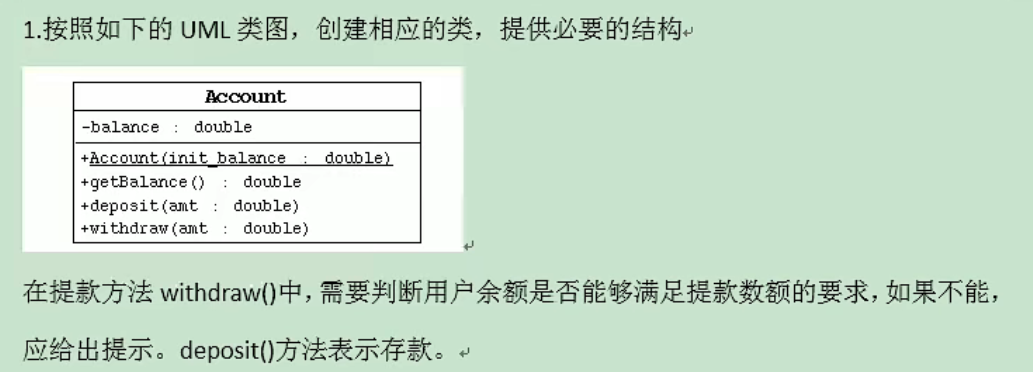
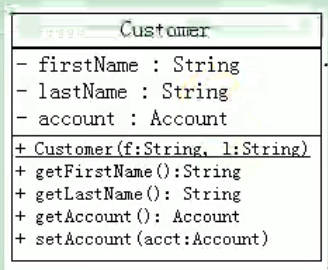
实验2: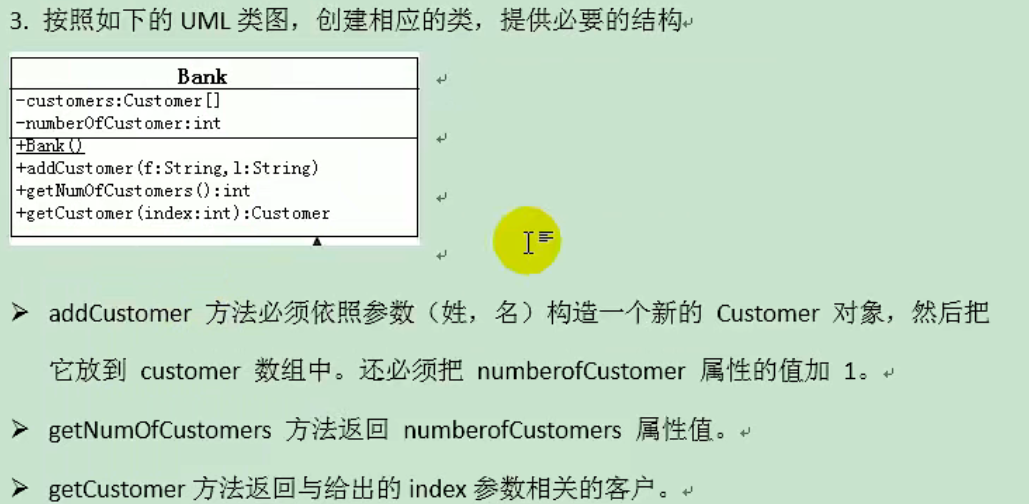
/*** 1、写一个名为 Account 的类模拟账户。* 该类包括的属性:账号 id,余额balance,年利率annuallnterestRate;* 包含的方法:访问器方法(getter和setter方法),取款方法withdraw(),存款方法deposit()。* 1、写一个名为 Customer 的类模拟账户。* 该类包括的属性:户名 name, 账户 account;* 包含的方法:访问器方法(getter和setter方法)。*/public class Test {public static void main(String[] args) {//实验1Customer c = new Customer("嘉然");Account a = new Account(1, 1000.0, 0.123);c.setAccount(a);c.getAccount().deposit(1000);c.getAccount().withdraw(3000);c.getAccount().withdraw(2000);//实验2Bank b = new Bank();b.addCustomer("嘉然");b.getCustomer(0).setAccount(new Account(1, 1000, 0.123));b.getCustomer(0).getAccount().withdraw(500);b.addCustomer("珈乐");b.getCustomer(0).setAccount(new Account(1, 2000, 0.123));b.getCustomer(0).getAccount().withdraw(500);System.out.println(b.getNumCustomer());}}class Account{private int id;private double banlance;private double annuallnterestRate;//构造器public Account(int id,double banlance,double annuallnterestRate){this.id = id;this.banlance = banlance;this.annuallnterestRate = annuallnterestRate;}//set、get方法public void setId(int id){this.id = id;}public int getId(){return id;}public void setBanlance(double banlance){this.banlance = banlance;}public double getBanlance(){return banlance;}public void setAnnuallnterestRate(double annuallnterestRate){this.annuallnterestRate = annuallnterestRate;}public double getAannuallnterestRate(){return annuallnterestRate;}//取钱方法public void withdraw(double amount){if(banlance >= amount){this.banlance -= amount;System.out.println("成功取出" + amount + "元,余额" + this.banlance + "元");}else{System.out.println("存款不足,余额" + this.banlance + "元");}}//存钱方法public void deposit(double amount){this.banlance += amount;System.out.println("成功存入" + amount + "元,余额" + this.banlance + "元");}}class Customer{private String name;private Account account;//构造器public Customer(String name){this.name = name;}//set。get方法public void setName(String name){this.name = name;}public String getName(){return name;}public void setAccount(Account account){this.account = account;}public Account getAccount(){return account;}}class Bank{private Customer[] customers = new Customer[10];private int numCustomer;//构造器public Bank(){}//添加客户public void addCustomer(String name){Customer c = new Customer(name);customers[numCustomer] = c;numCustomer++;}//获取客户个数public int getNumCustomer(){return numCustomer;}//获取指定位置的客户public Customer getCustomer(int index){if (index >= 0 && index < numCustomer){return customers[index];}else{return null;}}}
7.package关键字
package com.xxx.yyy.zzz;/*** 1.更好的实现项目中类的管理,提供包的概念。* 2.用package声明类或接口所属的包,声明在文件首行。* 3.包,属于标识符,遵循标识符的命名规则、规范(xxxyyyzzz)、见名知意。* 4.每"."—次,就代表一层文件目录。*/
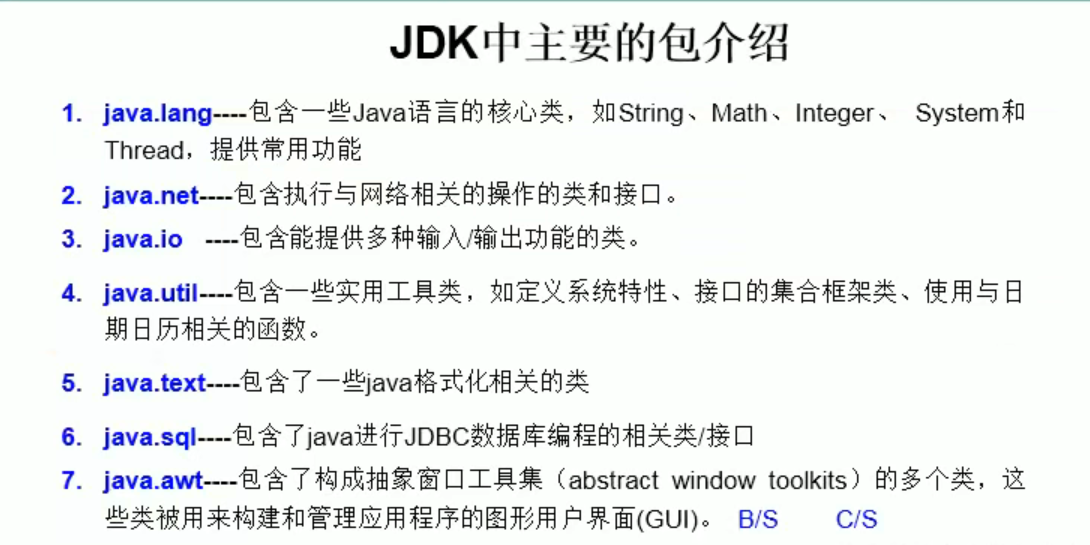
8.MVC设计模式*
MVC是常用的设计模式之一,将整个程序分为三个层次:数据模型层,控制器层,与视图模型层这种将程序输入输出、数据处理,以及数据的展示分离开来的设计模式使程序结构变的灵活而且清晰,同时也描述了程序各个对象间的通信方式,降低了程序的耦合性。
M:数据模型层(model)
V:视图模型层(view)
C:控制器层(controller)
理解就可…
8.import关键字
package com.xxx.yyy.zzz;import java.xxx.*;public class cat{}/*** import:导入* 1.在源文件中显式的使用import结构导入指定包下的类、接口* 2.声明在包的声明和类的声明之间* 3.如果需要导入多个结构,则并列写出即可* 4.可以使用"xxx.*"的方式,表示可以导入xxx包下的所有结构* 5.如果使用的类或接口是java.lang包下定义的,则可以省略import结构 sysout之类的常用语句* 6.如果使用的类或接口是本包下定义的,则可以省略import结构* 7. 特殊的可以用类的全部路径调用类*/

若有收获,就点个赞吧
0 人点赞


