直接下载解压包,复制三份,删除每一份中的data数据文件夹,以及logs文件加里面的日志
#节点 1 的配置信息:#集群名称,节点之间要保持一致cluster.name: my-elasticsearch#节点名称,集群内要唯一node.name: node-1001node.master: truenode.data: true#ip 地址network.host: localhost#http 端口http.port: 1001#tcp 监听端口transport.tcp.port: 9301#discovery.seed_hosts: ["localhost:9301", "localhost:9302","localhost:9303"]#discovery.zen.fd.ping_timeout: 1m#discovery.zen.fd.ping_retries: 5#集群内的可以被选为主节点的节点列表#cluster.initial_master_nodes: ["node-1", "node-2","node-3"]#跨域配置#action.destructive_requires_name: truehttp.cors.enabled: truehttp.cors.allow-origin: "*"
#节点 2 的配置信息:#集群名称,节点之间要保持一致cluster.name: my-elasticsearch#节点名称,集群内要唯一node.name: node-1002node.master: truenode.data: true#ip 地址network.host: localhost#http 端口http.port: 1002#tcp 监听端口transport.tcp.port: 9302# 把当前节点接入到前一个节点中discovery.seed_hosts: ["localhost:9301"]discovery.zen.fd.ping_timeout: 1mdiscovery.zen.fd.ping_retries: 5#集群内的可以被选为主节点的节点列表#cluster.initial_master_nodes: ["node-1", "node-2","node-3"]#跨域配置#action.destructive_requires_name: truehttp.cors.enabled: truehttp.cors.allow-origin: "*"
#节点 3 的配置信息:#集群名称,节点之间要保持一致cluster.name: my-elasticsearch#节点名称,集群内要唯一node.name: node-1003node.master: truenode.data: true#ip 地址network.host: localhost#http 端口http.port: 1003#tcp 监听端口transport.tcp.port: 9303#候选主节点的地址,在开启服务后可以被选为主节点discovery.seed_hosts: ["localhost:9301", "localhost:9302"]discovery.zen.fd.ping_timeout: 1mdiscovery.zen.fd.ping_retries: 5#集群内的可以被选为主节点的节点列表#cluster.initial_master_nodes: ["node-1", "node-2","node-3"]#跨域配置#action.destructive_requires_name: truehttp.cors.enabled: truehttp.cors.allow-origin: "*"
依次启动三个节点,双击bin/elasticsearch.bat启动
然后查看集群健康状态
http://127.0.0.1:1001/_cluster/health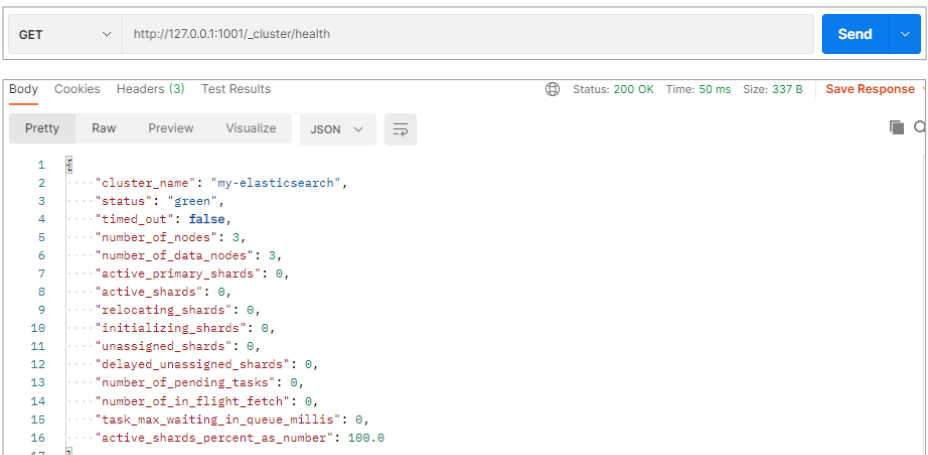
| 状态 | 说明 |
|---|---|
| green | 所有的主分片和副分片都正常运行 |
| yellow | 所有的主分片都正常运行,但不是所有的副分片都正常运行 |
| red | 有主分片没有正常运行 |

若有收获,就点个赞吧
0 人点赞


