title: Github Actions 为什么这么香
tags: 工具
id: -9
categories: 工具
description: 本篇文章简单介绍了 Github Actions 的用法,以及一些变量的解释
keywords: GitHub Actions
cover: https://pic1.afdiancdn.com/user/8a7f563c2e3811ecab5852540025c377/common/731ab9880a63b4eb0d82d354cdbdadec_w2240_h1260_s743.jpg
translate_title: why-github-actions-is-so-popular
subtitle: Why GitHub Actions Is So Popular
date: 2020-10-06 10:51:58
updated: 2020-10-06 12:00:00
本文存在大量纰漏待修正
Github Actions为什么这么香,我为什么专门建了一个组织ccknbc-actions来跑actions并储存博客源码,或者其他只是单纯来跑actions的项目,一开始就单纯只是想分类,forked一堆,主账号自己的项目却混在其中,最新的反而是天天运行actions的(排在前面)
而对大多数博主来说,都是把自己的源码(包含源文章)仓库私有起来,而一个普通账号每个月私有仓库运行时间为2000分钟,确实,是完全够用的,对于我们这种月更博主来说一个月100分钟而已(好吧我就是懒);不过作为白嫖党我还是公开了仓库(这样就不限制运行时间了),但如果你选择了定时执行某些项目,注意间隔最小为5分钟,而触发方式也是多种多样的,但最让人欣喜的是手动触发方式终于完成了技术革命,不再监控star动作了,而是只有项目所有者可执行,这样就不会再运行记录里出现一堆无关记录影响查看(虽然之前判断仓库所有者也是OK,但是强迫症不接受两秒运行跳过无关记录)
而且由于分配的临时机性能还不错,速度还是很可观的,并且不受长城防火墙的限制,可以很方便的做一些其他事情,这里就不细说,回到标题,它为什么这么香呢?
可能在工作流文件书写上没其他第三方简单,用过Travis CI或者Gitlab CI的都应该有体会,但自家的经过这么久的发展,用起来还是比较舒服的,而且用户编写的actions可以直接拿来用发布到市场,这样有些功能的实现就不用再自己想半天去实现,几行代码就搞定,用HEXO写博客的都知道Gitee托管静态网页要更新的话就得手动点一下更新才行,而actions就可以帮我们去点一下以实现同步全自动更新,多平台部署
Github本身自带的模板是OK的,但毕竟很多新手完全不懂,但其实上手一段时间就明白了每一步在做什么为什么要这样写,官方文档的例子虽然很简单但确实是包含了常用的一些步骤,再加上很多人分享,直接拿来用就行,毕竟搜索引擎不能摆在那不用,爬几篇文章学习一下就会了,这里我以部署HEXO博客为例来说一下
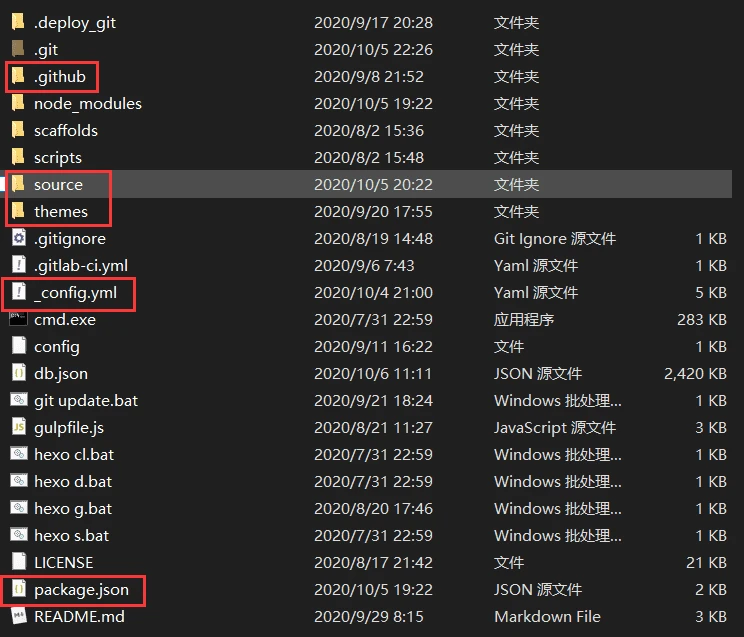
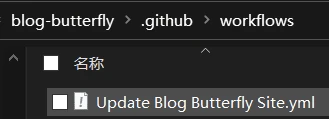
首先我们得明白,要让Github能在你git push上去后能自动部署博客,你得知道博客的源文件是必须要的,但备份哪些呢,下图只是以本站做一个示例,框中的是必须要有的(如果你不打算修改主题源码其实也不用备份,但毕竟可以节约时间,第一次备份前记得在主题文件夹删掉.git隐藏文件夹,不然推上去是空的会导致运行失败),其他根据个人需求,,配一个证书或者README等,但你还在疑惑;我没有.github文件夹啊,没错这个就是我们自己新建的文件夹,在博客根目录依次建立.github/workflows/*.yml文件
就像下图这样,工作流文件.yml你可以随便命名啦,然后我们在工作流文件中添加如下内容
name: Update Blog Butterfly Siteon:push:branches:- masterworkflow_dispatch:inputs:name:description: '手动触发'required: falsejobs:deploy:runs-on: ubuntu-lateststeps:- name: Checkoutuses: actions/checkout@v2with:ref: master- name: Setup Nodeuses: actions/setup-node@v2-betawith:node-version: "12.x"- name: Install HEXO CIrun: |npm install hexo-cli -g- name: Catchuses: actions/cache@v2.1.1id: cache-dependencieswith:path: node_moduleskey: ${{runner.OS}}-${{hashFiles('**/package-lock.json')}}- name: Install Dependenciesif: steps.cache-dependencies.outputs.cache-hit != 'true'run: |npm install- name: Generaterun: |hexo cleangit clone https://github.com/CCKNBC/butterfly.git publichexo generategulp- name: Deployrun: |cd ./publicgit config --global user.name "ccknbc"git config --global user.email "ccknbc@qq.com"git add -Agit commit -m "Updated By Github Actions"git push --force --quiet "https://ccknbc:${{ secrets.GH_TOKEN }}@github.com/ccknbc/butterfly.git" master:mastergit push --force --quiet "https://ccknbc:${{ secrets.GT_TOKEN }}@gitee.com/ccknbc/butterfly.git" master:mastergit push --force --quiet "https://${{ secrets.CD_USER }}:${{ secrets.CD_TOKEN }}@e.coding.net/ccknbc/blog/butterfly.git" master:master- name: Build Gitee Pagesuses: yanglbme/gitee-pages-action@masterwith:gitee-username: ccknbcgitee-password: ${{ secrets.GITEE_PASSWORD }}gitee-repo: ccknbc/butterfly
{% note info icon %}
在 workflow 文档流里我们可以用 {% raw %}${{ secrets.GITHUB_TOKEN }}{% endraw %} 做权限认证,是一个默认存在的变量,并不需要我们去添加 ACCESS_TOKEN,跨仓库的话还是要自己手动生成一个,关于这点,可以查看官方文档相关内容
{% endnote %}
你可能有所疑惑但又看得懂一些命令,别急,请接着往下看
GitHub Actions 指南
GitHub Actions使你可以直接在你的GitHub库中创建自定义的工作流,工作流指的就是自动化的流程,比如构建、测试、打包、发布、部署等等,也就是说你可以直接进行 CI(持续集成)和 CD(持续部署)
基本概念
workflow: 一个workflow工作流就是一个完整的过程,每个workflow包含一组jobs任务job : jobs任务包含一个或多个job,每个job包含一系列的steps步骤step: 每个step步骤可以执行指令或者使用一个action动作action: 每个action动作就是一个通用的基本单元
说明:
- 最外层的
name指定了workflow的名称 on声明了一旦发生了push操作就会触发这个workflowjobs定义了任务集,其中可以有一个或多个job任务,示例中只有一个runs-on声明了运行的环境steps定义需要执行哪些步骤- 每个
step可以定义自己的name和id,通过uses可以声明使用一个具体的action,通过run声明需要执行哪些指令。 可以使用上下文参数
on声明了何时触发workflow,它可以是:一个或多个
GitHub事件,比如push了一个commit、创建了一个issue,产生了一次pull request等等,示例:on:[push,pull_request]预定的时间,示例(每天零点零分触发,不过因为时差关系,是北京时间上午8点):
on:
schedule:
-cron:'0 0 * * *'
某个外部事件。所谓外部事件触发,简而言之就是你可以通过
REST API向GitHub发送请求去触发,具体请查阅官方文档:repository-dispatch-event
配置多个事件,示例:
```yaml
on:

# Trigger the workflow on push or pull request,

# but only for the master branch

push:

branches:

- master

pull_request:

branches:

- master

# Also trigger on page_build, as well as release created events

page_build:

release:

types: # This configuration does not affect the page_build event above

- created
详细文档请参考: 触发事件

<a name="jobs"></a>
## jobs

`jobs`可以包含一个或多个 `job` ,如:

```yaml
jobs:

my_first_job:

name: My first job

my_second_job:

name: My second job
如果多个job 之间存在依赖关系,那么你可能需要使用 needs :
jobs:

job1:

job2:

needs: job1

job3:

needs: [job1, job2]
这里的needs声明了job2 必须等待 job1 成功完成,job3必须等待 job1 和 job2依次成功完成
每个任务默认超时时间最长为 360分钟,你可以通过 timeout-minutes 进行配置:
jobs:
    job1:
        timeout-minutes:
runs-on & strategy
runs-on 指定了任务的 runner 即执行环境,runner 分两种:GitHub-hosted runner 和 self-hosted runner
所谓的 self-hosted runner 就是用你自己的机器,但是需要 GitHub 能进行访问并给与其所需的机器权限,这个不在本文描述范围内,有兴趣可参考 self-hosted runner
GitHub-hosted runner 其实就是 GitHub 提供的虚拟环境,目前有以下四种:
windows-latest : Windows Server 2019ubuntu-latest或ubuntu-18.04ubuntu-16.04:Ubuntu 16.04macos-latest:macOS Catalina 10.15
比较常见的:
runs-on:ubuntu-latest
runs-on 多环境
有时候我们常常需要对多个操作系统、多个平台、多个编程语言版本进行测试,为此我们可以配置一个构建矩阵
例如:
runs-on: ${{ matrix.os }}

strategy:

matrix:

os: [ubuntu-16.04, ubuntu-18.04]

node: [6, 8, 10]
示例中配置了两种os操作系统和三种 node版本即总共六种情况的构建矩阵,{% raw %} ${{matrix.os}} {% endraw %}是一个上下文参数
strategy 策略,包括:
matrix: 构建矩阵fail-fast: 默认为true,即一旦某个矩阵任务失败则立即取消所有还在进行中的任务max-paraller: 可同时执行的最大并发数,默认情况下GitHub会动态调整
示例:
runs-on: ${{ matrix.os }}

strategy:

matrix:

os: [macos-latest, windows-latest, ubuntu-18.04]

node: [4, 6, 8, 10]

include:

# includes a new variable of npm with a value of 2 for the matrix leg matching the os and version

- os: windows-latest

node: 4

npm: 2
include声明了 os 为 windows-latest 时,增加一个 node和npm分别使用特定的版本的矩阵环境
与include 相反的就是exclude :
runs-on: ${{ matrix.os }}

strategy:

matrix:

os: [macos-latest, windows-latest, ubuntu-18.04]

node: [4, 6, 8, 10]

exclude:

# excludes node 4 on macOS

- os: macos-latest

node: 4
exclude 用来删除特定的配置项,比如这里当os 为 macos-latest,将 node为 4 的版本从构建矩阵中移除
steps
steps 的通用格式类似于:
steps:

- name: <step_name>

uses: <action>

with:

<parameter_name>: <parameter_value>

id: <step_id>

continue-on-error: true


- name: <step_name>

timeout-minutes:

run: <commands>
每个 step 步骤可以有:
id: 每个步骤的唯一标识符name: 步骤的名称uses: 使用哪个actionrun: 执行哪些指令with: 指定某个action可能需要输入的参数continue-on-error: 设置为true允许此步骤失败job仍然通过timeout-minutes : step的超时时间
action
action 动作通常是可以通用的,这意味着你可以直接使用别人定义好的action
checkout action
checkout action 是一个标准动作,当以下情况时必须且需要率先使用:
workflow需要项目库的代码副本,比如构建、测试、或持续集成这些操作workflow中至少有一个action是在同一个项目库下定义的
使用示例:
- users:action/checkout@v1
如果你只想浅克隆你的库,或者只复制最新的版本,你可以在 with中使用fetch-depth声明,例如:
- user:action/checkout@v1
  with:
      fetch-depth:1
引用 action
- 官方
action标准库: github.com/actions - 社区库:
marketplace
引用公有库中的 action
引用 action 的格式是{owner}/{repo}@{ref}或 {owner}/{repo}/{path}@{ref},例如上例的中actions/checkout@v1,你还可以使用标准库中的其它 action,如设置 node 版本:
jobs:

my_first_job:

name: My Job Name

steps:

- uses: actions/setup-node@v1

with:

node-version: 10.x
引用同一个库中的 action
引用格式:{owner}/{repo}@{ref}或 ./path/to/dir
例如项目文件结构为:
-- hello-world (repository)

 |__ .github

 └── workflows

 └── my-first-workflow.yml

 └── actions

 |__ hello-world-action

 └── action.yml
当你想要在workflow 中引用自己的action 时可以:
jobs:

build:

runs-on: ubuntu-latest

steps:

# This step checks out a copy of your repository.

- uses: actions/checkout@v1

# This step references the directory that contains the action.

- uses: ./.github/actions/hello-world-action
引用 Docker Hub 上的 container
如果某个 action 定义在了一个docker container image 中且推送到了Docker Hub 上,你也可以引入它,格式是docker://{image}:{tag} ,示例:
jobs:

my_first_job:

steps:

- name: My first step

uses: docker://alpine:3.8
更多信息参考:Docker-image.yml workflow 和Creating a Docker container ``action
构建 actions
请参考:building-actions
env
环境变量可以配置在以下地方:
envjobs.<job_id>.envjobs.<job_id>.steps.env
示例:
env:

NODE_ENV: dev


jobs:

job1:

env:

NODE_ENV: test


steps:

- name:

env:

NODE_ENV: prod
如果重复,优先使用最近的那个
if & context
你可以在 job和step中使用if条件语句,只有满足条件时才执行具体的job 或 step :
jobs.<job_id>.ifjobs.<job_id>.steps.if
任务状态检查函数:
success(): 当上一步执行成功时返回truealways(): 总是返回truecancelled(): 当workflow被取消时返回truefailure(): 当上一步执行失败时返回true
例如:
steps:

- name: step1

if: always()


- name: step2

if: success()


- name: step3

if: failure()
意思就是 step1总是执行,step2 需要上一步执行成功才执行,step3 只有当上一步执行失败才执行
${{<expression>}}
上下文和表达式: ${{<expression>}}
有时候我们需要与第三方平台进行交互,这时候通常需要配置一个token,但是显然这个 token 不可能明文使用,这种个情况下我们要做的就是:
- 在具体
repository库Settings的Secrets中添加一个密钥,如SOMEONE_TOKEN
{% note warning %} 注:关于如何获取github或者其他平台的密钥及授权不是本文重点,大家可以自行百度 {% endnote %}
- 然后在
workflow中就可以通过${{secrets.SOMEONE_TOKEN}}将token安全地传递给环境变量
steps:

- name: My first action

env:

SOMEONE_TOKEN: ${{ secrets.SOMEONE_TOKEN }}
这里的secrets 就是一个上下文,除此之外还有很多,比如:
github.event_name: 触发workflow的事件名称job.status: 当前job的状态,如success, failure, or cancelledsteps.<step id>.outputs: 某个action的输出runner.os : runner的操作系统如Linux, Windows, or macOS
这里只列举了少数几个
另外在if 中使用时不需要 ${{}} 符号,比如:
steps:

- name: My first step

if: github.event_name == 'pull_request' && github.event.action == 'unassigned'

run: echo This event is a pull request that had an assignee removed.
上下文和表达式详细信息请参考:contexts-and-expression
看到这里你应该对示例文件有了一定的理解,并且想自己去实验一下了,那就去actions页面找到官方示例去体验一下吧
但对于为什么要备份package.json我想大家还是心存疑惑,那我们看看具体内容吧
{
  "name": "hexo-site",
  "version": "0.0.0",
  "private": true,
  "scripts": {
    "build": "hexo generate",
    "clean": "hexo clean",
    "deploy": "hexo deploy",
    "server": "hexo server"
  },
  "hexo": {
    "version": "5.2.0"
  },
  "dependencies": {
    "cheerio": "^1.0.0-rc.3",
    "gulp-htmlmin": "^5.0.1",
    "hexo": "^5.2.0",
    "hexo-baidupush": "^1.0.2",
    "hexo-charts": "^1.0.3",
    "hexo-cli": "^4.2.0",
    "hexo-deployer-git": "^2.1.0",
    "hexo-generator-archive": "^1.0.0",
    "hexo-generator-baidu-sitemap": "^0.1.9",
    "hexo-generator-category": "^1.0.0",
    "hexo-generator-feed": "^3.0.0",
    "hexo-generator-index": "^2.0.0",
    "hexo-generator-search": "^2.4.1",
    "hexo-generator-sitemap": "^2.1.0",
    "hexo-generator-tag": "^1.0.0",
    "hexo-render-pug": "^2.1.4",
    "hexo-renderer-ejs": "^1.0.0",
    "hexo-renderer-marked": "^3.3.0",
    "hexo-renderer-pug": "^1.0.0",
    "hexo-renderer-stylus": "^2.0.1",
    "hexo-server": "^2.0.0",
    "hexo-tag-aplayer": "^3.0.4",
    "hexo-wordcount": "^6.0.1",
    "pump": "^3.0.0",
    "terser": "^4.8.0"
  },
  "devDependencies": {
    "gulp": "4.0.2",
    "gulp-cli": "2.3.0",
    "gulp-clean-css": "^4.3.0",
    "gulp-htmlclean": "^2.7.22",
    "gulp-uglify": "^3.0.2"
  }
}
我们看到里面包含了npm脚本和一些依赖(包含dev版本的),有了这个文件我们只需执行npm i(install)即可自动安装所以所需依赖插件,而不用一个一个去敲一堆命令啦,理解了这个简单的例子,大家在部署其他项目时也许能更得心应手吧
今天的分享就到这里结束了,本文还有很多纰漏还请读者指出,后续将更正,下篇文章见

若有收获,就点个赞吧
0 人点赞


