最近在研究 jdk 源码的时候发现经常用到 System.arraycopy() 这个方法,于是写下来作为记录。
System.arraycopy() 作用
可以实现数组之间的复制
函数原型
public static native void arraycopy(Object src, int srcPos,Object dest, int destPos,int length);
src:源数组;srcPos:源数组要复制的起始位置;dest:目的数组;destPos:目的数组放置的起始位置;length:复制的长度。
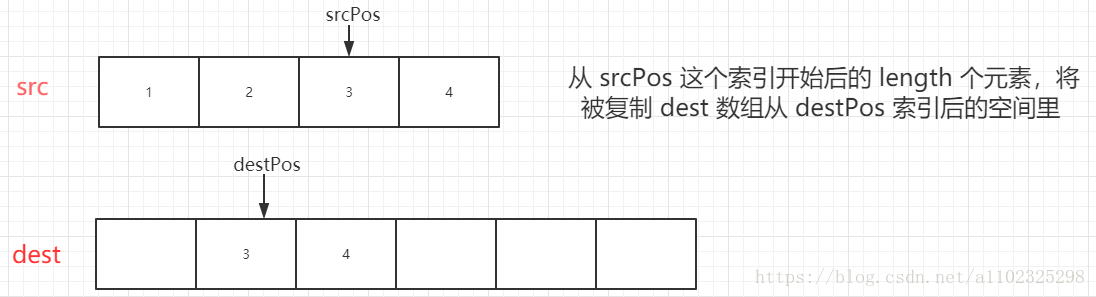
简单描述就是从 src 的 srcPos 位置拷贝 length 长度的数据到 dest 的 destPos 位置,如果 src 和 dest 是同一个对象的话,则相当于先将数据拷贝到一个临时的数组,然后再覆盖数组中 destPos 开始的一段数据。
常见的使用方法
public class Test {

    public static void main(String[] args) {
        int[] numArray = {1,2,3,4,5,6};
        int[] newArray = new int[6];
        System.arraycopy(numArray,3,newArray,3,3);
        //打印结果  [0, 0, 0, 4, 5, 6]
        System.out.println(Arrays.toString(newArray));
    }
}
注意事项
public class Test{

    public static void main(String[] args) {
        int[] numArray = {1,2,3,4,5,6};
        System.out.println(numArray);
        System.arraycopy(numArray,3,numArray,2,3);
        System.out.println(numArray);
        System.out.println(Arrays.toString(numArray));
    }
}
打印结果
[I@4554617c
[I@4554617c
[1, 2, 4, 5, 6, 6]
可以看出如果 src 和 dest 是同一个对象的话,则相当于先将数据拷贝到一个临时的数组,然后再覆盖数组中 destPos 开始的一段数据。
public class Test {

    public static void main(String[] args) {
        Person p1 = new Person("老王");

        Person[] personArray = new Person[1];
        personArray[0] = p1;
        Person[] newPersonArray = new Person[1];

        System.arraycopy(personArray,0,newPersonArray,0,1);
        newPersonArray[0].name = "老叶";
        System.out.println(newPersonArray[0].name);
        System.out.println(personArray[0].name);
    }
}
class Person {
    String name;
    Person(String name) {
        this.name = name;
    }
}
打印结果
老叶
老叶
数组里面存储的是引用类型时,复制的是引用位置,所以修改复制后数组的值会影响原来的数组。
但是如果数组中存储的是基本数据类型,例如 int、long、double 等类型,就不会出现这种情况。
优点
实际我们自己写个 for 循环也可以解决数组的复制,但是 System.arraycopy() 函数是 native 函数,即原生态方法,自然效率更高。
https://blog.csdn.net/a1102325298/article/details/81098744?utm_medium=distribute.pc_relevant.none-task-blog-BlogCommendFromMachineLearnPai2-1.nonecase&depth_1-utm_source=distribute.pc_relevant.none-task-blog-BlogCommendFromMachineLearnPai2-1.nonecase

若有收获,就点个赞吧
0 人点赞


