后端学习路线: https://roadmap.sh/backend

问题
如何重头开发一个 后端程序(Golang)?做后端软件都需要完成什么功能?样例讲解?程序调试的方式?信息化后端架构讲解?数据库和服务器运行的原理, 怎么去调用数据库的?后端软件API接口的测试方法?-
补充问题
如何去使用别人的库如何使用命令行-
重头开始一个 GO程序
说明
编译运行环境安装
安装 Golang 的开发运行环境 (https://golang.google.cn/dl/go1.17.8.windows-amd64.msi)
- 安装好 git (Golang 的软件包下载都基于 git) (淘宝镜像)
-
开发环境(IDE Integrated Development Environment)
vscode
- 安装 go 语言插件
-
配置包代理
国内无法访问google的go包管理网站, 需要使用国内代理, 在命令行输入如下命令
go env -w GO111MODULE=ongo env -w GOPROXY=https://goproxy.cn,direct
开发 hello world
新建一个空文件夹
go-hello使用命令初始化项目 go-hello 为项目名称
go mod init go-hello
mod文件如下 ``` module go-hello
go 1.17
- 第 1 行是项目名称- 第 3 行是 go 版本- 新建一个 `hello.go`文件, 写如下信息```gopackage mainimport ("fmt")func main() {fmt.Println("Hello, Go!")}
- 命令行输入
go run hello.go -
后端软件的功能
对数据做增删改查
- 操作数据库
- mysql
- postgre
- orical
- sqllite
- 操作文件
- json
- yaml
- toml
- ini
- 二进制格式
- 操作数据库
- 与其他程序交互数据
- 基于 TCP 流传输
- 基于某协议传输(下面的协议都基于TCP 的应用层协议)
- grpc (RPC是远程过程调用)
- http (https://www.runoob.com/http/http-tutorial.html)
- json
- xml
过程:
人 → 软件
需要存储数据,读取以前的数据
人 → 软件使用文件
数据太多了
人 → 软件使用数据库
开发功能太多了,界面老变
人 → 前端(不一定是网页) → 软件使用数据库
跨平台,多用户,
人 → 前端(网页) → 软件使用数据库
安装 go 库
在 go.mod 写入要导入库的信息, 然后运行 go mod tidy即可完成库的安装
require (gitee.com/kmyss/gf-ex v0.7.0github.com/gogf/gf v1.16.4github.com/gogf/gf-jwt v1.1.3github.com/gogf/swagger v1.2.0github.com/kr/text v0.2.0 // indirectgithub.com/lib/pq v1.10.2github.com/niemeyer/pretty v0.0.0-20200227124842-a10e7caefd8e // indirectgolang.org/x/net v0.0.0-20210614182718-04defd469f4e // indirectgolang.org/x/sys v0.0.0-20210616094352-59db8d763f22 // indirectgopkg.in/check.v1 v1.0.0-20200227125254-8fa46927fb4f // indirectgopkg.in/yaml.v3 v3.0.0-20200615113413-eeeca48fe776 // indirectkingbase.com/gokb v0.0.0-00010101000000-000000000000)
require 表示里面的库都是需要的.gitee.com/kmyss/gf-ex是库的名称 v0.7.0 是使用的版本
要使用的库可以去网上查找 (https://pkg.go.dev/)
开发一个 后端程序
- 我们使用 goframe 框架
代码如下 ```go func main() { server := g.Server()
server.Group(“/api/v0”, func(group *ghttp.RouterGroup) {
group.GET("/", func(req *ghttp.Request) {req.Response.WriteExit("hello1212121")})
})
server.Run() }
- 在 `/api/v0`可以访问到 `hello1212121`信息.
- 配置 server, 新建 `config.toml`文件, 查找样例 config ([https://goframe.org/pages/viewpage.action?pageId=17203798](https://goframe.org/pages/viewpage.action?pageId=17203798)) 可以修改服务器配置
```toml
[server]
# 基本配置
address             = ":9000"                     # 本地监听地址。默认":80"
serverRoot          = "/public"                   # 静态文件服务的目录根路径,配置时自动开启静态文件服务。默认关闭
项目解析
项目结构
├─cmd ├─config ├─internal main.gocmd为程序命令控制目录, 里面定义了所有可以输入的命令config为配置文件所在目录, 具体配置可以看 goframe 框架文档 和 命令的helpinternal为逻辑代码main.go程序入口函数
程序的执行流程:
main -> cmd 命令解析 -> 读取配置信息 -> 执行对应操作cmd 命令解析说明
读取命令行的参数
gcmd.GetArg- 读取命令行的选项
gcmd.GetOpt - 读配置文件的值
g.Cfg().Getxxx```go package main
import ( “fmt” “github.com/gogf/gf/frame/g” “github.com/gogf/gf/os/gcmd” )
func main() {
arg := gcmd.GetArg(1)

switch arg {
case "hello":
    opt := gcmd.GetOpt("name")
    if g.IsEmpty(opt) {
        opt = g.Cfg().GetString("app.name", "World")
    }
    fmt.Println("你好,", opt)
case "help":
    fmt.Println("请输入 hello")
default:
    fmt.Println("啥也没有输入")
}
}
下面  `hello` 表示命令, `--name`表示选项, `哈哈`是 name 选项的值.
```bash
hello.exe hello --name 哈哈
hello.exe hello --name=哈哈
go run hello.go hello --name 哈哈
go run hello.go hello --name=哈哈
[app]
name="配置文件"
- 库封装基于上述原理.
库 CMD 由多个参数组成 ```go type Command struct { Use string // 命令名称 Short string // 命令短描述 Long string // 命令长描述 Example string // 命令使用案例 Note string // 命令的详细说明
Run func(Command) Help func(Command)
parent Command // 父命令 commands gmap.ListMap // 子命令 flags *gmap.ListMap // 标签
maxCommandLen int // 辅助记录命令长度 maxFlagLen int // 辅助记录flag的最大值 }
<a name="whvtd"></a>
#### 接口
<a name="nMd8c"></a>
## 程序的调试
程序调试的前提是发现程序有问题.<br />调试 静态文件 MIME type 错误问题记录<br />[goframe 框架静态文件代理, 出现 MIME type Error 问题](https://www.yuque.com/yss930819/guqz9f/dhr8w7?view=doc_embed)
<a name="yuObW"></a>
## 后端架构
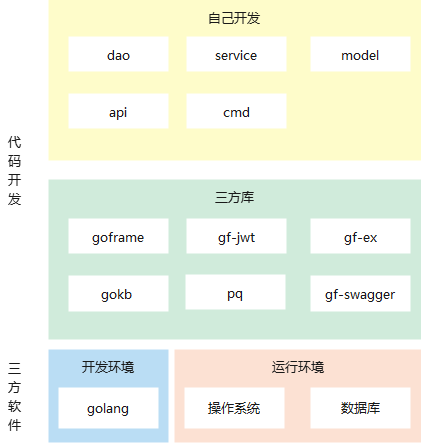<br />`api`处理用户输入信息的准确性<br />`service`处理业务逻辑<br />`model`所有数据结构<br />`dao`数据库交互封装<br />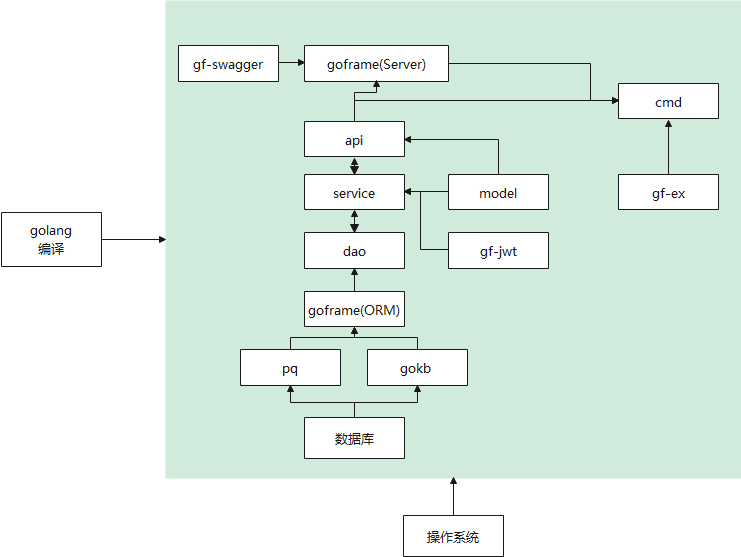
<a name="g1EJP"></a>
## 如何调用数据库
- 数据库开发商会提供数据库的驱动,实现 golang 规定的数据库接口.
- 接口包文件为 `database\sql`
- 注册 sql 驱动
- 开发 goframe 框架 DB 驱动
- 注册 goframe 框架 DB 驱动
- 之后使用 goframe 的 dao 组件对数据库进行操作
<a name="NqBh5"></a>
## API测试
- 我们在开发完成 API 后可以用多种方式对 API 代码进行测试
- 在 golang 中编写测试文件, 使用 goframe 的 httpclient 做测试.
```go
func TestHelloApi(t *testing.T) {
get, err := g.Client().Get("http://127.0.0.1:9000/api/v0/hello")
if err != nil {
return
}
t.Log(get.RawRequest())
t.Log(get.RawResponse())
}
func TestLoginApi(t *testing.T) {
get, err := g.Client().Post("http://127.0.0.1:9000/api/v0/other/login", g.MapStrAny{
"username": "admin",
"password": gmd5.MustEncrypt("admin"),
})
if err != nil {
return
}
t.Log(get.RawRequest())
t.Log(get.RawResponse())
}
- 使用 swagger 进行测试. 函数生成 swagger 的说明文档在 https://wiki.yss-home-cloud.diskstation.me:6812/AIS/other/third/swaggo 百度搜索 swaggo
- 找其他的测试工具做测试
其他
- 一个项目可以有多个go 文件里有 main 函数, 具体运行那个 main 函数, 根据选择的文件决定.

若有收获,就点个赞吧
0 人点赞


