关于 List 接口
- java.util.List 接口 是 java.util.Collection 接口的子接口;
- List 集合中的元素是有先后顺序之分的,并且 List 内包含的元素可以是重复的;
- List 集合中的每个元素都对应一个整型的序号记录其在容器中的位置,可以根据序号存取容器中的元素,也就是支持索引。
- 实现类有:ArrayList、LinkedList 和 Vector
public interface List<E> extends Collection<E> {

方法一览
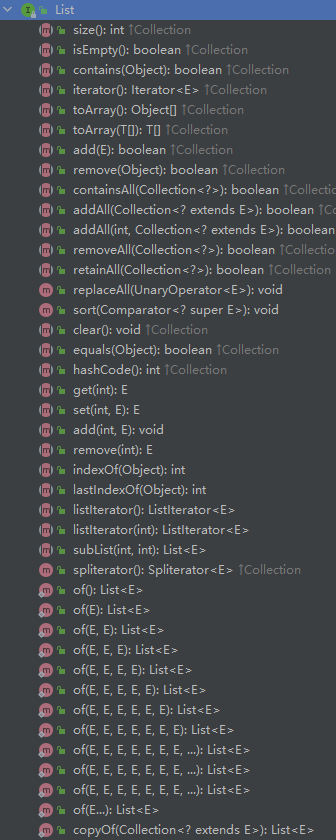
常用操作
add
addAll
get
indexOf
lastIndexOf
subList
set
remove
isEmpty
public class Main {public static void main(String[] args) {List list = new ArrayList();// 泛型List<Book> bookList = new ArrayList<>();// 没有使用泛型,不限定 list 内存储元素的类型list.add(1);list.add("java");list.add('A');list.add('A');list.add(true);// 使用了泛型,限定 list 内只能存储 Book 类型数据bookList.add(new Book("三国演义", 25));bookList.add(new Book("水浒传", 25));bookList.add(new Book("安娜卡列尼娜", 25));bookList.add(new Book("罪与罚", 25));System.out.println(list);System.out.println(bookList);list.get(2);list.indexOf('A');list.lastIndexOf('A');list.subList(0, 3);list.isEmpty();list.set(2, "test");list.addAll(Arrays.asList(1, 2, "3", false));list.remove("java");list.remove("A");bookList.addAll(list);System.out.println(list);System.out.println(bookList);}}class Book {private String name;private double price;public Book(String name, double price) {this.name = name;this.price = price;}@Overridepublic String toString() {return "Book{" +"name='" + name + '\'' +", price=" + price +'}';}}
遍历 List 的三种方式
- 迭代器
- 增强 for
常规 for 循环 ```java public class Main { public static void main(String[] args) {
// 泛型List<Book> bookList = new ArrayList<>();// 使用了泛型,限定 list 内只能存储 Book 类型数据bookList.add(new Book("三国演义", 25));bookList.add(new Book("水浒传", 25));bookList.add(new Book("安娜卡列尼娜", 25));bookList.add(new Book("罪与罚", 25));// 迭代器Iterator<Book> iterator = bookList.iterator();while (iterator.hasNext()) {Book book = iterator.next();System.out.println(book);}// 增强 forfor (Book book : bookList) {System.out.println(book);}// for 循环for (int i = 0; i < bookList.size(); i++) {System.out.println(bookList.get(i));}
} }
class Book { private String name; private double price;
public Book(String name, double price) {
    this.name = name;
    this.price = price;
}

@Override
public String toString() {
    return "Book{" +
            "name='" + name + '\'' +
            ", price=" + price +
            '}';
}
}
<a name="3G41s"></a>
# 对 List 排序的两种方式

- 使用 List 原生的 get / set 函数,自定义排序算法
- 使用匿名 Comparator 比较器,自定义排序算法
```java
public class Main {
    public static void main(String[] args) {
        // 泛型
        List<Book> bookList = new ArrayList<>();

        // 使用了泛型,限定 list 内只能存储 Book 类型数据
        bookList.add(new Book("三国演义", 23.6));
        bookList.add(new Book("水浒传", 22));
        bookList.add(new Book("唐诗宋词", 25));
        bookList.add(new Book("罪与罚", 23));

        // 冒泡排序:从小到大
        sort(bookList);

        // 打印 list
        for (Book book : bookList) {
            System.out.println(book);
        }
        System.out.println();

        // 匿名 Comparator 比较器排序:从大到小
        bookList.sort(new Comparator<Book>() {
            @Override
            public int compare(Book o1, Book o2) {
                if (o1.getPrice() > o2.getPrice()) {
                    return -1;
                }
                if (o1.getPrice() == o2.getPrice()) {
                    return 0;
                }
                return 1;
            }
        });

        // 打印 list
        for (Book book : bookList) {
            System.out.println(book);
        }
    }

    // 冒泡排序
    public static void sort(List list) {
        int size = list.size();

        for (int i = 0; i < size - 1; i++) {
            for (int j = 0; j < size - 1 - i; j++) {
                // 取出 list 中存储的 Book 对象
                Book book1 = (Book) list.get(j);
                Book book2 = (Book) list.get(j + 1);

                if (book1.getPrice() > book2.getPrice()) {
                    list.set(j, book2);
                    list.set(j + 1, book1);
                }

            }
        }
    }
}

class Book {
    private String name;
    private double price;

    public Book(String name, double price) {
        this.name = name;
        this.price = price;
    }

    @Override
    public String toString() {
//        return "Book{" +
//                "name='" + name + '\'' +
//                ", price=" + price +
//                '}';
        return "名称:" + name + "\t\t价格" + price;
    }

    public double getPrice() {
        return price;
    }
}
输出
名称:水浒传        价格22.0
名称:罪与罚        价格23.0
名称:三国演义        价格23.6
名称:唐诗宋词        价格25.0

名称:唐诗宋词        价格25.0
名称:三国演义        价格23.6
名称:罪与罚        价格23.0
名称:水浒传        价格22.0

若有收获,就点个赞吧
0 人点赞


