1. 模型构建
利用PAI提供的可视化建模Studio平台,基于海量大数据语料预训练获得的NLP迁移学习模型,进行文本内容风控场景的文本分类模型训练。详见:https://www.yuque.com/easyx/easynlp/ptl085

5. 模型部署调用
部署PAI-EAS服务
您可以通过如下任何一种方式部署模型:
- 控制台上传选择Processor种类为EasyNLP,详情请参见控制台上传部署。
本地客户端部署在服务配置文件service.json中,将processor字段配置为相应的Processor Code,即easy_nlp_cpu_tf1.12或easy_nlp_gpu_tf1.12(需要根据部署所用的资源进行选择,如果processor与资源不匹配,则会导致部署报错),在model_config的type字段指定训练时所使用的模型类型,示例如下。其他参数的详细解释请参见创建服务:
使用GPU部署的配置:
{"name": "risk_text","processor_type": "python","processor": "easynlp_tf1.12_gpu","model_path": "oss://path-to-your-model/deployment/","model_config": "{\"type\":\"text_classify_bert\"}","request_id": "0a981de716274387300375617e7e24","metadata": {"instance": 1,"cuda": "9.0"},"cloud": {"computing": {"instance_type": "ecs.gn5i-c4g1.xlarge"}}}
使用CPU部署的配置:
{
"name": "risk_text",
"processor_type": "python",
"processor": "easynlp_tf1.12_cpu",
"model_path": "oss://path-to-your-model/deployment/",
"model_config": "{\"type\":\"text_classify_bert\"}",
"request_id": "0a981de716274387300375617e7e24",
"metadata": {
   "instance": 1,
   "cuda": "9.0"
},
"cloud": {
   "computing": {
       "instance_type": "xx"
   }
}
}
注意:
model_path填的是新版模型存放的用户的oss地址,格式为(http://test1201.oss-cn-beijing-bmj108-xxx)
-
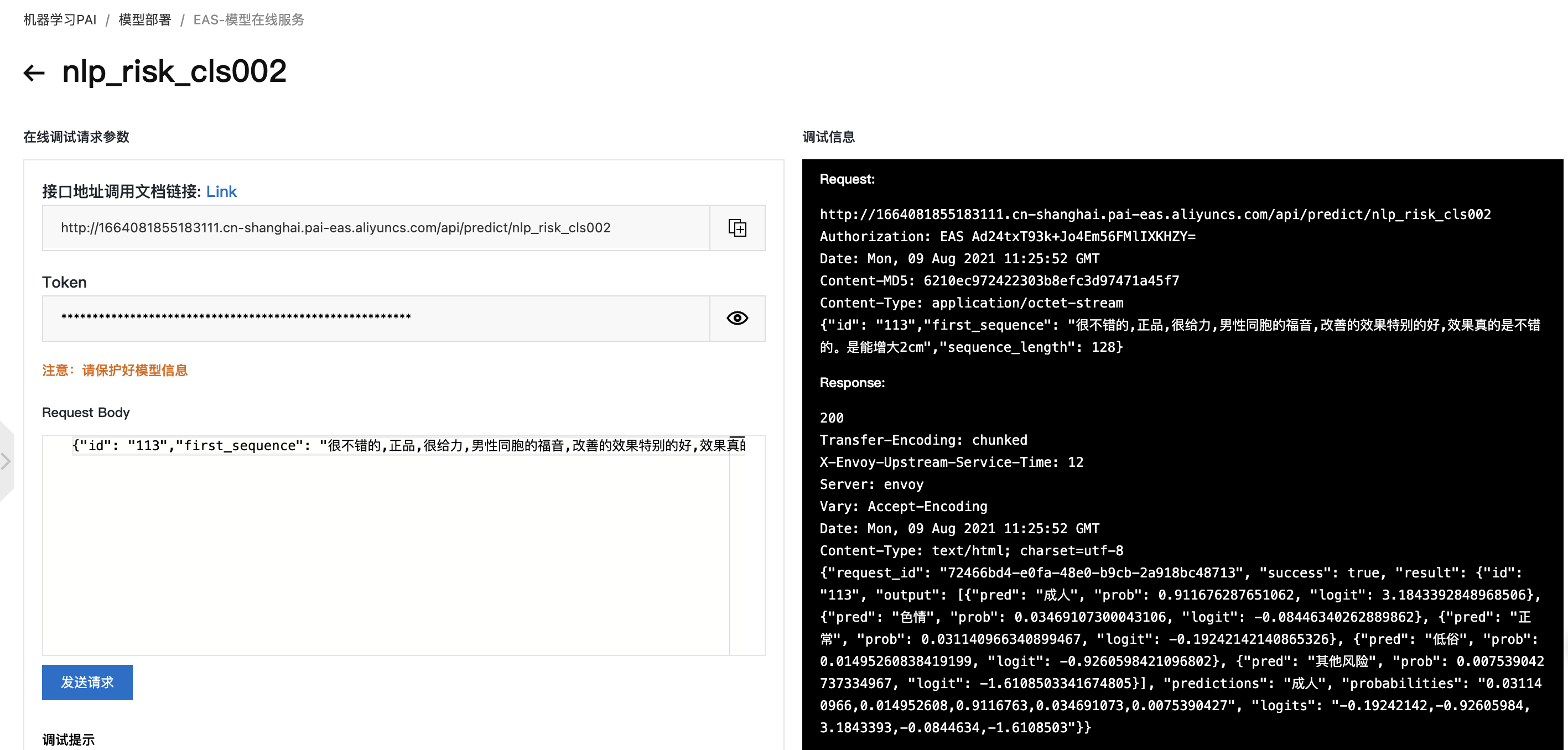
调试模型服务
- 在PAI-EAS模型在线服务页面,单击上一步中已部署服务操作列下的在线调试。
在调试页面的在线调试请求参数区域的
Request Body处填如,格式如下:{"id": "113","first_sequence": "很不错的,正品,很给力","sequence_length": 10}点击发送请求,其可在调试信息区域查看预测结果。
脚本批量调用
- 在PAI EAS模型在线服务页面,单击已部署服务服务方式列下的调用信息。
- 在调用信息对话框的公网地址调用页签,查看公网调用的访问地址和Token。
- 下载:模型集成脚本,下载完之后,找到eas_nlp_risk.py脚本
修改
eas_nlp_risk.py脚本,填入token和client信息,运行python eas_nlp_risk.py即可,示例如下:#!/usr/bin/env python #encoding=utf-8 from eas_prediction import PredictClient from eas_prediction import StringRequest if __name__ == '__main__': # 如果只需要线上模型结果,可以将use_ensemble = False,如果想尝试词表集成后的结果use_ensemble = True use_ensemble = False client = PredictClient('http://xxx.pai-eas.aliyuncs.com', 'risk_text_classify') client.set_token('xxx==') client.init() if not use_ensemble: request = StringRequest( '[{"id": "110","first_sequence": "想赢勇士想到 发疯?格林新发现吓呆众人","sequence_length": 128},\ {"id": "112","first_sequence": "骗人的,千万别买,谁买谁后悔?商家就是欺诈。垃圾商家。买了之后想退货门都没有,以各种手段不退货。买者慎重。","sequence_length": 128},\ {"id": "113","first_sequence": "很不错的,正品,很给力,效果真的是不错的。","sequence_length": 128}]') for x in range(0, 50000): resp = client.predict(request) # print(str(resp.response_data, 'utf8')) print("test endding") else: clear_word = clear_dict_word("vocub.pickle") ori_data = read_predict_data("0331_test.xlsx") total_res = [] total_res.append(["原始文本", "模型预测结果", "模型结果概率", "模型结果logit", "词表结果", "集成结果"]) for index, predict_sample in enumerate(ori_data): assert len(predict_sample) == 4 sample_id, sentence, ground_truth, _ = predict_sample vocub_res = filter_sentence(sentence, clear_word) online_input = '[{"id": \"' + str(sample_id) + '\",\"first_sequence\": \"' + sentence +'\",\"sequence_length\": ' + str(10) + "}]" request = StringRequest(online_input) resp = client.predict(request) result = eval(str(resp.response_data, 'utf8').replace('true', 'True')) model_predictions_label = result["result"]['predictions'] output = result['result'] output_index = 0 if output["output"][0]["pred"] == model_predictions_label else 1 model_predictions_label, label_prob, label_logit = output["output"][output_index]["pred"], output["output"][output_index]["prob"], \ output["output"][output_index]["logit"] ensemble_res = ensemble_res_fn(model_predictions_label, vocub_res) total_res.append([ sentence, model_predictions_label, str(label_prob), str(label_logit), vocub_res, ensemble_res ]) with open('risk_res.csv', 'w', newline='', encoding='gbk') as file: csv_writer = csv.writer(file, delimiter='\t') for item in total_res: csv_writer.writerow(item) print("test endding")注意,这里有个参数, 默认use_ensemble = False, 如果想尝试集成结果,可以修改成:use_ensemble = True,重新运行脚本即可。
监控服务指标
调用模型服务后,您可以查看模型调用的相关指标水位,包括QPS、RT、CPU、GPU及Memory等等。
- 在PAI EAS模型在线服务页面,单击已调用服务服务监控列下的
 图标。
图标。 - 在服务监控页签,即可查看模型调用的指标水位。从服务监控的水位图中可以看到部署的BERT文本分类模型的时延在10 ms左右。


若有收获,就点个赞吧
0 人点赞


