在 Notifcation 中接收语音输入
编写:wangyachen - 原文:http://developer.android.com/training/wearables/notifications/voice-input.html
如果手持式设备上的Notification包含了一个输入文本的action,比如回复邮件,那么这个action正常情况下应该会调起一个activity让用户进行输入。但是,当这个action出现在可穿戴式设备上时,是没有键盘可以让用户进行输入的,所以开发者应该让用户指定一个反馈或者通过RemoteInput预先设定好文本信息。
当用户通过语音或者选择可见的消息进行回复时,系统会将文本的反馈信息与开发者指定的Notification中的action中的Intent进行绑定,并且将该intent发送给手持设备中的app。
Note:Android模拟器并不支持语音输入。如果使用可穿戴式设备的模拟器的话,可以打开AVD设置中的Hardware keyboard present,实现用打字代替语音。

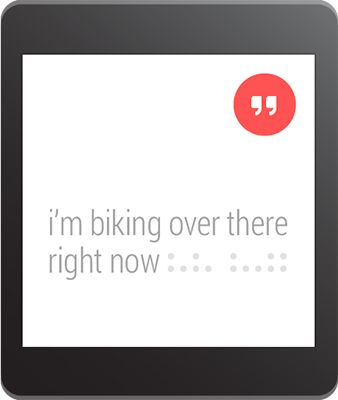
定义语音输入
为了创建一个支持语音输入的action,需要创建一个RemoteInput.Builder的实例,将其加到Notification的action中。这个类的构造函数接受一个String类型的参数,系统用这个参数作为语音输入的key,后面我们会用这个key来取得在手持设备中输入的文本。
举个例子,下面展示了如何创建一个RemoteInput对象,其中,该提供了一个用于提示语音输入的自定义label。
// Key for the string that's delivered in the action's intentprivate static final String EXTRA_VOICE_REPLY = "extra_voice_reply";String replyLabel = getResources().getString(R.string.reply_label);RemoteInput remoteInput = new RemoteInput.Builder(EXTRA_VOICE_REPLY).setLabel(replyLabel).build();
添加预先设定的文本反馈
除了要打开语音输入支持之外,开发者还可以提供多达5条的文本反馈,这样用户可以直接选择实现快速回复。该功能可通过调用setChoices())并传递一个String数组实现。
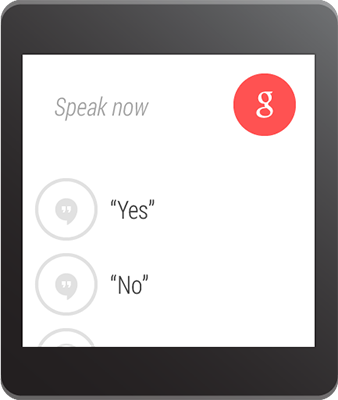
举个例子,可以用resource数组的方式定义这些反馈:
res/values/strings.xml
<?xml version="1.0" encoding="utf-8"?><resources><string-array name="reply_choices"><item>Yes</item><item>No</item><item>Maybe</item></string-array></resources>
然后,填充 String 数组,并将其添加到RemoteInput中:
public static final EXTRA_VOICE_REPLY = "extra_voice_reply";...String replyLabel = getResources().getString(R.string.reply_label);String[] replyChoices = getResources().getStringArray(R.array.reply_choices);RemoteInput remoteInput = new RemoteInput.Builder(EXTRA_VOICE_REPLY).setLabel(replyLabel).setChoices(replyChoices).build();
添加语音输入作为Notification的action
为了实现设置语音输入,可以把RemoteInput对象通过addRemoteInput())设置到一个action中。然后我们可以将这个action应用到Notification中,例如:
// Create an intent for the reply actionIntent replyIntent = new Intent(this, ReplyActivity.class);PendingIntent replyPendingIntent =PendingIntent.getActivity(this, 0, replyIntent,PendingIntent.FLAG_UPDATE_CURRENT);// Create the reply action and add the remote inputNotificationCompat.Action action =new NotificationCompat.Action.Builder(R.drawable.ic_reply_icon,getString(R.string.label, replyPendingIntent)).addRemoteInput(remoteInput).build();// Build the notification and add the action via WearableExtenderNotification notification =new NotificationCompat.Builder(mContext).setSmallIcon(R.drawable.ic_message).setContentTitle(getString(R.string.title)).setContentText(getString(R.string.content)).extend(new WearableExtender().addAction(action)).build();// Issue the notificationNotificationManagerCompat notificationManager =NotificationManagerCompat.from(mContext);notificationManager.notify(notificationId, notification);
当程序发出这个Notification的时候,用户在可穿戴设备上左滑便可以看到reply的按钮。
将语音输入转化为String
通过调用getResultsFromIntent())方法,将返回值放在”Reply”的action指定的intent中,开发者便可以在回复的action的intent中指定的activity里,接收到用户转录后的消息。该方法返回的是包含了文本反馈的Bundle。我们可以通过查询Bundle中的内容来获得这条反馈。
Note:请不要使用Intent.getExtras())来获取语音输入的结果,因为语音输入的内容是存储在ClipData中的。getResultsFromIntent())提供了一条很方便的途径来接收字符数组类型的语音信息,并且不需要经过ClipData自身的调用。
下面的代码展示了一个接收intent,并且返回语音反馈信息的方法,该方法是依据之前例子中的EXTRA_VOICE_REPLY作为key进行检索:
/*** Obtain the intent that started this activity by calling* Activity.getIntent() and pass it into this method to* get the associated voice input string.*/private CharSequence getMessageText(Intent intent) {Bundle remoteInput = RemoteInput.getResultsFromIntent(intent);if (remoteInput != null) {return remoteInput.getCharSequence(EXTRA_VOICE_REPLY);}}return null;}

若有收获,就点个赞吧
0 人点赞


