adb的简介和u2的基本操作
adb的安装与使用
Adb又称Android调试桥,用于通过电脑端与模拟器或者是设备之间的交互的一个工具
Adb client 命令行程序‘adb’用于从shell或脚本中运行adb命令
Adb server adb server 是运行在PC的的一个后台程序
Adbd 程序adbd作为一个后台进程在Android设备或模拟器系统中运行
adb有什么作用?
- 安装卸载apk文件
- 移动设备和PC之间拷贝文件
- 查看设备上安装的应用信息
- 文件管理
- 按键操作
adb如何使用?
把adb的bin目录添加到环境变量当中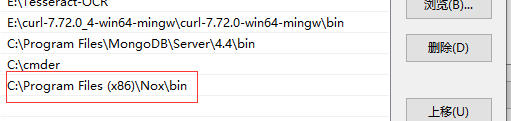
adb devices 查看链接的移动设备adb kill-server 关闭链接的移动设备adb install apk文件路径 安装app应用adb shell pm list packages 查看应用包名adb uninstall 应用包名 卸载应用
UIAutomator2快速入门
python -m uiautomator2 init 初始化移动设备
Uiautomator-server: 就是谷歌原声的 uiautomator
Atx-agent: uiautomator的守护进程
minicap和minitouch 中2个包是atx-agent增加远程控制功能的依赖
UIAutomator2控制移动设备
u2.connect_wifi('172.17.100.15') 通过wifiu2.connect_usb('127.0.0.1:62025') 通过usb(手机序列号)u2.connect_adb_wifi('172.17.100.15:5555') 通过adb wifi
UIAutomato2启动手机app
使用aapt工具进入这个路径输入aapt dump badging apk的文件名找到包名d.app_start('包名')停止d.app_stop('包名')
UIAutomator2自动化工具基本操作
d.service('uiautomator').running() uiautomator运行状态d.service('uiautomator').start() 启动uiautomatord.service('uiautomator').stop() 停止uiautomatord.app_install(data='apk地址') 安装appd.app_current() 获取当前前台app的信息d.app_stop('包名') 停止当前appd.app_clear('包名') 清除缓存d.app_uninstall('包名') 卸载appd.app_list() 获取所有app的信息d.app_stop_all() 停止所有appd.app_uninstall_all() 卸载所有app

若有收获,就点个赞吧
0 人点赞


