1. 挂载iso文件

临时挂载
创建挂载目录并挂载iso文件
mkdir /mntmount -o loop -t iso9660 /root/rhel-8.2-X86_64-dvd.iso /mnt
挂载成功可,可通过df -hl查看挂载情况
root@rhel8 ~]# df -hl | grep -v tmpfsFilesystem Size Used Avail Use% Mounted on/dev/nvme0n1p1 20G 13G 7.8G 62% //dev/loop0 7.9G 7.9G 0 100% /mnt
永久挂载
[root@rhel8 ~]# vim /etc/fstabUUID=1ddeda22-dae5-4422-a083-8f6e206cb163 / xfs defaults 0 0UUID=a86a861e-e1bb-4aed-a0e2-544431a0ecb4 swap swap defaults 0 0/root/rhel-8.2-x86_64-dvd.iso /mnt iso9660 defaults 0 0
2. 更新yum源文件
[root@rhel8 ~]# vim /etc/yum.repos.d/redhat8.repo[appstream]name=redhat8baseurl=file:///mnt/AppStreamenabled=1gpgcheck=0[baseos]name=baseosbaseurl=file:///mnt/BaseOSenabled=1gpgcheck=0
若Redhat为7.0或者以前,需留意baseurl的路径为file:///mnt/. 我自己个人觉得是因为Redhat8.0这边版本较之前的版本多了AppStream和BaseOS的文件夹.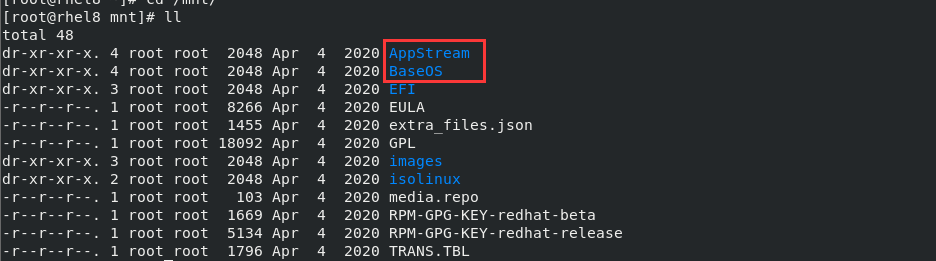
更新完毕后,保存退出;
清除yum缓存
[root@rhel8 ~]# yum clean allUpdating Subscription Management repositories.Unable to read consumer identityThis system is not registered to Red Hat Subscription Management. You can use subscription-manager to register.12 files removed[root@rhel8 ~]#
更新yum缓存
[root@rhel8 ~]# yum makecacheUpdating Subscription Management repositories.Unable to read consumer identityThis system is not registered to Red Hat Subscription Management. You can use subscription-manager to register.redhat8 87 MB/s | 5.8 MB 00:00baseos 116 MB/s | 2.3 MB 00:00Last metadata expiration check: 0:00:01 ago on Sun 20 Mar 2022 12:06:12 PM CST.Metadata cache created.[root@rhel8 ~]#
3. 检验yum更新源可用性
[root@rhel8 ~]# yum list

若有收获,就点个赞吧
0 人点赞


