必做
1,命令行键入:nmtui 连接网络
开机自连网络
cd /etc/sysconfig/network-scripts/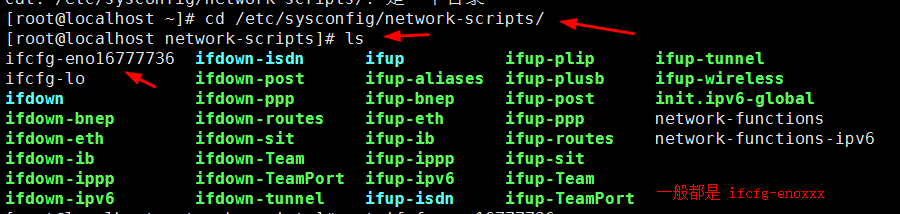
vi ifcfg-enoXXX (有时候是ifcfg-ethxx)
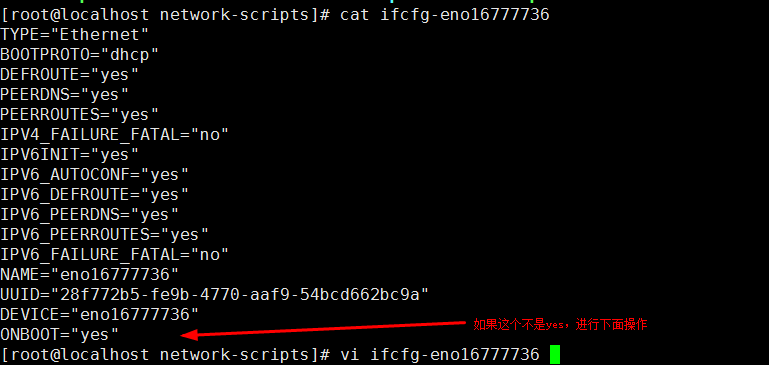
输入:reboot重启 或者输入:service network restart
2,安装基础包:
yum -y install gcc glibc gcc-c++ make net-tools screen vim lrzsz tree dos2unix lsof tcpdump bash-completion wget ntp
3,关闭防火墙
systemctl disable firewalld
systemctl stop firewalld
————-
#关闭selinux
sed -i ‘s#SELINUX=disabled#SELINUX=enforcing#g’ /etc/sysconfig/selinux
———-
可选
配置yum源
删除yum.repos.d目录下所有文件
rm -f /etc/yum.repos.d/*
然后重新下载阿里的
wget -O /etc/yum.repos.d/CentOS-Base.repo http://mirrors.aliyun.com/repo/Centos-7.repo
参考https://xiaojingjing.iteye.com/blog/2393165
4,主机名的修改
①,vim /etc/hostname ②,dd删除掉原有的 ③,修改 reboot
5,时区的修改 timedatectl
[root@zkfocus /]# timedatectl
      Local time: 三 2018-12-19 09:50:13 CST
  Universal time: 三 2018-12-19 01:50:13 UTC     世界时间
        RTC time: 三 2018-12-19 01:50:13         主板时间
       Time zone: Asia/Shanghai (CST, +0800)
     NTP enabled: no
NTP synchronized: no
 RTC in local TZ: no
      DST active: n/a
[root@zkfocus /]# timedatectl set-timezone Asia/Shanghai
将主板时间修改为本地时间-实验
[root@zkfocus /]# timedatectl set-local-rtc 1
[root@zkfocus /]# timedatectl
      Local time: 三 2018-12-19 09:54:56 CST
  Universal time: 三 2018-12-19 01:54:56 UTC
        RTC time: 三 2018-12-19 09:54:55
       Time zone: Asia/Shanghai (CST, +0800)
     NTP enabled: no
NTP synchronized: no
 RTC in local TZ: yes
      DST active: n/a

Warning: The system is configured to read the RTC time in the local time zone.
         This mode can not be fully supported. It will create various problems
         with time zone changes and daylight saving time adjustments. The RTC
         time is never updated, it relies on external facilities to maintain it.
         If at all possible, use RTC in UTC by calling
         'timedatectl set-local-rtc 0'.
6,网卡接口 3-6
centos7 默认不带ifconfig
yum install net-tools安装进行使用
7,修改IP地址
[root@zkfocus /]# vim /etc/sysconfig/network-scripts/ifcfg-ens33
[root@zkfocus /]# cat /etc/sysconfig/network-scripts/ifcfg-ens33
TYPE=Ethernet
PROXY_METHOD=none
BROWSER_ONLY=no
BOOTPROTO=dhcp
DEFROUTE=yes
IPV4_FAILURE_FATAL=no
IPV6INIT=yes
IPV6_AUTOCONF=yes
IPV6_DEFROUTE=yes
IPV6_FAILURE_FATAL=no
IPV6_ADDR_GEN_MODE=stable-privacy
NAME=ens33
UUID=585387b1-3abc-4a27-9e23-0336c4ec5e0f
DEVICE=ens33
ONBOOT=yes
8,命令参数补全
如果没有该功能 添加 yum install bash-completion
9,ss查看端口
-l 处于listen的端口 -t tcp协议的端口 -n将服务名改为端口 -u udp协议的端口 -p 展示端口的进程信息
[root@zkfocus config]# ss -luntp
Netid  State      Recv-Q Send-Q Local Address:Port               Peer Address:Port
udp    UNCONN     0      0         *:68                    *:*                   users:(("dhclient",pid=695,fd=6))
tcp    LISTEN     0      128       *:22                    *:*                   users:(("sshd",pid=874,fd=3))
tcp    LISTEN     0      100    127.0.0.1:25                    *:*                   users:(("master",pid=1027,fd=13))
tcp    LISTEN     0      128      :::22                   :::*                   users:(("sshd",pid=874,fd=4))
tcp    LISTEN     0      100     ::1:25                   :::*                   users:(("master",pid=1027,fd=14))
[root@zkfocus config]# netstat -luntp
Active Internet connections (only servers)
Proto Recv-Q Send-Q Local Address           Foreign Address         State       PID/Program name
tcp        0      0 0.0.0.0:22              0.0.0.0:*               LISTEN      874/sshd
tcp        0      0 127.0.0.1:25            0.0.0.0:*               LISTEN      1027/master
tcp6       0      0 :::22                   :::*                    LISTEN      874/sshd
tcp6       0      0 ::1:25                  :::*                    LISTEN      1027/master
udp        0      0 0.0.0.0:68              0.0.0.0:*                           695/dhclient
[root@zkfocus config]#

若有收获,就点个赞吧
0 人点赞


