git管理
git init:把目录变成Git可以管理的仓库
通过git init命令把这个目录变成Git可以管理的仓库:
和把大象放到冰箱需要3步相比,把一个文件放到Git仓库只需要两步。
第一步,用命令git add告诉Git,把文件添加到仓库:
$ git add readme.txt
执行上面的命令,没有任何显示,这就对了,Unix的哲学是“没有消息就是好消息”,说明添加成功。
第二步,用命令git commit告诉Git,把文件提交到仓库:
$ git commit -m "wrote a readme file"[master (root-commit) eaadf4e] wrote a readme file1 file changed, 2 insertions(+)create mode 100644 readme.txt
git status:时刻掌握仓库当前的状态
Changes not staged for commit:changes没有被存储到commit
no changes added to commit:没有changes被添加到commit中
On branch master
nothing to commit, working tree clean:repo里没有东西需要被commit
On branch master
Changes to be committed: :repo里变化需要被提交
modified: readme.txt :readme.txt已被修改
工作区,版本库,暂存区,历史区
- working directory:工作区
- repository:版本库
- stage(index):暂存区
- history:历史区
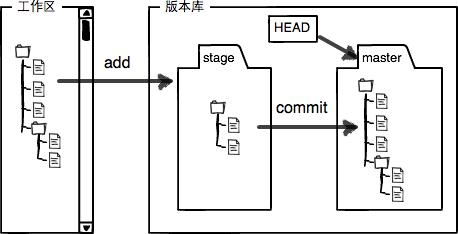
转换关系

- git restore
…” to discard changes in working directory - git restore —staged
…” to unstage - git reset —hard commit_id
note:git checkout暂时不用
时光穿梭
git reset —hard commit_id
- HEAD
- commit_id
git log (—pretty=oneline):穿梭前看看有哪些版本,从而回到过去
- git reflog:回到过去之后,重返未来

若有收获,就点个赞吧
0 人点赞


