背景
在现实生活以及程序设计中,经常要访问一个聚合对象中的各个元素,如“数据结构”中的链表遍历,通常的做法是将链表的创建和遍历都放在同一个类中,但这种方式不利于程序的扩展,如果要更换遍历方法就必须修改程序源代码,这违背了 “开闭原则”。
既然将遍历方法封装在聚合类中不可取,那么聚合类中不提供遍历方法,将遍历方法由用户自己实现是否可行呢?答案是同样不可取,因为这种方式会存在两个缺点:
- 暴露了聚合类的内部表示,使其数据不安全;
- 增加了客户的负担。
“迭代器模式”能较好地克服以上缺点,它在客户访问类与聚合类之间插入一个迭代器,这分离了聚合对象与其遍历行为,对客户也隐藏了其内部细节,且满足“单一职责原则”和“开闭原则”,如 Java 中的 Collection、List、Set、Map 等都包含了迭代器。
应用
迭代器模式在生活中应用的比较广泛,比如:物流系统中的传送带,不管传送的是什么物品,都会被打包成一个个箱子,并且有一个统一的二维码。这样我们不需要关心箱子里是什么,在分发时只需要一个个检查发送的目的地即可。再比如,我们平时乘坐交通工具,都是统一刷卡或者刷脸进站,而不需要关心是男性还是女性、是残疾人还是正常人等信息。
模式的定义与特点
迭代器(Iterator)模式的定义:提供一个对象来顺序访问聚合对象中的一系列数据,而不暴露聚合对象的内部表示。迭代器模式是一种对象行为型模式,其主要优点如下。
- 访问一个聚合对象的内容而无须暴露它的内部表示。
- 遍历任务交由迭代器完成,这简化了聚合类。
- 它支持以不同方式遍历一个聚合,甚至可以自定义迭代器的子类以支持新的遍历。
- 增加新的聚合类和迭代器类都很方便,无须修改原有代码。
- 封装性良好,为遍历不同的聚合结构提供一个统一的接口。
其主要缺点是:增加了类的个数,这在一定程度上增加了系统的复杂性。
在日常开发中,我们几乎不会自己写迭代器。除非需要定制一个自己实现的数据结构对应的迭代器,否则,开源框架提供的 API 完全够用
模式的结构与实现迭代器模式是通过将聚合对象的遍历行为分离出来,抽象成迭代器类来实现的,其目的是在不暴露聚合对象的内部结构的情况下,让外部代码透明地访问聚合的内部数据。现在我们来分析其基本结构与实现方法。
1. 模式的结构
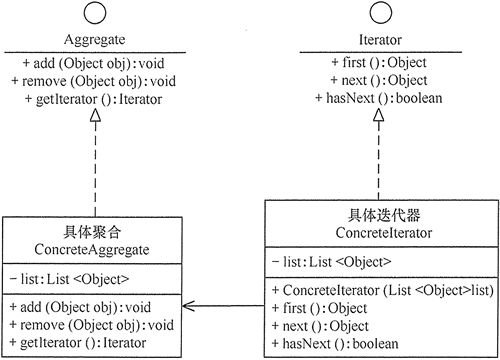
迭代器模式主要包含以下角色。
- 抽象聚合(Aggregate)角色:定义存储、添加、删除聚合对象以及创建迭代器对象的接口。
- 具体聚合(ConcreteAggregate)角色:实现抽象聚合类,返回一个具体迭代器的实例。
- 抽象迭代器(Iterator)角色:定义访问和遍历聚合元素的接口,通常包含 hasNext()、first()、next() 等方法。
具体迭代器(Concretelterator)角色:实现抽象迭代器接口中所定义的方法,完成对聚合对象的遍历,记录遍历的当前位置。
2.实现
```php <?php
//迭代 class AlphabeticalOrderIterator implements \Iterator { private $collection;
private $position = 0;private $reverse = false;public function __construct($collection, $reverse = false){$this->collection = $collection;$this->reverse = $reverse;}public function rewind(){$this->position = $this->reverse ? count($this->collection->getItems()) - 1 : 0;}public function current(){return $this->collection->getItems()[$this->position];}public function key(){return $this->position;}public function next(){$this->position = $this->position + ($this->reverse ? -1 : 1);}public function valid(){return isset($this->collection->getItems()[$this->position]);}
}
//聚合 class WordsCollection implements \IteratorAggregate { private $items = [];
public function getItems(){return $this->items;}public function addItem($item){$this->items[] = $item;}public function getIterator(): Iterator{return new AlphabeticalOrderIterator($this);}public function getReverseIterator(): Iterator{return new AlphabeticalOrderIterator($this, true);}
}
$aa = new WordsCollection(); $aa->addItem(‘11’); $aa->addItem(‘22’); $aa->addItem(‘33’);
echo ‘正序’.PHP_EOL;; foreach ($aa->getIterator() as $item){ echo $item.PHP_EOL; }
echo ‘倒序’.PHP_EOL;
foreach ($aa->getReverseIterator() as $item) { echo $item.PHP_EOL; }
输出```php正序112233倒序332211
读取csv
<?phpclass CsvIterator implements \Iterator{const ROW_SIZE = 4096;/*** The pointer to the CSV file.** @var resource*/protected $filePointer = null;/*** The current element, which is returned on each iteration.** @var array*/protected $currentElement = null;/*** The row counter.** @var int*/protected $rowCounter = null;/*** The delimiter for the CSV file.** @var string*/protected $delimiter = null;/*** The constructor tries to open the CSV file. It throws an exception on* failure.** @param string $file The CSV file.* @param string $delimiter The delimiter.** @throws \Exception*/public function __construct($file, $delimiter = ','){try {$this->filePointer = fopen($file, 'rb');$this->delimiter = $delimiter;} catch (\Exception $e) {throw new \Exception('The file "' . $file . '" cannot be read.');}}/*** This method resets the file pointer.*/public function rewind(): void{$this->rowCounter = 0;rewind($this->filePointer);}/*** This method returns the current CSV row as a 2-dimensional array.** @return array The current CSV row as a 2-dimensional array.*/public function current(): array{$this->currentElement = fgetcsv($this->filePointer, self::ROW_SIZE, $this->delimiter);$this->rowCounter++;return $this->currentElement;}/*** This method returns the current row number.** @return int The current row number.*/public function key(): int{return $this->rowCounter;}/*** This method checks if the end of file has been reached.** @return bool Returns true on EOF reached, false otherwise.*/public function next(): bool{if (is_resource($this->filePointer)) {return !feof($this->filePointer);}return false;}/*** This method checks if the next row is a valid row.** @return bool If the next row is a valid row.*/public function valid(): bool{if (!$this->next()) {if (is_resource($this->filePointer)) {fclose($this->filePointer);}return false;}return true;}}/*** The client code.*/$csv = new CsvIterator(__DIR__ . '/student.csv');foreach ($csv as $key => $row) {print_r($row);}
student.csv
zhanglibin,23,男long,24,女ko,33,妖
输出
Array([0] => zhanglibin[1] => 23[2] => 男)Array([0] => long[1] => 24[2] => 女)Array([0] => ko[1] => 33[2] => 妖)

若有收获,就点个赞吧
0 人点赞


