https://www.jianshu.com/p/2e02212b59e3
JSON Schema 简介
JSON Schema is a vocabulary that allows you to annotate and validate JSON documents.
JSON Schema官网
JSON Schema 是一个可以对json格式数据进行校验和进行内容描述的文档,它本身也是基于json格式的。
主要有以下作用:
- 对现有的json数据格式进行描述(字段类型、内容长度、是否必须存在、取值示例等);
- 是一个描述清晰、人机可读的文档;
- 自动测试、验证客户端提交的数据;
JSON Schema 简单示例
我们把需要被验证的json文档称为instance,用来校验它的文档就是schema;
一个最基础的schema就是一个空的json对象 {} ,对instance不做任何限制,没有任何描述。下面是一个简单的instance和schema示例:
需要被校验的instance:
schema:{"foo": 32,"bar": "Must equal this value"}
其中关键字“type”可以用来对instance的类型进行限制,它可以取如下几个值 object, array, string, number, boolean, null。{"type": "object","properties": {"foo": {"type": "number"},"bar": {"const": "Must equal this value"}}}
关键字“const”要求被验证的数据与其所定义的内容保持一致。JSON Schema 在线工具
根据JSON数据和对应的JSON Schema校验数据:
http://json-schema-validator.herokuapp.com/
https://jsonschemalint.com/
根据JSON数据在线生成JSON Schema:
https://jsonschema.net/JSON Schema第三方工具
JSON Schema已经有多种语言实现的第三方工具可以使用,详见官网说明:http://json-schema.org/implementations。下面3个是java的相关实现:
json-schema-validator supports draft 4 includes draft-04 hype-schema syntax support (LGPLv3)
json-schema (implementation based on the org.json API) supports draft 4, draft 6 (Apache License 2.0)
json-schema-validator supports draft 4 (Apache License 2.0)使用第三方工具json-schema-validator
下面使用上述3个工具中的第一个,实现用schema验证json数据的功能:
1.首先在pom里,添加如下配置:
2.编写工具类JsonSchemaValidator.java<!-- fge --><dependency><groupId>com.github.fge</groupId><artifactId>json-schema-validator</artifactId><version>2.2.6</version></dependency><!-- fasterxml --><dependency><groupId>com.fasterxml.jackson.core</groupId><artifactId>jackson-core</artifactId><version>2.8.8</version></dependency><dependency><groupId>com.fasterxml.jackson.core</groupId><artifactId>jackson-databind</artifactId><version>2.8.8</version></dependency>
3.接收页面数据、读取文件数据的JsonSchemaControllerpublic class JsonSchemaValidator { public static Map<String, Object> validateJsonByFgeByJsonNode(JsonNode jsonNode, JsonNode schemaNode) { Map<String, Object> result = new HashMap<String, Object>(); ProcessingReport report = null; report = JsonSchemaFactory.byDefault().getValidator().validateUnchecked(schemaNode, jsonNode); if (report.isSuccess()) { // 校验成功 result.put("message", "校验成功!"); result.put("success", true); return result; } else { System.out.println("校验失败!"); Iterator<ProcessingMessage> it = report.iterator(); String ms = ""; while (it.hasNext()) { ProcessingMessage pm = it.next(); if (!LogLevel.WARNING.equals(pm.getLogLevel())) { ms += pm; } } result.put("message", "校验失败!" + ms); result.put("success", false); return result; } } public static JsonNode getJsonNodeFromString(String jsonStr) { JsonNode jsonNode = null; try { jsonNode = JsonLoader.fromString(jsonStr); } catch (IOException e) { e.printStackTrace(); } return jsonNode; } public static JsonNode getJsonNodeFromFile(String filePath) { JsonNode jsonNode = null; try { jsonNode = new JsonNodeReader().fromReader(new FileReader(filePath)); } catch (FileNotFoundException e) { e.printStackTrace(); } catch (IOException e) { e.printStackTrace(); } return jsonNode; } }
3.前端页面json_schema.html@RestController public class JsonSchemaController { @Value("${upload.rootPath}") private String rootPath; @RequestMapping(value = "/json-schema/validate", method = RequestMethod.GET) public Map<String, Object> jsonSchemaValidate(String jsonStr) { Map<String, Object> result = new HashMap<String, Object>(); JsonNode jsonNode = JsonSchemaValidator.getJsonNodeFromString(jsonStr); if (jsonNode == null) { result.put("success", false); result.put("message", "json报文格式错误"); return result; } String filePath = rootPath + "/json-file/json_schema_test.json"; JsonNode schemaNode = JsonSchemaValidator.getJsonNodeFromFile(filePath); if (schemaNode == null) { result.put("success", false); result.put("message", "json Schema文件不存在,无法校验!"); return result; } return JsonSchemaValidator.validateJsonByFgeByJsonNode(jsonNode, schemaNode); } }<body class=" "> <div> <textarea class=" " name="parameterContentLeft" id="parameterContentLeft" placeholder="请输入请求报文内容"></textarea> </div> <br> <button onclick="setAjaxRequest();" id="doJson" class=" ">发送</button> <div class=" "> <pre id="responsePre"> </pre> </div> <script src="frame/jquery.min.js"></script> <script> function setAjaxRequest() { $.ajax({ url : "/json-schema/validate", type : "GET", data : { jsonStr : $("#parameterContentLeft").val() }, async : false }).done(function(data) { $("#responsePre").html(data.message); }); } </script> </body>测试功能
下面使用上面提到的在线生成scheme的工具里提供的样例,测试下我们刚才编写的代码:
instance:
schema过长,就不贴了,详见这里{ "checked": false, "dimensions": { "width": 5, "height": 10 }, "id": 1, "name": "A green door", "price": 12.5, "tags": [ "home", "green" ]
在页面进行测试,效果如下:
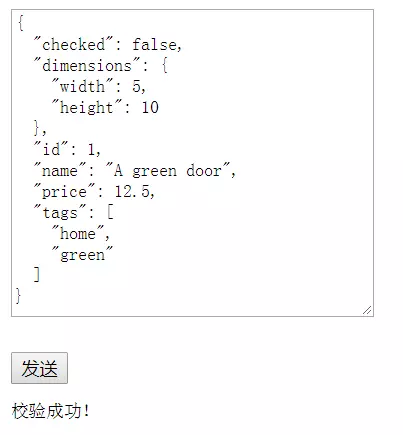
image
把 “width”: 5 改为 “width”: 5.5,测试效果:
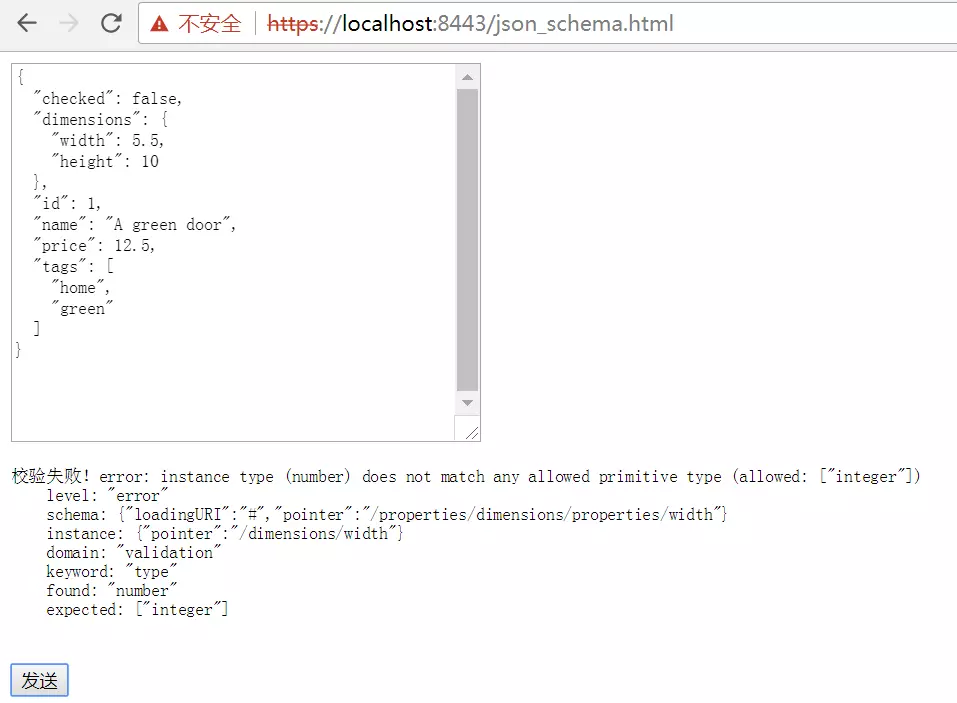
qq 20171226130003
在2个在线测试工具上测试效果:
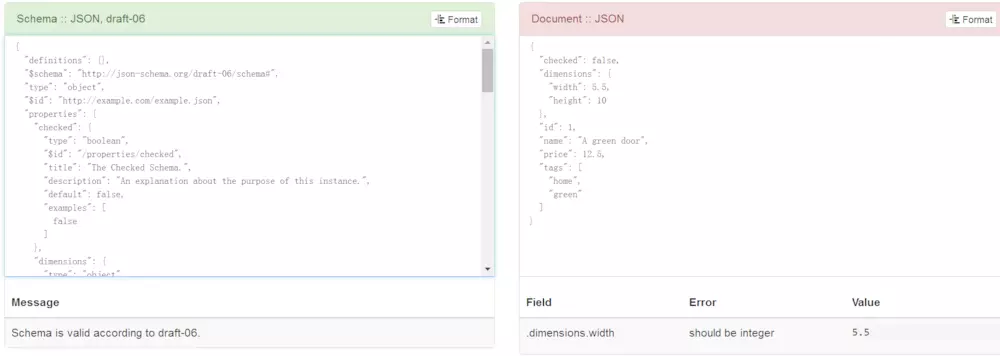
qq 20171226121604
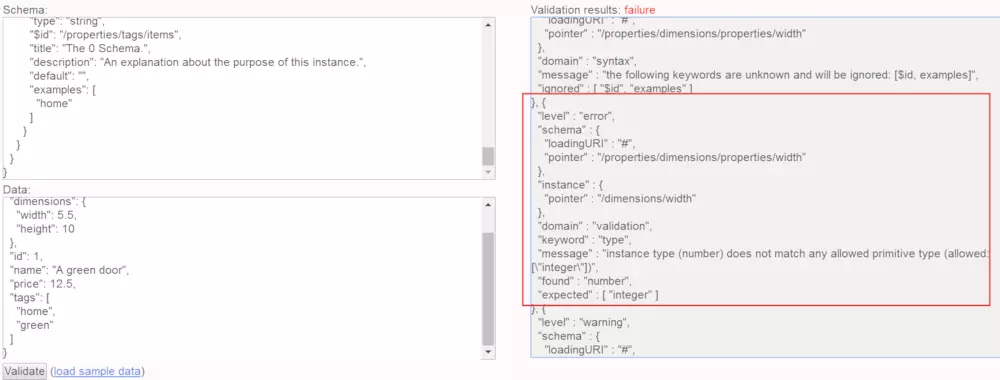
qq 20171226121733
可以看到2个在线测试工具,一个输出了错误信息和警告信息,另一个只输出了错误信息。而我们本地开发的工具只输出了错误信息,是因为我把警告过滤掉了,这个可以根据实际需求进行修改。

若有收获,就点个赞吧
0 人点赞


