项目需求:


数据库设计


项目架构的程序设计
- 基于Python语言,版本:>=3.6及以上。
- 使用Django框架,版本:2.2.*的LTS版本。
- MySQL数据库
- 连接数据库:mysqlclient=1.4.6
- 图像处理: Pillow=5.0.0
- Web前端技术:HTML、CSS、JavaScript和Jquery等
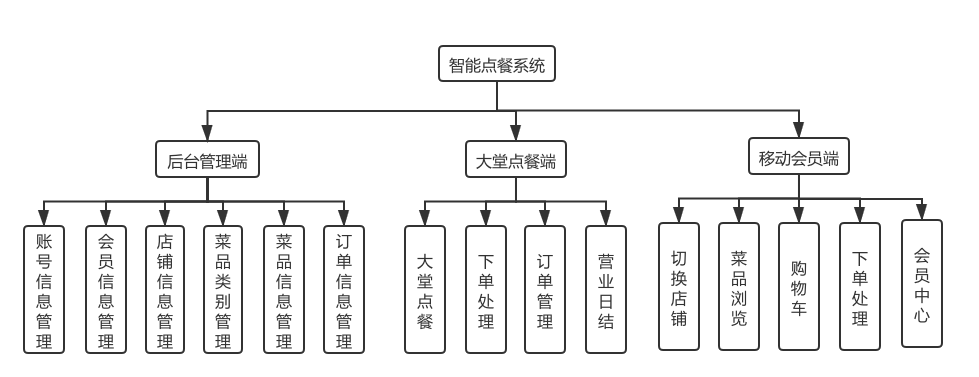
项目共计三个应用:myadmin、web和mobile
myobject/ 项目目录||--myadmin/ 后台管理应用| |--__init__.py| |--views/| | |--index.py 后台首页、登录、退出、验证码加载等视图方法| | |--user.py 员工信息管理视图| | |--member.py 会员信息管理视图| | |--shop.py 店铺信息管理视图| | |--product.py 菜品信息管理视图| | |--orders.py 订单信息管理视图| | |--.....| || |-- admin.py| |-- apps.py| |-- models.py 定义了整个网站的models类,除了本应使用,还提供给其他应用| |-- shopmiddleware.py 定了整个网站的中间件(验证是否登录及权限管理信息)| |-- tests.py| |-- urls.py 配置了整个网站后台所有请求路由||--web/ 前台应用(大堂点餐)| |-- __init__.py| |--views/| | |--index.py 大堂点餐应用的登录、退出、验证码、加载店铺等方法| | |--product.py 菜品展示视图| | |--shopcart.py 购物车管理视图| | |--orders.py 订单管理视图| |-- admin.py| |-- apps.py| |-- models.py| |-- tests.py| |-- urls.py 配置了大堂点餐应用的所有请求路由||--mobile/ 移动端点餐应用\| |-- __init__.py| |--views/| | |--index.py 登录,退出路由| | |--shop.py 店铺信息加载视图| | |--product.py 菜品信息加载展示视图| | |--orders.py 个人订单信息管理视图| | |--member.py 个人中心管理视图| | |--......| || |-- admin.py| |-- apps.py| |-- models.py| |-- tests.py| |-- urls.py 配置了移动端点餐应用的所有请求路由||--myobject/ 项目目录| |-- __init__.py| |-- settings.py| |-- urls.py| |-- wsgi.py||--static/ 静态资源目录| |-- uploads/ 上传文件存储目录| |-- myadmin/ 后台管理静态资源目录| |-- web/ 大堂点餐静态资源目录| |-- mobile/ 移动端管理静态资源目录||--templates/ 模板目录| |-- myadmin/ 后台管理模板目录| |-- web/ 大堂点餐模板目录| |-- mobile/ 移动端管理模板目录||--manage.py 入口文件
访问url设计:
http://主机名:端口/应用名/视图名/函数名
视图中的函数命名格式:index() ---- 浏览信息add() ---- 加载添加界面insert() ---- 执行添加delete() ---- 执行删除(路由中使用del)edit() ---- 加载编辑界面update() ---- 执行信息编辑
项目搭建
# 创建项目框架 `myobject`django-admin startproject myobjectcd myobject# 在项目中创建一个myadmin应用(项目的后台管理)python manage.py startapp myadmin# 在项目中再创建一个web应用(项目前台大堂点餐应用)python manage.py startapp web# 在项目中再创建一个mobile应用(移动客户点餐端应用)python manage.py startapp mobile# 创建模板目录mkdir templatesmkdir templates/myadminmkdir templates/webmkdir templates/mobile# 创建静态资源目录mkdir staticmkdir static/myadminmkdir static/webmkdir static/mobilemkdir static/uploads# 创建前后台应用模板目录,并在里面各创建一个`__init__.py`和`index.py`的空文件mkdir myadmin/viewstouch myadmin/views/__init__.pytouch myadmin/views/index.pymkdir web/viewstouch web/views/__init__.pytouch web/views/index.pymkdir mobile/viewstouch mobile/views/__init__.pytouch mobile/views/index.py# 删除前后台应用的默认模板文件# rm -rf myadmin/views.py# rm -rf web/views.py# rm -rf mobile/views.py# 拷贝路由文件到应用目录中cp myobject/urls.py myadmin/urls.pycp myobject/urls.py web/urls.pycp myobject/urls.py mobile/urls.py# 退出项目目录cd ..#查看项目目录结构tree myobjectmyobject/├── manage.py├── myobject│ ├── __init__.py│ ├── settings.py│ ├── urls.py│ └── wsgi.py├── myadmin│ ├── admin.py│ ├── apps.py│ ├── __init__.py│ ├── migrations│ │ └── __init__.py│ ├── views│ │ ├── __init__.py│ │ └── index.py│ ├── models.py│ ├── tests.py│ └── urls.py├── web│ ├── admin.py│ ├── apps.py│ ├── __init__.py│ ├── migrations│ │ ├── __init__.py│ ├── views│ │ ├── __init__.py│ │ └── index.py│ ├── models.py│ ├── tests.py│ └── urls.py├── mobile│ ├── admin.py│ ├── apps.py│ ├── __init__.py│ ├── migrations│ │ ├── __init__.py│ ├── views│ │ ├── __init__.py│ │ └── index.py│ ├── models.py│ ├── tests.py│ └── urls.py├── static│ ├── myadmin/│ ├── web/│ ├── mobile/│ └── uploads/└── templates├── myadmin/├── web/└── mobile/
配置:
注意:此配置需要安装mysql数据库mysqlclient软件包, 如:$ pip install mysqlclient
创建数据库 shop
-- 员工信息表CREATE TABLE `user` (`id` int(10) unsigned NOT NULL AUTO_INCREMENT COMMENT '员工账号id',`username` varchar(50) DEFAULT NULL COMMENT '员工账号',`nickname` varchar(50) DEFAULT NULL COMMENT '昵称',`password_hash` varchar(100) DEFAULT NULL COMMENT '密码',`password_salt` varchar(50) DEFAULT NULL COMMENT '密码干扰值',`status` tinyint(3) unsigned NOT NULL DEFAULT '1' COMMENT '状态:1正常/2禁用/9删除',`create_at` datetime DEFAULT NULL COMMENT '创建时间',`update_at` datetime DEFAULT NULL COMMENT '修改时间',PRIMARY KEY (`id`)) ENGINE=InnoDB AUTO_INCREMENT=4 DEFAULT CHARSET=utf8;-- 店铺信息表CREATE TABLE `shop` (`id` int(10) unsigned NOT NULL AUTO_INCREMENT COMMENT '店铺id',`name` varchar(255) NOT NULL COMMENT '店铺名称',`cover_pic` varchar(255) DEFAULT NULL COMMENT '封面图片',`banner_pic` varchar(255) DEFAULT NULL COMMENT '图标Logo',`address` varchar(255) DEFAULT NULL COMMENT '店铺地址',`phone` varchar(255) DEFAULT NULL COMMENT '联系电话',`status` tinyint(4) NOT NULL DEFAULT '1' COMMENT '状态:1:正常 2:暂停 9:删除',`create_at` datetime DEFAULT NULL COMMENT '添加时间',`update_at` datetime DEFAULT NULL COMMENT '修改时间',PRIMARY KEY (`id`)) ENGINE=InnoDB AUTO_INCREMENT=5 DEFAULT CHARSET=utf8;-- 菜品类别表CREATE TABLE `category` (`id` int(10) unsigned NOT NULL AUTO_INCREMENT COMMENT '菜品分类id',`shop_id` int(11) DEFAULT NULL COMMENT '店铺id',`name` varchar(50) DEFAULT NULL COMMENT '分类名称',`status` tinyint(4) NOT NULL DEFAULT '1' COMMENT '状态:1正常 9删除',`create_at` datetime DEFAULT NULL COMMENT '添加时间',`update_at` datetime DEFAULT NULL COMMENT '修改时间',PRIMARY KEY (`id`)) ENGINE=InnoDB AUTO_INCREMENT=9 DEFAULT CHARSET=utf8;-- 菜品信息表CREATE TABLE `product` (`id` int(11) unsigned NOT NULL AUTO_INCREMENT COMMENT '菜品id',`shop_id` int(11) DEFAULT NULL COMMENT '店铺id',`category_id` int(11) DEFAULT NULL COMMENT '菜品分类id',`cover_pic` varchar(50) DEFAULT NULL COMMENT '菜品图片',`name` varchar(50) DEFAULT NULL COMMENT '菜品名称',`price` double(6,2) DEFAULT NULL COMMENT '单价',`status` tinyint(4) DEFAULT NULL COMMENT '状态:1:正常 2:停售 9:删除',`create_at` datetime DEFAULT NULL COMMENT '添加时间',`update_at` datetime DEFAULT NULL COMMENT '修改时间',PRIMARY KEY (`id`)) ENGINE=InnoDB AUTO_INCREMENT=18 DEFAULT CHARSET=utf8;-- 会员信息表CREATE TABLE `member` (`id` int(10) unsigned NOT NULL AUTO_INCREMENT COMMENT '会员表id',`nickname` varchar(50) DEFAULT NULL COMMENT '昵称',`avatar` varchar(255) DEFAULT NULL COMMENT '头像',`mobile` varchar(50) DEFAULT NULL COMMENT '电话',`status` tinyint(3) unsigned NOT NULL DEFAULT '1' COMMENT '状态:1正常/2禁用/9删除',`create_at` datetime DEFAULT NULL COMMENT '添加时间',`update_at` datetime DEFAULT NULL COMMENT '修改时间',PRIMARY KEY (`id`)) ENGINE=InnoDB AUTO_INCREMENT=5 DEFAULT CHARSET=utf8;-- 订单信息表CREATE TABLE `orders` (`id` int(10) unsigned NOT NULL AUTO_INCREMENT COMMENT '订单表id',`shop_id` int(10) unsigned DEFAULT NULL COMMENT '店铺id号',`member_id` int(10) unsigned DEFAULT NULL COMMENT '会员id',`user_id` int(10) unsigned DEFAULT NULL COMMENT '操作员id',`money` double(8,2) DEFAULT NULL COMMENT '金额',`status` tinyint(3) unsigned DEFAULT NULL COMMENT '订单状态:1过行中/2无效/3已完成',`payment_status` tinyint(3) unsigned DEFAULT NULL COMMENT '支付状态:1未支付/2已支付/3已退款',`create_at` datetime DEFAULT NULL COMMENT '添加时间',`update_at` datetime DEFAULT NULL COMMENT '修改时间',PRIMARY KEY (`id`)) ENGINE=InnoDB AUTO_INCREMENT=1 DEFAULT CHARSET=utf8;-- 订单信息详情表CREATE TABLE `order_detail` (`id` int(10) unsigned NOT NULL AUTO_INCREMENT COMMENT '订单详情id',`order_id` int(10) unsigned DEFAULT NULL COMMENT '订单id',`product_id` int(10) unsigned DEFAULT NULL COMMENT '菜品id',`product_name` varchar(50) DEFAULT NULL COMMENT '菜品名称',`price` double(6,2) unsigned DEFAULT NULL COMMENT '单价',`quantity` int(10) unsigned NOT NULL DEFAULT '1' COMMENT '数量',`status` tinyint(3) unsigned NOT NULL DEFAULT '1' COMMENT '状态:1正常/9删除',PRIMARY KEY (`id`)) ENGINE=InnoDB AUTO_INCREMENT=1 DEFAULT CHARSET=utf8 CHECKSUM=1 DELAY_KEY_WRITE=1 ROW_FORMAT=DYNAMIC COMMENT='订单详情信息表';-- 支付信息表CREATE TABLE `payment` (`id` int(10) unsigned NOT NULL AUTO_INCREMENT COMMENT '支付表id',`order_id` int(10) unsigned DEFAULT NULL COMMENT '订单id',`member_id` int(10) unsigned DEFAULT NULL COMMENT '会员id',`money` double(8,2) unsigned DEFAULT NULL COMMENT '支付金额',`type` tinyint(3) unsigned DEFAULT NULL COMMENT '付款方式:1会员付款/2收银收款',`bank` tinyint(3) unsigned DEFAULT NULL COMMENT '收款银行渠道:1微信/2余额/3现金/4支付宝',`status` tinyint(3) unsigned DEFAULT NULL COMMENT '支付状态:1未支付/2已支付/3已退款',`create_at` datetime DEFAULT NULL COMMENT '添加时间',`update_at` datetime DEFAULT NULL COMMENT '修改时间',PRIMARY KEY (`id`)) ENGINE=InnoDB AUTO_INCREMENT=6 DEFAULT CHARSET=utf8;CREATE TABLE `django_session` (`session_key` varchar(40) NOT NULL,`session_data` longtext NOT NULL,`expire_date` datetime(6) NOT NULL,PRIMARY KEY (`session_key`),KEY `django_session_expire_date_a5c62663` (`expire_date`)) ENGINE=InnoDB DEFAULT CHARSET=utf8;-- 在user上表中添加一条后台管理员账户数据insert into `user`(`id`,`username`,`nickname`,`password_hash`,`password_salt`,`status`,`create_at`,`update_at`) values (1,'zhangsan','张三','1e191d851b3b49a248f4ea62f6b06410','123456',1,'2018-08-08 18:18:18','2018-09-07 08:06:55');
编辑myobject/myobject/init.py文件
#注册数据库import pymysqlpymysql.install_as_MySQLdb()
编辑myobject/myobject/settings.py文件
# myobject/myobject/settings.py 项目配置文件# 1. 配置允许访问的主机名信息ALLOWED_HOSTS = ['*']或ALLOWED_HOSTS = ['localhost','127.0.0.1','192.168.2.240']...# 2. 将myadmin和web的应用添加到项目框架结构中INSTALLED_APPS = ['django.contrib.admin','django.contrib.auth','django.contrib.contenttypes','django.contrib.sessions','django.contrib.messages','django.contrib.staticfiles','myadmin','web','mobile',]...# 3. 配置模板目录 os.path.join(BASE_DIR,'templates')TEMPLATES = [{'BACKEND': 'django.template.backends.django.DjangoTemplates','DIRS': [os.path.join(BASE_DIR,'templates')],'APP_DIRS': True,'OPTIONS': {'context_processors': ['django.template.context_processors.debug','django.template.context_processors.request','django.contrib.auth.context_processors.auth','django.contrib.messages.context_processors.messages',],},},]...# 4. 配置项目的数据库连接信息:DATABASES = {'default': {'ENGINE': 'django.db.backends.mysql','NAME': 'shop','USER': 'root','PASSWORD': '','HOST': 'localhost','PORT': '3306',}}...# 5. 设置时区和语言LANGUAGE_CODE = 'zh-hans'TIME_ZONE = 'Asia/Shanghai'...# 6. 配置网站的静态资源目录STATIC_URL = '/static/'STATICFILES_DIRS = [os.path.join(BASE_DIR, 'static'),]
项目urls路由信息配置:
打开根路由文件:myobject/myobject/urls.py路由文件,编写路由配置信息
# myobject/myobject/urls.py#from django.contrib import adminfrom django.urls import include,pathurlpatterns = [#path('admin/', admin.site.urls),path('', include("web.urls")), # 默认前台大堂点餐端path('myadmin/', include("myadmin.urls")), # 后台管理端path('mobile/', include("mobile.urls")), # 移动会员端]
打开项目后台管理路由文件:myobject/myadmin/urls.py路由文件,编写路由配置信息
# myobject/myadmin/urls.pyfrom django.urls import pathfrom myadmin.views import indexurlpatterns = [# 后台首页path('', index.index, name="myadmin_index"),]
打开项目前台大堂点餐端路由文件:myobject/web/urls.py路由文件,编写路由配置信息
# myobject/web/urls.pyfrom django.urls import pathfrom web.views import indexurlpatterns = [# path('', index.index, name="index"),]
打开项目移动会员端路由文件:myobject/mobile/urls.py路由文件,编写路由配置信息
# myobject/mobile/urls.pyfrom django.urls import pathfrom web.views import indexurlpatterns = [# path('', index.index, name="index"),]
编写视图测试
# myobject/myadmin/views/index.pyfrom django.shortcuts import renderfrom django.http import HttpResponse#后台首页def index(request):return HttpResponse('欢迎进入点餐系统网站后台管理!')# myobject/web/views/index.pyfrom django.shortcuts import renderfrom django.http import HttpResponse#前台首页def index(request):return HttpResponse('欢迎进入大堂点餐前台首页!')# myobject/mobile/views/index.pyfrom django.shortcuts import renderfrom django.http import HttpResponse#移动端首页def index(request):return HttpResponse('欢迎进入移动会员端首页!')
导入页面模板:
- 从github上下载一个后台简洁模板:https://github.com/ColorlibHQ/AdminLTE
- 将后台模板目录中的资源目录:bower_components、dist、local、package.json复制到项目的后台静态资源目录static/myadmin/中
权限设计
用户登录信息存储在Django框架中的session,而session信息又存放的数据库中,所以要先使用数据迁移命令在MySQL数据库中先生成一些Django默认自带表。 ```plsql python manage.py migrate或 执行下面sql语句在shop数据库中创建session表
CREATE TABLE django_session (
session_key varchar(40) NOT NULL,
session_data longtext NOT NULL,
expire_date datetime(6) NOT NULL,
PRIMARY KEY (session_key),
KEY django_session_expire_date_a5c62663 (expire_date)
) ENGINE=InnoDB DEFAULT CHARSET=utf8
通过中间件进行登录权限判断<br />在myadmin应用中创建中间件:```plsql#创建文件: myobject/myadmin/shopmiddleware.py# 自定义中间件类from django.shortcuts import redirectfrom django.urls import reverseimport reclass ShopMiddleware(object):def __init__(self, get_response):self.get_response = get_response# One-time configuration and initialization.print("ShopMiddleware")def __call__(self, request):# 获取当前请求路径path = request.path#print("mycall..."+path)# 后台请求路由判断# 定义网站后台不用登录也可访问的路由urlurllist = ['/myadmin/login','/myadmin/dologin','/myadmin/logout','/myadmin/verify']# 判断当前请求是否是访问网站后台,并且path不在urllist中if re.match(r"^/myadmin",path) and (path not in urllist):# 判断当前用户是否没有登录if "adminuser" not in request.session:# 执行登录界面跳转return redirect(reverse('myadmin_login'))# 请求继续执行下去response = self.get_response(request)# Code to be executed for each request/response after# the view is called.return response
将自定义的中间件注册到项目中:
#编辑 myobject/settings.py 配置文件MIDDLEWARE = ['django.middleware.security.SecurityMiddleware','django.contrib.sessions.middleware.SessionMiddleware','django.middleware.common.CommonMiddleware','django.middleware.csrf.CsrfViewMiddleware','django.contrib.auth.middleware.AuthenticationMiddleware','django.contrib.messages.middleware.MessageMiddleware','django.middleware.clickjacking.XFrameOptionsMiddleware','myadmin.shopmiddleware.ShopMiddleware', #注册中间件]
操作界面:


若有收获,就点个赞吧
0 人点赞


