
在项目中新建一个模块专门用于处理spring could
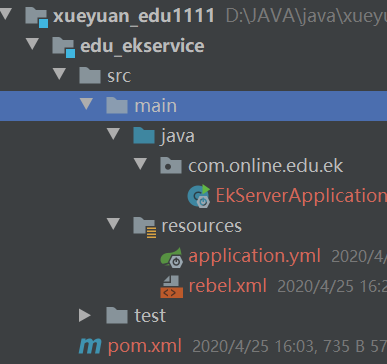
主pom.xml导入依赖,统一版本
<dependencyManagement><dependencies><!--Spring Cloud,注意版本号,具体对应的版本到官网查询--><dependency><groupId>org.springframework.cloud</groupId><artifactId>spring-cloud-dependencies</artifactId><version>Hoxton.SR2</version><type>pom</type><scope>import</scope></dependency></dependencies></dependencyManagement>
edu_ekservice的pom.xml
<?xml version="1.0" encoding="UTF-8"?>
<project xmlns="http://maven.apache.org/POM/4.0.0"
         xmlns:xsi="http://www.w3.org/2001/XMLSchema-instance"
         xsi:schemaLocation="http://maven.apache.org/POM/4.0.0 http://maven.apache.org/xsd/maven-4.0.0.xsd">
    <parent>
        <artifactId>xueyuan_edu1111</artifactId>
        <groupId>com.online.edu</groupId>
        <version>0.0.1-SNAPSHOT</version>
    </parent>
    <modelVersion>4.0.0</modelVersion>

    <artifactId>edu_ekservice</artifactId>

<dependencies>
    <!--注册中心-->
    <dependency>
        <groupId>org.springframework.cloud</groupId>
        <artifactId>spring-cloud-starter-netflix-eureka-server</artifactId>
    </dependency>
</dependencies>
</project>
application.yml
server:
  port: 9002

eureka:
  client:
#是否将自己注册到Eureka服务器中,本身是服务器,无需注册
    register-with-eureka: false
#是否从Eureka中获取注册信息
    fetch-registry: false
    service-url:
#指定注册中心地址
      defaultZone: http://127.0.0.1:${server.port}/eureka/
启动类
package com.online.edu.ek;

import org.springframework.boot.SpringApplication;
import org.springframework.boot.autoconfigure.SpringBootApplication;
import org.springframework.cloud.netflix.eureka.server.EnableEurekaServer;

/**
 * @version 1.0 2020/4/25
 * @auther LENOVO
 */
@SpringBootApplication
@EnableEurekaServer//加入此注解
public class EkServerApplication {
    public static void main(String[] args) {
        SpringApplication.run(EkServerApplication.class);
    }
}
启动
访问http://localhost:xxxx/
System Status:系统信息
DS Replicas:服务器副本
Instances currently registered with Eureka:已注册的微服务列表
General Info:一般信息
Instance Info:实例信息 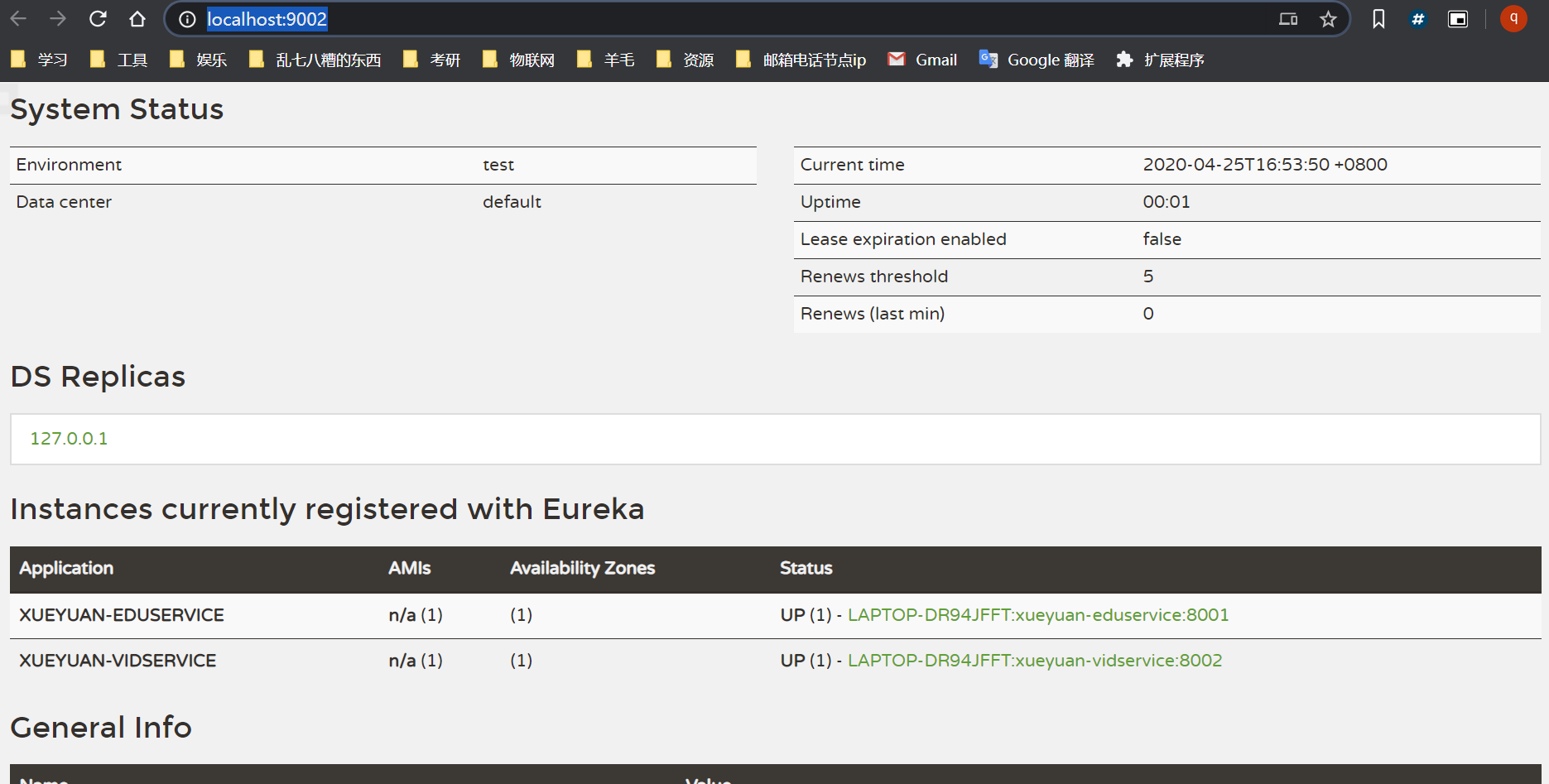
组件服务注册
1、客户端配置pom
在需要的module中配置Eureka客户端的pom依赖
        <!--服务注册-->
        <dependency>
            <groupId>org.springframework.cloud</groupId>
            <artifactId>spring-cloud-starter-netflix-eureka-client</artifactId>
        </dependency>
2、添加服务配置信息
配置application.properties,在客户端微服务中添加注册Eureka服务的配置信息
#指定注册中心地址
eureka:
  client:
    service-url:
      defaultZone: http://127.0.0.1:9002/eureka/
#eureka服务器上获取的是服务器的ip地址,否则是主机名
  instance:
    prefer-ip-address: true
3、添加Eureka客户端注解
在客户端微服务启动类中添加注解@EnableEurekaClient
@SpringBootApplication
@EnableEurekaClient
public class XueyuanEduservice1111Application {

    public static void main(String[] args) {
        SpringApplication.run(XueyuanEduservice1111Application.class, args);
    }

}
4、启动客户端微服务
启动注册中心
启动已注册的微服务,可以在Eureka注册列表中看到被注册的微服务
实现服务调用
在调用端添加pom依赖
        <!--服务调用-->
        <dependency>
            <groupId>org.springframework.cloud</groupId>
            <artifactId>spring-cloud-starter-openfeign</artifactId>
        </dependency>
在调用端的启动类添加注解@EnableFeignClients
@SpringBootApplication
@EnableEurekaClient
@EnableFeignClients
public class XueyuanEduservice1111Application {

    public static void main(String[] args) {
        SpringApplication.run(XueyuanEduservice1111Application.class, args);
    }

}
创建包和接口
创建client包
@FeignClient注解用于指定从哪个服务中调用功能 ,名称与被调用的服务名保持一致。
@DeleteMapping注解用于对被调用的微服务进行地址映射。
@PathVariable注解一定要指定参数名称,否则出错
@Component注解防止,在其他位置注入CodClient时idea报错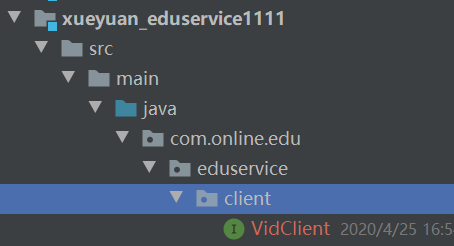
package com.online.edu.eduservice.client;

/**
 * 调用vidservice的接口
 * @version 1.0 2020/4/25
 * @auther LENOVO
 */
@FeignClient("xueyuan-vidservice")
@Component
public interface VidClient {

    /**
     * 定义调用的方法
     * 方法调用的路径
     * @param videoId
     * @return
     */
    @DeleteMapping("/vidservice/vod/{videoId}")
    public R delectVideoIdAliyun(@PathVariable("videoId") String videoId);
}
在调用模块的service层调用
package com.online.edu.eduservice.service.impl;

import com.baomidou.mybatisplus.core.conditions.query.QueryWrapper;
import com.baomidou.mybatisplus.extension.service.impl.ServiceImpl;
import com.online.edu.eduservice.client.VidClient;
import com.online.edu.eduservice.entity.EduVideo;
import com.online.edu.eduservice.mapper.EduVideoMapper;
import com.online.edu.eduservice.service.EduVideoService;
import org.springframework.beans.factory.annotation.Autowired;
import org.springframework.stereotype.Service;
import org.springframework.util.StringUtils;

import java.util.ArrayList;
import java.util.List;

/**
 * <p>
 * 课程视频 服务实现类
 * </p>
 *
 * @author testjava
 * @since 2020-04-21
 */
@Service
public class EduVideoServiceImpl extends ServiceImpl<EduVideoMapper, EduVideo> implements EduVideoService {

    //注入带调用vid的接口
    @Autowired
    private VidClient vidClient;

    /**
     * 根据小节id删除小节
     * @param SectionId
     * @return
     */
    @Override
    public boolean removeVideo(String SectionId) {
        //根据小节id查询数据库获取视频id
        EduVideo eduVideo = baseMapper.selectById(SectionId);
        String videoSourceId = eduVideo.getVideoSourceId();
        //判断是否为空(null/""),不为则删除
        if (!StringUtils.isEmpty(videoSourceId)){
            //调用方法,根据id查询删除
            vidClient.delectVideoIdAliyun(videoSourceId);
        }
        //删除小节时
        int result = baseMapper.deleteById(SectionId);
        return result>0;
    }
}

若有收获,就点个赞吧
0 人点赞


