https://tianchi.aliyun.com/competition/entrance/531872/information
目标:
理论:
1、理解评价指标 Dice coefficient
步骤:
1、下载数据
windows下,先wsl切换到到linux terminal,之后:
mkdir data && cd data
wget http://tianchi-competition.oss-cn-hangzhou.aliyuncs.com/531872/%E5%9C%B0%E8%A1%A8%E5%BB%BA%E7%AD%91%E7%89%A9%E8%AF%86%E5%88%AB/train_mask.csv.zip
wget http://tianchi-competition.oss-cn-hangzhou.aliyuncs.com/531872/%E5%9C%B0%E8%A1%A8%E5%BB%BA%E7%AD%91%E7%89%A9%E8%AF%86%E5%88%AB/train.zip
wget http://tianchi-competition.oss-cn-hangzhou.aliyuncs.com/531872/%E5%9C%B0%E8%A1%A8%E5%BB%BA%E7%AD%91%E7%89%A9%E8%AF%86%E5%88%AB/test_a_samplesubmit.csv
wget http://tianchi-competition.oss-cn-hangzhou.aliyuncs.com/531872/%E5%9C%B0%E8%A1%A8%E5%BB%BA%E7%AD%91%E7%89%A9%E8%AF%86%E5%88%AB/test_a.zip
unzip train_mask.csv.zip test_a_samplesubmit.csv test_a.zip
2、读取数据:
3、测试提交结果
安装环境:
查看cuda版本:
nvida控制面板里-》系统信息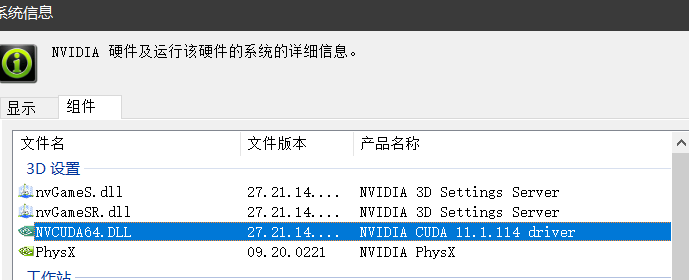
conda install pytorch torchvision torchaudio cudatoolkit=11.0 -c pytorch
解决conda下载慢问题:
conda config —add channels https://mirrors.tuna.tsinghua.edu.cn/anaconda/pkgs/free/
conda config —add channels https://mirrors.tuna.tsinghua.edu.cn/anaconda/pkgs/main/
conda config —set show_channel_urls yes
来自 [https://blog.csdn.net/qq_42514225/article/details/107736711](https://blog.csdn.net/qq_42514225/article/details/107736711)
几个问题:
- 理解RLE编码过程,并完成赛题数据读取并可视化;
- 回顾下pandas的一些操作:
统计所有图片整图中没有任何建筑物像素占所有训练集图片的比例;
统计所有图片中建筑物像素占所有像素的比例;
计所有图片中建筑物区域平均区域大小;
- FCN模型

若有收获,就点个赞吧
0 人点赞


