封装
含义
所谓封装,就是将类的某些信息隐藏在类的内部,不允许外部程序直接访问
,只能通过该类提供的方法来实现对隐藏信息的操作和访问。
简单来说,既要隐藏对象的信息,也要留出访问的接口。
特点:
- 只能通过规定的方法访问数据
- 隐藏类的实例细节,方便修改和实现
封装的实现
对于如何实现封装,我们可以通过以下三个步骤: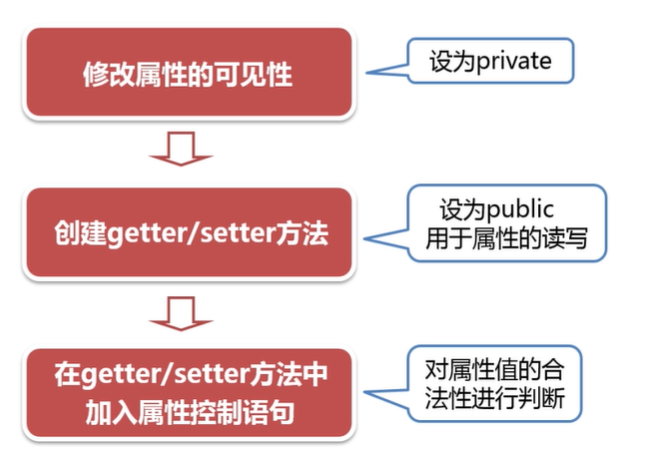
在之前的课程中,我们使用了宠物猫这个例子,那么这个宠物猫的年龄可以由我们自由的设置,那么如果我们给宠物猫的年龄设置为负值,则就不符合现实的逻辑了。
修改属性的可见性
public class Cat {//将属性的访问控制修饰符修改为private-限定只能在当前类内被访问private String name;private int month;private double weight;private String species;}
private修饰的属性只能在当前类中进行操作和访问,在本类之外,是不允许被直接访问的。
创建公有的get/set方法
public class Cat {
    //1.将属性的访问控制修饰符修改为private
    private String name;
    private int month;
    private double weight;
    private String species;

    //2.创建公有的get/set方法
    public String getName() {
        return name;
    }
    public void setName(String name) {//传入相同的参数名与属性形成对照
        this.name = name;
    }
    public int getMonth() {
        return month;
    }
    public void setMonth(int month) {
        this.month = month;
    }
    public double getWeight() {
        return weight;
    }
    public void setWeight(double weight) {
        this.weight = weight;
    }
    public String getSpecies() {
        return species;
    }
    public void setSpecies(String species) {
        this.species = species;
    }
}
相关方法名的定义:
- get + 首字母大写的属性名() :get 方法一般都是具有和属性数据类型一致的返回值,并且是没有形参的。
- set + 首字母大写的属性名(参数):set 方法一般都是具有和属性数据类型一致的方法参数,返回值一般是 void。
如果一个属性只有get方法以供获取的话,我们说该属性就是一个只读属性。如果只有set方法以供操作的话,那么该属性就是一个只写属性。
在 Eclipse 中,可以通过快捷方式生成相关属性的 getter 和 setter
在 「source」-> 「generate getters and setters」
在get/set方法中加入属性控制
这一步并不是必须的,而是为了针对属性值进行合理的判断,防止对属性值的胡乱操作。
/**
 * 针对年龄范围作出合理限制
 * @param month
 */
public void setMonth(int month) {
    if(month < 0 || month >= 240) {
        System.out.println("年龄不合理,暂定为1");
        this.month = 1;
    } else {
        this.month = month;
    }
}
访问和操作属性
import com.dodoke.obj.animal.*;
public class CatTest {
    public static void main(String[] args) {
        Cat one = new Cat();
        one.setName("凡凡");
        one.setMonth(3);
        one.setWeight(0.5);
        one.setSpecies("英短");
        System.out.println("昵称:" + one.getName());
        System.out.println("月份:" + one.getMonth());
        System.out.println("重量:" + one.getWeight());
        System.out.println("品种:" + one.getSpecies());
    }
}
对于已经封装好的类,我们想要操作和访问其属性,只有利用其对外暴露的接口set/get方法,才能实现。
带参构造器中的属性控制
在之前的课程中,我们提到可以使用带参构造器实现对象实例化时候的属性设定。
//保证类中无论何时都有一个无参构造器
public Cat() {

}

public Cat(int month) {
    this.month = month;
}
===============================
//测试
public static void main(String[] args) {
    Cat two = new Cat(-3);
    System.out.println(two.getMonth());
}
我们发现上述代码执行之后,并没有完成对属性值的限制,这是因为在构造器中,我们直接对属性值进行了操作。所以,我们可以利用set方法中的属性限制,完成代码逻辑。
public Cat(int month) {
    //this.month = month;
    this.setMonth(month);
}
static关键字
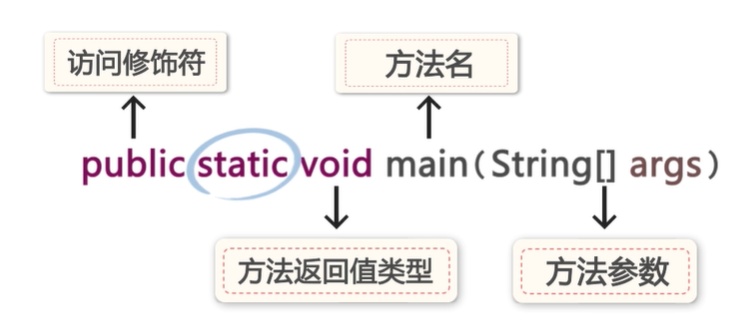
针对于主方法,我们来学习static关键字的作用。static代表着静态信息。
首先我们通过一段代码来看一下static的作用
public class Cat {
    //1.将属性的访问控制修饰符修改为private
    private String name;
    private int month;
    private double weight;
    private String species;

    public static int price;//价格

    //2.创建公有的get/set方法
    public String getName() {
        return name;
    }
    public void setName(String name) {
        this.name = name;
    }
    public int getMonth() {
        return month;
    }
    /**
     * 针对年龄范围作出合理限制
     * @param month
     */
    public void setMonth(int month) {
        if(month < 0 || month >= 240) {
            this.month = 1;
        } else {
            this.month = month;
        }
    }
    public double getWeight() {
        return weight;
    }
    public void setWeight(double weight) {
        this.weight = weight;
    }
    public String getSpecies() {
        return species;
    }
    public void setSpecies(String species) {
        this.species = species;
        String str = "男";
        if(str.equals("男")) {
            System.out.println("性别为男");
        } else {
            System.out.println("性别为女");
        }
    }

    public Cat() {

    }

    public Cat(int month) {
        this.setMonth(month);
    }
}
public class CatTest {
    public static void main(String[] args) {
        Cat one = new Cat();
        one.setName("花花");
        one.setMonth(3);
        one.setWeight(0.5);
        one.setSpecies("英短");
        one.price = 2000;

        Cat two = new Cat();
        two.setName("凡凡");
        two.setMonth(1);
        two.setWeight(0.4);
        two.setSpecies("中华田园猫");
        two.price = 150;

        System.out.println("我叫" + one.getName() + ",我的售价是" + one.price);
        System.out.println("我叫" + two.getName() + ",我的售价是" + two.price);

    }
}
上述代码运行之后,我们会发现两只猫的售价都是150。这里就是static的一个作用了。
static表示静态的,static修饰的属性称之为【类变量,静态变量】,方法称之为【类方法,静态方法】。
在Java程序中,static修饰的成员具有这样一个特征,无论该类最终实例化出来多少对象,静态成员都会共用一块静态空间。也就是说: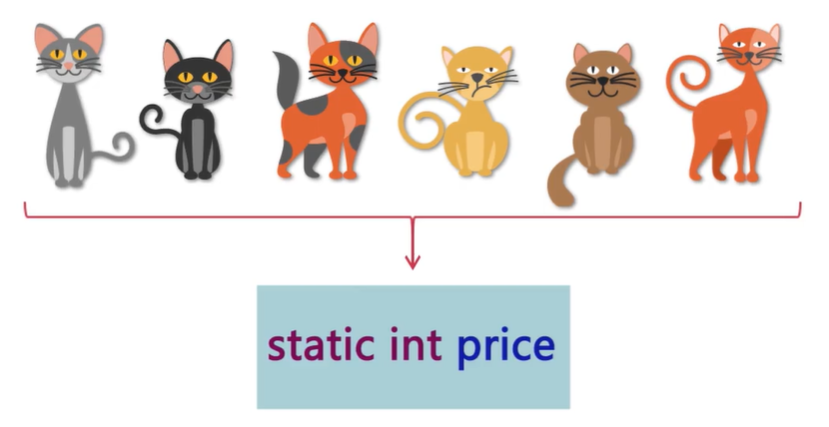
无论有多少宠物猫,对于价格而言,它们是共用同一块静态空间的。这也就是花花的价格起先是两千,而在凡凡的价格修改为150之后,两者的价格都被修改为150了。因为两者都在针对同一块内存空间进行操作。
对普通成员而言:
当这个类的对象产生的时候,它的相关成员会产生,而当这个对象销毁的时候,这些成员就会进行资源释放。
对静态成员而言:
从类第一次加载的时候,静态成员就会产生,一直到这个类不在有任何对象被使用。也就是它彻底销毁的时候,静态资源才会进行资源的释放。所以静态成员的生命周期比较长寿。
**
所以,静态资源有着如下的特性:
- 类对象共享
- 类加载时产生,销毁时释放,生命周期长
静态资源的访问方式:
- 对象.静态成员
- 类.静态成员
只是对于使用对象.静态成员的方式调用静态成员,会出现警告。这是因为本质上,用static修饰的成员变量和方法,是属于类的,而不是属于该类的实例(对象)。
| 成员属性/方法 | 类属性/方法 |
|---|---|
| 属于类的成员(对象)的属性和方法 | 属于对象共有(类)的属性和方法 |
static的修饰内容
static用来修饰方法和属性
public static class Cat {}//不能用在类的修饰上
public void eat() {
    static int a = 5;//注意不能用来修饰局部变量
}
静态内容与非静态内容的访问限制
1. 在成员方法中,可以直接访问类中静态成员
public static void eat() {
    System.out.println("小猫吃鱼");
}

public void run() {
    eat();
    this.name = "妞妞";
    //注意这边this表示的是正在调用该属性的对象
    //其实也就是使用了==>对象.静态资源的调用方式
    this.price = 20;
    System.out.println("售价是" + Cat.price + "的" + this.name + "快跑");
}
测试:
public class CatTest {
    public static void main(String[] args) {
        Cat one = new Cat();
        one.setName("花花");
        one.setMonth(3);
        one.setWeight(0.5);
        one.setSpecies("英短");
        one.price = 2000;
        Cat.price = 3000;
        one.run();
    }
}
2. 静态方法中不能直接访问同一个类的非静态成员,只能直接调用同一个类中的静态成员。
public static void eat() {
    run();//不能调用
    this.name = "胖虎";//静态方法中不能使用this
    name = "胖虎";
    price = 1500;//可以调用
    Cat cat = new Cat();
    cat.run();//这样才可以调用
    System.out.println("小猫吃鱼");
}
如果想要访问非静态成员,只能通过对象实例化后,对象.成员方法/属性的方式访问
代码块
在Java中,如果在语句当中出现{},这样的大括号对这就叫代码块。
普通代码块
顺序执行
public void run(String name) {
    {
        System.out.println("我是普通代码块1");
    }//出现在普通方法中
    System.out.println(name + "快跑");
    {
        System.out.println("我是普通代码块2");
    }
}
public static void main(String[] args) {
    Cat one = new Cat();
    one.run("花花");
}
构造代码块
创建对象时调用,优先于构造方法执行;多个构造代码块顺序执行;
public class Cat {
    //1.将属性的访问控制修饰符修改为private
    private String name;
    private int month;
    private double weight;
    private String species;

    public static int price;//价格

    {
        System.out.println("我是构造代码块1");
    }//直接出现在类中

    //2.创建公有的get/set方法
    public String getName() {
        return name;
    }
    public void setName(String name) {
        this.name = name;
    }
    public int getMonth() {
        return month;
    }
    /**
     * 针对年龄范围作出合理限制
     * @param month
     */
    public void setMonth(int month) {
        if(month < 0 || month >= 240) {
            this.month = 1;
        } else {
            this.month = month;
        }
    }
    public double getWeight() {
        return weight;
    }
    public void setWeight(double weight) {
        this.weight = weight;
    }
    public String getSpecies() {
        return species;
    }
    public void setSpecies(String species) {
        this.species = species;
    }

    public Cat() {
        System.out.println("我是宠物猫~");
    }
    {
        System.out.println("我是构造代码块2");
    }//直接出现在类中

    public Cat(int month) {
        this.setMonth(month);
    }

    public static void eat() {
        System.out.println("小猫吃鱼");
    }

    public void run(String name) {
        {
            System.out.println("我是普通代码块1");
        }//出现在普通方法中
        System.out.println(name + "快跑");
        {
            System.out.println("我是普通代码块2");
        }
    }
}
- 测试:
public static void main(String[] args) {
  Cat one = new Cat();
  one.run("花花");
}
========================
运行结果:
我是构造代码块1
我是构造代码块2
我是宠物猫~
我是普通代码块1
花花快跑
我是普通代码块2
静态代码块
static修饰的代码块,优于构造代码块执行,多个静态代码块顺序执行;无论产生多少个实例,只调用一次。
public class Cat {
    //1.将属性的访问控制修饰符修改为private
    private String name;
    private int month;
    private double weight;
    private String species;

    public static int price;//价格

    {
        System.out.println("我是构造代码块1");
    }//直接出现在类中

    //2.创建公有的get/set方法
    public String getName() {
        return name;
    }
    public void setName(String name) {
        this.name = name;
    }
    public int getMonth() {
        return month;
    }
    /**
     * 针对年龄范围作出合理限制
     * @param month
     */
    public void setMonth(int month) {
        if(month < 0 && month >= 240) {
            this.month = 1;
        } else {
            this.month = month;
        }
    }
    public double getWeight() {
        return weight;
    }
    public void setWeight(double weight) {
        this.weight = weight;
    }
    public String getSpecies() {
        return species;
    }
    public void setSpecies(String species) {
        this.species = species;
    }

    public Cat() {
        System.out.println("我是宠物猫~");
    }
    static{
        System.out.println("我是静态代码块");
    }
    public Cat(int month) {
        this.setMonth(month);
    }

    public static void eat() {
        System.out.println("小猫吃鱼");
    }

    public void run(String name) {
        {
            System.out.println("我是普通代码块1");
        }//出现在普通方法中
        System.out.println(name + "快跑");
        {
            System.out.println("我是普通代码块2");
        }
    }
}
- 仅希望执行一次的代码就可以放到静态代码块中,这样可以提高代码的执行效率。
在普通代码块中可以操作类成员,但是在静态代码块中只能操作静态成员,如果想用需要先实例化对象,通过对象.成员调用。
代码块中的变量
public void run(String name) {
    {
        System.out.println("我是普通代码块1");
    }//出现在普通方法中
    System.out.println(name + "快跑");
    {
        System.out.println("我是普通代码块2");
    }
}
这样一段代码,实际上形成了三个作用空间。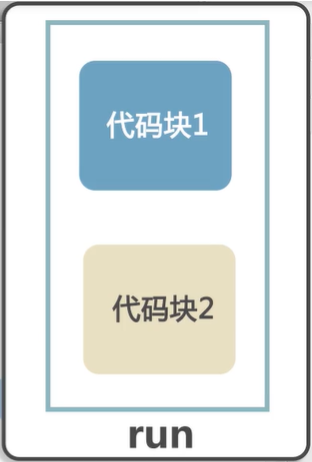
在之前的局部变量的课程中,我们也讲过,一个作用空间中是不允许出现两个同名变量的。那么在代码块中,是否可以出现同名变量呢?
public void run(String name) {
    {
        int temp = 12;
        System.out.println("我是普通代码块1,temp=" + temp);
    }//出现在普通方法中
    System.out.println(name + "快跑,temp=" +temp);//出错,temp的作用范围只在大括号内
    {
        int temp = 13;
        System.out.println("我是普通代码块2,temp=" +temp);
    }
}
在一个代码块运行结束的时候,代码块中的局部变量就会被垃圾回收机制自动回收。
public void run(String name) {
    int temp = 14;//以下的temp定义都会出错。
    {
        int temp = 12;
        System.out.println("我是普通代码块1,temp=" + temp);
    }//出现在普通方法中
    System.out.println(name + "快跑,temp=" +temp);//出错,temp的作用范围只在大括号内
    {
        int temp = 13;
        System.out.println("我是普通代码块2,temp=" +temp);
    }
}

若有收获,就点个赞吧
0 人点赞


