一、QFrame Class Family
抽象基类不可以直接使用,例如,QAbstractcrollArea有最常用的QTextEidt和各种项目视图类。
子类:标签类,lcd数字类,分裂器类,堆叠控件类,工具盒类。
1.1 基类 QFrame
最主要特点:明显的边界框架。
两个部分:
- Shape
- NoFrame
- Box
- Panel 有凹凸的面板 StyledPanel 依赖于GUI样式的。。
- HLine 水平分离器 VLine 垂直分离器
- WinPanel win2000的凹凸面板
- Shadow
- Plain 无3d效果
- Raised 凸起的3d效果 Sunken 凹陷的3d效果
1.2 QLabel
可以显示png,gif动图,
1、png
2、gif动图ui->label->setPixmap(QPixmap("F:/logo.png"));
wordwrap:文本自动换行QMovie *movie = new QMovie("F:/donghua.gif");ui->label->setMovie(movie);movie->start();
1.3 QLCDNumber
1.4 QStackedWidget
特点:可以有多个页面,且每个页面都有自己的控件。
需要使用QComboBox和QListWidget来选择它的每个页面。
需要设置QListWidget控件的currentRowChanged信号和QStackedWidget的setCurrentIndex槽函数,也就是说,选中不同的排的时候,stackedWidget那边更换当前的index,从而实现切换页面的效果。二、QThread Class Family
2.1 QProcess进程
继承自QIODevice ```cppinclude
QProcess myProcess;
myProcess.start(“notepad.exe”);
获取进程信息的方式:1. 事件循环的方式:使用connect对进程进行监听。1. 无事件循环的方式:直接调用myProcess的相关函数,通过返回值来获取进程状态,这是一种阻塞的方式。> 不可在主线程中调用哦,例如QApplication::exec()函数中。<a name="c0Oj7"></a>### Inter-Process Communication——IPC<a name="HkE6n"></a>### 2.1.1 TCP/IP高层:QNetworkAccessmanager、QFtp<br />底层:QTcpSocket、QTcpServer、QSslSocket<a name="XiXSD"></a>### 2.1.2 共享内存QSharedMemory:访问共享内存<br />QSystemSemaphore:控制系统共享资源的访问<br />允许多个线程和进程安全的访问共享内存段。<a name="vwoSi"></a>### 2.1.3 D-BusUnix库,允许从一个进程发射的信号,关联到另一个进程槽上<a name="rmwdj"></a>### 2.1.4 Qt通信协议——QCOPQCopChannel:仅在嵌入式linux可使用,和D-Bus相似,当QCOP不依赖于第三方库。<a name="qxqIM"></a>## 2.2 QThread线程QThread继承自QObject。1. 充分利用多处理器的机器。1. 有效解决在不冻结一个应用程序的用户界面下执行一个耗时的操作问题。<a name="o04rJ"></a>### 2.2.1 启动线程QThread从run函数开始执行,并且也从run函数结束。调用start函数的时候,会默认调用run函数。> run函数是通过exec函数来开启事件循环。每一个线程都有自己的事件循环,通过调用exec函数来开始启用事件循环。<br />注意:在线程中,是无法使用任何的控件类的。<a name="irjlZ"></a>#### 法一:```cppclass MyThread:public QThread{public:void stop();protected:void run();private:volatile bool stopped;};void MyThread::run(){}void MyThread::stop(){stopped = true;}
法二:使用QObject::moveToThread()
class worker:public QObject{Q_OBJECTpublic slots:void doWork(const QString ¶meter){emit resultReady(result);}signals:void resultReady(const QString &result);}
2.2.1.1 如何在QThread和QGui之间传递参数?
创建一个新类QThread的Worker并使用信号/槽来在您的worker和UI之间进行通信。
在我看来,每次你想要运行流程而不是重用同一个工人时,创建一个新工人会更容易。因此,您必须在创建新工作人员之前删除该工作人员。您可以使用QObject::deleteLater插槽。Worker当您必须将结果发送到UI并在您的插槽中MainWindow处理结果时,您需要在类中触发信号。
你还需要一个标志来阻止工人。
class Worker: public QThread{Q_OBJECTpublic:Worker(QString const& aAddress, unsigned int aPort, QObject* parent=nullptr): QThread(parent),address(aAddress), port(aPort){}virtual ~Worker(){qDebug() << "Deleted" << address << port;}public slots:void run(){running = true;int i = 0;while(running){for (int i = 0; i != 100000; ++i) {} // Long time processing++i;done(QString("Loop count %1").arg(i));}deleteLater(); // Delete the thread when finished (can be handle by the UI, too)}void stop() // Call it to stop the thread{running = false;}signals:void done(QString const&); // Will send message to the UIprivate:QString address;unsigned int port;bool running;};
class MyWindow: public QWidget{Q_OBJECTpublic:MyWindow(QWidget* parent=nullptr): QWidget(parent),address(new QLineEdit),port(new QLineEdit),ok(new QPushButton("Run")),label(new QLabel()){QVBoxLayout* layout = new QVBoxLayout(this);layout->addWidget(address);layout->addWidget(port);layout->addWidget(ok);layout->addWidget(label);connect(ok, &QPushButton::clicked, this, &MyWindow::process);}public slots:void process(){// Create a new workerWorker* worker = new Worker(address->text(), port->text().toUInt(), this);connect(ok, &QPushButton::clicked, worker, &Worker::stop); // If user clicks on the ok btn again, delete the previous workerconnect(worker, &Worker::done, this, &MyWindow::processResult); // Process the data sent by the worker in the UIworker->start();}void processResult(QString const& result){label->setText("The result: " + result);}private:QLineEdit* address;QLineEdit* port;QPushButton* ok;QLabel* label;};
在大多数情况下,您应该进行子类化QObject和使用QThread::moveToThread。但是,QThread当你的进程包含一个你可能想要从外部中断的无限循环时,直接子类更容易;
头文件中,定义函数?
也就是说,C++标准规定了此类函数会被视为内联函数,但是具体实现要根据编译器而定,如果编译器没有将其视为内联函数,那么头文件被多个源文件包含以后,会出现多处定义,在链接的时候会报错。
2.2.2 同步进程
QMutex:一个互斥锁,保护一个资源
QReadWriteLock:用来代替QMutex
QSemaphore:信号量,QMutex的一般化,保护一定数量的相同的资源。
QWaitCondition:条件变量,一个进程在一定条件下唤醒其他的线程。
2.2.2.1 生产者和消费者的问题
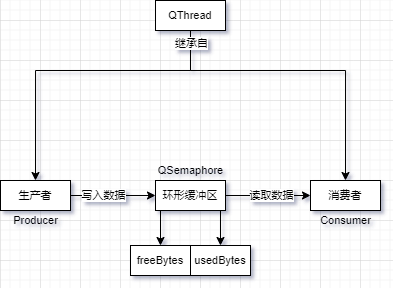
freeBytes空闲的资源,生产者没有添加数据,或者消费者正在读取的数据。
usedBytes可以使用的资源,生产者已经添加的数据,但是消费者没有读取的数据。
#include <QtCore>#include <stdio.h>#include <stdlib.h>#include <QDebug>const int DataSize = 10;const int BufferSize = 5;char buffer[BufferSize];QSemaphore freeBytes(BufferSize);//空闲区为缓冲区的大小QSemaphore usedBytes;// 生产者线程类class Producer : public QThread{public:void run();};void Producer::run(){qsrand(QTime(0,0,0).secsTo(QTime::currentTime()));// 设置随机数的种子for (int i = 0; i < DataSize; ++i) {freeBytes.acquire();//获取一定数量的资源,默认获取一个资源buffer[i % BufferSize] = "ACGT"[(int)qrand() % 4]; //使用随机数来获取ACGT中的一个qDebug() << QString("producer: %1").arg(buffer[i % BufferSize]);usedBytes.release();//释放了一个字节}}// 消费者线程类class Consumer : public QThread{public:void run();};void Consumer::run(){for (int i = 0; i < DataSize; ++i) {usedBytes.acquire();qDebug() << QString("consumer: %1").arg(buffer[i % BufferSize]);freeBytes.release();}}// 主函数int main(int argc, char *argv[]){QCoreApplication app(argc, argv);Producer producer;Consumer consumer;producer.start();consumer.start();producer.wait();//确保程序退出时,两个线程有时间执行完毕。consumer.wait();return app.exec();}
Qt随机函数:这两个函数则在#include
qsrand:设置随机数的种子
qrand QT生成随机数的格式是:
qsrand(QTime(0,0,0).secsTo(QTime::currentTime()));qrand();
2.2.3 线程和QObject
QObject可以在多线程中使用发射信号来调用其他线程中的槽,而且向其他线程中的对象发送事件,因为每个线程都有自己的事件循环。
1、QObject的可重入性。
3个约束条件:
1. QObject的子对象必须在创建它的父对象的线程中创建。1. 事件驱动只能在单一的线程中使用。1. 必须确保在删除QThread对象以前删除在该线程中所创建的所有对象。
对于GUI类,尤其是QWidget及其所有子类,是不可重入的。
可重入:可以被中断
如何解决GUI类不可被重入呢?
3、从其他线程中访问QObject之类
4、跨线程的信号和槽
2.2.4 两个术语
2.2.4.1 可重入
reentrant,可以被多个函数所调用,只能在每个调用自己的数据时。
C++类:一般是可重入的,但被多个函数调用,结果是不可预测的。
class Counter{public:Counter(){n=0;}void increment(){++n;}void decrement(){--n;}int value() const{return n;}private:int n;};
例如 ++和 —操作(这俩操作不是原子的,也就是可以被其他线程中断),以下是三个机器指令
- 向寄存器中加载变量的值
- 递增或者递减寄存器的值
- 将寄存器的值存储到内存中
2.2.4.2 线程安全
上面讲到,++和—这样的操作都不是原子操作,需要执行顺序的三个机器指令,那么,咋解决呢?
那么,我们可以用QMutex来保护对数据成员的所有访问:
QMutexLocker 类在它的构造函数中,自动锁住,然后在析构函数中进行解锁。class Counter{public:Counter(){n=0;}void increment(){QMutexLocker locker(&mutex);++n;}void decrement(){QMutexLocker locker(&mutex);--n;}int value() const{QMutexLocker locker(&mutex);return n;}private:mutable QMutex mutex;//使const成员函数中的变量可以修改int n;};
锁住mutex确保了不同线程的访问可以序列化进行。三、Qt WebEngine Widgets Classes (C++)
源于官方文档
提供基于C++和QWidget的web渲染引擎。
- 头文件:#include
-
3.1 三大模块
| QtWebEngineCore | Provides public API shared by both QtWebEngine and QtWebEngineWidgets | 提供了QtWebEngine和QtWebEngineWidgets的公共API | | —- | —- | —- | | QtWebEngine | Provides QML types for rendering web content within a QML application | 提供了QML应用的渲染网页内容的QML类型 | | QtWebEngineWidgets | Provides C++ classes for rendering web content in a QWidget based application | 提供了渲染QWidget应用网页内容的C++类 |
我们要讲的QtWebEngineWidgets这个是C++版本的,而QtWebEngine是QML版本的。
3.2 相关类
| QWebEngineCertificateError | 一些证书错误信息 | | :—-: | —- | |
QWebEngineClientCertificateSelection | 选择了指定的客户端证书 | |
QWebEngineContextMenuData | 一些上下文菜单行为内容和及其扩展内容的数据信息 | | QWebEngineDownloadItem | 网上下载的任务 | | QWebEngineFullScreenRequest | 使能允许或者禁止请求进入或者退出全屏模式 | | QWebEngineHistory | 网页浏览历史 | | QWebEnginePage | Object to view and edit web documents | | QWebEngineProfile | Web engine profile shared by multiple pages | | QWebEngineScript | 封装了JS项目 | | QWebEngineScriptCollection | 表示了用户脚本的收集器 | | QWebEngineSettings | Object to store the settings used by QWebEnginePage | | QWebEngineView | 被用于显示和编辑web文档的控件 |
3.3 QWebEngineView Class
- Header:
- #include
- #include
- qmake:
- QT += webenginewidgets
- Since:
- Qt 5.4
- Inherits:
If you want to provide support for web sites that allow the user to open new windows, such as pop-up windows, you can subclass QWebEngineView and reimplement the createWindow() function.
当你想创建的新的窗口的时候,你可以创建QWebEngineView子类,并且重载createWindow()函数。
3.4 QtWebChannel
https://blog.csdn.net/sunnyloves/article/details/88683090
四、QtXmlPatterns Class Family
https://doc.qt.io/archives/qt-4.8/qxmlquery.html#running-xpath-expressions
http://www.voidcn.com/article/p-oxwuefmo-bwo.html
QtXmlPatterns模块提供了支持XPath,XQuery,XSLT和XML模式验证。
4.1 QXmlQuery Class
此类可以使用在XML数据查询或者非XML数据(类XML)。
注意:此类中的所有函数都是可重入的。
QXmlQuery类用于编译和执行XQuery语言(XPath,XQuery,XSLT),最常用在查询XML数据,但它也可以查询已经模块化的非XML数据哦!
当我们需要查询XML的时候,我们可以详细查看这两个模型: XQuery 1.0 and XPath 2.0 Data Model.
实例1:
QXmlQuery query;query.setQuery("doc('index.html')/html/body/p[1]");QXmlSerializer serializer(query, myOutputDevice);query.evaluateTo(&serializer);
这个实例来匹配XML数据的第一段,并且,输出结果。
如果你想使用QXmlQuery 查询非XML数据,你需要写QAbstractXmlNodeModel的子类,作为XML数据模型的替换,通过QAbstractXmlNodeModel接口,可以将非XML数据转换成可用的XML数据。
Running XPath Expressions
The XPath language is a subset of the XQuery language, so running an XPath expression is the same as running an XQuery query. Pass the XPath expression to QXmlQuery using setQuery().
void QXmlQuery::setQuery(QIODevice *sourceCode, const QUrl &documentURI = QUrl())void QXmlQuery::setQuery(const QString &sourceCode, const QUrl &documentURI = QUrl())void QXmlQuery::setQuery(const QUrl &queryURI, const QUrl &baseURI = QUrl())
最常用的实际上是第三个:
queryURI:XPath 语句
我搞了半天,没成功有时间再研究!
RhythmboxTrackModel::RhythmboxTrackModel(){QXmlQuery query;QXmlQuery entries;QString res;QDomDocument rhythmdb;/** Try and open the Rhythmbox DB. An API call which tells us where* the file is would be nice.*/QFile db(QDir::homePath() + "/.gnome2/rhythmbox/rhythmdb.xml");if ( ! db.exists()) {db.setFileName(QDir::homePath() + "/.local/share/rhythmbox/rhythmdb.xml");if ( ! db.exists())return;}if (!db.open(QIODevice::ReadOnly | QIODevice::Text))return;/** Use QXmlQuery to execute and XPath query. Check the version to* make sure.*/query.setFocus(&db);query.setQuery("rhythmdb[@version='1.6']/entry[@type='song']");if ( ! query.isValid())return;query.evaluateTo(&res);db.close();/** Parse the result as an XML file. These shennanigans actually* reduce the load time from a minute to a matter of seconds.*/rhythmdb.setContent("" + res + "");m_entryNodes = rhythmdb.elementsByTagName("entry");for (int i = 0; i < m_entryNodes.count(); i++) {QDomNode n = m_entryNodes.at(i);QString location = n.firstChildElement("location").text();m_mTracksByLocation[location] = n;}qDebug() << rhythmdb.doctype().name();qDebug() << "RhythmboxTrackModel: m_entryNodes size is" << m_entryNodes.size();}
五、Qt Network
5.1 HTTP
五、小功能
5.1 QGraphicsTextItem
5.2 QMenu
https://blog.csdn.net/llittlestar123/article/details/108528022?utm_medium=distribute.pc_relevant.none-task-blog-baidujs_baidulandingword-1&spm=1001.2101.3001.4242
添加头文件
#include <QMenu>#include <QAction>
在私有属性中定义一个QMenu对象指针:
private:QMenu *m_menu; //新建一个Menu属性
配置构造函数
在CPP文件中的构造函数中为菜单指针初始化空间,注意QMenu传入的参数是this,这样将用户窗体作为菜单的父类,进入父类的继承体系,在父类析构时会先自动析构其所有子类,因此在析构函数中就没有必要对m_menu进行空间释放。
定义几个菜单动作:
QAction * addRow = new QAction("Add one row"); //定义为表格添加一行的动作QAction * removeRow = new QAction("Remove one row"); //定义从表格中删除一行的动作QAction *removeAllRow = new QAction("Remove all rows"); //定义删除表格所有行动作
将定义好的动作添加到菜单之中:
m_menu->addAction(addRow); //添加动作到菜单m_menu->addAction(removeRow); //添加动作到菜单m_menu->addSeparator(); //添加一个分隔符m_menu->addAction(removeAllRow); //添加动作到菜单
鼠标右键事件
当用户在表格中鼠标点击右键时,在鼠标点击的位置出现定义的菜单,那么有三个问题需要具体考虑:如何获取鼠标点击了右键,第二如何获取鼠标位置,第三如何交互式显示菜单。
如何获取鼠标点击了右键,可以参考上一文中对鼠标输入控件的捕捉:
else if (event->button()==Qt::RightButton) //捕获鼠标右键输入{
此处先试用pos()来获取鼠标的位置。
else if (event->button()==Qt::RightButton) //捕获鼠标右键输入{QPoint mousePos = event->pos(); //获取鼠标位置
显示菜单
else if (event->button()==Qt::RightButton) //捕获鼠标右键输入{QPoint mousePos = event->pos(); //获取鼠标位置m_menu->exec(mousePos); //显示菜单}
试运行
![[Original] Qt Tutorial(Class Edition) - 图3](/uploads/projects/yanjitai@cbymmn/57eb7e2c216008269a81a437e913017c.png)
有意思的是菜单并没有显示在表格窗体之中,而是显示在窗体之外。显然使用pos()函数获取鼠标位置是不对的,需要使用globalPos()。
- pos()获取的是鼠标在子窗体局部坐标系的位置
- globalPos()获取的是鼠标在操作系统桌面全局坐标系下的位置。而菜单对象的exec()函数需要的参数是全局坐标系下的位置。
将代码进行修改:
void CustomTableWidget::mousePressEvent(QMouseEvent *event){if(event->button()==Qt::LeftButton){qDebug()<<"table mouse press event";}else if (event->button()==Qt::RightButton) //捕获鼠标右键输入{QPoint mousePos = event->globalPos(); //此处调用鼠标的globalPos()而不是pos(),pos()输出是相对当前子窗体的位置m_menu->exec(mousePos); //显示菜单}return QTableWidget::mousePressEvent(event); //记得返回基类的时间处理函数}
![[Original] Qt Tutorial(Class Edition) - 图4](/uploads/projects/yanjitai@cbymmn/1a724dbc55c8febb7e94cacaae1a7f01.png)
源代码
头文件
#ifndef CUSTOMTABLEWIDGET_H#define CUSTOMTABLEWIDGET_H#include <QMouseEvent>#include <QMenu>#include <QAction>#include <QTableWidget> //手动包含class CustomTableWidget : public QTableWidget{Q_OBJECTpublic:CustomTableWidget(QWidget *parent = nullptr);protected:void mousePressEvent(QMouseEvent *event) override;private:QMenu *m_menu; //新建一个Menu属性};#endif // CUSTOMTABLEWIDGET_H
cpp文件
#include "customtablewidget.h"#include <QDebug>CustomTableWidget::CustomTableWidget(QWidget *parent):QTableWidget(parent),m_menu(new QMenu(this)){QAction * addRow = new QAction("Add one row"); //定义为表格添加一行的动作QAction * removeRow = new QAction("Remove one row"); //定义从表格中删除一行的动作QAction *removeAllRow = new QAction("Remove all rows"); //定义删除表格所有行动作m_menu->addAction(addRow); //添加动作到菜单m_menu->addAction(removeRow); //添加动作到菜单m_menu->addSeparator(); //添加一个分隔符m_menu->addAction(removeAllRow); //添加动作到菜单}void CustomTableWidget::mousePressEvent(QMouseEvent *event){if(event->button()==Qt::LeftButton){qDebug()<<"table mouse press event";}else if (event->button()==Qt::RightButton) //捕获鼠标右键输入{QPoint mousePos = event->globalPos(); //此处调用鼠标的globalPos()而不是pos(),pos()输出是相对当前子窗体的位置m_menu->exec(mousePos); //显示菜单}return QTableWidget::mousePressEvent(event); //记得返回基类的时间处理函数}
菜单QAction关联槽函数
首先需要定义每个动作对应的槽函数,一共定义了三个动作,需要在头文件对三个对应的槽函数进行定义。三个槽函数只希望在用户窗体内部调用,因此将其定义为私有属性:
private slots:void addOneRowSlot (); //为表格添加一行槽函数void removeOneRowSlot (); //删除表格一行槽函数void removeAllRowsSlot (); //删除表格所有行槽函数
再在cpp文件之中对槽函数进行实现,此时槽函数的具体实现全为空:
void CustomTableWidget::addOneRowSlot (){}void CustomTableWidget::removeOneRowSlot (){}void CustomTableWidget::removeAllRowsSlot (){}
下一步将槽函数与菜单动作关联,使用信号与槽关联方式:
//将动作信号与槽函数关联connect(addRow,&QAction::triggered,this,&CustomTableWidget::addOneRowSlot);connect(removeRow,&QAction::triggered,this,&CustomTableWidget::removeOneRowSlot);connect(removeAllRow,&QAction::triggered,this,&CustomTableWidget::removeAllRowsSlot);
此时每个动作都会与槽函数关联,只是尚未具体实现槽函数,点击动作后表格不会出现任何反应。
对表格添加一行的槽函数进行实现:
void CustomTableWidget::addOneRowSlot(){int rowCout = rowCount();this->setRowCount(rowCout+1);}
对删除表格一行的槽函数进行实现:
void CustomTableWidget::removeOneRowSlot(){int rowCout = rowCount();if(rowCout==0) return;setRowCount(rowCout-1);}
对删除表格所有行的槽函数进行实现:
void CustomTableWidget::removeAllRowsSlot(){setRowCount(0);}
5.3 QPalette

若有收获,就点个赞吧
0 人点赞


