使用场景
- 使用clickhouse(分布式表–> 多个本地表分片),导入数据时,为了不影响集群性能,不走分布式表,而走本地表
- 完整截取一个文件,并分发到不同的地方处理,数据不出现重复
脚本详情
原始版
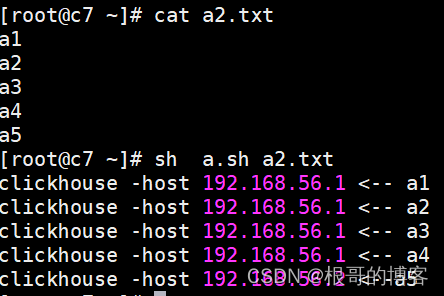 ```shell
!/bin/bash
[ $# -lt 1 ] && echo “usage: sh $0 xx.cvs” && exit
file=$1
count=wc -l $file |awk '{print $1}'
hosts=( 192.168.56.1 192.168.56.2 192.168.56.3 ) hostnums=${#hosts[@]}
x,y 当前数据所在的stop, start行号
x=1 page_num=1 page_size=2
while [ $x -le $count ] do [ $x = 1 ] && y=$x || y=$(( x + 1 )) let x+=${page_size} #分页大小,数据批次导入到一个主机中
flag=$(( pagenum % hostnums )) if [ $flag = 1 ] ;then sed -n “$y,$x p” $file |awk -v host=${hosts[0]} ‘{print “clickhouse -host “ host_ “ <— “ $0}’
#sed -n "$y,$x p" $file | clickhouse-client -h 192.168.56.1 --port 9000 -d default -m -u default --password 123456 --format_csv_delimiter=$'|' --query="insert into test_yh.product_id format CSV"
elif [ $flag = 2 ] ;then sed -n “$y,$x p” $file |awk -v host=${hosts[1]} ‘{print “clickhouse -host “ host “ <—“ $0}’
#sed -n "$y,$x p" $file | clickhouse-client -h ${hosts[2]} --port 9000 -d default -m -u default --password 123456 --format_csv_delimiter=$'|' --query="insert into test_yh.product_id format CSV"
else sed -n “$y,$x p” $file |awk -v host=${hosts[2]} ‘{print “clickhouse -host “ host “ <—“ $0}’
#sed -n "$y,$x p" $file | clickhouse-client -h ${hosts[3]} --port 9000 -d default -m -u default --password 123456 --format_csv_delimiter=$'|' --query="insert into test_yh.product_id format CSV"
fi
let page_num++ done
<a name="W5p9c"></a>#### 改进版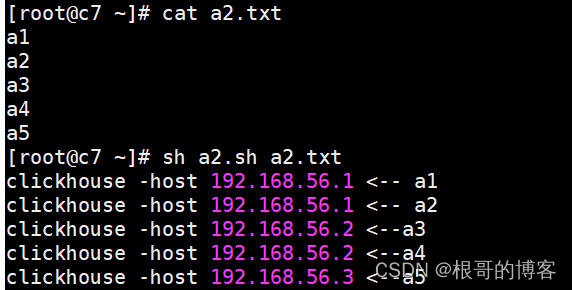```shell#!/bin/bash[ $# -lt 1 ] && echo "usage: sh $0 xx.cvs" && exitfile=$1count=` wc -l $file |awk '{print $1}' `hosts=(192.168.56.1192.168.56.2192.168.56.3)hostnums=${#hosts[@]}#批次分页:所在页码,页大小page_size=2#当前数据所在的stop, start行号 (不需要改动)page_num=1start_num=1stop_num=0#遍历所有文件的数据while [ $stop_num -le $count ]dolet stop_num+=${page_size}#根据页码来分配数据,取模1==>host1, 取模2==>host2flag=$(( page_num % hostnums ))if [ $flag = 1 ] ;thensed -n "$start_num,$stop_num p" $file |awk -v host_=${hosts[0]} '{print "clickhouse -host " host_ " <-- " $0}'#sed -n "$start_num,$stop_num p" $file | clickhouse-client -h 192.168.56.1 --port 9000 -d default -m -u default --password 123456 --format_csv_delimiter=$'|' --query="insert into test_yh.product_id format CSV"elif [ $flag = 2 ] ;thensed -n "$start_num,$stop_num p" $file |awk -v host_=${hosts[1]} '{print "clickhouse -host " host_ " <--" $0}'#sed -n "$start_num,$stop_num p" $file | clickhouse-client -h ${hosts[2]} --port 9000 -d default -m -u default --password 123456 --format_csv_delimiter=$'|' --query="insert into test_yh.product_id format CSV"elsesed -n "$start_num,$stop_num p" $file |awk -v host_=${hosts[2]} '{print "clickhouse -host " host_ " <--" $0}'#sed -n "$start_num,$stop_num p" $file | clickhouse-client -h ${hosts[3]} --port 9000 -d default -m -u default --password 123456 --format_csv_delimiter=$'|' --query="insert into test_yh.product_id format CSV"filet start_num=${stop_num}+1let page_num++done
最终版
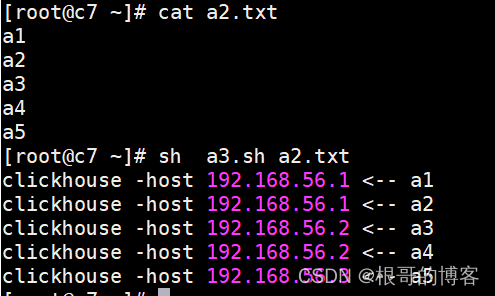
#!/bin/bash[ $# -lt 1 ] && echo "usage: sh $0 xx.cvs" && exitfile=$1count=` wc -l $file |awk '{print $1}' `hosts=(192.168.56.1192.168.56.2192.168.56.3)hostnums=${#hosts[@]}#批次分页:所在页码,页大小page_size=2#当前数据所在的stop, start行号 (不需要改动)page_num=1start_num=1stop_num=0#遍历所有文件的数据while [ $stop_num -le $count ]dolet stop_num+=${page_size}#根据页码来分配数据,取模1==>host1, 取模2==>host2flag=$(( page_num % hostnums ))index=$(( flag - 1 ))host=${hosts[$index]}sed -n "$start_num,$stop_num p" $file |awk -v host_=${host} '{print "clickhouse -host " host_ " <-- " $0}'#sed -n "$start_num,$stop_num p" $file | clickhouse-client -h ${host} --port 9000 -d default -m -u default --password 123456 --format_csv_delimiter=$'|' --query="insert into test_yh.product_id format CSV"let start_num=${stop_num}+1let page_num++done

若有收获,就点个赞吧
0 人点赞


