1. 含义不同
会把传入的数据当成一个占位符,最终在数据上添加一个单引号处理
$ 会把传入的数据直接显示在sql语句中,不会添加单引号
使用 # 的xml文件
<select id="selectUserByYear" resultType="user">select * from #{year}_user</select>

可以看到最终执行的sql 为 select * from ‘2021’_user 这个肯定是有问题的
切换为 $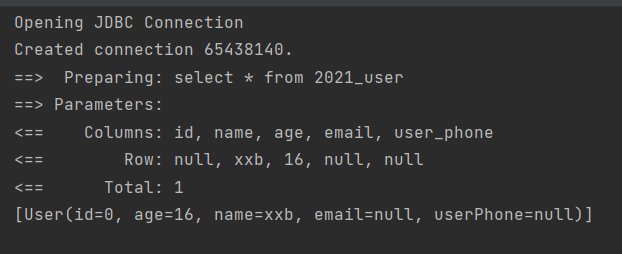
数据直接显示在sql语句中
2. 实现方式不同
$作用相等于是字符串拼接
相当于使用StringBuffer的append方法将${year}追加在 _user前
作用相当于变量值替换
相当于使用PreparedStement接口来进行赋值操作。
3. 使用场景
对于sql语句中非变量部分,可以使用$
当 SQL 语句中的元数据(如表名或列名)是动态生成的时候,字符串替换将会非常有用。 举个例子,如果你想 select 一个表任意一列的数据时,不需要这样写:
@Select("select * from user where id = #{id}")User findById(@Param("id") long id);@Select("select * from user where name = #{name}")User findByName(@Param("name") String name);@Select("select * from user where email = #{email}")User findByEmail(@Param("email") String email);// 其它的 "findByXxx" 方法
而是可以只写这样一个方法:
@Select("select * from user where ${column} = #{value}")User findByColumn(@Param("column") String column, @Param("value") String value);
4. 注意事项

若有收获,就点个赞吧
0 人点赞


