当一个项目的mapper中 xml 日益增多的情况下,不可能一个个去手动的注入
<mappers><!-- 扫描路径下的mapper映射文件 --><mapper resource="mapper/UserMapper.xml"/><mapper resource="mapper/UserResultMapper.xml"/></mappers>
需要批量注入
1. 原生的方式
1.1 放在 resources 目录
maven 默认打包会将src/main/java和src/main/resources相同包下的文件合并到同一包中
tips: 本地测试前 maven clean 一下
<mappers><package name="com.xxb.mybatisDemon.mapper"/></mappers>
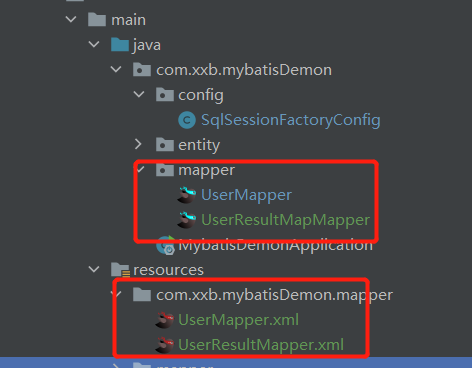
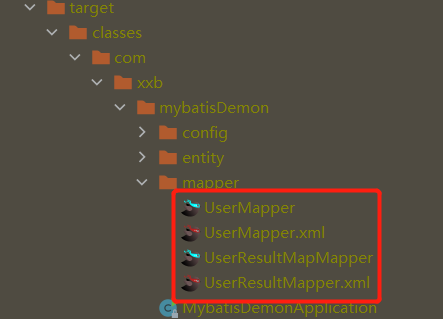
1.2 放在 java 目录
如果是 src/main.java 目录下 ,还得配置 maven 的配置文件 因为,如果 xml 文件在 java 目录下,则不会打包。
<build><resources><resource><directory>src/main/java</directory><includes><include>**/*.xml</include></includes><filtering>false</filtering></resource></resources></build>
2. 集成 Spring
2.1 使用 XML 进行配置
<beans xmlns="http://www.springframework.org/schema/beans"xmlns:xsi="http://www.w3.org/2001/XMLSchema-instance"xmlns:mybatis="http://mybatis.org/schema/mybatis-spring"xsi:schemaLocation="http://www.springframework.org/schema/beans http://www.springframework.org/schema/beans/spring-beans-3.0.xsdhttp://mybatis.org/schema/mybatis-spring http://mybatis.org/schema/mybatis-spring.xsd"><!-- 配置接口存储的包,用来扫描mapper接口 --><mybatis:scan base-package="edu.zju.bme.data.manage.mapper" /><bean id="sqlSessionFactory" class="org.mybatis.spring.SqlSessionFactoryBean"><!-- 配置mapper文件位置,扫描映射文件,可以使用Ant风格的路径格式 --><property name="mapperLocations" value="classpath*:mappers/**/*.xml" />// ...</bean></beans>

若有收获,就点个赞吧
0 人点赞


