9.2.1 Java 的异常处理机制
- 抛出异常:创建异常对象,交由运行时系统处理
当一个方法出现错误引发异常时,方法创建异常对象并交付给运行时系统,系统对象中包含了异常类型和异常出现时的程序状态等异常信息。运行时系统负责寻找处置异常的代码并执行。 - 捕获异常:寻找合适的异常处理器处理异常,否则终止运行
在方法抛出异常之后,运行时系统将转为寻找合适的异常处理器,即 Exception Handler。潜在的异常处理是异常发生时依次存留在调用栈中的方法的集合。当异常处理器所能处理的异常类型与抛出的异常类型相符时,即为合适的异常处理器。运行时系统从发生异常的方法开始,依次回查调用栈中的方法,直至找到含有异常处理器的方法并执行。当运行时系统遍历了调用栈都没找到合适的异常处理器,则运行时系统终止,Java 程序终止。
下面看一个示例。
package throwable;public class ExceptionHandleMechanism {public static int doWork() {try {int i = 10 / 0; // 会抛出异常System.out.println("i=" + i);} catch (ArithmeticException e) { // 捕获异常// 捕获 ArithmeticExceptionSystem.out.println("ArithmeticException: " + e);return 0;} catch (Exception e) { // 捕获异常// 捕获 ExceptionSystem.out.println("Exception: " + e);return 1;} finally {System.out.println("Finally");return 2;}}public static void main(String[] args) {System.out.println("执行后的值为:" + doWork());System.out.println("Mission Complete");}}
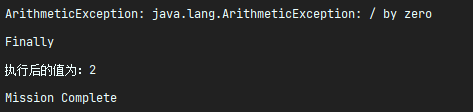
finally 会在 catch 的 return 语句执行之前执行,因此这里返回的是 2 而不是 0。
尽量不要捕获类似 Exception 这样的通用异常,而是应该捕获特定的异常。
package throwable;public class ExceptionHandleMechanism {public static void doWork() {try {int i = 10 / 0; // 会抛出异常System.out.println("i=" + i);} catch (ArithmeticException e) { // 捕获异常} finally {System.out.println("Finally");}}public static void main(String[] args) {doWork();System.out.println("Mission Complete");}}
违反了“不要生吞异常”原则。
如果不把异常抛出,或者输出到日志,程序可能在后续代码以不可控的方式结束。
package throwable;public class ExceptionHandleMechanism {public static void doWork() {try {int i = 10 / 0; // 会抛出异常System.out.println("i=" + i);} catch (ArithmeticException e) { // 捕获异常System.out.println("ArithmeticException: " + e);} finally {System.out.println("Finally");}}public static void main(String[] args) {doWork();System.out.println("Mission Complete");}}
对于很多子模块的系统或者分布式系统来说,如果通过控制台直接打印异常,而不是将异常持久化保存下来,我们无法找到相关的异常,更无法找到堆栈的轨迹。
9.2.2 Java 异常的处理原则
- 具体明确:抛出的异常应能通过异常类名和 message 准确说明异常的类型和产生异常的原因
- 提早抛出:应尽可能早的发现并抛出异常,便于精确定位问题
延迟捕获:异常的捕获和处理应尽可能延迟,让掌握更多信息的作用域来处理异常
9.2.3 高校主流的异常处理框架
在用户看来,应用系统发生的所有异常都是应用系统内部的异常
设计一个通用的继承自 RuntimeException 的异常来统一处理
- 其余异常都统一转译为上述异常 AppException
- 在 catch 之后,抛出上述异常的子类,并提供足以定位的信息
- 由前端接收 AppException 做统一处理
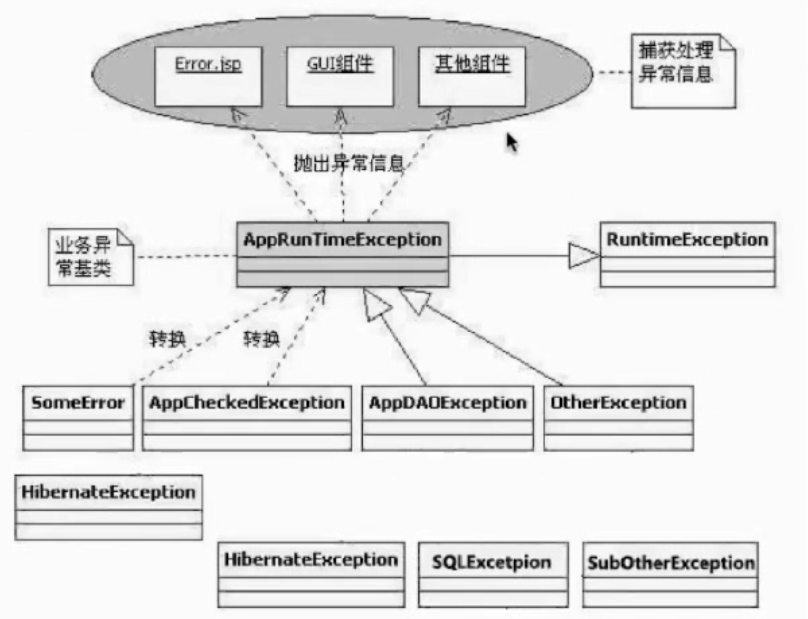
如图所示,AppRunTimeException 是系统异常的基类,对外只抛出这个异常。这个异常可以由前端客户端接收处理,当异常发生的时候,客户端的相关组件捕获这些异常,同时将友好的信息而不是堆栈的信息展示给客户,比如输入的验证码错误,输入的密码错误之类的。
在 AppRunTimeException 下面有各种各样的异常和错误,最终都会被转义为 RuntimeException。
AppRunTimeException 下面还可以设计一些异常,比如 AppDAOException、AppCheckedException 和 OtherException 等,这些都是根据实际需要灵活处理。
再往下就是如何捕获一些比较原始的异常,比如 SQLException、HibernateException,将其转义为更高级一点的 AppDAOException。
9.2.4 try-catch 的性能
下面看一个示例。
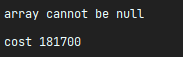
package throwable;public class ExceptionPerformance {public static void testException(String[] array) {try {System.out.println(array[0]);} catch (NullPointerException e) {System.out.println("array cannot be null");}}public static void testIf(String[] array) {if (array != null) {System.out.println(array[0]);} else {System.out.println("array cannot be null");}}public static void main(String[] args) {long start = System.nanoTime();testIf(null);System.out.println("cost " + (System.nanoTime() - start));}}
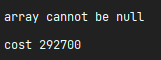
package throwable;public class ExceptionPerformance {public static void testException(String[] array) {try {System.out.println(array[0]);} catch (NullPointerException e) {System.out.println("array cannot be null");}}public static void testIf(String[] array) {if (array != null) {System.out.println(array[0]);} else {System.out.println("array cannot be null");}}public static void main(String[] args) {long start = System.nanoTime();testException(null);System.out.println("cost " + (System.nanoTime() - start));}}
Java 异常处理消耗性能的地方
- try-catch 块影响 JVM 的优化
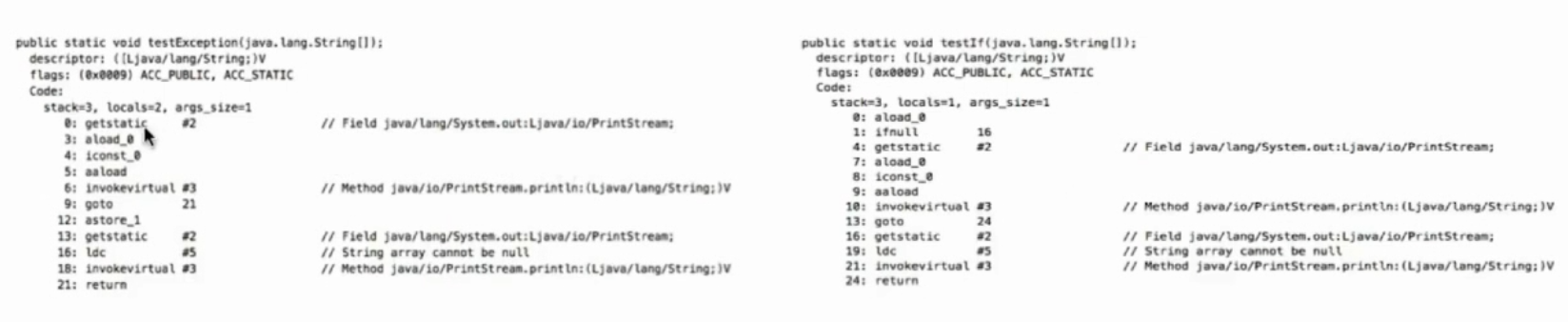
- 异常对象实例需要保存栈快照等信息,开销较大
建议仅捕获可能出现异常的必要的代码段,不要用一个大 try 包去包住整个代码段,同时也不要利用异常来控制代码流程,因为它的效率远没有 if else switch 效率高。

若有收获,就点个赞吧
0 人点赞


