1、目标/伪目标
- 语法格式
targets : prerequisites
command...
目标文件:依赖文件 实现目标文件的编译语句
目标
hello:hello.o
    gcc hello.o -o hello
hello.o:hello.S
    gcc -c hello.S -o hello.o
hello.S:hello.i
    gcc -S hello.i -o hello.S
hello.i:hello.c
    gcc -E hello.c -o hello.i

clean:
    rm hello hello.o hello.S hello.i
运行测试
[root@hadoop1 demo]# make
gcc -E hello.c -o hello.i
gcc -S hello.i -o hello.S
gcc -c hello.S -o hello.o
gcc hello.o -o hello
[root@hadoop1 demo]# ls
hello  hello.c  hello.i  hello.o  hello.S  Makefile
[root@hadoop1 demo]# ./hello
hello
root@ubuntu:/mnt/hgfs/make_demo# make clean
rm hello hello.o hello.S hello.i
make命令后,默认会执行第一条命令hello:hello.o,这里依赖hello.o所以又执行了后续的命令
- 可以指定运行命令
root@ubuntu:/home/wangchun/demo# make hello.i gcc -E hello.c -o hello.i
伪目标
- 伪目标clean没有依赖文件 ``` hello:hello.o gcc hello.o -o hello hello.o:hello.S gcc -c hello.S -o hello.o hello.S:hello.i gcc -S hello.i -o hello.S hello.i:hello.c gcc -E hello.c -o hello.i
clean: @echo ‘delete’ rm hello.i hello.S hello.o hello
- 就可以使用make clean
root@ubuntu:/home/wangchun/demo# make clean delete rm hello.i hello.S hello.o hello
<a name="ddc7d28b"></a>
### 3、变量

- 变量的使用,小括号()、大括号{}都行
name = tom test: @echo $(name) @echo ${name}
- 前面的变量可以使用后面的变量
a = $(b) tom b = $(c) c = hello
test: @echo $(a) @echo $(b)
- 前面的变量可以使用后面的变量,可能会无限递归报错
a = hello a = $(a) tom
test: @echo $(a)
- = :=的区别
例子1
a = hello y = $(a) tom a = nihao
test: @echo $(a) # nihao @echo $(y) # nihao tom
例子2
a := hello y := $(a) tom a := nihao
test: @echo $(a) # nihao @echo $(y) # hello tom
- :=声明的变量不能使用后面定义的
y := $(x) world x := hello
test: @echo $(x) # hello @echo $(y) # world
- = 替换
- := 恒等于,常量不能变化
- += 追加


<a name="o6Kkl"></a>
#### export

- 将变量传递到下级makefile中
平台的linux版本
export PLAT_UBUNTU = ubuntu
平台的芯片型号
export PLAT_GK71 = gk7102s
<a name="haDV6"></a>
#### @

- 命令前添加@表示命令行不打印执行命令
> all:
> @echo 'aa'
> echo 'bb'

<a name="0suD9"></a>
### 目标文件/依赖文件

<a name="HSB9r"></a>
### 4、make
<a name="8kLEP"></a>
#### makefile文件

- GNU make找寻默认的Makefile的规则是在当前目录下依次找三个文件——“GNUmakefile”、“makefile”和“Makefile”。其按顺序找这三个文件,一旦找到,就开始读取这个文件并执行。
- 指定makefile文件(三种写法)
> make -f demo.mk
> make --file demo.mk
> make --makefile demo.mk

- make的默认是makefile中的第一个目标,而其它目标一般是由这个目标连带出来的。
> all:a1 a2 a3
>     @echo $@
> a1:
>     @echo $@
> a2:
>     @echo $@
> a3:
>     @echo $@
>
> root@ubuntu:/mnt/hgfs/make_demo# make
> a1
> a2
> a3
> all

> root@ubuntu:/mnt/hgfs/make_demo# make all

> a1

> a2

> a3

> all

- 一些约定俗成的目标
> all:这个伪目标是所有目标的目标,其功能一般是编译所有的目标。

> clean:这个伪目标功能是删除所有被make创建的文件。

> install:这个伪目标功能是安装已编译好的程序,其实就是把目标执行文件拷贝到指定的目标中去。

> print:这个伪目标的功能是例出改变过的源文件。

> tar:这个伪目标功能是把源程序打包备份。也就是一个tar文件。

> dist:这个伪目标功能是创建一个压缩文件,一般是把tar文件压成Z文件。或是gz文件。

> TAGS:这个伪目标功能是更新所有的目标,以备完整地重编译使用。

> check和test:这两个伪目标一般用来测试makefile的流程。

<a name="Id6bE"></a>
#### 编译子makefile
> debug:

>     cd test && $(MAKE)

<a name="MzjWN"></a>
### define命令包

- 命令包,$(命令)来调用
all: $(cmd)
define cmd echo ‘run cmd’ endef
<a name="jlt3z"></a>
###
<a name="WaDee"></a>
#### 通配符
- %.c 任意的.c文件
- *.c 所有的.c文件
- $^所有的依赖文件
- $@所有的目标文件
- $< 所有的依赖文件的第一个文件
<a name="870a51ba"></a>
### 函数
<a name="z7442"></a>
#### subst
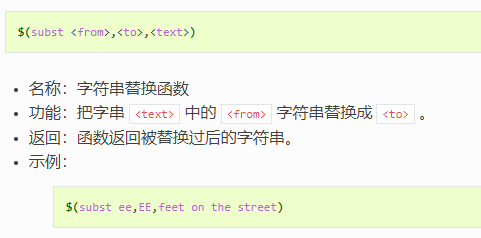
result = $(subst ee,EE,feet on the street) all: @echo $(result)
<a name="Wor3Q"></a>
#### findstring
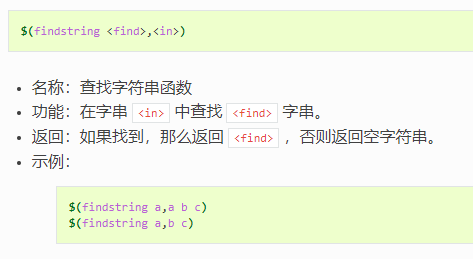
str = ‘a b c ‘ result = $(findstring a,$(str)) all: @echo $(result) ```
sort
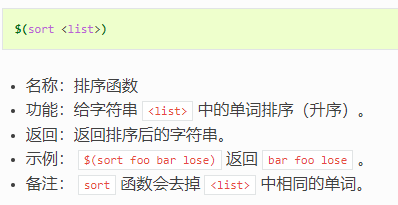
if-then-else-fi
- if函数
all:
@if [ "debug" = "debug" ]; \then \ echo ‘right’;\ echo ‘right1’;\ else \ echo ‘error’;\ fi
ifeq
- 注意换行写法
x = tom test: ifeq ($(x),tom)
@echo '1'else
@echo '2'endif
判断文件存在
OBJS_DIR = dir
all :
$(mk_objs_dir)define mk_objs_dir
@if test ! -d $(OBJS_DIR);\
then \

echo 'no exit';\

mkdir $(OBJS_DIR);\

else \

echo 'exit';\
fi
endef
foreach
- $(foreach ,
- ,
) - 这个函数的意思是,把参数
- 中的单词逐一取出放到参数 所指定的变量中,然后再执行
所包含的表达式。每一次 会返回一个字符串,循环过程中, 的所返回的每个字符串会以空格分隔,最后当整个循环结束时, 所返回的每个字符串所组成的整个字符串(以空格分隔)将会是foreach函数的返回值。 name = a b c d
a.o b.o c.o d.o
result = $(foreach n,$(name),$(n).o)
all:
echo $(result)
shell
- shell函数把执行操作系统命令后的输出作为函数返回
content := $(shell pwd)
all:
echo $(content)
sed
test2 = $(test) | sed -e ‘s/abc/123/‘
替换所有匹配的abc
test3 = $(test) | sed -e ‘s/abc/123/g’
debug:
@echo $(test)

@echo $(test2)

@echo $(test3)
- 替换文件中字符串(将myfile路径的文件中*.0字符串替换成ddd)
sed -i ‘s,.*.o:, ddd:,g’ $(myfile);
include
- 执行其他的makefile文件
-include xx.mk

若有收获,就点个赞吧
0 人点赞


