参考文档:
Valiant/kube-prometheus
版本确认
#kubectl version -o yamlclientVersion:buildDate: "2021-06-28T04:01:44Z"compiler: gcgitCommit: 40ad569gitTreeState: ""gitVersion: v1.20.4-aliyun.1goVersion: go1.15.8major: "1"minor: 20+platform: linux/amd64serverVersion:buildDate: "2021-08-23T11:21:01Z"compiler: gcgitCommit: 66492d8gitTreeState: ""gitVersion: v1.20.4-aliyun.1goVersion: go1.15.8major: "1"minor: 20+platform: linux/amd64
kube-prometheus的兼容性说明(https://gitee.com/cyt_0906/kube-prometheus/tree/main#kubernetes-compatibility-matrix),按照兼容性说明,部署的是最新的release-0.7版本。 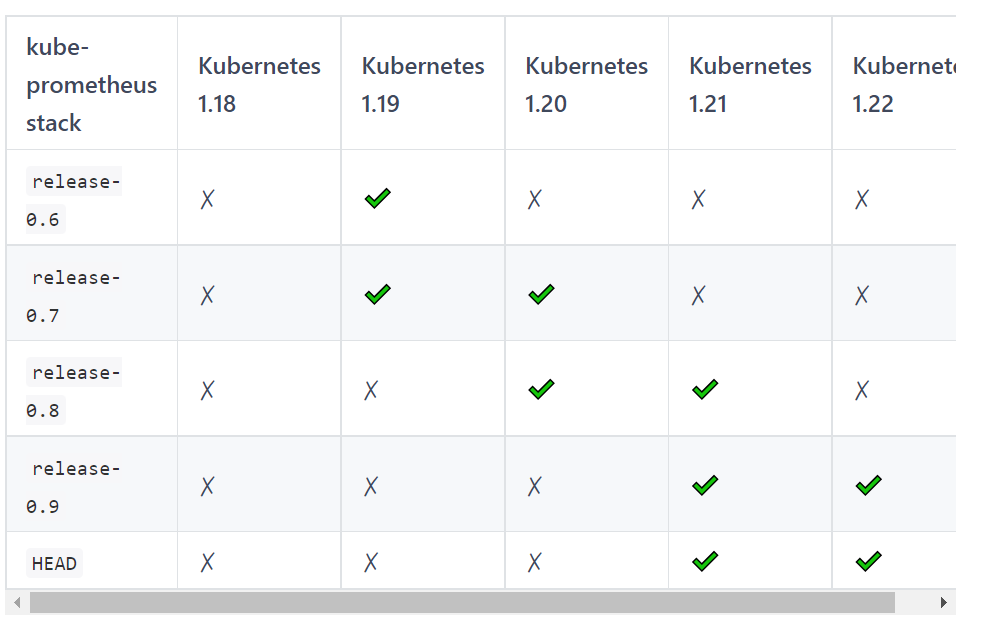
从官方的地址获取最新的release-0.7分支,或者直接打包下载release-0.7
git clone https://github.com/prometheus-operator/kube-prometheus.git
git checkout release-0.7
或者
wget -c https://github.com/prometheus-operator/kube-prometheus/archive/v0.7.0.zip
为了Kubernetes集群外访问prometheus、grafana和alertmanager,可以配置NodePort或者Ingress,此处简单起见,直接修改为NodePort。
[root@iZbp1f7371evyioh8jilpzZ manifests]# cat prometheus-service.yaml
apiVersion: v1
kind: Service
metadata:
  labels:
    prometheus: k8s
  name: prometheus-k8s
  namespace: monitoring
spec:
  type: NodePort           #新增
  ports:
  - name: web
    port: 9090
    targetPort: web
    nodePort: 31001        #新增
  selector:
    app: prometheus
    prometheus: k8s
  sessionAffinity: ClientIP
[root@iZbp1f7371evyioh8jilpzZ manifests]# cat alertmanager-service.yaml
apiVersion: v1
kind: Service
metadata:
  labels:
    alertmanager: main
  name: alertmanager-main
  namespace: monitoring
spec:
  type: NodePort      #新增
  ports:
  - name: web
    port: 9093
    targetPort: web
    nodePort: 31003  #新增
  selector:
    alertmanager: main
    app: alertmanager
  sessionAffinity: ClientIP
[root@iZbp1f7371evyioh8jilpzZ manifests]# cat grafana-service.yaml
apiVersion: v1
kind: Service
metadata:
  labels:
    app: grafana
  name: grafana
  namespace: monitoring
spec:
  type: NodePort          #新增
  ports:
  - name: http
    port: 3000
    targetPort: http
    nodePort: 31002       #新增
  selector:
    app: grafana
如果使用 Rancher 可能会有一个问题。
Rancher 会启一个 prometheus-operator 的,当你再进行部署的时候就会产生冲突
通过更改deployment中的副本数停掉,Rancher 启动的 prometheus-operator
kubectl edit deployment/prometheus-operator-monitoring-operato -n cattle-prometheus
开始安装
cd kube-prometheus/manifests
kubectl create -f manifests/setup
kubectl create -f manifests/
调整目录结构
按照顺序执行如下命令
mkdir -p serviceMonitor prometheus adapter node-exporter kube-state-metrics grafana alertmanager operator other

mv *serviceMonitor* serviceMonitor/
mv prometheus-adapter-* adapter/
mv grafana-* grafana
mv prometheus-* prometheus
mv alertmanager-* alertmanager
mv kube-state-metrics-* kube-state-metrics
mv node-exporter-* node-exporter

mv setup/* operator/
rm -rf setup/
[root@iZbp1f7371evyioh8jilpzZ manifests]# tree
.
├── adapter
│   ├── prometheus-adapter-apiService.yaml
│   ├── prometheus-adapter-clusterRoleAggregatedMetricsReader.yaml
│   ├── prometheus-adapter-clusterRoleBindingDelegator.yaml
│   ├── prometheus-adapter-clusterRoleBinding.yaml
│   ├── prometheus-adapter-clusterRoleServerResources.yaml
│   ├── prometheus-adapter-clusterRole.yaml
│   ├── prometheus-adapter-configMap.yaml
│   ├── prometheus-adapter-deployment.yaml
│   ├── prometheus-adapter-roleBindingAuthReader.yaml
│   ├── prometheus-adapter-serviceAccount.yaml
│   └── prometheus-adapter-service.yaml
├── alertmanager
│   ├── alertmanager-alertmanager.yaml
│   ├── alertmanager-secret.yaml
│   ├── alertmanager-serviceAccount.yaml
│   └── alertmanager-service.yaml
├── grafana
│   ├── grafana-dashboardDatasources.yaml
│   ├── grafana-dashboardDefinitions.yaml
│   ├── grafana-dashboardSources.yaml
│   ├── grafana-deployment.yaml
│   ├── grafana-serviceAccount.yaml
│   └── grafana-service.yaml
├── kube-state-metrics
│   ├── kube-state-metrics-clusterRoleBinding.yaml
│   ├── kube-state-metrics-clusterRole.yaml
│   ├── kube-state-metrics-deployment.yaml
│   ├── kube-state-metrics-serviceAccount.yaml
│   └── kube-state-metrics-service.yaml
├── node-exporter
│   ├── node-exporter-clusterRoleBinding.yaml
│   ├── node-exporter-clusterRole.yaml
│   ├── node-exporter-daemonset.yaml
│   ├── node-exporter-serviceAccount.yaml
│   └── node-exporter-service.yaml
├── operator
│   ├── 0namespace-namespace.yaml
│   ├── prometheus-operator-0alertmanagerConfigCustomResourceDefinition.yaml
│   ├── prometheus-operator-0alertmanagerCustomResourceDefinition.yaml
│   ├── prometheus-operator-0podmonitorCustomResourceDefinition.yaml
│   ├── prometheus-operator-0probeCustomResourceDefinition.yaml
│   ├── prometheus-operator-0prometheusCustomResourceDefinition.yaml
│   ├── prometheus-operator-0prometheusruleCustomResourceDefinition.yaml
│   ├── prometheus-operator-0servicemonitorCustomResourceDefinition.yaml
│   ├── prometheus-operator-0thanosrulerCustomResourceDefinition.yaml
│   ├── prometheus-operator-clusterRoleBinding.yaml
│   ├── prometheus-operator-clusterRole.yaml
│   ├── prometheus-operator-deployment.yaml
│   ├── prometheus-operator-serviceAccount.yaml
│   └── prometheus-operator-service.yaml
├── other
├── prometheus
│   ├── prometheus-clusterRoleBinding.yaml
│   ├── prometheus-clusterRole.yaml
│   ├── prometheus-prometheus.yaml
│   ├── prometheus-roleBindingConfig.yaml
│   ├── prometheus-roleBindingSpecificNamespaces.yaml
│   ├── prometheus-roleConfig.yaml
│   ├── prometheus-roleSpecificNamespaces.yaml
│   ├── prometheus-rules.yaml
│   ├── prometheus-serviceAccount.yaml
│   └── prometheus-service.yaml
└── serviceMonitor
    ├── alertmanager-serviceMonitor.yaml
    ├── grafana-serviceMonitor.yaml
    ├── kube-state-metrics-serviceMonitor.yaml
    ├── node-exporter-serviceMonitor.yaml
    ├── prometheus-adapter-serviceMonitor.yaml
    ├── prometheus-operator-serviceMonitor.yaml
    ├── prometheus-serviceMonitorApiserver.yaml
    ├── prometheus-serviceMonitorCoreDNS.yaml
    ├── prometheus-serviceMonitorKubeControllerManager.yaml
    ├── prometheus-serviceMonitorKubelet.yaml
    ├── prometheus-serviceMonitorKubeScheduler.yaml
    └── prometheus-serviceMonitor.yaml

若有收获,就点个赞吧
0 人点赞


