window算子在flink中是非常重要的,要理解window算子首先要明白window的相关机制和原理。本文将从实战的角度讲解api的使用,详细的原理机制建议先阅读官方文档Windows。下面以Tumbling Windows为例讲解一些常见用法。下面基于ProcessingTime的样例都适用于EventTime。
基于ProcessingTime的基本用法
Window Join
定义
| Transformation | Description |
|---|---|
| DataStream,DataStream → DataStream | Join two data streams on a given key and a common window. |
说明
将两个window的数据进行join
样例
代码
public class WindowJoinDemo {public static void main(String[] args) throws Exception {final StreamExecutionEnvironment env = StreamExecutionEnvironment.createLocalEnvironment();env.setParallelism(1);DataStream<Tuple2<String, Integer>> orangeStream = env.addSource(new DataSource());DataStream<Tuple2<String, Integer>> greenStream = env.addSource(new DataSource());DataStream<Tuple3<String, Integer, Integer>> joinedStream = runWindowJoin(orangeStream, greenStream, 5);joinedStream.print("join");env.execute("Windowed Join Demo");}public static DataStream<Tuple3<String, Integer, Integer>> runWindowJoin(DataStream<Tuple2<String, Integer>> grades,DataStream<Tuple2<String, Integer>> salaries,long windowSize) {return grades.join(salaries).where(new NameKeySelector()).equalTo(new NameKeySelector()).window(TumblingProcessingTimeWindows.of(Time.seconds(windowSize))).apply(new JoinFunction<Tuple2<String, Integer>, Tuple2<String, Integer>, Tuple3<String, Integer, Integer>>() {@Overridepublic Tuple3<String, Integer, Integer> join(Tuple2<String, Integer> first,Tuple2<String, Integer> second) {return new Tuple3<String, Integer, Integer>(first.f0, first.f1, second.f1);}});}private static class NameKeySelector implements KeySelector<Tuple2<String, Integer>, String> {@Overridepublic String getKey(Tuple2<String, Integer> value) {return value.f0;}}private static class DataSource extends RichParallelSourceFunction<Tuple2<String, Integer>> {private volatile boolean running = true;@Overridepublic void run(SourceContext<Tuple2<String, Integer>> ctx) throws Exception {int bound = 50;String[] keys = new String[]{"foo", "bar", "baz"};final long numElements = RandomUtils.nextLong(10, 20);int i = 0;while (running && i < numElements) {Thread.sleep(RandomUtils.nextLong(1, 5) * 1000L);Tuple2 data = new Tuple2<>(keys[RandomUtils.nextInt(0, 3)], RandomUtils.nextInt(0, bound));ctx.collect(data);System.out.println(Thread.currentThread().getId() + "-sand data:" + data);i++;}}@Overridepublic void cancel() {running = false;}}}
输出结果
59-sand data:(bar,49)58-sand data:(bar,44)58-sand data:(foo,2)59-sand data:(baz,34)58-sand data:(baz,2)59-sand data:(baz,29)join> (baz,34,2)join> (baz,29,2)
说明
两条流里面的数据类型都是Tuple2,随机生成一些数据,窗口大小设置为5秒,根据两个流数据中的key进行join
Window CoGroup
定义
| Transformation | Description |
|---|---|
| DataStream,DataStream → DataStream | Cogroups two data streams on a given key and a common window. |
说明
coGroup方法的是用与上面join方法类似,不同的地方在于coGroup方法可以拿到两个窗口的所有数据,所以可以实现更多的场景,例如join就相当于coGroup的特例,也就是两个窗口的数据集根据key取交集。
样例
代码
public class WindowCoGroupDemo {public static void main(String[] args) throws Exception {final StreamExecutionEnvironment env = StreamExecutionEnvironment.createLocalEnvironment();env.setParallelism(1);DataStream<Tuple2<String, Integer>> orangeStream = env.addSource(new DataSource());DataStream<Tuple2<String, Integer>> greenStream = env.addSource(new DataSource());DataStream<Tuple3<String, Integer, Integer>> joinedStream = runWindowCoGroup(orangeStream, greenStream, 10);joinedStream.print();env.execute("Windowed CoGroup Demo");}public static DataStream<Tuple3<String, Integer, Integer>> runWindowCoGroup(DataStream<Tuple2<String, Integer>> orangeStream,DataStream<Tuple2<String, Integer>> greenStream,long windowSize) {return orangeStream.coGroup(greenStream).where(new NameKeySelector()).equalTo(new NameKeySelector()).window(TumblingProcessingTimeWindows.of(Time.seconds(windowSize))).apply(new Join());}private static class Join implements CoGroupFunction<Tuple2<String, Integer>, Tuple2<String, Integer>, Tuple3<String, Integer, Integer>>{@Overridepublic void coGroup(Iterable<Tuple2<String, Integer>> first, Iterable<Tuple2<String, Integer>> second, Collector<Tuple3<String, Integer, Integer>> out) throws Exception {first.forEach(x -> {second.forEach(y -> {if (x.f0.equals(y.f0)){out.collect(new Tuple3<>(x.f0, x.f1, y.f1));}});});}}private static class NameKeySelector implements KeySelector<Tuple2<String, Integer>, String> {@Overridepublic String getKey(Tuple2<String, Integer> value) {return value.f0;}}private static class DataSource extends RichParallelSourceFunction<Tuple2<String, Integer>> {private volatile boolean running = true;@Overridepublic void run(SourceContext<Tuple2<String, Integer>> ctx) throws Exception {int bound = 50;String[] keys = new String[]{"foo", "bar", "baz"};final long numElements = RandomUtils.nextLong(10, 20);int i = 0;while (running && i < numElements) {Thread.sleep(RandomUtils.nextLong(1, 5) * 1000L);Tuple2 data = new Tuple2<>(keys[RandomUtils.nextInt(0, 3)], RandomUtils.nextInt(0, bound));ctx.collect(data);System.out.println(Thread.currentThread().getId() + "-sand data:" + data);i++;}}@Overridepublic void cancel() {running = false;}}}
输出结果
59-sand data:(baz,4)59-sand data:(foo,48)57-sand data:(foo,34)57-sand data:(foo,40)59-sand data:(baz,24)59-sand data:(bar,1)57-sand data:(bar,22)57-sand data:(bar,41)(bar,1,22)(bar,1,41)(foo,48,34)(foo,48,40)
说明
样例中对两个窗口的数据进行了类似join的计算
基于EventTime的基本用法
EventTime&Watermark
样例
代码
public class EventTimeWindowDemo {public static void main(String[] args) throws Exception {final StreamExecutionEnvironment env = StreamExecutionEnvironment.createLocalEnvironment();env.setParallelism(1);env.setStreamTimeCharacteristic(TimeCharacteristic.EventTime);DataStream<Tuple3<String, Integer, Long>> orangeStream = env.addSource(new DataSource("orangeStream")).assignTimestampsAndWatermarks(new BoundedOutOfOrdernessGenerator());orangeStream.keyBy(0).window(TumblingEventTimeWindows.of(Time.seconds(30))).apply(new WindowFunction<Tuple3<String, Integer, Long>, Object, Tuple, TimeWindow>() {@Overridepublic void apply(Tuple tuple, TimeWindow window, Iterable<Tuple3<String, Integer, Long>> input, Collector<Object> out) throws Exception {System.out.println(window.toString());out.collect(input);}}).name("EventTimeWindow").print("out");env.execute("EventTime Demo");}private static class DataSource extends RichParallelSourceFunction<Tuple3<String, Integer, Long>> {private volatile boolean running = true;private volatile String name;public DataSource(String name) {this.name = name;}@Overridepublic void run(SourceContext<Tuple3<String, Integer, Long>> ctx) throws Exception {Random random = new Random();int bound = 100;final long numElements = 10;int i = 0;while (running && i < numElements) {Thread.sleep(1500);Tuple3 data = new Tuple3<>("foo", random.nextInt(bound), getRandomInt(i*10, 60+i*10));ctx.collect(data);System.out.println(Thread.currentThread().getId() + "-" + this.name + "-sand data:" + data);i++;}Thread.sleep(5000);}@Overridepublic void cancel() {running = false;}private long getRandomInt(int min, int max){return 1573441860000L + 1000* RandomUtils.nextInt(min, max);}}private static class BoundedOutOfOrdernessGenerator implements AssignerWithPeriodicWatermarks<Tuple3<String, Integer, Long>> {private final long maxOutOfOrderness = 10000;private long currentMaxTimestamp;@Overridepublic long extractTimestamp(Tuple3<String, Integer, Long> row, long previousElementTimestamp) {long timestamp = row.f2;currentMaxTimestamp = Math.max(timestamp, currentMaxTimestamp);System.out.println(Thread.currentThread().getId() + "-" + row + ",time="+stampToDate(row.f2.toString()) + ",watermark=" + stampToDate(String.valueOf(currentMaxTimestamp - maxOutOfOrderness)));return timestamp;}@Overridepublic Watermark getCurrentWatermark() {return new Watermark(currentMaxTimestamp - maxOutOfOrderness);}private static String stampToDate(String s) {String res;SimpleDateFormat simpleDateFormat = new SimpleDateFormat("yyyy-MM-dd HH:mm:ss");long lt = new Long(s);Date date = new Date(lt);res = simpleDateFormat.format(date);return res;}}}
输出结果

说明
- 时间窗口设置为30s
- watermark的计算公式为当前最大时间戳减去10s,也就是最大可容忍延迟10s的数据
- 默认采用的是
EventTimeTrigger,下面是触发窗口计算的公式,其中window.maxTimestamp()返回的是窗口结束时间-1毫秒
@Overridepublic TriggerResult onElement(Object element, long timestamp, TimeWindow window, TriggerContext ctx) throws Exception {if (window.maxTimestamp() <= ctx.getCurrentWatermark()) {// if the watermark is already past the window fire immediatelyreturn TriggerResult.FIRE;} else {ctx.registerEventTimeTimer(window.maxTimestamp());return TriggerResult.CONTINUE;}}
Interval Join
定义
| Transformation | Description |
|---|---|
| KeyedStream,KeyedStream → DataStream | Join two elements e1 and e2 of two keyed streams with a common key over a given time interval, so that e1.timestamp + lowerBound <= e2.timestamp <= e1.timestamp + upperBound |
说明
- 这个算子只支持EventTime
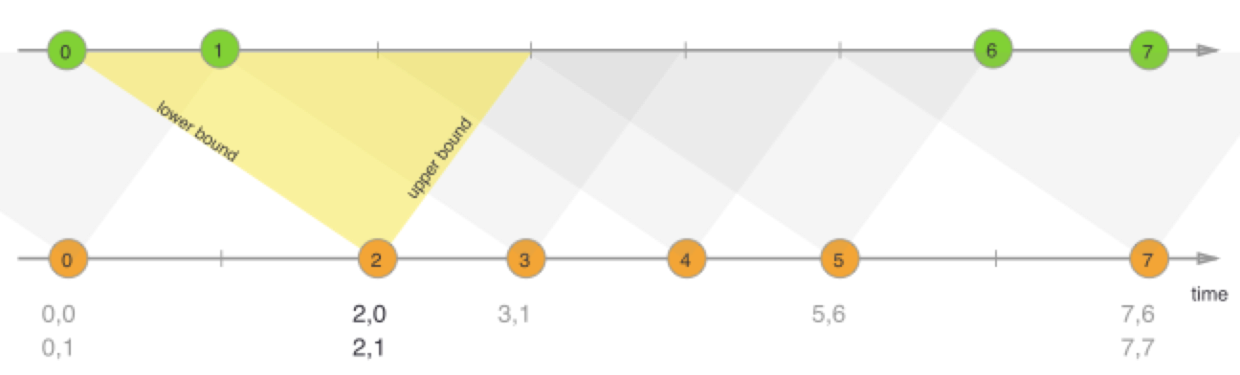
- 下图为这个算子的基本原理,watermark是对单个流中数据允许迟到多久进行控制的一个机制,而两个流进行join,就会涉及到两条流中的窗口是否同步的问题,这样就要考虑流和流之间的窗口存在延迟的情况,也就是
between要指定的时间
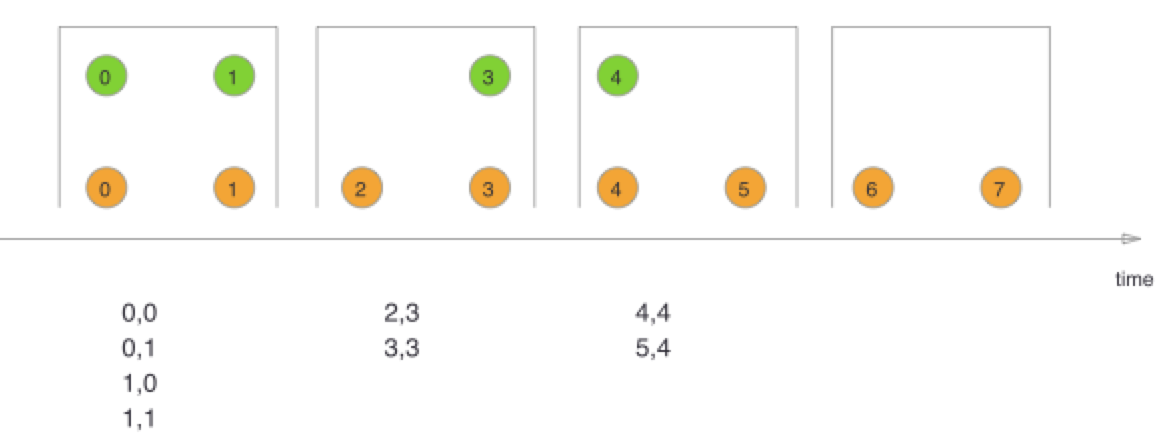
- 上面介绍的Window Join算子(如下图)是基于两个相同时间窗口内所有数据的inner join;而Interval Join是以每个元素为视角,一条流中的元素去另一条流中查找key相同的元素,并且两个元素的时间戳要满足
a.timestamp + lowerBound <= b.timestamp <= a.timestamp + upperBound
样例
代码
public class IntervalJoinDemo {public static void main(String[] args) throws Exception {final StreamExecutionEnvironment env = StreamExecutionEnvironment.createLocalEnvironment();env.setParallelism(1);//Time-bounded stream joins are only supported in event timeenv.setStreamTimeCharacteristic(TimeCharacteristic.EventTime);DataStream<Tuple3<String, Integer, Long>> orangeStream = env.addSource(new DataSource("orangeStream")).assignTimestampsAndWatermarks(new BoundedOutOfOrdernessGenerator());DataStream<Tuple3<String, Integer, Long>> greenStream = env.addSource(new DataSource("greenStream")).assignTimestampsAndWatermarks(new BoundedOutOfOrdernessGenerator());orangeStream.keyBy(0).intervalJoin(greenStream.keyBy(0)).between(Time.seconds(-5), Time.seconds(5)).process(new ProcessJoinFunction<Tuple3<String, Integer, Long>, Tuple3<String, Integer, Long>, Object>() {@Overridepublic void processElement(Tuple3<String, Integer, Long> left, Tuple3<String, Integer, Long> right, Context ctx, Collector<Object> out) throws Exception {out.collect(new Tuple5<>(left.f0, left.f1, left.f2, right.f1, right.f2));}}).name("intervalJoin").print("xxxxxx");env.execute("Interval Join Demo");}private static class DataSource extends RichParallelSourceFunction<Tuple3<String, Integer, Long>> {private volatile boolean running = true;private volatile String name;public DataSource(String name) {this.name = name;}@Overridepublic void run(SourceContext<Tuple3<String, Integer, Long>> ctx) throws Exception {Random random = new Random();int bound = 100;Tuple3[] data = new Tuple3[]{new Tuple3<>("foo", random.nextInt(bound), getRandomInt(50, 70)), new Tuple3<>("foo", random.nextInt(bound), getRandomInt(40, 60))};final long numElements = data.length;int i = 0;while (running && i < numElements) {Thread.sleep(RandomUtils.nextLong(1, 5) * 1000L);ctx.collect(data[i]);System.out.println(Thread.currentThread().getId() + "-" + this.name + "-sand data:" + data[i]);i++;}}@Overridepublic void cancel() {running = false;}private long getRandomInt(int min, int max){return 1573441870000L + 1000*(new Random().nextInt(max-min+1)+min);}}private static class BoundedOutOfOrdernessGenerator implements AssignerWithPeriodicWatermarks<Tuple3<String, Integer, Long>> {private final long maxOutOfOrderness = 10000;private long currentMaxTimestamp;@Overridepublic long extractTimestamp(Tuple3<String, Integer, Long> row, long previousElementTimestamp) {System.out.println(Thread.currentThread().getId() + "-" + row + ",time="+stampToDate(row.f2.toString()));long timestamp = row.f2;currentMaxTimestamp = Math.max(timestamp, currentMaxTimestamp);System.out.println(Thread.currentThread().getId() + "-watermark:" + stampToDate(String.valueOf(currentMaxTimestamp - maxOutOfOrderness)));return timestamp;}@Overridepublic Watermark getCurrentWatermark() {return new Watermark(currentMaxTimestamp - maxOutOfOrderness);}private static String stampToDate(String s) {String res;SimpleDateFormat simpleDateFormat = new SimpleDateFormat("yyyy-MM-dd HH:mm:ss");long lt = new Long(s);Date date = new Date(lt);res = simpleDateFormat.format(date);return res;}}}

若有收获,就点个赞吧
0 人点赞


