
Flume安装部署
下载地址
http://www.apache.org/dyn/closer.lua/flume/1.9.0/apache-flume-1.9.0-bin.tar.gz
安装部署
rz apache-flume-1.9.0-bin.tar.gztar -xzvf /opt/software/apache-flume-1.9.0-bin.tar.gz -C /opt/modulemv /opt/module/apache-flume-1.9.0-bin /opt/module/flume
删除lib目录下的guava-11.0.2.jar,以兼容Hadoop3.1.3
rm /opt/module/flume/lib/guava-11.0.2.jar
Flume入门案例
监控端口数据
案例需求
实用一个Flume监听一个端口,收集该端口数据,并打印到控制台。
需求分析
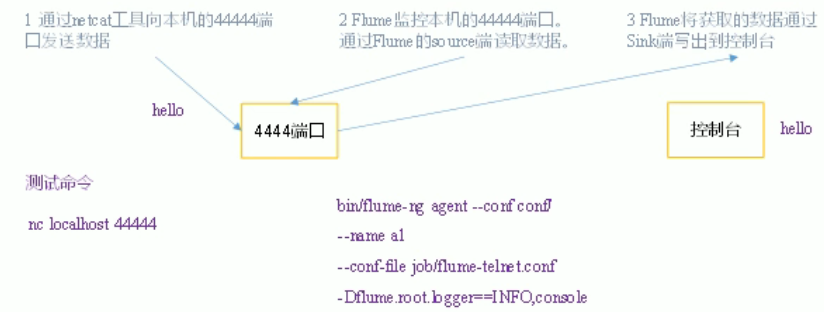
实现步骤
安装netcat工具
sudo yum install -y nc
判断44444端口是否被占用
sudo netstat -nlp|grep 44444
# 开服务端nc -lk 44444# 开客户端nc localhost 44444
创建Flume Agent配置文件flume-netcat-logger.conf
在flume目录下创建job文件夹并进入job文件夹
cd /opt/module/flumemkdir jobcd job
在job文件夹下创建flume agent配置文件flume-netcat-logger.conf
vim flume-netcat-logget.conf
在flume-netcat-logger.conf文件中添加如下内容 ```java
example.conf: A single-node Flume configuration
Name the components on this agent
a1.sources = r1 a1.sinks = k1 a1.channels = c1
Describe/configure the source
a1.sources.r1.type = netcat a1.sources.r1.bind = localhost a1.sources.r1.port = 44444
Describe the sink
a1.sinks.k1.type = logger
Use a channel which buffers events in memory
a1.channels.c1.type = memory a1.channels.c1.capacity = 1000 a1.channels.c1.transactionCapacity = 100
Bind the source and sink to the channel
a1.sources.r1.channels = c1 a1.sinks.k1.channel = c1
7. 运行```javabin/flume-ng agent -n a1 -c conf/ -f job/net-flume-logger.conf -Dflume.root.logger=INFO,console

监控单个追加文件
案例需求
需求分析
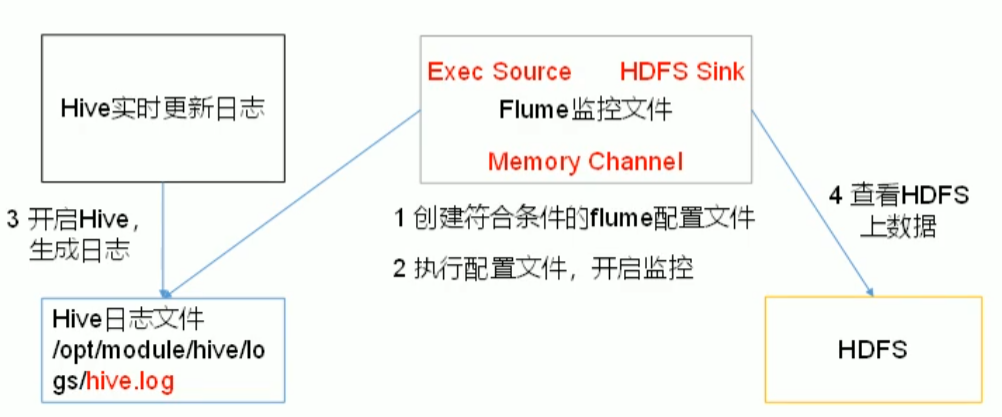
实现步骤
- Flume要想将数据输出到HDFS,依赖Hadoop相关的jar包
检查/etc/profile.d/my_env.sh文件,确定Hadoop和Java相关环境变量配置正确
- 创建flume-file-hdfs.conf文件
创建文件
vim flume-file-hdfs.conf
a1.sources = r1a1.sinks = k1a1.channels = c1a1.sources.r1.type = execa1.sources.r1.command = tail -F /opt/module/hive/logs/hive.loga1.channels.type = memorya1.channels.cappacity = 1000a1.channels.c1.transactionCapacity = 100a1.sinks.k1.type = hdfsa1.sinks.k1.hdfs.path = hdfs://hadoop102:9820/flume/%Y%m%d/%H# 上传文件前缀a1.sinks.k1.hdfs.filePrefix = logs-# 是否按照时间滚动文件a1.sinks.k1.hdfs.round = true# 多少时间单位创建一个新的文件夹a1.sinks.k1.hdfs.roundValue = 1# 定义时间单位a1.sinks.k1.hdfs.roundUnit = hour# 是否使用本地时间戳a1.sinks.k1.hdfs.useLocalTimeStamp = true# 积攒多少event上传到hdfs一次a1.sinks.k1.hdfs.batchSize=100# 设置文件类型,可支持压缩a1.sinks.k1.hdfs.fileType = DataStream# 多久生成一个新的文件a1.sinks.k1.hdfs.rollInterval = 60# 设置每个文件的滚动大小a1.sinks.k1.hdfs.rollSize = 124217700# 文件的滚动与event的数量无关a1.sinks.k1.hdfs.rollCount = 0a1.sources.r1.channels = c1a1.sinks.k1.channel = c1

若有收获,就点个赞吧
0 人点赞


