1.环境信息
使用SpringBoot集成Mybatis有两种方式,本文使用IDEA搭建:
- 1.Spring Initializr
- 2.使用IDEA插件
环境信息: OS:Win10 Jdk:JavaSE 8 Ide:Idea Ultimate MySQL:8.0.16 MyBatis:3.5.2 Spring Boot:2.1.7.RELEASE
2.创建Web项目
Idea集成了Spring Initializr,新建项目:
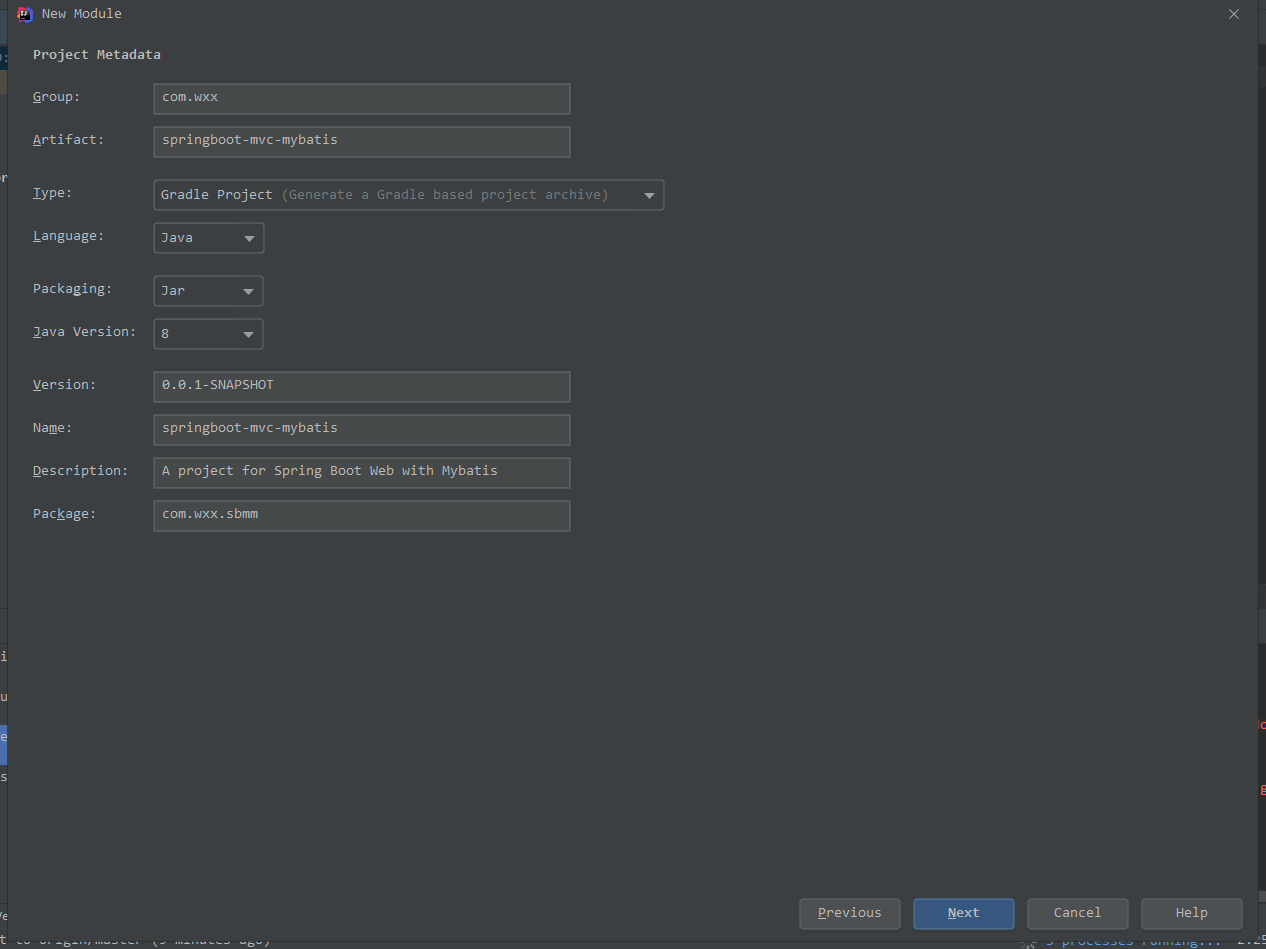
- 1.选择Spring Initializr,新建项目并填写基本信息
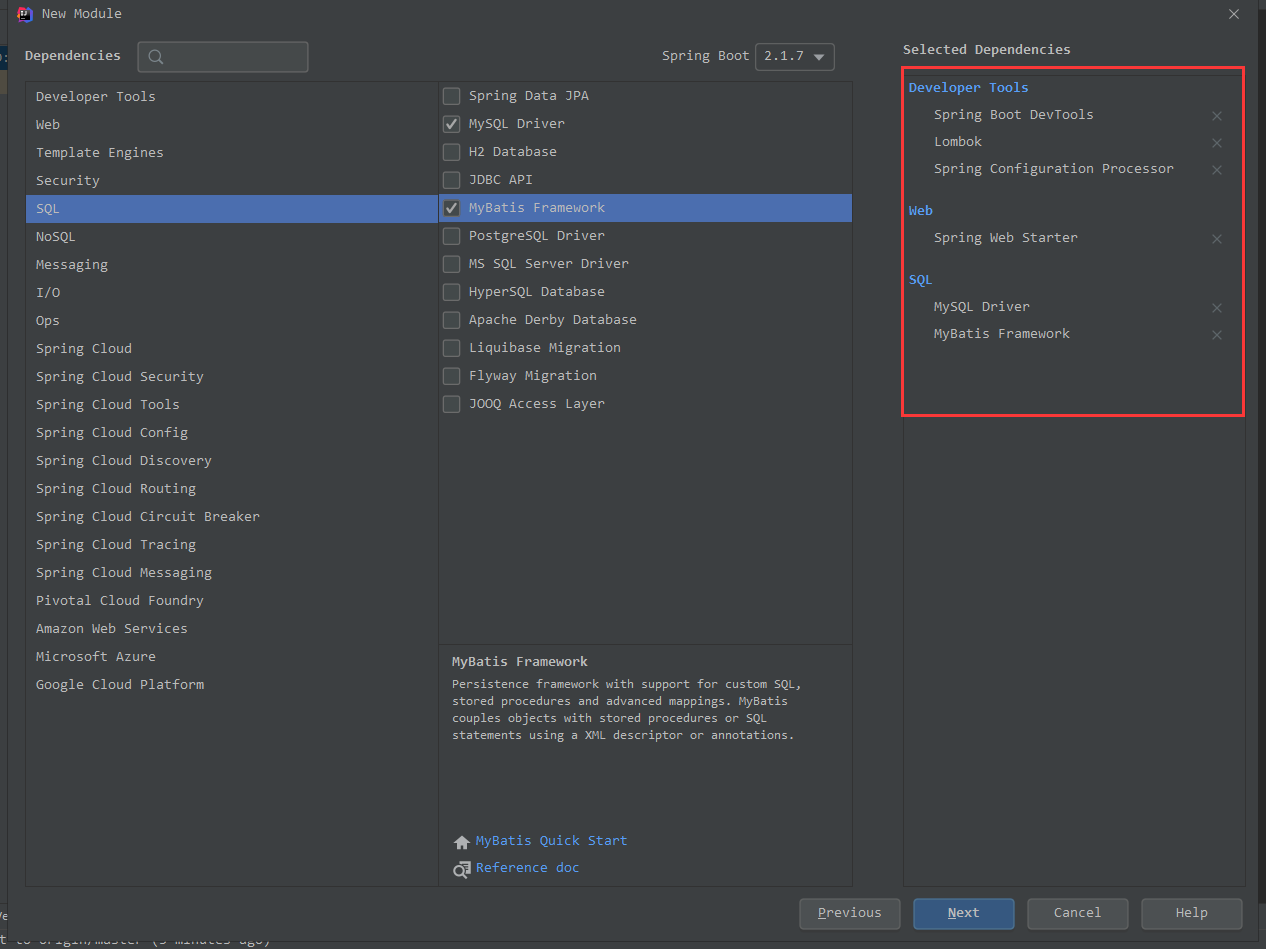
- 3.选择需要的工具
选择Web、MySQL Driver和MyBatis Framework等必要依赖:
- 4.确认完成,build.gradle如下:
plugins {id 'org.springframework.boot' version '2.1.7.RELEASE'id 'java'}apply plugin: 'io.spring.dependency-management'group = 'com.wxx'version = '0.0.1-SNAPSHOT'sourceCompatibility = '1.8'configurations {developmentOnlyruntimeClasspath {extendsFrom developmentOnly}compileOnly {extendsFrom annotationProcessor}}repositories {mavenCentral()}dependencies {implementation 'org.springframework.boot:spring-boot-starter-web'implementation 'org.mybatis.spring.boot:mybatis-spring-boot-starter:2.1.0'compileOnly 'org.projectlombok:lombok'developmentOnly 'org.springframework.boot:spring-boot-devtools'runtimeOnly 'mysql:mysql-connector-java'annotationProcessor 'org.springframework.boot:spring-boot-configuration-processor'annotationProcessor 'org.projectlombok:lombok'testImplementation 'org.springframework.boot:spring-boot-starter-test'}
4.集成Mybatis
4.1 创建Domain
实体类有:Student、Score,与数据库表相对应;Student:
@Data@AllArgsConstructor@NoArgsConstructor@Builderpublic class Student {private Integer id;private String name;private Integer age;private String sex;private String hobbies;private String address;}
Score:
@Data@Builder@AllArgsConstructor@NoArgsConstructorpublic class Score {private Integer id;private Integer studentId;private String studentName;private String subject;private Integer subjectScore;}
StudentScore、StudentScores,是关联查询时使用的,并没有相对应的表;
StudentScore:
@Data@AllArgsConstructor@NoArgsConstructor@Builderpublic class StudentScore {private String name;private Integer age;private String sex;private Score score;}
StudentScores:
@Data@AllArgsConstructor@NoArgsConstructor@Builderpublic class StudentScores {private String name;private Integer age;private String sex;private List<Score> scoreList;}
注:@Data,@Builder,@AllArgsConstructor,@NoArgsConstructor为lombok的注解
4.2 配置文件
application.properties:
spring.application.name=student-servicespring.boot.admin.client.enabled=truespring.profiles.active=dev
配置日志、MySQL连接、MyBatis扫描包路径等信息;application-dev.yml:
server:connection-timeout: 30000msport: 8081servlet.context-path: /logging:path: ./file: st.log#max-size: 10M#max-history: 1level:root: INFOorg:springframework:web: INFOcom:wxx:sbmm:mapper: DEBUGspring:data:mongodb:database: studentServicehost: localhostport: 27017datasource:# 遇到时区问题用这个# jdbc:mysql://localhost:3306?useUnicode=true&characterEncoding=UTF-8&useJDBCCompliantTimezoneShift=true&useLegacyDatetimeCode=false&serverTimezone=UTCurl: jdbc:mysql://localhost:3306/studentService?useSSL=false&useUnicode=true&characterEncoding=UTF-8&useJDBCCompliantTimezoneShift=true&useLegacyDatetimeCode=false&serverTimezone=UTCdriver-class-name: com.mysql.cj.jdbc.Driverusername: rootpassword: 12345678# schema.sql中一般存放的是DDL脚本,即通常为创建或更新库表的脚本# data.sql中一般是DML脚本,即通常为数据插入脚本schema: classpath:schema.sqldata: classpath:data.sqlplatform: mysqlinitialization-mode: alwayscontinue-on-error: false#data-password:#data-username:#schema-password:#schema-username:sql-script-encoding: utf-8separator: ;# type: com.alibaba.druid.pool.DruidDataSourcemybatis:mapper-locations: classpath:mapper/*.xmltype-aliases-package: com.wxx.sbmm.domain# config-location:configuration:cache-enabled: true
MyBatis配置信息,参考[Configuration部分]:http://www.mybatis.org/spring-boot-starter/mybatis-spring-boot-autoconfigure/index.html
这里使用springboot默认的数据库连接池;
配置中使用schema.sql存放创建库表的脚本,data.sql数据插入脚本,这是springboot的默认配置;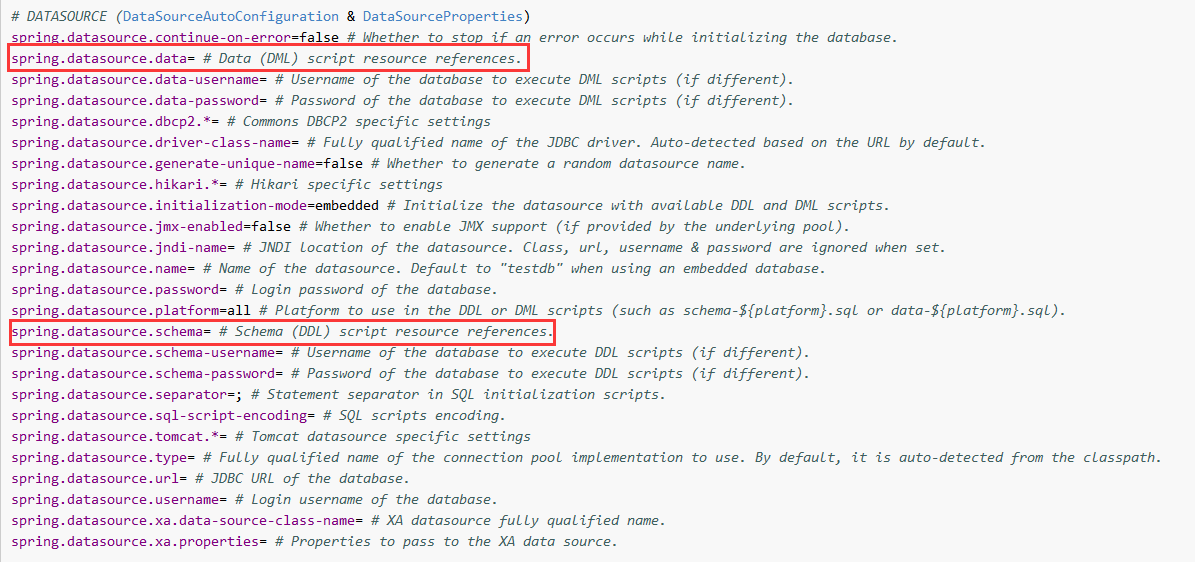
更多
SpringBoot配置信息,参考:https://docs.spring.io/spring-boot/docs/current/reference/html/common-application-properties.html
4.3 配置数据库初始化脚本
数据库为:studentService
手动创建数据库:CREATE SCHEMA studentService DEFAULT CHARACTER SET utf8 ;
包含两个表,针对它们进行单表查询和关联查询:
学生表:t_student
成绩表:t_score
ER图: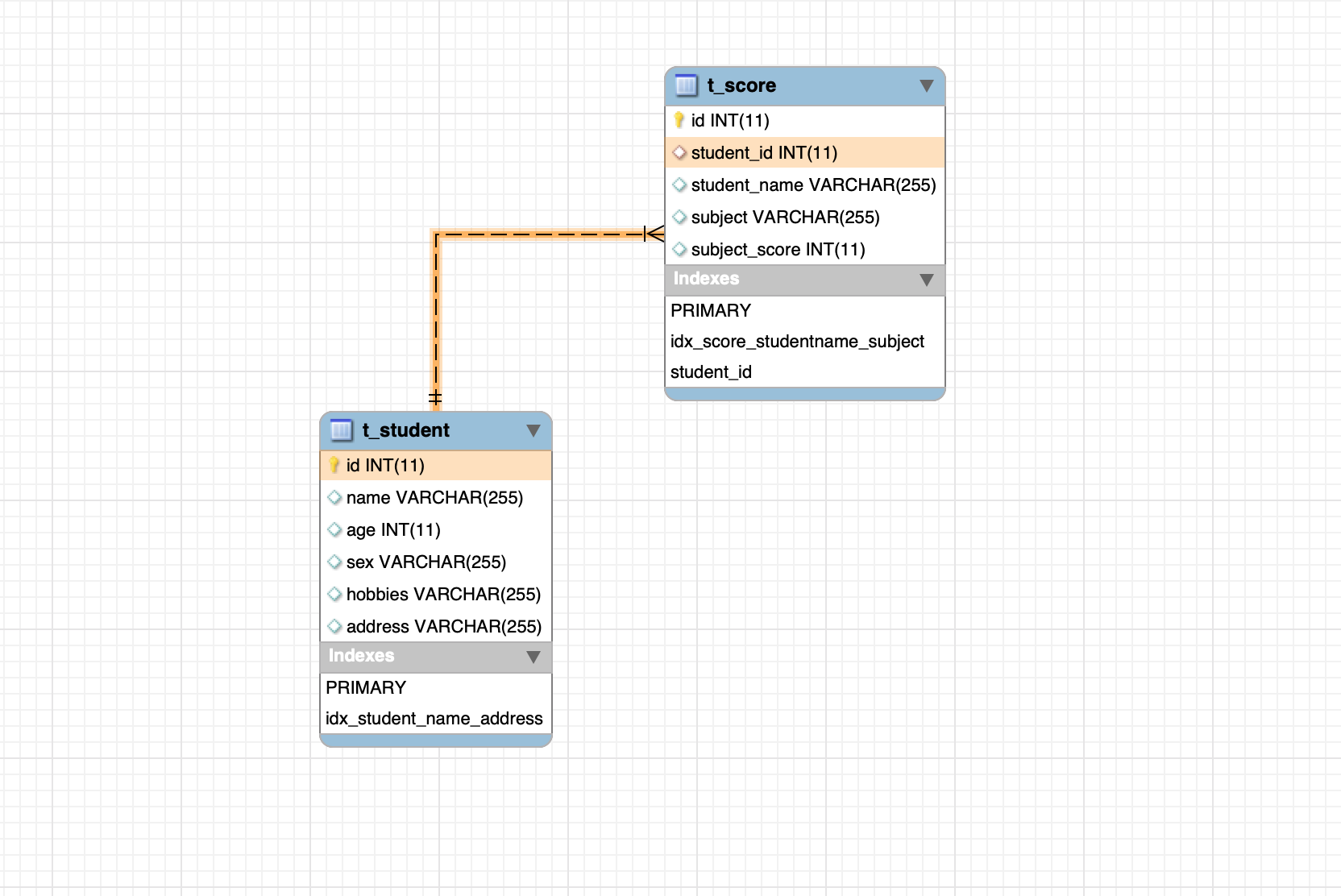
schema.sql:初始化库表SQL
CREATE DATABASE IF NOT EXISTS `studentService`;CREATE TABLE IF NOT EXISTS `t_student` (`id` INT NOT NULL AUTO_INCREMENT COMMENT 'ID',`name` VARCHAR(255) DEFAULT "" COMMENT '姓名',`age` INT DEFAULT 10 COMMENT '年龄',`sex` VARCHAR(255)DEFAULT "Male" COMMENT '性别',`hobbies` VARCHAR(255) DEFAULT "" COMMENT '爱好',`address` VARCHAR(255) DEFAULT "" COMMENT '住址',PRIMARY KEY(`id`),UNIQUE INDEX `idx_student_name_address` (`name`,`address`) USING BTREE)ENGINE = INNODB DEFAULT CHARSET=utf8 AUTO_INCREMENT = 1 COMMENT '学生表';CREATE TABLE IF NOT EXISTS `t_score` (`id` INT NOT NULL AUTO_INCREMENT COMMENT 'ID',`student_id` INT DEFAULT 0 COMMENT '学生ID',`student_name` VARCHAR(255) DEFAULT "" COMMENT '学生姓名',`subject` VARCHAR(255) DEFAULT "" COMMENT '学科',`subject_score` INT COMMENT '学科成绩',PRIMARY KEY(`id`),UNIQUE INDEX `idx_score_studentname_subject` (`student_name`,`subject`) USING BTREE ,FOREIGN KEY (student_id) REFERENCES t_student (id))ENGINE = INNODB DEFAULT CHARSET=utf8 AUTO_INCREMENT = 1 COMMENT '学生成绩表';
data.sql:初始化数据SQL
INSERT INTO t_student (name,age, sex, hobbies, address)SELECT "Even",9,"Male","ShuXue,English","XiAn" FROM DUAL WHERE NOT EXISTS(SELECT 1 FROM t_student WHERE name = "Even");INSERT INTO t_student (name,age, sex, hobbies, address)SELECT "Weison",11,"Male","XuWen,WuLi","HeNan" FROM DUAL WHERE NOT EXISTS(SELECT 1 FROM t_student WHERE name = "Weison");INSERT INTO t_student (name,age, sex, hobbies, address)SELECT "Angule",13,"Female","XuWen,English","Chengdu" FROM DUAL WHERE NOT EXISTS(SELECT 1 FROM t_student WHERE name = "Angule");INSERT INTO t_score (student_id,student_name, subject, subject_score)SELECT 1,"Even","YuWen",90 FROM DUAL WHERE NOT EXISTS(SELECT 1 FROM t_score WHERE student_name = "Even" and subject ="YuWen");INSERT INTO t_score (student_id,student_name, subject, subject_score)SELECT 1,"Even","ShuXue",89 FROM DUAL WHERE NOT EXISTS(SELECT 1 FROM t_score WHERE student_name = "Even" and subject ="ShuXue");INSERT INTO t_score (student_id,student_name, subject, subject_score)SELECT 1,"Even","English",67 FROM DUAL WHERE NOT EXISTS(SELECT 1 FROM t_score WHERE student_name = "Even" and subject ="English");INSERT INTO t_score (student_id,student_name, subject, subject_score)SELECT 2,"Weison","YuWen",69 FROM DUAL WHERE NOT EXISTS(SELECT 1 FROM t_score WHERE student_name = "Weison" and subject ="YuWen");INSERT INTO t_score (student_id,student_name, subject, subject_score)SELECT 2,"Weison","ShuXue",94 FROM DUAL WHERE NOT EXISTS(SELECT 1 FROM t_score WHERE student_name = "Weison" and subject ="ShuXue");INSERT INTO t_score (student_id,student_name, subject, subject_score)SELECT 2,"Weison","English",82 FROM DUAL WHERE NOT EXISTS(SELECT 1 FROM t_score WHERE student_name = "Weison" and subject ="English");INSERT INTO t_score (student_id,student_name, subject, subject_score)SELECT 3,"Angule","YuWen",58 FROM DUAL WHERE NOT EXISTS(SELECT 1 FROM t_score WHERE student_name = "Angule" and subject ="YuWen");INSERT INTO t_score (student_id,student_name, subject, subject_score)SELECT 3,"Angule","ShuXue",73 FROM DUAL WHERE NOT EXISTS(SELECT 1 FROM t_score WHERE student_name = "Angule" and subject ="ShuXue");INSERT INTO t_score (student_id,student_name, subject, subject_score)SELECT 3,"Angule","English",91 FROM DUAL WHERE NOT EXISTS(SELECT 1 FROM t_score WHERE student_name = "Angule" and subject ="English");commit;
4.4 配置SQL XML
写sql的地方:StudentMapper.xml;
XML中
sql标签id与Mapper接口中的方法名要一致,MyBatis会对他们进行关联去实现Mapper接口;
<?xml version="1.0" encoding="UTF-8" ?><!DOCTYPE mapper PUBLIC "-//mybatis.org//DTD Mapper 3.0//EN""http://mybatis.org/dtd/mybatis-3-mapper.dtd" ><mapper namespace="com.wxx.sbmm.mapper.StudentMapper"><!--执行增加操作的SQL语句1.id和parameterType 分别与StudentMapper接口中的addStudent方法的名字和 参数类型一致2.以#{studentName}的形式引用Student参数 的studentName属性,MyBatis将使用反射读取Student参数的此属性3.#{studentName}中studentName大小写敏感。引用其他的属性与此一致4.seGeneratedKeys设置为"true"表明要MyBatis获取由数据库自动生成的主键5.keyProperty="id"指定把获取到的主键值注入到Student的id属性--><!-- 当表中字段名跟实体类字段名不一致 或 为了返回list类型 可以定义returnMap --><resultMap id="studentMap" type="Student"><id column="id" property="id"/><result column="name" property="name"/><result column="age" property="age"/><result column="sex" property="sex"/><result column="hobbies" property="hobbies"/><result column="address" property="address"/></resultMap><resultMap id="scoreResultMap" type="Score"><id column="id" property="id"/><result column="student_id" property="studentId"/><result column="student_name" property="studentName"/><result column="subject" property="subject"/><result column="subject_score" property="subjectScore"/></resultMap><!--增删改查 开始--><!--新增 1--><insert id="saveStudent" parameterType="Student" useGeneratedKeys="true" keyProperty="id">insert into t_student(name,age,sex,hobbies,address)values(#{name},#{age},#{sex},#{hobbies},#{address})</insert><!--删除 1--><delete id="deleteStudentByName" parameterType="String">delete from t_student where name=#{name}</delete><!--删除 2--><delete id="deleteByStudent" parameterType="Student">delete from t_student<where>1=1<if test="name != null and name != ''">and name = #{name}</if><if test="age != null and age != ''">and age = #{age}</if><if test="sex != null and sex != ''">and sex=#{sex}</if><if test="hobbies != null and hobbies != ''">and hobbies=#{hobbies}</if><if test="address != null and address != ''">and address=#{address}</if></where></delete><!--修改 1--><update id="updateStudent" parameterType="Student">update t_student set<if test="age != null and age != ''">age = #{age},</if><if test="sex != null and sex != ''">sex = #{sex},</if><if test="hobbies != null and hobbies != ''">hobbies = #{hobbies},</if><if test="address != null and address != ''">address = #{address}</if>where name=#{name}</update><!--查询 1 --><select id="findStudentByName" parameterType="String" resultMap="studentMap">SELECT * FROM t_student where name = #{name};</select><!--查询 2 返回list的select语句,注意resultMap的值是指向前面定义好的 --><select id="findStudents" resultMap="studentMap">select * from t_student</select><!--查询 2 返回list的select语句,注意resultMap的值是指向前面定义好的 --><select id="findScores" resultMap="scoreResultMap">select * from t_score</select><!--查询 3 利用 hashMap 传递多个参数 --><select id="findStudentByMap" parameterType="Map" resultType="Student">select * from t_student<where>1=1<if test="name != null and name != ''">and name = #{name}</if><if test="age != null and age != ''">and age = #{age}</if><if test="sex != null and sex != ''">and sex=#{sex}</if><if test="hobbies != null and hobbies != ''">and hobbies=#{hobbies}</if><if test="address != null and address != ''">and address=#{address}</if></where></select><!--查询 4 利用 hashMap 传递多个参数 --><select id="findStudentByStudent" parameterType="Student" resultType="Student">select * from t_student<where>1=1<if test="name != null and name != ''">and name = #{name}</if><if test="age != null and age != ''">and age = #{age}</if><if test="sex != null and sex != ''">and sex=#{sex}</if><if test="hobbies != null and hobbies != ''">and hobbies=#{hobbies}</if><if test="address != null and address != ''">and address=#{address}</if></where></select><!--查询 5 Mybatis 自带的多个参数传递方法 这个时候没有 parameterType, 但用到了类似 #{param1} 类似的参数 --><select id="findStudentByAgeAndSex" resultType="com.wxx.sbmm.domain.Student">select * from t_student where age = #{param1} and sex=#{param2}</select><!--增删改查 结束--><!--联合查询 开始--><!--联合查询:studentScoreListResultMap--><resultMap id="studentScoreListResultMap" type="com.wxx.sbmm.domain.StudentScores"><id column="aid" jdbcType="INTEGER" property="id"/><result column="name" jdbcType="VARCHAR" javaType="String" property="name"/><result column="age" javaType="Integer" property="age"/><result column="sex" javaType="String" property="sex"/><collection property="scoreList" javaType="List" ofType="Score"><id column="bid" jdbcType="INTEGER" property="id"/><result property="studentId" column="student_id"/><result property="studentName" column="student_name"/><result property="subject" column="subject"/><result property="subjectScore" column="subject_score"/></collection></resultMap><!--联合查询:studentScoreResultMap--><resultMap id="studentScoreResultMap" type="com.wxx.sbmm.domain.StudentScore"><id column="aid" jdbcType="BIGINT" javaType="Integer" property="id"/><result property="name" jdbcType="VARCHAR" javaType="String" column="name"/><result property="age" column="age" jdbcType="VARCHAR" javaType="Integer"/><result property="sex" column="sex" jdbcType="VARCHAR" javaType="String"/><association property="score" javaType="com.wxx.sbmm.domain.Score"><id property="id" column="bid"/><result property="studentId" column="student_id"/><result property="studentName" column="student_name"/><result property="subject" column="subject"/><result property="subjectScore" column="subject_score"/></association></resultMap><!-- 联合查询 1 findStudentScoreList--><select id="findStudentScores" parameterType="Integer" resultMap="studentScoreListResultMap">selecta.id aid,a.name name,a.age age,a.sex sex,b.id bid,b.student_id student_id,b.student_name student_name,b.subject subject,b.subject_score subject_scorefrom t_student aleft join t_score bon a.id=b.student_id</select><!-- 联合查询 2 findStudentScore--><select id="findStudentScore" resultMap="studentScoreResultMap">selecta.id aid,a.name name,a.age age,a.sex sex,b.id bid,b.student_id student_id,b.student_name student_name,b.subject subject,b.subject_score subject_scorefrom t_student aleft join t_score bon a.id=b.student_idwhere b.subject = 'English'and a.name = b.student_name</select><!-- 联合查询 结束 --></mapper>
Mapper XML 官方说明:http://www.mybatis.org/mybatis-3/sqlmap-xml.html#
5.代码
5.1 创建StudentMapper
使用@Mapper 注解标明 Mapper接口,MyBatis会帮我们去实现这个接口,该接口中方法与4.4xml中sql标签ID相对应:
package com.wxx.sbmm.mapper;import com.wxx.sbmm.domain.Score;import com.wxx.sbmm.domain.Student;import com.wxx.sbmm.domain.StudentScore;import com.wxx.sbmm.domain.StudentScores;import org.apache.ibatis.annotations.Mapper;import org.apache.ibatis.annotations.Param;import java.util.List;import java.util.Map;@Mapperpublic interface StudentMapper {// 增删改查Integer saveStudent(Student student);Integer deleteStudentByName(@Param("name") String name);Integer deleteByStudent(Student student);Integer updateStudent(Student student);// 5种查询Student findStudentByName(@Param("name") String name);List<Student> findStudents();List<Student> findStudentByMap(Map<String, String> map);List<Student> findStudentByStudent(Student student);List<Student> findStudentByAgeAndSex(Integer age, String sex);// 关联查询List<StudentScores> findStudentScores();List<StudentScore> findStudentScore();}
Mapper更多信息,参考:http://www.mybatis.org/spring/mappers.html#
5.2 创建Service
package com.wxx.sbmm.service;import com.wxx.sbmm.domain.Student;import com.wxx.sbmm.domain.StudentScore;import com.wxx.sbmm.domain.StudentScores;import com.wxx.sbmm.mapper.StudentMapper;import org.springframework.stereotype.Service;import javax.annotation.Resource;import java.util.List;import java.util.Map;@Servicepublic class StudentService {@Resourceprivate StudentMapper studentMapper;public Integer addStudent(Student student) {return studentMapper.saveStudent(student);}public Integer deleteStudentByName(String name) {return studentMapper.deleteStudentByName(name);}public Integer deleteByStudent(Student student) {return studentMapper.deleteByStudent(student);}public Integer updateStudent(Student student) {return studentMapper.updateStudent(student);}public Student findStudentByName(String name) {return studentMapper.findStudentByName(name);}public List<Student> findStudents() {return studentMapper.findStudents();}public List<Student> findStudentByMap(Map<String, String> map) {return studentMapper.findStudentByMap(map);}public List<Student> findStudentByStudent(Student student) {return studentMapper.findStudentByStudent(student);}public List<Student> findStudentByAgeAndSex(Integer age, String sex) {return studentMapper.findStudentByAgeAndSex(age, sex);}public List<StudentScores> findStudentScores() {return studentMapper.findStudentScores();}public List<StudentScore> findStudentScore() {return studentMapper.findStudentScore();}}
5.3 创建Controller
package com.wxx.sbmm.controller;import com.wxx.sbmm.domain.Student;import com.wxx.sbmm.domain.StudentScore;import com.wxx.sbmm.domain.StudentScores;import com.wxx.sbmm.service.StudentService;import org.springframework.beans.factory.annotation.Autowired;import org.springframework.web.bind.annotation.*;import java.util.HashMap;import java.util.List;import java.util.Map;@RestControllerpublic class StudentController {@Autowiredprivate StudentService studentService;@PostMapping("/students")public Integer saveStudent(@RequestBody Student student) {Integer addNum = studentService.addStudent(student);return addNum;}@DeleteMapping("/students/{name}")public Integer deleteStudentByName(@PathVariable String name) {Integer deleteNum = studentService.deleteStudentByName(name);return deleteNum;}@DeleteMapping("/students")public Integer deleteStudentByStudent(@RequestBody Student student) {Integer deleteNum = studentService.deleteByStudent(student);return deleteNum;}@PutMapping("/students")public Integer updateStudent(@RequestBody Student student) {Integer updateNum = studentService.updateStudent(student);return updateNum;}@GetMapping("/students/{name}")public Student findStudentByName(@PathVariable String name) {Student student = studentService.findStudentByName(name);return student;}@GetMapping("/students")public List<Student> getStudentListByAgeAndSexAndHobbies() {List<Student> studentList = studentService.findStudents();return studentList;}@GetMapping("/students/map")public List<Student> findStudentByMap() {Map<String, String> map = new HashMap<>();map.put("name", "Even");List<Student> studentList = studentService.findStudentByMap(map);return studentList;}@GetMapping("/students/st")public List<Student> findStudentByStudent() {List<Student> studentList = studentService.findStudentByStudent(Student.builder().name("Even").build());return studentList;}@GetMapping("/students/{age}/{sex}")public List<Student> findStudentByAgeAndSex(@PathVariable Integer age, @PathVariable String sex) {List<Student> studentList = studentService.findStudentByAgeAndSex(age, sex);return studentList;}@GetMapping("/students/scores")public List<StudentScores> findStudentScores() {List<StudentScores> studentList = studentService.findStudentScores();return studentList;}@GetMapping("/students/score")public List<StudentScore> findStudentScore() {List<StudentScore> studentScores = studentService.findStudentScore();return studentScores;}}
5.4 最终项目
应该是这个样子: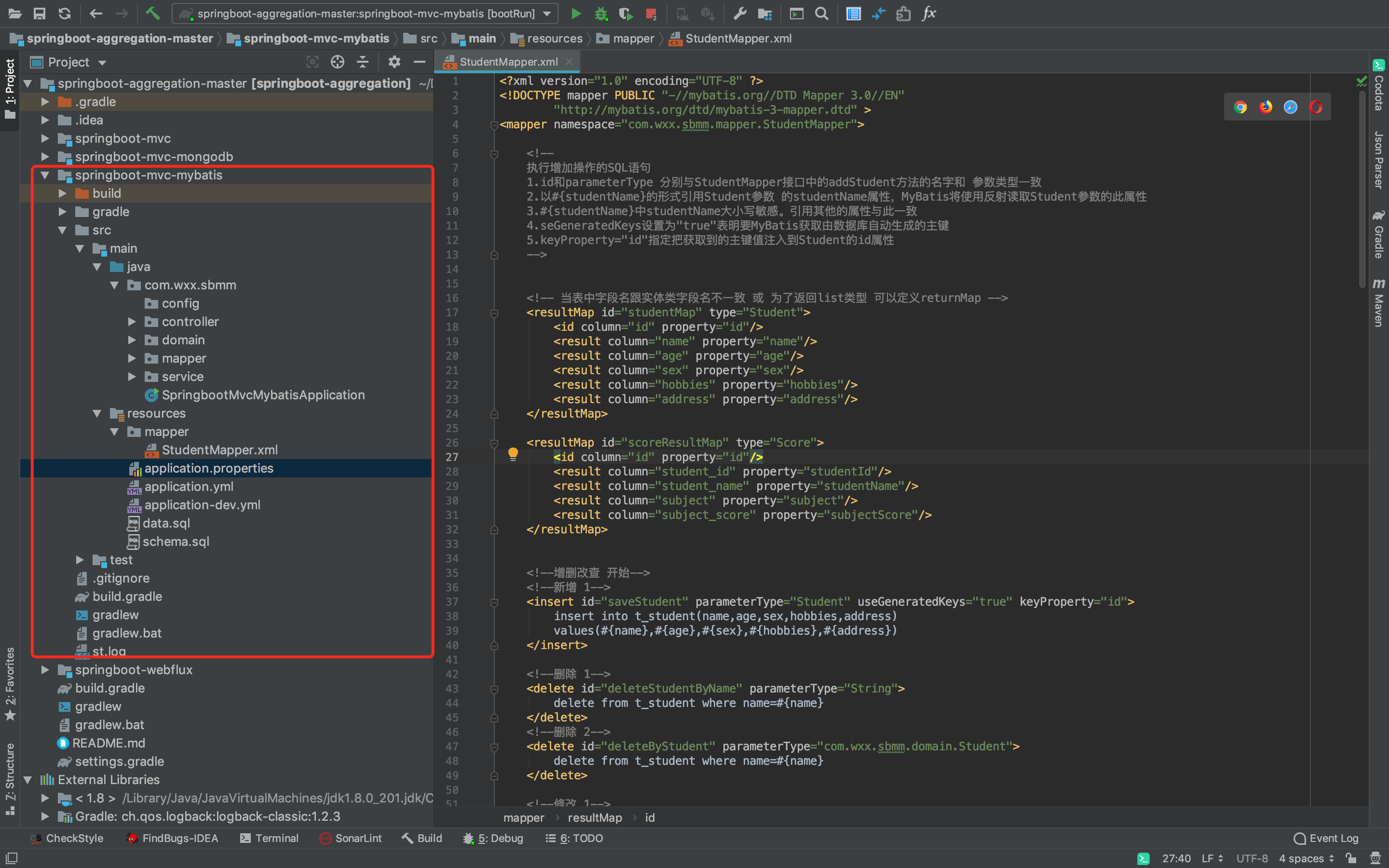 启动项目后,刷新数据库,看到数据库、表和数据都有了: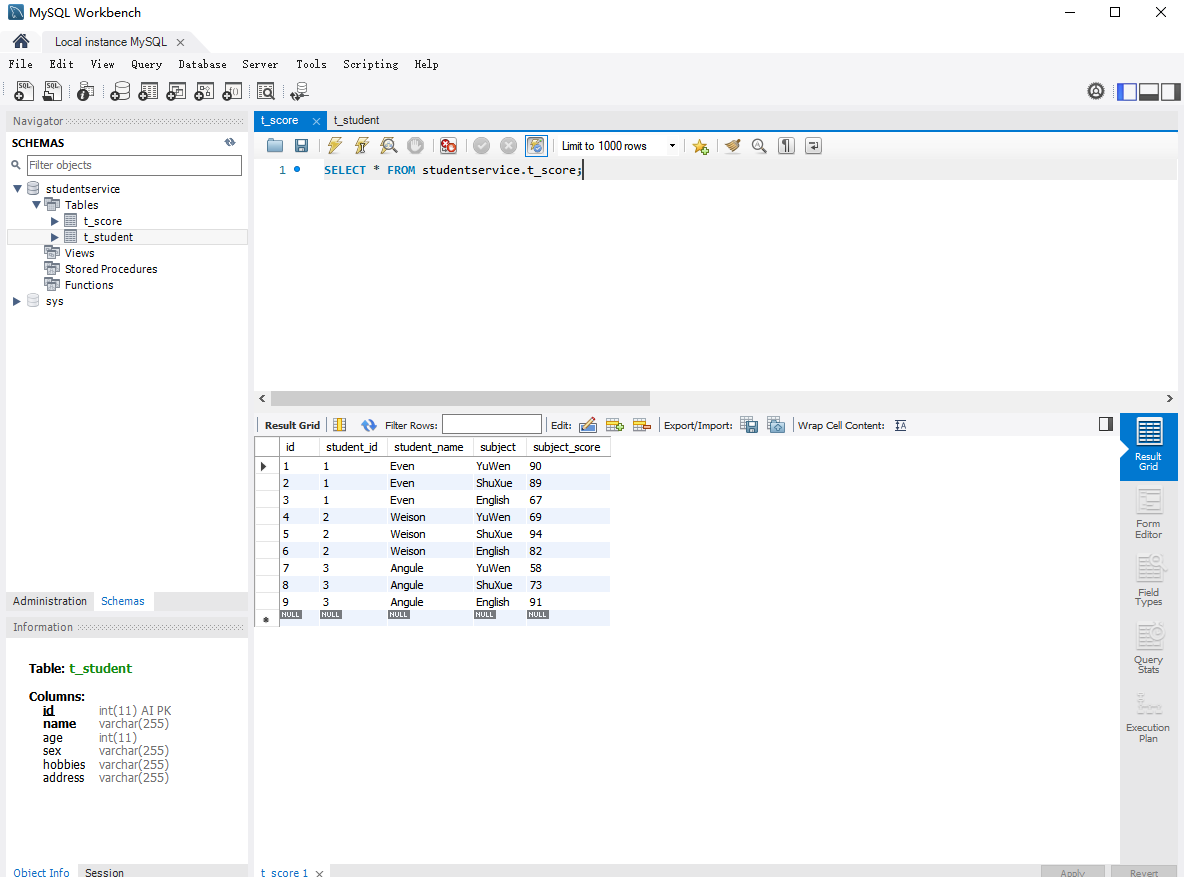
6. 测试
两个比较复杂的接口返回:/students/scores: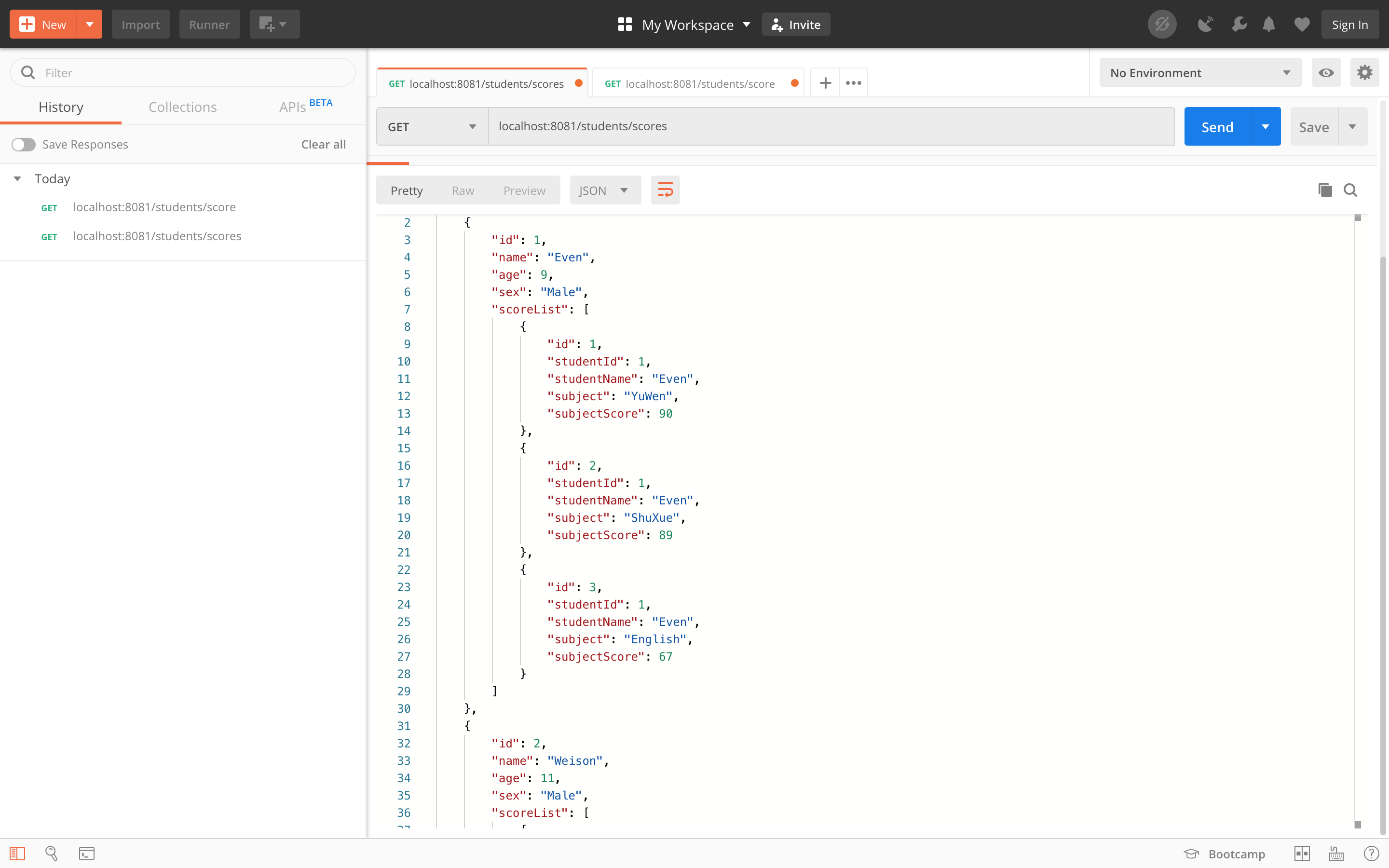
/students/score: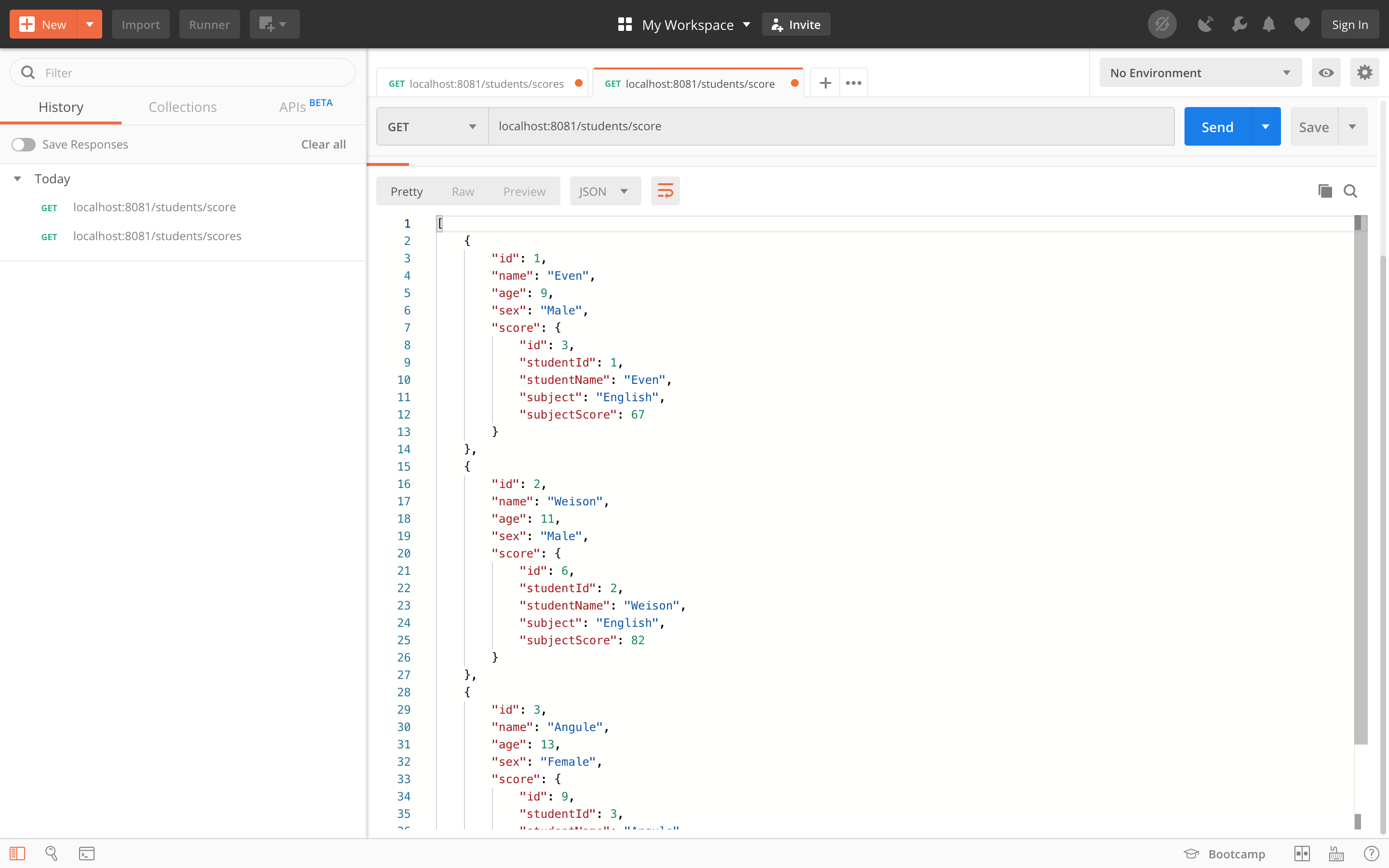
代码 —> https://github.com/WeisonWei/springboot-aggregation/tree/master/springboot-mvc-mybatis

若有收获,就点个赞吧
0 人点赞


