演示仓库地址(可以翻 commit 记录):https://github.com/wangpeng1994/webpack-demo
1. Tree Shaking的使用和原理分析
概念:一个模块可能有多个方法,只要其中某个方法被用到了,则整个文件都会被打到 bundle 里面去,而 tree shaking (摇树优化)则只把使用到的方法打入 bundle,没用到的方法在编译时会标记为无用代码,会在 uglify 阶段被擦除掉。
使用:webpack 在 production 模式下默认开启,要求模块必须是 ES6 模块语法,CommonJS 的方式不支持。
开启 Tree Shaking 后,DCE 死码消除(Dead code elimination)特性会移除对程序运行结果没有任何影响的代码(死代码),如:
- 代码不会被执行,不可到达 if (false) { ... }- 代码执行的结果不会被用到- 代码只会影响死变量(只写不读)
测试关闭 tree-shaking
先把 webpack 的配置 mode 改为 none,然后:
tree-shaking.js:
export function a() {return 'This is function a';}export function b() {return 'This is function b';}
search.js 中引用:
import { a } from './tree-shaking';
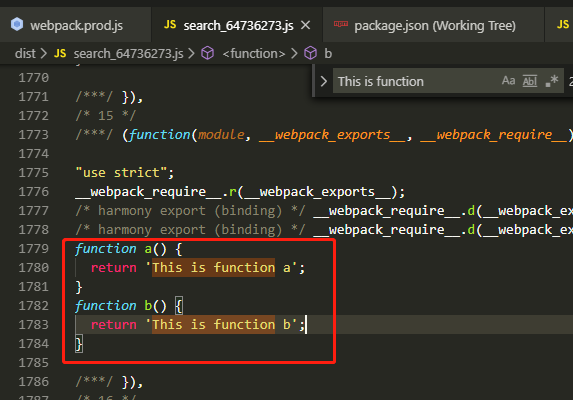
webpack 在 none 模式下不会开启 tree-shaking 特性,所以即使引入 a 后没有实际调用,打包后到对应的输出文件 search_64736273.js 中查找,依然发现 tree-shaking.js 模块被打包进来了:
测试开启 tree-shaking
现在 mode 改为 production。
显然,因为 tree-shaking.js 模块中导出的 a 函数并没有实际调用,所以被 shaking 掉了,并没有出现在打包结果中。
现在尝试在 search.js 中调用一下 a 函数:
import { a } from './tree-shaking';a();
结果发现还是被 shaking 掉了!为什么?因为 a 函数其实是“死”代码,虽然可以被执行,但并不能对外界产生影响(既没改变外界变量(没副作用),其输出也没被外界所使用)。
如何不被 shaking 掉?在 search.js 中使用时疯狂互动一下:
import { a } from './tree-shaking';const text = a();console.log(text);
最终发现即使开启了 tree-shaking 之后,a 也依然坚挺地存在(只是 a 过于简单,production 打包时被优化直接进行了替换):
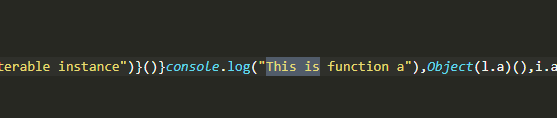
但会发现 tree-shaking.js 模块中导出的 b 函数还是被干掉了,因为没用到,一如刚才只是简单调用 a() 但未能产生实际互动而被干掉一样。
2. Scope Hoisting的使用和原理分析
虽然这也是 webpack 在 production 模式下自动干的事情,但了解一下这个概念,还是有助于深入了解 webpack 的,至于为什么要深入了解 webpack,若找不到理由,不去了解也罢。
2.1 问题由来
webpack 构建后的代码存在大量闭包代码,它们主要是模块初始化函数,本质是因为浏览器不支持模块化机制所以才需要它们。未开启 Scope Hoisting(作用域提升)时,每个 module 都会被独立包裹一层。导致体积增大,运行代码时创建的函数作用域变多,内存开销变大。
编译之前。
common.js:
export function common() {return 'common module';}
helloworld.js:
export function helloworld() {console.log('helloworld() is called');return 'Hello webpack';}
index.js:
import { common } from '../../common';import { helloworld } from './helloworld';common();document.write(helloworld());
打包出来的是一个 IIFE(立即执行函数表达式,匿名闭包),modules 是一个数组,每一项是一个模块初始化函数,__webpack_require__ 函数用来加载 module,调用 __webpack_require__(0) 加载 entry module,启动程序。简单起见下面省略了一些模块定义的代码,但依然可以看到存在 3 个被包裹着的 module:
(function(modules) {// The module cachevar installedModules = {};// The require functionfunction __webpack_require__(moduleId) {// Check if module is in cacheif (installedModules[moduleId]) {return installedModules[moduleId].exports;}// Create a new module (and put it into the cache)var module = installedModules[moduleId] = {i: moduleId,l: false,exports: {}};// Execute the module functionmodules[moduleId].call(module.exports, module, module.exports, __webpack_require__);// Flag the module as loadedmodule.l = true;// Return the exports of the modulereturn module.exports;}// Load entry module and return exportsreturn __webpack_require__(0);})([/* 0 *//***/ (function(module, __webpack_exports__, __webpack_require__) {"use strict";__webpack_require__.r(__webpack_exports__);/* harmony import */ var _common__WEBPACK_IMPORTED_MODULE_0__ = __webpack_require__(1);/* harmony import */ var _helloworld__WEBPACK_IMPORTED_MODULE_1__ = __webpack_require__(2);Object(_common__WEBPACK_IMPORTED_MODULE_0__["common"])();document.write(Object(_helloworld__WEBPACK_IMPORTED_MODULE_1__["helloworld"])());/***/ }),/* 1 *//***/ (function(module, __webpack_exports__, __webpack_require__) {"use strict";__webpack_require__.r(__webpack_exports__);/* harmony export (binding) */ __webpack_require__.d(__webpack_exports__, "common", function() { return common; });function common() {return 'common module';}/***/ }),/* 2 *//***/ (function(module, __webpack_exports__, __webpack_require__) {"use strict";__webpack_require__.r(__webpack_exports__);/* harmony export (binding) */ __webpack_require__.d(__webpack_exports__, "helloworld", function() { return helloworld; });function helloworld() {console.log('helloworld() is called');return 'Hello webpack';}/***/ })]);
2.2 scope hoisting 原理和使用
开启 scope hoisting 后,webpack 会将所有 module 的代码按照引用顺序放在一个函数作用域里,然后适当地重命名一些变量防止变量名冲突。通过 scope hoisting 可以减少函数声明代码和内存开销。
webpack 在 production 模式下会自动开启 scope hoisting,但为了避免演示时 js 代码被自动压缩、难以辨别,所以这里将 mode 更改为 none(否则默认值是 production),然后手动引入 new webpack.optimize.ModuleConcatenationPlugin() 插件(注意!源代码中必须使用的是 ES6 的 module 语法)。
对比一下末尾处同样位置的模块包裹函数,由于 common 和 helloworld 模块都只被引用了一次(被 index.js 引用),所以被提升到了同一个模块初始化函数中:
/***/ 12:/***/ (function(module, __webpack_exports__, __webpack_require__) {"use strict";__webpack_require__.r(__webpack_exports__);// CONCATENATED MODULE: ./common/index.jsfunction common() {return 'common module';}// CONCATENATED MODULE: ./src/index/helloworld.jsfunction helloworld() {console.log('helloworld() is called');return 'Hello webpack';}// CONCATENATED MODULE: ./src/index/index.jscommon();document.write(helloworld());/***/ })
假如 common 模块同时被 search.js 引用:
import { common } from '../../common';// common();
现在 common 模块被引用了两次(index.js 和 search.js),看一下 index.js 的编译结果,由于 common 模块被引用了两次(index.js 和 search.js),所以即使开启了 ModuleConcatenationPlugin,还是没提升,存在单独的模块包裹中:
/***/ 0:/***/ (function(module, __webpack_exports__, __webpack_require__) {"use strict";__webpack_require__.r(__webpack_exports__);/* harmony export (binding) */ __webpack_require__.d(__webpack_exports__, "common", function() { return common; });function common() {return 'common module';}/***/ }),/***/ 14:/***/ (function(module, __webpack_exports__, __webpack_require__) {"use strict";__webpack_require__.r(__webpack_exports__);// EXTERNAL MODULE: ./common/index.jsvar common = __webpack_require__(0);// CONCATENATED MODULE: ./src/index/helloworld.jsfunction helloworld() {console.log('helloworld() is called');return 'Hello webpack';}// CONCATENATED MODULE: ./src/index/index.jsObject(common["common"])();document.write(helloworld());/***/ })
search.js 的编译结果(略)也类似,虽然 common 在 search.js 中引用后属于死代码,但由于不是 production 模式,所以 webpack 未开启 tree-shaking,因此依然会和 index.js 一样对 common 单独包裹。
上面所说的模块都是指 module,而不是 chunk 概念,概念参见第一章,另外上面例子中使用了双 entry,会打包出对应的 index.js 和 search.js:
const path = require('path');const webpack = require('webpack');module.exports = {mode: 'none',entry: {index: path.join(__dirname, 'src/index.js'),search: path.join(__dirname, 'src/search.js')},output: {path: path.join(__dirname, 'dist'),filename: '[name]_[chunkhash:8].js',},plugins: [new webpack.optimize.ModuleConcatenationPlugin()]}
3. 代码分割和动态import
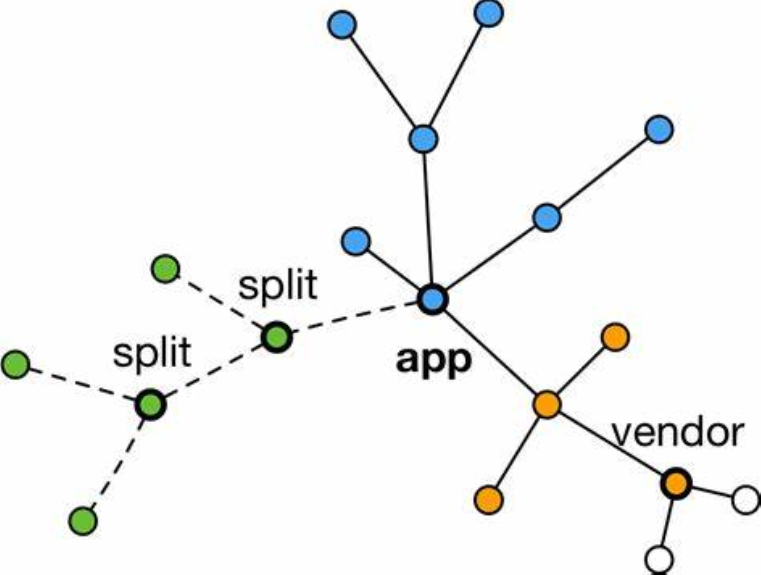
当某些代码在某些条件下才会被使用到,那么分割代码就有意义,将代码库分割成 chunks(语块)可以做到按需加载。
适用场景:
- 抽离相同代码到一个共享块(之前介绍过)
- 脚本懒加载,使得初始下载的代码更小
懒加载 js 脚本有两种 方式:
- CommonJS:require.ensure
- ES6 动态 import(目前还没有原生支持,需要 babel 转换)
推荐使用第二种方式,先安装 babel 插件:
npm install @babel/plugin-syntax-dynamic-import -D
然后在 .babelrc 使用该插件:
{
  "presets": [
    "@babel/preset-env",
    "@babel/preset-react"
  ],
  "plugins": [
    "@babel/plugin-syntax-dynamic-import"
  ]
}
定义被懒加载的组件:
import React from 'react';

export default () => <div>动态 import</div>;
search.js:
import React from 'react';
import ReactDOM from 'react-dom';
import beauty from './images/beauty.jpg';
import './index.less';

class Search extends React.Component {

  constructor() {
    super(...arguments);

    this.state = {
      Text: null
    }
  }

  loadComponent() {
    // 可以通过下面这种注释来主动命名 text chunk 块,编译时会被 webpack 识别
    import(/* webpackChunkName: "text" */'./text.js').then(Text => {
      this.setState({
        Text: Text.default
      });
    });
  }

  render() {
    const { Text } = this.state;

    return (
      <div className="search-text">
        {
          Text ? <Text /> : null
        }
        点击图片可以懒加载 Text 组件<img src={beauty} onClick={this.loadComponent.bind(this)} />
      </div>
    );
  }
}

ReactDOM.render(
  <Search />,
  document.getElementById('root')
);
使用动态 import 后,被懒加载的模块会自动分割成 chunk 块(其它别管,只看红框):
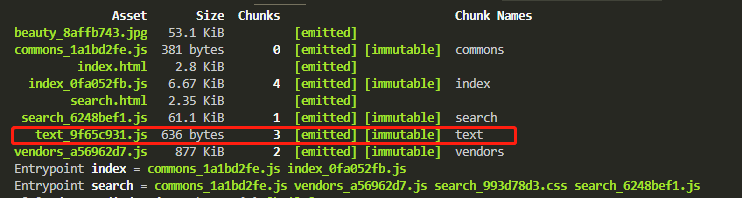
此时只有点击图片时,才会异步加载 text 代码块(通过 jsoup)。

若有收获,就点个赞吧
0 人点赞


