环境准备
3个节点,都是 Centos 7.6 系统,内核版本:3.10.0-1062.4.1.el7.x86_64,在每个节点上添加 hosts 信息:
$ cat /etc/hosts10.151.30.11 master110.151.30.22 node110.151.30.23 node2
禁用防火墙:
$ systemctl stop firewalld
$ systemctl disable firewalld
禁用SELINUX:
$ setenforce 0
$ cat /etc/selinux/config
SELINUX=disabled
由于开启内核ipv4转发需要加载br_netfilter模块,所以要加载该模块:
$ modprobe br_netfilter
创建/etc/sysctl.d/k8s.conf,添加如下内容:
net.bridge.bridge-nf-call-ip6tables = 1
net.bridge.bridge-nf-call-iptables = 1
net.ipv4.ip_forward = 1
bridge-nf 使得 netfilter 可以对 Linux 网桥上的 IPv4/ARP/IPv6 包过滤。比如,设置net.bridge.bridge-nf-call-iptables=1后,二层的网桥在转发包时也会被 iptables的 FORWARD 规则所过滤。常用的选项包括:
- net.bridge.bridge-nf-call-arptables:是否在 arptables 的 FORWARD 中过滤网桥的 ARP 包
- net.bridge.bridge-nf-call-ip6tables:是否在 ip6tables 链中过滤 IPv6 包
- net.bridge.bridge-nf-call-iptables:是否在 iptables 链中过滤 IPv4 包
- net.bridge.bridge-nf-filter-vlan-tagged:是否在 iptables/arptables 中过滤打了 vlan 标签的包。
使修改生效:
$ sysctl -p /etc/sysctl.d/k8s.conf
安装ipvs:
$ cat > /etc/sysconfig/modules/ipvs.modules <<EOF
#!/bin/bash
modprobe -- ip_vs
modprobe -- ip_vs_rr
modprobe -- ip_vs_wrr
modprobe -- ip_vs_sh
modprobe -- nf_conntrack_ipv4
EOF
$ chmod 755 /etc/sysconfig/modules/ipvs.modules && bash /etc/sysconfig/modules/ipvs.modules && lsmod | grep -e ip_vs -e nf_conntrack_ipv4
使用lsmod | grep -e ip_vs -e nf_conntrack_ipv4查看是否已经正确加载所需要的内核模块
各节点安装ipset软件包:
$ yum install ipset
为了便于查看ipvs的代理规则,需要看装下ipvsadm:
$ yum install ipvsadm
同步服务器时间:
$ yum install chrony -y
$ systemctl enable chronyd
$ systemctl start chronyd
$ chronyc sources
210 Number of sources = 4
MS Name/IP address         Stratum Poll Reach LastRx Last sample
===============================================================================
^+ sv1.ggsrv.de                  2   6    17    32   -823us[-1128us] +/-   98ms
^- montreal.ca.logiplex.net      2   6    17    32    -17ms[  -17ms] +/-  179ms
^- ntp6.flashdance.cx            2   6    17    32    -32ms[  -32ms] +/-  161ms
^* 119.28.183.184                2   6    33    32   +661us[ +357us] +/-   38ms
$ date
Tue Aug 27 09:28:41 CST 2019
关闭swap分区:
$ swapoff -a
安装Docker:
$ yum install -y yum-utils \
  device-mapper-persistent-data \
  lvm2
# 如果下面命令执行超时,可以使用阿里云的源代替:http://mirrors.aliyun.com/docker-ce/linux/centos/docker-ce.repo
$ yum-config-manager \
    --add-repo \
    https://download.docker.com/linux/centos/docker-ce.repo
$ yum list docker-ce --showduplicates | sort -r
 * updates: mirrors.tuna.tsinghua.edu.cn
Loading mirror speeds from cached hostfile
Loaded plugins: fastestmirror, langpacks
Installed Packages
 * extras: mirrors.tuna.tsinghua.edu.cn
 * epel: mirrors.yun-idc.com
docker-ce.x86_64            3:19.03.1-3.el7                     docker-ce-stable
docker-ce.x86_64            3:19.03.0-3.el7                     docker-ce-stable
docker-ce.x86_64            3:18.09.8-3.el7                     docker-ce-stable
......
docker-ce.x86_64            18.03.1.ce-1.el7.centos             docker-ce-stable
docker-ce.x86_64            18.03.0.ce-1.el7.centos             docker-ce-stable
......
 * base: mirror.lzu.edu.cn
Available Packages

# 建议安装19.03版本,是最新验证的版本
$ yum install -y docker-ce-19.03.11
配置镜像加速器:
$ mkdir -p /etc/docker  # 如果没有这个目录先创建,然后添加 daemon.json 文件
$ vi /etc/docker/daemon.json
{
  "exec-opts": ["native.cgroupdriver=systemd"],
  "log-driver": "json-file",
  "log-opts": {
    "max-size": "100m"
  },
  "storage-driver": "overlay2",
  "registry-mirrors" : [
    "https://ot2k4d59.mirror.aliyuncs.com/"
  ]
}
由于默认情况下kubelet使用的cgroupdriver是systemd,所以需要保持docker和kubelet的cgroupdriver一致,修改docker的cgroupdriver=systemd。如果不修改docker,则需要修改kubelet的启动配置,需要保持两者一致。
启动Docker:
$ systemctl start docker
$ systemctl enable docker
采用kubeadm安装,安装kubeadm采用yum的方式(阿里云源):
cat <<EOF > /etc/yum.repos.d/kubernetes.repo
[kubernetes]
name=Kubernetes
baseurl=http://mirrors.aliyun.com/kubernetes/yum/repos/kubernetes-el7-x86_64
enabled=1
gpgcheck=0
repo_gpgcheck=0
gpgkey=http://mirrors.aliyun.com/kubernetes/yum/doc/yum-key.gpg
        http://mirrors.aliyun.com/kubernetes/yum/doc/rpm-package-key.gpg
EOF
安装kubeadm,kubelet,kubectl:
# --disableexcludes 禁掉除了kubernetes之外的别的仓库
$ yum install -y kubelet-1.19.3 kubeadm-1.19.3 kubectl-1.19.3 --disableexcludes=kubernetes
$ kubeadm version
kubeadm version: &version.Info{Major:"1", Minor:"19", GitVersion:"v1.19.3", GitCommit:"1e11e4a2108024935ecfcb2912226cedeafd99df", GitTreeState:"clean", BuildDate:"2020-10-14T12:47:53Z", GoVersion:"go1.15.2", Compiler:"gc", Platform:"linux/amd64"}
将kubelet设置成开机自启:
$ systemctl enable --now kubelet
到这里为止上面所有的操作都需要在所有节点执行配置。
初始化集群
在master节点配置kubeadm初始化文件:
$ kubeadm config print init-defaults > kubeadm.yaml
根据需求修改配置,比如修改imageRepositroy的值,kube-proxy的模式为ipvs,另外我们安装的是fannel网络插件,需要将networking.podSubnet设置为10.244.0.0/16:
apiVersion: kubeadm.k8s.io/v1beta2
bootstrapTokens:
- groups:
  - system:bootstrappers:kubeadm:default-node-token
  token: abcdef.0123456789abcdef
  ttl: 24h0m0s
  usages:
  - signing
  - authentication
kind: InitConfiguration
localAPIEndpoint:
  advertiseAddress: 10.151.30.11  # apiserver 节点内网IP
  bindPort: 6443
nodeRegistration:
  criSocket: /var/run/dockershim.sock
  name: master1
  taints:
  - effect: NoSchedule
    key: node-role.kubernetes.io/master
---
apiServer:
  timeoutForControlPlane: 4m0s
apiVersion: kubeadm.k8s.io/v1beta2
certificatesDir: /etc/kubernetes/pki
clusterName: kubernetes
controllerManager: {}
dns:
  type: CoreDNS
etcd:
  local:
    dataDir: /var/lib/etcd
imageRepository: registry.aliyuncs.com/google_containers
# registry.aliyuncs.com/k8sxio   # 修改成阿里云镜像源
kind: ClusterConfiguration
kubernetesVersion: v1.19.3
networking:
  dnsDomain: cluster.local
  podSubnet: 10.244.0.0/16  # Pod 网段,flannel插件需要使用这个网段
  serviceSubnet: 10.96.0.0/12
scheduler: {}
---
apiVersion: kubeproxy.config.k8s.io/v1alpha1
kind: KubeProxyConfiguration
mode: ipvs  # kube-proxy 模式
完整了解上面的资源对象对应的属性,可以查看对应的 godoc 文档,地址:https://godoc.org/k8s.io/kubernetes/cmd/kubeadm/app/apis/kubeadm/v1beta2
然后使用上面的配置文件进行初始化:
# 也可以提前先将相关镜像 pull 下来
$ kubeadm config images pull --config kubeadm.yaml
$ kubeadm init --config kubeadm.yaml
W1017 17:52:13.831477    8682 configset.go:348] WARNING: kubeadm cannot validate component configs for API groups [kubelet.config.k8s.io kubeproxy.config.k8s.io]
[init] Using Kubernetes version: v1.19.3
[preflight] Running pre-flight checks
[preflight] Pulling images required for setting up a Kubernetes cluster
[preflight] This might take a minute or two, depending on the speed of your internet connection
[preflight] You can also perform this action in beforehand using 'kubeadm config images pull'
[certs] Using certificateDir folder "/etc/kubernetes/pki"
[certs] Generating "ca" certificate and key
[certs] Generating "apiserver" certificate and key
[certs] apiserver serving cert is signed for DNS names [kubernetes kubernetes.default kubernetes.default.svc kubernetes.default.svc.cluster.local master1] and IPs [10.96.0.1 10.151.30.11]
[certs] Generating "apiserver-kubelet-client" certificate and key
[certs] Generating "front-proxy-ca" certificate and key
[certs] Generating "front-proxy-client" certificate and key
[certs] Generating "etcd/ca" certificate and key
[certs] Generating "etcd/server" certificate and key
[certs] etcd/server serving cert is signed for DNS names [localhost master1] and IPs [10.151.30.11 127.0.0.1 ::1]
[certs] Generating "etcd/peer" certificate and key
[certs] etcd/peer serving cert is signed for DNS names [localhost master1] and IPs [10.151.30.11 127.0.0.1 ::1]
[certs] Generating "etcd/healthcheck-client" certificate and key
[certs] Generating "apiserver-etcd-client" certificate and key
[certs] Generating "sa" key and public key
[kubeconfig] Using kubeconfig folder "/etc/kubernetes"
[kubeconfig] Writing "admin.conf" kubeconfig file
[kubeconfig] Writing "kubelet.conf" kubeconfig file
[kubeconfig] Writing "controller-manager.conf" kubeconfig file
[kubeconfig] Writing "scheduler.conf" kubeconfig file
[kubelet-start] Writing kubelet environment file with flags to file "/var/lib/kubelet/kubeadm-flags.env"
[kubelet-start] Writing kubelet configuration to file "/var/lib/kubelet/config.yaml"
[kubelet-start] Starting the kubelet
[control-plane] Using manifest folder "/etc/kubernetes/manifests"
[control-plane] Creating static Pod manifest for "kube-apiserver"
[control-plane] Creating static Pod manifest for "kube-controller-manager"
[control-plane] Creating static Pod manifest for "kube-scheduler"
[etcd] Creating static Pod manifest for local etcd in "/etc/kubernetes/manifests"
[wait-control-plane] Waiting for the kubelet to boot up the control plane as static Pods from directory "/etc/kubernetes/manifests". This can take up to 4m0s
[apiclient] All control plane components are healthy after 27.507850 seconds
[upload-config] Storing the configuration used in ConfigMap "kubeadm-config" in the "kube-system" Namespace
[kubelet] Creating a ConfigMap "kubelet-config-1.19" in namespace kube-system with the configuration for the kubelets in the cluster
[upload-certs] Skipping phase. Please see --upload-certs
[mark-control-plane] Marking the node master1 as control-plane by adding the label "node-role.kubernetes.io/master=''"
[mark-control-plane] Marking the node master1 as control-plane by adding the taints [node-role.kubernetes.io/master:NoSchedule]
[bootstrap-token] Using token: abcdef.0123456789abcdef
[bootstrap-token] Configuring bootstrap tokens, cluster-info ConfigMap, RBAC Roles
[bootstrap-token] configured RBAC rules to allow Node Bootstrap tokens to get nodes
[bootstrap-token] configured RBAC rules to allow Node Bootstrap tokens to post CSRs in order for nodes to get long term certificate credentials
[bootstrap-token] configured RBAC rules to allow the csrapprover controller automatically approve CSRs from a Node Bootstrap Token
[bootstrap-token] configured RBAC rules to allow certificate rotation for all node client certificates in the cluster
[bootstrap-token] Creating the "cluster-info" ConfigMap in the "kube-public" namespace
[kubelet-finalize] Updating "/etc/kubernetes/kubelet.conf" to point to a rotatable kubelet client certificate and key
[addons] Applied essential addon: CoreDNS
[addons] Applied essential addon: kube-proxy

Your Kubernetes control-plane has initialized successfully!

To start using your cluster, you need to run the following as a regular user:

  mkdir -p $HOME/.kube
  sudo cp -i /etc/kubernetes/admin.conf $HOME/.kube/config
  sudo chown $(id -u):$(id -g) $HOME/.kube/config

You should now deploy a pod network to the cluster.
Run "kubectl apply -f [podnetwork].yaml" with one of the options listed at:
  https://kubernetes.io/docs/concepts/cluster-administration/addons/

Then you can join any number of worker nodes by running the following on each as root:

kubeadm join 10.151.30.11:6443 --token abcdef.0123456789abcdef \
    --discovery-token-ca-cert-hash sha256:da20ca0b12aea4afedc2a05026c285668ac3403949a5d091aa3123a7e87b9913
拷贝kubeconfig文件:
$ mkdir -p $HOME/.kube
$ sudo cp -i /etc/kubernetes/admin.conf $HOME/.kube/config
$ sudo chown $(id -u):$(id -g) $HOME/.kube/config
kubeadm init命令执行流程如下:
添加节点
初始化集群上面的配置和操作要提前做好,将master节点上面的$HOME/.kube/config文件拷贝到node节点对应的文件中,安装kubeadm、kebelet、kubectl(可选),然后执行上面的初始化完成后提示的join命令:
$ kubeadm join 10.151.30.11:6443 --token abcdef.0123456789abcdef \
>     --discovery-token-ca-cert-hash sha256:da20ca0b12aea4afedc2a05026c285668ac3403949a5d091aa3123a7e87b9913
[preflight] Running pre-flight checks
[preflight] Reading configuration from the cluster...
[preflight] FYI: You can look at this config file with 'kubectl -n kube-system get cm kubeadm-config -oyaml'
[kubelet-start] Writing kubelet configuration to file "/var/lib/kubelet/config.yaml"
[kubelet-start] Writing kubelet environment file with flags to file "/var/lib/kubelet/kubeadm-flags.env"
[kubelet-start] Starting the kubelet
[kubelet-start] Waiting for the kubelet to perform the TLS Bootstrap...

This node has joined the cluster:
* Certificate signing request was sent to apiserver and a response was received.
* The Kubelet was informed of the new secure connection details.

Run 'kubectl get nodes' on the control-plane to see this node join the cluster.
忘记join命令可以使用:kubeadm token create —print-join-command
kebeadm join命令执行流程如下:
执行成功后运行get nodes:
$ kubectl get nodes
NAME          STATUS     ROLES    AGE    VERSION
master       NotReady    master   39m    v1.15.3
node1        NotReady    <none>   106s   v1.15.3
可以看到是NotReady状态,这里需要安装网络插件,可以在https://kubernetes.io/docs/setup/production-environment/tools/kubeadm/create-cluster-kubeadm/选择插件,我使用flannel:
$ wget https://raw.githubusercontent.com/coreos/flannel/master/Documentation/kube-flannel.yml
# 因为有节点是多网卡,所以需要在资源清单文件中指定内网网卡
# 搜索到名为 kube-flannel-ds 的 DaemonSet,在kube-flannel容器下面
$ vi kube-flannel.yml
......
containers:
- name: kube-flannel
  image: quay.io/coreos/flannel:v0.13.0
  command:
  - /opt/bin/flanneld
  args:
  - --ip-masq
  - --kube-subnet-mgr
  - --iface=eth0  # 如果是多网卡的话,指定内网网卡的名称
......
$ kubectl apply -f kube-flannel.yml  # 安装 flannel 网络插件
在查看pod:
$ kubectl get pods -n kube-system
NAME                              READY   STATUS     RESTARTS   AGE
coredns-6d56c8448f-plwrw          1/1     Running    0          4m5s
coredns-6d56c8448f-s46mp          1/1     Running    0          4m5s
etcd-master1                      1/1     Running    0          4m13s
kube-apiserver-master1            1/1     Running    0          4m13s
kube-controller-manager-master1   1/1     Running    0          4m13s
kube-flannel-ds-6tv9h             1/1     Running    0          50s
kube-flannel-ds-t6m2x             1/1     Running    0          50s
kube-proxy-bcdv5                  1/1     Running    0          4m5s
kube-proxy-fmhs7                  1/1     Running    0          2m43s
kube-scheduler-master1            1/1     Running    0          4m13s
当我们部署完网络插件后执行 ifconfig 命令,正常会看到新增的cni0与flannel1这两个虚拟设备,但是如果没有看到cni0这个设备也不用太担心,我们可以观察/var/lib/cni目录是否存在,如果不存在并不是说部署有问题,而是该节点上暂时还没有应用运行,我们只需要在该节点上运行一个 Pod 就可以看到该目录会被创建,并且cni0设备也会被创建出来。
网络插件运行正常,node也就正常了:
$ kubectl get nodes
NAME      STATUS   ROLES    AGE     VERSION
master1   Ready    master   5m7s    v1.19.3
node1     Ready    <none>   3m23s   v1.19.3
用同样的方法添加另外节点。
Dashboard
v1.19.3版本的集群需要安装最新的2.0+版本的Dashboard:
# 推荐使用下面这种方式
$ wget https://raw.githubusercontent.com/kubernetes/dashboard/v2.0.4/aio/deploy/recommended.yaml
$ vi recommended.yaml
# 修改Service为NodePort类型
......
kind: Service
apiVersion: v1
metadata:
  labels:
    k8s-app: kubernetes-dashboard
  name: kubernetes-dashboard
  namespace: kubernetes-dashboard
spec:
  ports:
    - port: 443
      targetPort: 8443
  selector:
    k8s-app: kubernetes-dashboard
  type: NodePort  # 加上type=NodePort变成NodePort类型的服务
......
在 YAML 文件中可以看到新版本 Dashboard 集成了一个 metrics-scraper 的组件,可以通过 Kubernetes 的 Metrics API 收集一些基础资源的监控信息,并在 web 页面上展示,所以要想在页面上展示监控信息就需要提供 Metrics API,比如安装 Metrics Server。
直接创建:
$ kubectl apply -f recommended.yaml
新版本的Dashboard会被默认安装在kubernetes-dashboard这个命名空间下:
$ kubectl get pods -n kubernetes-dashboard
NAME                                         READY   STATUS    RESTARTS   AGE
dashboard-metrics-scraper-7b59f7d4df-d228v   1/1     Running   0          4m23s
kubernetes-dashboard-665f4c5ff-4zmst         1/1     Running   0          4m24s
$ kubectl get svc -n kubernetes-dashboard
NAME                        TYPE        CLUSTER-IP       EXTERNAL-IP   PORT(S)         AGE
dashboard-metrics-scraper   ClusterIP   10.97.184.215    <none>        8000/TCP        31s
kubernetes-dashboard        NodePort    10.106.248.135   <none>        443:30750/TCP   32s
然后可以通过30750端口去访问Dashboard: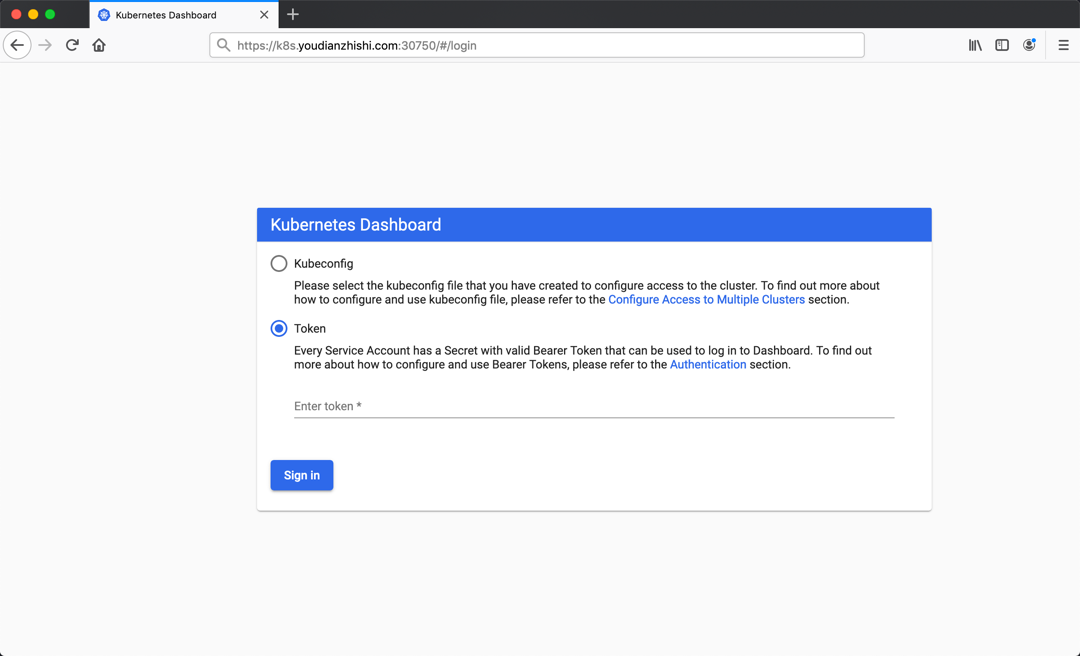
然后创建一个具有全局所有权限的用户来登录Dashboard(admin.yaml):
kind: ClusterRoleBinding
apiVersion: rbac.authorization.k8s.io/v1beta1
metadata:
  name: admin
roleRef:
  kind: ClusterRole
  name: cluster-admin
  apiGroup: rbac.authorization.k8s.io
subjects:
- kind: ServiceAccount
  name: admin
  namespace: kubernetes-dashboard
---
apiVersion: v1
kind: ServiceAccount
metadata:
  name: admin
  namespace: kubernetes-dashboard
直接创建:
$ kubectl apply -f admin.yaml
$ kubectl get secret -n kubernetes-dashboard|grep admin-token
admin-token-lwmmx                  kubernetes.io/service-account-token   3         1d
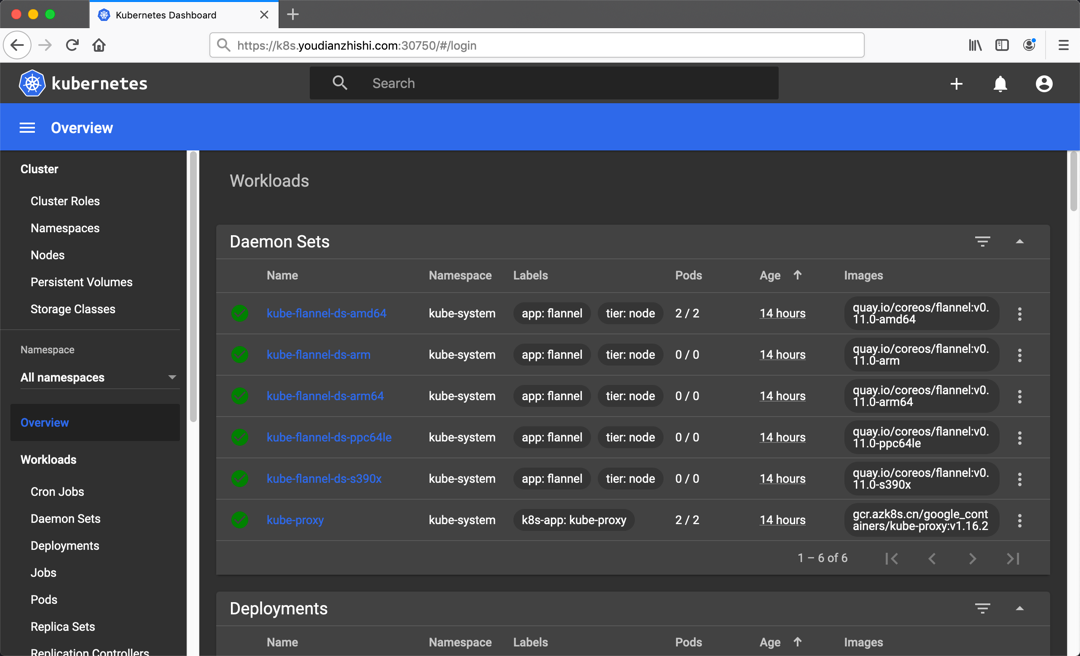
$ kubectl get secret admin-token-lwmmx -o jsonpath={.data.token} -n kubernetes-dashboard |base64 -d# 会生成一串很长的base64后的字符串
清理
如果在集群安装过程中遇到其他问题,可以使用下面命令进行重置:
$ kubeadm reset
$ ifconfig cni0 down && ip link delete cni0
$ ifconfig flannel.1 down && ip link delete flannel.1
$ rm -rf /var/lib/cni/

若有收获,就点个赞吧
0 人点赞


