连接数据库
首先一个网站初步需要登录页面admin,图片存放目录img,文件配置了目录config,调用函数目录common,创建完成后,进入config目录,创建config.php,写入如下语句:
<?php$host="localhost"; //目标数据库地址$username="root"; //连接数据库用户名$password="root"; //连接数据库密码$dbname="sevenpark"; //连接数据库名$con=mysqli_connect($host,$username,$password,$dbname); //连接成功返回一个代表到 MySQL 连接的对象if($con->connect_error){die("连接数据库失败!".$con->connect_error);}$con->query("set names utf-8"); //设置编码$con->close(); //关闭连接
connect_error返回返回上一个 MySQL 操作产生的文本错误信息
然后进入phpmyadmin,新建数据库名为sevenpark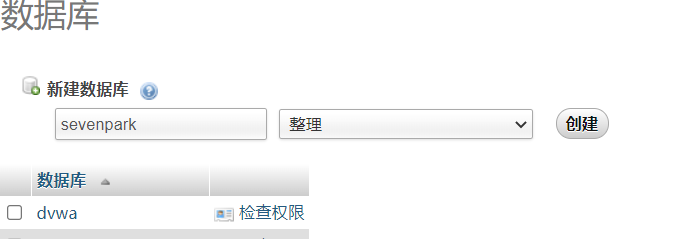
浏览器访问config.php配置文件,无报错说明数据库连接成功
编写后台登陆界面
在admin创建login.php文件,作为后台登录页面
登录页面的主题结构:
<html>
<head>
    <title>七号公园后台</title>
    <style>
        .login{
            width: 400px;
            height: 400px;
            margin: 0px auto;
        }
    </style>
</head>
<body>
    <div class="login">
        <form method="post" action="login.php" enctype="multipart/form-data">
            <table>
                <tr>
                    <td><label for="username">用户名:</label></td>
                    <td><input type="text" name="username" id="username"></td>
                </tr>
                <tr>
                    <td><label for="password">密 码:</label></td>
                    <td><input type="password" name="password" id="password"></td>
                </tr>
                <tr>
                    <td colspan="2"><input type="submit" name="submit" value="登录"></td>
                </tr>
            </table>
        </form>
    </div>
</body>
</html>
使用post方式提交到当前页面,<style>标签使其居中
后端处理结构:
<?php
include_once "../config/config.php"; //连接数据库配置文件
if(isset($_POST['submit'])){
    $username=$_POST['username'];
    $password=$_POST['password'];
    @$result=$con->query("select * from users where username='$username' and password='$password'; ");
    $row=$result->fetch_assoc();
    if(($result->num_rows)>0 and ($row['password']==$password) ){
        echo "登录成功!";
    }else{
        echo "登录失败!";
    }
}
$con是导入的数据库的配置文件中的对象,$con->query()查询数据库中post提交的用户和密码是否存在,$result->ferch_assoc()是返回结果的数组,取password与输入的$password做比较,一个简单的过滤
因为还没有编写注册功能,所以我们手动往数据库里写入了username和password。
然后我们输入账户名和密码,网页提示登录成功!这时一个简单的登录页面就完成了
编写后台注册页面
前面以及编写了登录页面,但是数据还得手动写入数据库,所以接下来写一个注册功能
网上有几种编写注册按钮的方法,罗列一下:
方法一:使用onclick事件

<input type="button" value="按钮"
onclick="javascrtpt:window.location.href='http://www.baidu.com/'" />

或者直接使用按钮标签

<button onclick="window.location.href = 'https://www.baidu.com/'">百度</button>

2:在按钮标签方法一个标签

<a href="http://www.baidu.com/">
    <button>百度</button>
</a>

或使用

<a href="http://www.baidu.com/"><input type="button" value='百度'></a>

方法3:使用JavaScript函数

<脚本>

函数跳转(){
 window.location.href="http://www.baidu.com/";
}

</脚本>
<input type="button" value="百度" onclick=javascrtpt:jump() />
// 或者<input type="button" value="百度" onclick="jump()" />
// 或者<button onclick="jump()">百度</button>
在原来登录框处添加一个button按钮,作用是跳转至新的注册页面,<**td colspan="3"**><**button onclick="_window_**.open(**'register.php'**)**"**>注册</**button**></**td**>
同目录下创建register.php,导入数据库文件一样,下面实现也和登录框差不多,无非多了一个密码确认
<?php
include_once "../config/config.php";
?>
<head>
<title>注册页面</title>
<style>
.re{
width: 400px;
height: 400px;
margin: 0px auto;
}
</style>
</head>
<body>
<div class="re">
<form action=" " method="post" enctype="multipart/form-data">
<table>
<tr><td><label for="re_username">用  户  名:</label></td><td><input type="text" name="re_username" maxlength="10" id="re_username"></td></tr>
<tr><td><label for="re_password">密    码:</label></td><td><input type="text" name="re_password" maxlength="10" id="re_password"></td></tr>
<tr><td><label for="re_password_1">再次确认密码:</label></td><td><input type="text" name="re_password_1" maxlength="10" id="re_password_1"></td></tr>
<tr><td colspan="2"><input type="submit" name="re_submit" value="注册"></td></tr>
</table>
</form>
</div>
</body>
<?php
if((isset($_POST['re_submit']))) { //检测是否又数据提交
$re_username = $_POST['re_username'];
$re_password = $_POST['re_password'];
$re_password_1 = $_POST['re_password_1']; //获取二次输入密码
if ($re_password == $re_password_1) { //将俩次输入密码做比较,如果相同才像数据库存入
$row=$con->query("select * from users where username='$re_username'")->fetch_assoc();
var_dump($row);
if($row['username']==$re_username){
echo "用户名已存在!";
}else{
if($result = $con->query("insert into users(username,password)values('$re_username','$re_password')")){
echo "<script>alert('注册成功!请返回登录..')</script>";
echo "<script>window.open('login.php')</script>"; //内嵌式js代码,但是会浏览器被拦截弹窗
}else{
echo "<script>alert('未知原因,账户注册失败..请重试')</script>";
}
}
} else {
echo "俩次密码输入不相同";
}
}
判断一下俩次输入密码是否相同,相同就执行数据库存入,边学边写的网站,毕竟还有很多过滤验证什么的不严格,后续在完善
Js前端验证
由于现在,登录框和注册对用户的username和password并没有限制为空或者超长或超短等问题,所以要写一个JS的验证。
在form表单属性中添加onsubmit,为ture就提交表单,为false相反,所以onsumbit="return check(this)",这里this指的是当前表单,当实参传给自定义js函数check()
在头部加上<script>标签,声明check()函数,函数内容为对username和password的验证
    <script>
        function check(form){   //声明js函数 check 形参为form表单
            var username=form.username.value; //定义变量为表单中username的值
            if(username.length==0) { //对用户名长度做判断
                alert("用户名不能为空!");
                form.username.focus();  //光标回到输入
                return false;
            }

            var password = form.password.value; //定义变量为表单中username的值
            if(password.length==0) { //对用户名长度做判断
                alert("密码不能为空!");
                form.password.focus();  //光标回到输入
                return false;
            }
            return true;
        }
    </script>
引用bootstrap框架完善博客
下载地址:[https://v3.bootcss.com](https://v3.bootcss.com)
关于Bootstrap
- 简单灵活可用于架构流行的用户界面和交互接口的html、css、javascript工具集。
- 基于html5、css3的bootstrap,具有大量的诱人特性:友好的学习曲线,卓越的兼容性,响应式设计,12列格网,样式向导文档。
- 自定义JQuery插件,完整的类库,基于Less等
Bootstrap对移动设备的改动
Bootstrap使用了一些 HTML5 元素和 CSS 属性,为了让这些正常工作,需要使用HTML5文档类型(Doctype),在使用Bootstrap的项目开头要包含下面的代码段:
<!DOCTYPE html>
<html>
....
</html>
否则可能回出现浏览器显示不一致,特定情况下不一致等问题。
为了让 Bootstrap 对移动设备友好,确保适当的绘制和触屏缩放,要在网页的head之中添加 **viewport meta**标签:<meta name="viewport" content="width=device-width, initial-scale=1.0">_width_属性控制设备的宽度。假设浏览网站的设备分辨率不同,那么将它设置为 _device-width_ 可以确保它能正确呈现在不同设备上。_initial-scale=1.0_ 确保网页加载时,以 1:1 的比例呈现,不会缩放。
移动设备浏览器上,通过为 viewport meta 标签添加 _user-scalable=no_ 可以禁用其缩放(zooming)功能
如果_maximum-scale=1.0_ 与 user-scalable=no 一起使用,就无法缩放只能滚动

若有收获,就点个赞吧
0 人点赞


