安装步骤
- 我这里把压缩包 放到了 home下解压
tar -xvf docker-19.03.9.tgz
- 将解压出来的docker文件内容移动到 /usr/bin/ 目录下
cp docker/* /usr/bin/
- 将docker注册为service
vim /etc/systemd/system/docker.service
文件内容:
[Unit] Description=Docker Application Container Engine Documentation=https://docs.docker.com After=network-online.target firewalld.service Wants=network-online.target [Service] Type=notify # the default is not to use systemd for cgroups because the delegate issues still # exists and systemd currently does not support the cgroup feature set required # for containers run by docker ExecStart=/usr/bin/dockerd ExecReload=/bin/kill -s HUP $MAINPID # Having non-zero Limit*s causes performance problems due to accounting overhead # in the kernel. We recommend using cgroups to do container-local accounting. LimitNOFILE=infinity LimitNPROC=infinity LimitCORE=infinity # Uncomment TasksMax if your systemd version supports it. # Only systemd 226 and above support this version. #TasksMax=infinity TimeoutStartSec=0 # set delegate yes so that systemd does not reset the cgroups of docker containers Delegate=yes # kill only the docker process, not all processes in the cgroup KillMode=process # restart the docker process if it exits prematurely Restart=on-failure StartLimitBurst=3 StartLimitInterval=60s [Install] WantedBy=multi-user.target
- 启动
chmod +x /etc/systemd/system/docker.service #添加文件权限并启动docker systemctl daemon-reload #重载unit配置文件 systemctl start docker #启动Docker systemctl enable docker.service #设置开机自启
- 验证
systemctl status docker #查看Docker状态 docker -v #查看Docker版本 docker info
添加软连接
- 停止docker
sudo systemctl stop docker
- 添加软连接
ln -s /home/docker /var/lib/docker
- 启动docker
sudo systemctl start docker
- 查看软连接
cd /var/lib/docker/ ll
成功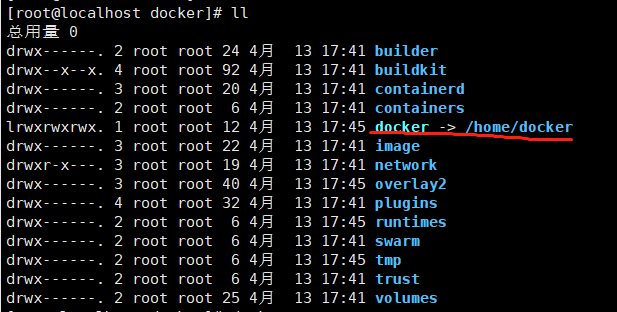

若有收获,就点个赞吧
0 人点赞


