1 Eureka是什么

Eureka是Netflix的一个子模块,也是核心模块之一。Eureka是一个基于REST的服务,用于定位服务,以实现云端中间层服务发现和故障转移。Eureka 是服务注册和发现模块
服务注册与发现对于微服务架构来说是非常重要的,有了服务发现与注册,只需要使用服务的标识符,就可以访问到服务,而不需要修改服务调用的配置文件了。功能类似于dubbo的注册中心,比如Zookeeper。
2 原理
2.1 Eureka的基本架构
Spring Cloud 封装了 Netflix 公司开发的 Eureka 模块来实现服务注册和发现(请对比Zookeeper)。
Eureka 采用了 C-S 的设计架构。Eureka Server 作为服务注册功能的服务器,它是服务注册中心。
而系统中的其他微服务,使用 Eureka 的客户端连接到 Eureka Server并维持心跳连接。这样系统的维护人员就可以通过 Eureka Server 来监控系统中各个微服务是否正常运行。SpringCloud 的一些其他模块(比如Zuul)就可以通过 Eureka Server 来发现系统中的其他微服务,并执行相关的逻辑。
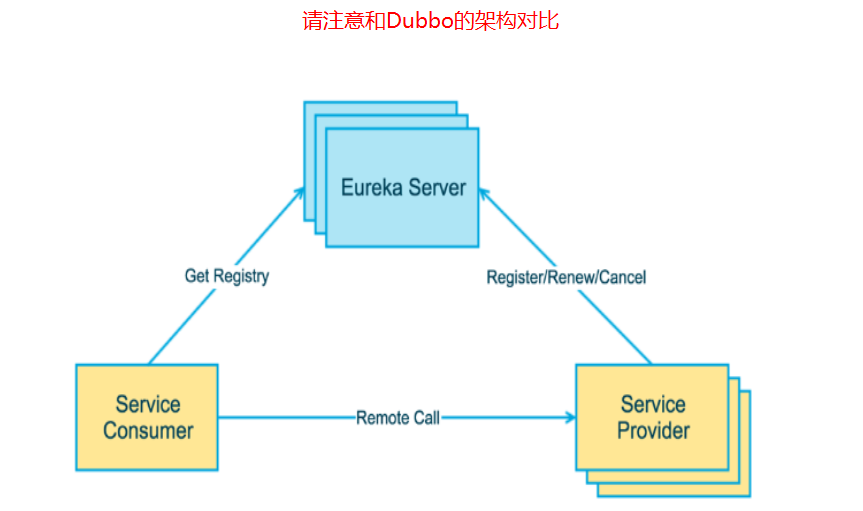

Eureka包含两个组件:Eureka Server和Eureka Client
Eureka Server提供服务注册服务
各个节点启动后,会在EurekaServer中进行注册,这样EurekaServer中的服务注册表中将会存储所有可用服务节点的信息,服务节点的信息可以在界面中直观的看到
EurekaClient是一个Java客户端,用于简化Eureka Server的交互,客户端同时也具备一个内置的、使用轮询(round-robin)负载算法的负载均衡器。在应用启动后,将会向Eureka Server发送心跳(默认周期为30秒)。如果Eureka Server在多个心跳周期内没有接收到某个节点的心跳,EurekaServer将会从服务注册表中把这个服务节点移除(默认90秒)
2.2 三大角色
Eureka Server 提供服务注册和发现
Service Provider服务提供方将自身服务注册到Eureka,从而使服务消费方能够找到
Service Consumer服务消费方从Eureka获取注册服务列表,从而能够消费服务
3 构建步骤
3.1 cloud-eureka-7001
1 新建cloud-eureka-7001 Model
2 pom.xml
<project xmlns="http://maven.apache.org/POM/4.0.0" xmlns:xsi="http://www.w3.org/2001/XMLSchema-instance"xsi:schemaLocation="http://maven.apache.org/POM/4.0.0 http://maven.apache.org/xsd/maven-4.0.0.xsd"><modelVersion>4.0.0</modelVersion><parent><groupId>com.spiritmark.cloud</groupId><artifactId>cloudDemo</artifactId><version>0.0.1-SNAPSHOT</version></parent><artifactId>cloud-eureka-7001</artifactId><dependencies><!--eureka-server服务端 --><dependency><groupId>org.springframework.cloud</groupId><artifactId>spring-cloud-starter-eureka-server</artifactId></dependency><dependency><groupId>org.springframework.cloud</groupId><artifactId>spring-cloud-starter-netflix-eureka-server</artifactId></dependency><!-- 修改后立即生效,热部署 --><dependency><groupId>org.springframework</groupId><artifactId>springloaded</artifactId></dependency><dependency><groupId>org.springframework.boot</groupId><artifactId>spring-boot-devtools</artifactId></dependency></dependencies></project>
3 yml
server:
  port: 7001

eureka:
  instance:
    hostname: localhost #eureka服务端的实例名称
  client:
    register-with-eureka: false #false表示不向注册中心注册自己。
    fetch-registry: false #false表示自己端就是注册中心,我的职责就是维护服务实例,并不需要去检索服务
    service-url:
      defaultZone: http://${eureka.instance.hostname}:${server.port}/eureka/        #设置与Eureka Server交互的地址查询服务和注册服务都需要依赖这个地址。
4 EurekaServer7001启动类
package com.spiritmark.cloud;

import org.springframework.boot.SpringApplication;
import org.springframework.boot.autoconfigure.SpringBootApplication;
import org.springframework.cloud.netflix.eureka.server.EnableEurekaServer;


@SpringBootApplication
@EnableEurekaServer//EurekaServer服务器端启动类,接受其它微服务注册进来
public class EurekaServer7001
{
  public static void main(String[] args)
  {
   SpringApplication.run(EurekaServer7001.class, args);
  }
}

3.2 cloud-provider-dept-8001
1 修改cloud-provider-dept-8001 服务提供者Model
2 修改pom.xml
   <!-- 将微服务provider侧注册进eureka -->
   <dependency>
     <groupId>org.springframework.cloud</groupId>
     <artifactId>spring-cloud-starter-eureka</artifactId>
   </dependency>
   <dependency>
     <groupId>org.springframework.cloud</groupId>
     <artifactId>spring-cloud-starter-config</artifactId>
   </dependency>
3 修改yml
eureka:
  client: #客户端注册进eureka服务列表内
    service-url:
      defaultZone: http://localhost:7001/eureka
4 修改DeptProvider8001 启动类
package com.spiritmark.cloud;

import org.springframework.boot.SpringApplication;
import org.springframework.boot.autoconfigure.SpringBootApplication;
import org.springframework.cloud.netflix.eureka.EnableEurekaClient;

@SpringBootApplication
@EnableEurekaClient //本服务启动后会自动注册进eureka服务中
public class DeptProvider8001
{
  public static void main(String[] args)
  {
   SpringApplication.run(DeptProvider8001.class, args);
  }
}
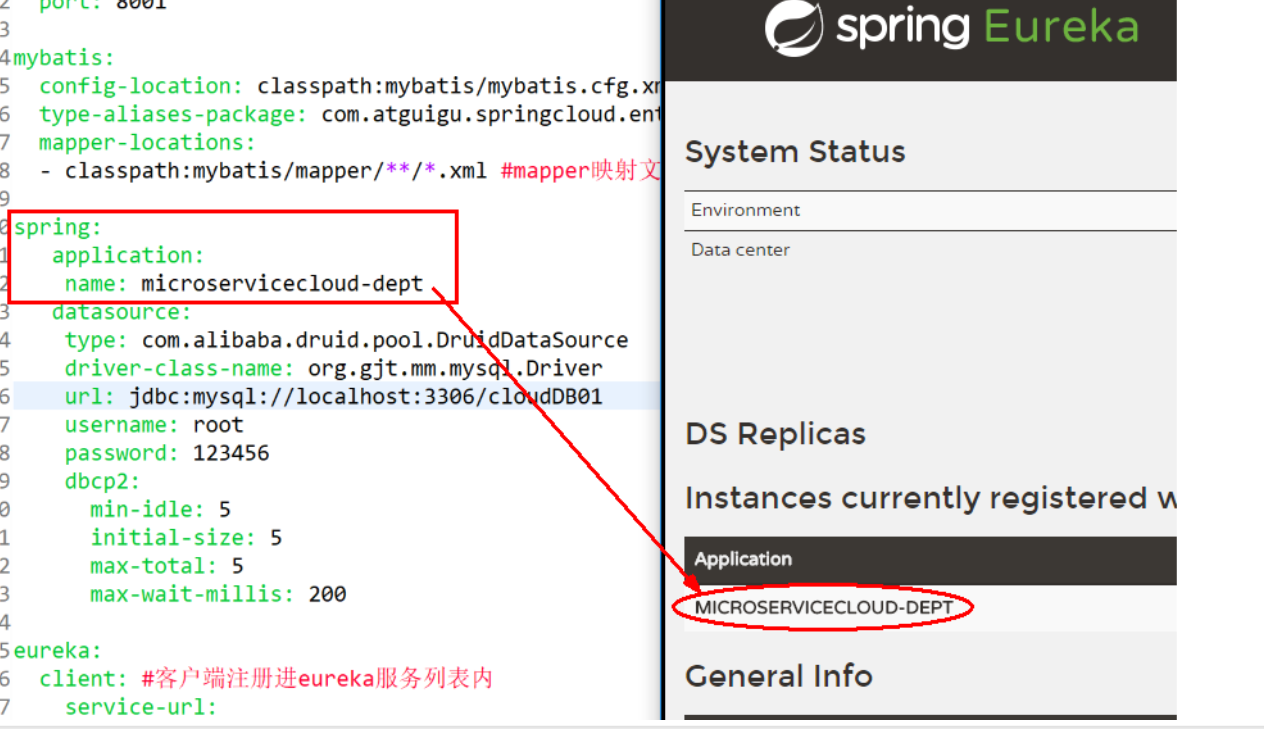
5 测试
先要启动EurekaServer http://localhost:7001/ 查看是否有服务注册
3.3 actuator与注册微服务信息完善
- 主机名称:服务名称修改(为了在服务注册中心点到服务名称时会展示主机名称)
修改yml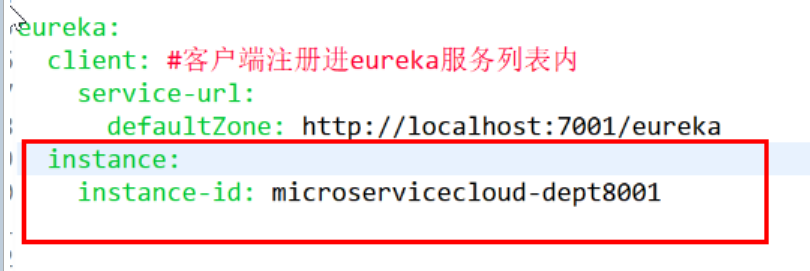
   eureka:
  client: #客户端注册进eureka服务列表内
    service-url:
      defaultZone: http://localhost:7001/eureka
  instance:
    instance-id: microservicecloud-dept8001
效果图
- 访问信息有IP信息提示
修改yml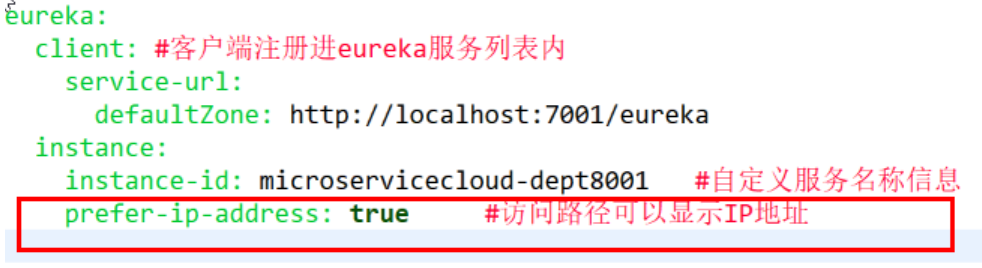
eureka:
  client: #客户端注册进eureka服务列表内
    service-url:
      defaultZone: http://localhost:7001/eureka
  instance:
    instance-id: microservicecloud-dept8001   #自定义服务名称信息
    prefer-ip-address: true     #访问路径可以显示IP地址
- 微服务info内容详细信息
超链接点击服务报告ErrorPage
修改cloud-provider-dept-8001 pom.xml
<dependency>
       <groupId>org.springframework.boot</groupId>
       <artifactId>spring-boot-starter-actuator</artifactId>
   </dependency>
修改总的父工程cloudDemo修改pom.xml添加构建build信息
<build>
   <finalName>cloudDemo</finalName>
   <resources>
     <resource>
       <directory>src/main/resources</directory>
       <filtering>true</filtering>
     </resource>
   </resources>
   <plugins>
     <plugin>
       <groupId>org.apache.maven.plugins</groupId>
       <artifactId>maven-resources-plugin</artifactId>
       <configuration>
         <delimiters>
          <delimit>$</delimit>
         </delimiters>
       </configuration>
     </plugin>
   </plugins>
  </build>
修改cloud-provider-dept-8001 yml
info:
  app.name: microservicecloud
  company.name: www.spiritmark.com
  build.artifactId: $project.artifactId$
  build.version: $project.version$
3.4 eureka自我保护

什么是自我保护模式?
默认情况下,如果EurekaServer在一定时间内没有接收到某个微服务实例的心跳,EurekaServer将会注销该实例(默认90秒)。但是当网络分区故障发生时,微服务与EurekaServer之间无法正常通信,以上行为可能变得非常危险了——因为微服务本身其实是健康的,此时本不应该注销这个微服务。Eureka通过“自我保护模式”来解决这个问题——当EurekaServer节点在短时间内丢失过多客户端时(可能发生了网络分区故障),那么这个节点就会进入自我保护模式。一旦进入该模式,EurekaServer就会保护服务注册表中的信息,不再删除服务注册表中的数据(也就是不会注销任何微服务)。当网络故障恢复后,该Eureka Server节点会自动退出自我保护模式。
在自我保护模式中,Eureka Server会保护服务注册表中的信息,不再注销任何服务实例。当它收到的心跳数重新恢复到阈值以上时,该Eureka Server节点就会自动退出自我保护模式。它的设计哲学就是宁可保留错误的服务注册信息,也不盲目注销任何可能健康的服务实例。一句话讲解:好死不如赖活着。
综上,自我保护模式是一种应对网络异常的安全保护措施。它的架构哲学是宁可同时保留所有微服务(健康的微服务和不健康的微服务都会保留),也不盲目注销任何健康的微服务。使用自我保护模式,可以让Eureka集群更加的健壮、稳定。
在Spring Cloud中,可以使用eureka.server.enable-self-preservation = false 禁用自我保护模式。
一句话:某时刻某一个微服务不可用了,eureka不会立刻清理,依旧会对该微服务的信息进行保存
4 集群配置
1 上面我们已经有一个Eureka服务注册中心(cloud-eureka-7001) 然后再新建两个Model(cloud-eureka-7002、cloud-eureka-7003)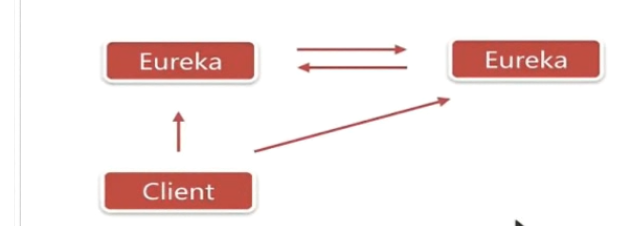
2 将cloud-eureka-7001pom.xml复制到7002、7003
3 新建EurekaServer7002 EurekaServer7003 主启动类
4 修改映射配置修改 C:\Windows\System32\drivers\etc\ host文件 127.0.0.1 eureka7001.com 127.0.0.1 eureka7002.com 127.0.0.1 eureka7003.com
5 Eureka服务器的yml配置
cloud-eureka-7001
server:
  port: 7001

eureka:
  instance:
    hostname: eureka7001.com #eureka服务端的实例名称
  client:
    register-with-eureka: false     #false表示不向注册中心注册自己。
    fetch-registry: false     #false表示自己端就是注册中心,我的职责就是维护服务实例,并不需要去检索服务
    service-url:
      #单机 defaultZone: http://${eureka.instance.hostname}:${server.port}/eureka/       #设置与Eureka Server交互的地址查询服务和注册服务都需要依赖这个地址(单机)。
      defaultZone: http://eureka7002.com:7002/eureka/,http://eureka7003.com:7003/eureka/
cloud-eureka-7002
server:
  port: 7002

eureka:
  instance:
    hostname: eureka7002.com #eureka服务端的实例名称
  client:
    register-with-eureka: false     #false表示不向注册中心注册自己。
    fetch-registry: false     #false表示自己端就是注册中心,我的职责就是维护服务实例,并不需要去检索服务
    service-url:
      #defaultZone: http://${eureka.instance.hostname}:${server.port}/eureka/       #设置与Eureka Server交互的地址查询服务和注册服务都需要依赖这个地址。
      defaultZone: http://eureka7001.com:7001/eureka/,http://eureka7003.com:7003/eureka/
cloud-eureka-7003
server:
  port: 7003

eureka:
  instance:
    hostname: eureka7003.com #eureka服务端的实例名称
  client:
    register-with-eureka: false     #false表示不向注册中心注册自己。
    fetch-registry: false     #false表示自己端就是注册中心,我的职责就是维护服务实例,并不需要去检索服务
    service-url:
      #defaultZone: http://${eureka.instance.hostname}:${server.port}/eureka/       #设置与Eureka Server交互的地址查询服务和注册服务都需要依赖这个地址。
      defaultZone: http://eureka7001.com:7001/eureka/,http://eureka7002.com:7002/eureka/
6 将cloud-provider-dept-8001注册到集群的Eureka服务注册中心上
修改8001 yml配置文件
server:
  port: 8001

mybatis:
  config-location: classpath:mybatis/mybatis.cfg.xml  #mybatis所在路径
  type-aliases-package: com.spiritmark.cloud.entity #entity别名类
  mapper-locations:
  - classpath:mybatis/mapper/**/*.xml #mapper映射文件

spring:
   application:
    name: microservicecloud-dept
   datasource:
    type: com.alibaba.druid.pool.DruidDataSource
    driver-class-name: org.gjt.mm.mysql.Driver
    url: jdbc:mysql://localhost:3306/cloudDB01
    username: root
    password: 123456
    dbcp2:
      min-idle: 5
      initial-size: 5
      max-total: 5
      max-wait-millis: 200

eureka:
  client: #客户端注册进eureka服务列表内
    service-url:
      defaultZone: http://eureka7001.com:7001/eureka/,http://eureka7002.com:7002/eureka/,http://eureka7003.com:7003/eureka/
  instance:
    instance-id: microservicecloud-dept8001   #自定义服务名称信息
    prefer-ip-address: true     #访问路径可以显示IP地址

info:
  app.name: microservicecloud
  company.name: www.spiritmark.com
  build.artifactId: $project.artifactId$
  build.version: $project.version$
yml 配置文件 的 org.gjt.mm.mysql.Driver com.mysql.jdbc.Driver的前身是org.gjt.mm.mysql.Driver,现在主要用com.mysql.jdbc.Driver,但为了保持兼容性保留了org.gjt.mm.mysql.Driver这个路径的引用。
8 启动3个服务注册中心,在启动服务提供者8001


若有收获,就点个赞吧
0 人点赞


