参考链接:https://help.aliyun.com/document_detail/106968.html :::info 实例中的环境为阿里云,我是部署在本地虚拟机上,环境有差异很多地方需要修改。 :::
创建GitLab源码项目并上传示例代码
1.创建gitlab源码项目
在gitlab中新建demo组
源码地址为:http://192.168.1.131/demo/gitlab-java-demo.git
2.执行以下命令获取示例代码并上传至gitlab
访问github有vpn用vpn,没有vpn修改hosts文件 ↓ https://blog.csdn.net/qq_27415615/article/details/124791034
多试几次就可以了。
# 拷贝git仓库到本地git clone https://github.com/haoshuwei/gitlab-ci-k8s-demo.git# 与远端仓库连接并指定名字git remote add gitlab http://xx.xx.xx.xx/demo/gitlab-java-demo.git#上传git push gitlab master
在k8s集群中安装gitlab runner
1. 获取runner注册信息
可以使用专用runner、组runner、或者shared runner,这里使用专用runner。
1. 登录[GitLab](https://about.gitlab.com/)。1. 在顶部导航栏中,选择**Projects > Your projects**。1. 在**Your projects**页签下,选择相应的Project。1. 在左侧导航栏中,选择**Settings > CI / CD**。1. 单击**Runners**右侧的**Expand**。
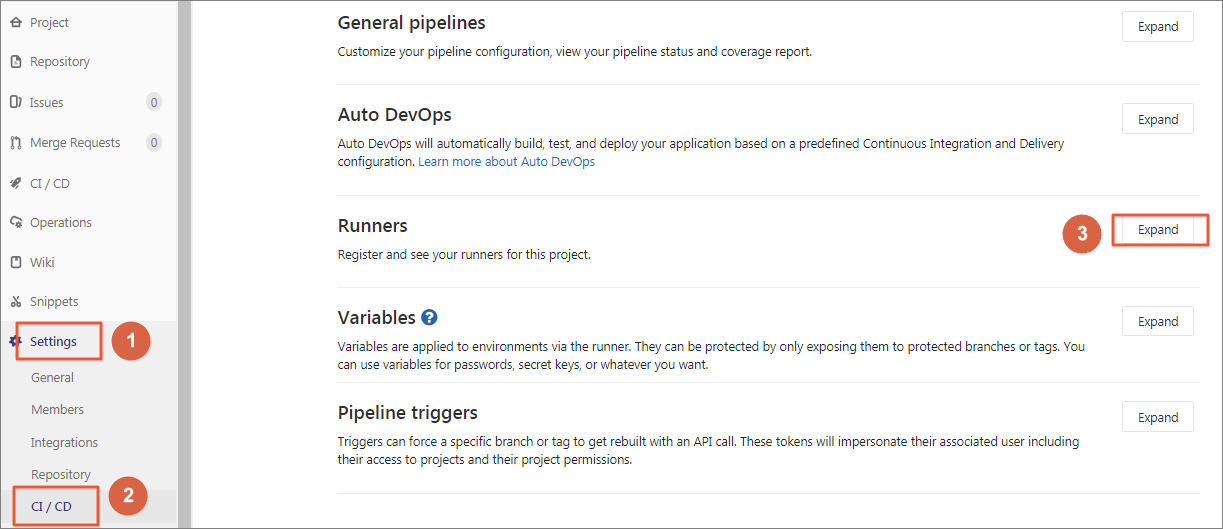
获取URL和registration token信息。
2.在k8s上获取并修改gitlab runner的helm chart
查看是否安装helm(k8s中的安装命令,类似yum)
如果没有需要安装:
安装包下载地址 https://github.com/helm/helm/releases
tar zxvf helm-xxxxx-linux-amd64.tar.gz
mv linux-amd64/helm /usr/local/bin/helm
添加chart存储库
helm repo add gitlab https://charts.gitlab.io
验证源
helm repo list
ok
获取gitlab runner的helm chart
git clone https://github.com/haoshuwei/gitlab-runner.git
替换gitlabUrl和runnerRegistrationToken字段:
## GitLab Runner Image
##
image: gitlab/gitlab-runner:alpine-v11.4.0

## Specify a imagePullPolicy
##
imagePullPolicy: IfNotPresent

## Default container image to use for initcontainer
init:
  image: busybox
  tag: latest

## The GitLab Server URL (with protocol) that want to register the runner against
##
gitlabUrl: http://xx.xx.xx.xx/

## The Registration Token for adding new Runners to the GitLab Server. This must
## be retreived from your GitLab Instance.
##
runnerRegistrationToken: "AMvEWrBTBu-d8czE****"
## Unregister all runners before termination
##
unregisterRunners: true

## Configure the maximum number of concurrent jobs
##
concurrent: 10

## Defines in seconds how often to check GitLab for a new builds
##
checkInterval: 30

## For RBAC support:
##
rbac:
  create: true
  clusterWideAccess: false

## Configure integrated Prometheus metrics exporter
##
metrics:
  enabled: true

## Configuration for the Pods that that the runner launches for each new job
##
runners:
  ## Default container image to use for builds when none is specified
  ##
  image: ubuntu:16.04

  ## Specify the tags associated with the runner. Comma-separated list of tags.
  ##
  tags: "k8s-runner"

  ## Run all containers with the privileged flag enabled
  ## This will allow the docker:dind image to run if you need to run Docker
  ## commands. Please read the docs before turning this on:
  ##
  privileged: true

  ## Namespace to run Kubernetes jobs in (defaults to the same namespace of this release)
  ##
  namespace: gitlab

  cachePath: "/opt/cache"

  cache: {}
  builds: {}
  services: {}
  helpers: {}

resources: {}
打包应用
helm package .
预期输出:
Successfully packaged chart and saved it to: /root/gitlab/gitlab-runner/gitlab-runner-0.1.37.tgz
安装应用:
helm install —namespace gitlab gitlab-runner *.tgz
我这里有提示,应该是版本的问题,先不管他:
W0629 22:43:34.484712 7768 warnings.go:70] rbac.authorization.k8s.io/v1beta1 Role is deprecated in v1.17+, unavailable in v1.22+; use rbac.authorization.k8s.io/v1 Role
3.缓存配置
略。。。
GitLab Runner对缓存方案的支持有限,所以您需要使用挂载Volume的方式做缓存。在上面的示例中,安装GitLab Runner时默认使用/opt/cache目录作为缓存空间。您也可以通过修改values.yaml文件中的runners.cachePath字段修改缓存目录。
例如,如需建立Maven缓存,您可以在variables下添加MAVEN_OPTS变量并指定本地缓存目录:
variables:
  KUBECONFIG: /etc/deploy/config
  MAVEN_OPTS: "-Dmaven.repo.local=/opt/cache/.m2/repository"
cat >>/home/gitlab-runner/.gitlab-runner/config.toml <<EOF
            [[runners.kubernetes.volumes.pvc]]
              name = "gitlab-runner-cache"
              mount_path = "{{ .Values.runners.cachePath }}"
            [[runners.kubernetes.volumes.host_path]]
              name = "docker"
              mount_path = "/var/run/docker.sock"
              read_only = true
              host_path = "/var/run/docker.sock"
    EOF
设置全局变量
- 在GitLab的顶部导航栏中,选择Projects > Your projects。
- 在Your projects页签下,选择相应的Project。
- 在左侧导航栏中,选择Settings > CI / CD。
- 单击Variables右侧的Expand。添加GitLab Runner可用的环境变量。本示例中,添加以下三个变量。
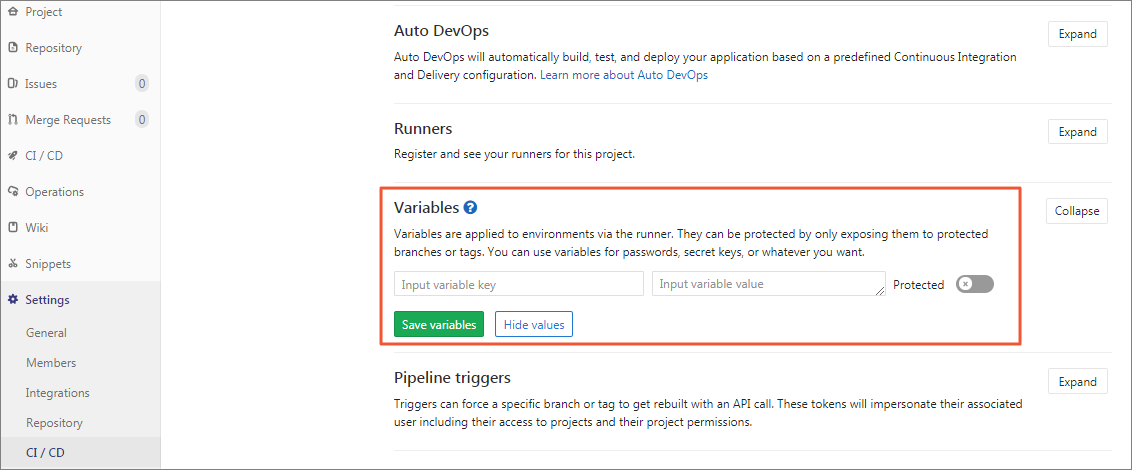
- REGISTRY_USERNAME:阿里云镜像仓库用户名。
- REGISTRY_PASSWORD:镜像仓库密码,不是用户密码!
- kube_config:KubeConfig的编码字符串。
执行以下命令生成kubeconfig的编码字符串:
echo $(cat ~/.kube/config | base64) | tr -d " "
:::info 这里可以在ci文件中cat一下,验证是否成功。 :::
编写.gitlab-ci.yml
编写.gitlab-ci.yml文件,完成Java Demo源码项目的编译构建、镜像推送和应用部署
image: docker:stable
stages:
  - package
  - docker_build
  - deploy_k8s
variables:
  KUBECONFIG: /etc/deploy/config
  MAVEN_OPTS: "-Dmaven.repo.local=/opt/cache/.m2/repository"
mvn_build_job:
  image: maven:3.6.2-jdk-14
  stage: package
  tags:
    - k8s-runner
  script:
    - mvn package -B -DskipTests
    - cp target/demo.war /opt/cache
docker_build_job:
  image: docker:latest
  stage: docker_build
  tags:
    - k8s-runner
  script:
    - docker login -u $REGISTRY_USERNAME -p $REGISTRY_PASSWORD registry.cn-beijing.aliyuncs.com
    - mkdir target
    - cp /opt/cache/demo.war target/demo.war
    - docker build -t registry.cn-beijing.aliyuncs.com/haoshuwei24/gitlabci-java-demo:$CI_PIPELINE_ID .
    - docker push registry.cn-beijing.aliyuncs.com/haoshuwei24/gitlabci-java-demo:$CI_PIPELINE_ID
deploy_k8s_job:
  image: registry.cn-hangzhou.aliyuncs.com/haoshuwei24/kubectl:1.16.6
  stage: deploy_k8s
  tags:
    - k8s-runner
  script:
    - mkdir -p /etc/deploy
    - echo $kube_config |base64 -d > $KUBECONFIG
    - sed -i "s/IMAGE_TAG/$CI_PIPELINE_ID/g" deployment.yaml
    - cat deployment.yaml
    - kubectl apply -f deployment.yaml
1. job:package报错
:::info 这里第一个job package会报错,pod起不来,因为pvc和pv没有绑定,其实压根没有pv;而且要注意名称空间需要设置成gitlab,这样方便pvc和pv绑定。 ::: 自己做好pv
apiVersion: v1
kind: PersistentVolume
metadata:
  name: pv-gitlab
spec:
  capacity:
    storage: 1Gi
  accessModes:
    - ReadWriteMany
  storageClassName: nfs
  claimRef:
    namespace: gitlab #要加上
    name: gitlab-runner-cache
  nfs:    # 实例中的阿里云盘要改成本地的nfs
    path: /opt/cache
    server: 172.31.0.131
kubectl apply -f gitlab-pv.yaml
修改~/gitlab-runner/templates下的pvc.yaml <br />注释掉阿里云盘<br />storageClassName为nfs
apiVersion: v1
kind: PersistentVolumeClaim
metadata:
  #annotations:
   # volume.beta.kubernetes.io/storage-provisioner: alicloud/disk
  #labels:
   # app: {{ template "gitlab-runner.fullname" . }}
  name: gitlab-runner-cache
  namespace: gitlab
spec:
  accessModes:
    - ReadWriteMany
  resources:
    requests:
      storage: 1Gi
  storageClassName: nfs
status: {}
kubectl create -f pvc.yaml
kubectl get pv,pvc -n gitlab
预期如下:
2. job2: docker_buid报错
:::info 主要是仓库地址忘记换了。。。,全部换成自己的。 :::
3. job3: deploy_k8s报错
:::info
报错内容:unable to recognize “deployment.yaml”: Get https://cluster-endpoint:6443/api?timeout=32s: dial tcp: lookup cluster-endpoint on 10.96.0.10:53: no such host
初看好像是验证的问题,实则就是解析不出来。本地环境和阿里云的区别,后面会详细解释。
需要在ci文件deploy_k8s阶段指定cluster-endpoint的ip,并修改service的type为NodePort。
这个阶段里的镜像地址别忘了换成自己的。
:::
4. 修改后的项目文件
apiVersion: apps/v1
kind: Deployment
metadata:
  name: java-demo
spec:
  replicas: 1
  selector:
    matchLabels:
      app: java-demo
  template:
    metadata:
      labels:
        app: java-demo
    spec:
      containers:
      - name: java-demo
        image: registry.cn-hangzhou.aliyuncs.com/jnx/gitlabci-java-demo:IMAGE_TAG
        imagePullPolicy: Always
        ports:
        - containerPort: 8080
---
apiVersion: v1
kind: Service
metadata:
  name: java-demo
spec:
  ports:
  - port: 80
    targetPort: 8080
    name: java-demo
  selector:
    app: java-demo
  type: NodePort
image: docker:stable
stages:
  - package
  - docker_build
  - deploy_k8s
variables:
  KUBECONFIG: /etc/deploy/config
  MAVEN_OPTS: "-Dmaven.repo.local=/opt/cache/.m2/repository"
mvn_build_job:
  image: maven:3.6.2-jdk-14
  stage: package
  tags:
    - k8s-runner
  script:
    - mvn package -B -DskipTests
    - cp target/demo.war /opt/cache
docker_build_job:
  image: docker:latest
  stage: docker_build
  tags:
    - k8s-runner
  script:
    - docker login -u $REGISTRY_USERNAME -p $REGISTRY_PASSWORD registry.cn-hangzhou.aliyuncs.com
    - mkdir target
    - cp /opt/cache/demo.war target/demo.war
    - docker build -t registry.cn-hangzhou.aliyuncs.com/jnx/gitlabci-java-demo:$CI_PIPELINE_ID .
    - docker push registry.cn-hangzhou.aliyuncs.com/jnx/gitlabci-java-demo:$CI_PIPELINE_ID
deploy_k8s_job:
  image: registry.cn-hangzhou.aliyuncs.com/haoshuwei24/kubectl:1.16.6
  stage: deploy_k8s
  tags:
    - k8s-runner
  script:
    - mkdir -p /etc/deploy
    - echo $kube_config |base64 -d > $KUBECONFIG
    - cat $KUBECONFIG
    - sed -i "s/IMAGE_TAG/$CI_PIPELINE_ID/g" deployment.yaml
    - cat deployment.yaml
    - echo "172.31.0.131  cluster-endpoint" >>/etc/hosts
    - kubectl apply -f deployment.yaml
执行pipeline

访问服务
http://192.168.1.127:30690/demo
预期输出:
Hello World!
关于报错的总结
1. cluster-endpoint
本地部署的k8s集群需要指定cluster-endpoint地址(k8s本来就是为云服务的),各种云上不会有这个问题,因为一般云上主机在云端内部DNS服务器上都是自动添加了DNS记录的,使用云端自有DNS就能解释了主机的IP,这个问题一般出现在本地部署。k8s API server默认开启两个端口:8080和6443,分别用于web ui dashboard和kubectl远程连接管理集群。因此需要在pipeline中指定cluster-endpoint的地址,不然kubectl命令不能执行下去,就会报错“Get https://cluster-endpoint:6443/api?timeout=32s: dial tcp: lookup cluster-endpoint on 10.96.0.10:53: no such host”。(10.96.0.10是k8s dns的地址。)
2. LoadBalancer
通过设置LoadBalancer映射到云服务上提供的LoadBalancer地址。这种用法仅用于公有云服务提供商的云平台设置Service的场景。对该Service的请求将会通过LoadBalancer转发到后端Pod上,负载分发的实现方式则依赖于云服务商提供的LoadBalancer的实现机制。这里需要换成NodePort。

若有收获,就点个赞吧
0 人点赞


