控制台命令:
连接数据库:net start mysql
关闭数据库:net stop mysql
登录数据库:
mysql-u用户名 -p密码mysql -hip地址 -u用户名 -p密码mysql --host=ip地址 --user=用户名 --password=密码
退出:
sql语句

SQL 语句分类
- DataDefinition Language (DDL数据定义语言) 如:建库,建表
- DataManipulationLanguage(DML数据操纵语言),如:对表中的记录操作增删改
- DataQueryLanguage(DQL数据查询语言),如:对表中的查询操作
- DataControl Language(DCL数据控制语言),如:对用户权限的设置
语法
在专业工具中分号可加可不加,在命令提示符里面必须加分号,
语句不区分大小写
| —空格 | 单行注释 |
|---|---|
| / / | 多行注释 |
| # | 这是 mysql 特有的注释方式 |
DDL(数据定义语言)
DDL操作数据库
创建
- 创建数据库
- CREATE DATABASE 数据库名;
- 判断数据库是否已经存在,不存在则创建数据库
- CREATE DATABASE IF NOT EXISTS 数据库名;
- 创建数据库并指定字符集
- CREATE DATABASE 数据库名 CHARACTER SET 字符集;
# 创建一个数据库mydb16create database mydb16;# 判断数据库是否已经存在,不存在则创建数据库create database if not exists mydb16;# 创建数据库并指定字符集create database mydb16 CHARACTER set utf8;
查找
#查看所有的数据库
show databases;
#查看某个数据库的定义信息
show create database mydb16;
删除
# 删除数据库
drop database mydb16;
修改
#    修改数据库默认的字符集;
alter database mydb16 character set utf8;
使用数据库(对图形化界面帮助不大,一般为命令提示行用)
#    查看正在使用的数据库
select database();#使用的一个 mysql 中的全局函数
#    改变要使用的数据库
use mydb16; #这里填数据库
DDL操作表结构
数据类型
| 分类 类型名称 类型说明 | | | | —- | —- | —- | |
整数 | tinyInt | 微整型:很小的整数(占 8 位二进制) | | | smallint | 小整型:小的整数(占 16 位二进制) | | | mediumint | 中整型:中等长度的整数(占 24 位二进制) | | | int(integer) | 整型:整数类型(占 32 位二进制) | | |
| | | 小数 | float | 单精度浮点数,占 4 个字节 | | | double | 双精度浮点数,占 8 个字节 | |
日期 | time | 表示时间类型 | | | date | 表示日期类型 | | | datetime | 同时可以表示日期和时间类型 | |
字符串 | char(11) | 固定长度的字符串,无论使用几个字符都占满全部,M 为 0~255 之间的整
数 | | | varchar(11) | 可变长度的字符串,使用几个字符就占用几个,M 为 0~65535 之间的整数 | |
大二进制 | tinyblob
Big Large Object | 允许长度 0~255 字节 | | | blob | 允许长度 0~65535 字节 | | | mediumblob | 允许长度 0~167772150 字节 | | | longblob | 允许长度 0~4294967295 字节 | | 大文本 | tinytext | 允许长度 0~255 字节 | | | text | 允许长度 0~65535 字节 | | | mediumtext | 允许长度 0~167772150 字节 | | | longtext | 允许长度 0~4294967295 字节 |
mysql 中char与varchar的区别与使用
char与varchar
char适用于定长的数据,,学号,性别,身份证号等长度固定的数值
varchar适用于长度不固定的数据,姓名,email等长度不定的数值
mysql 中char与varchar的区别与使用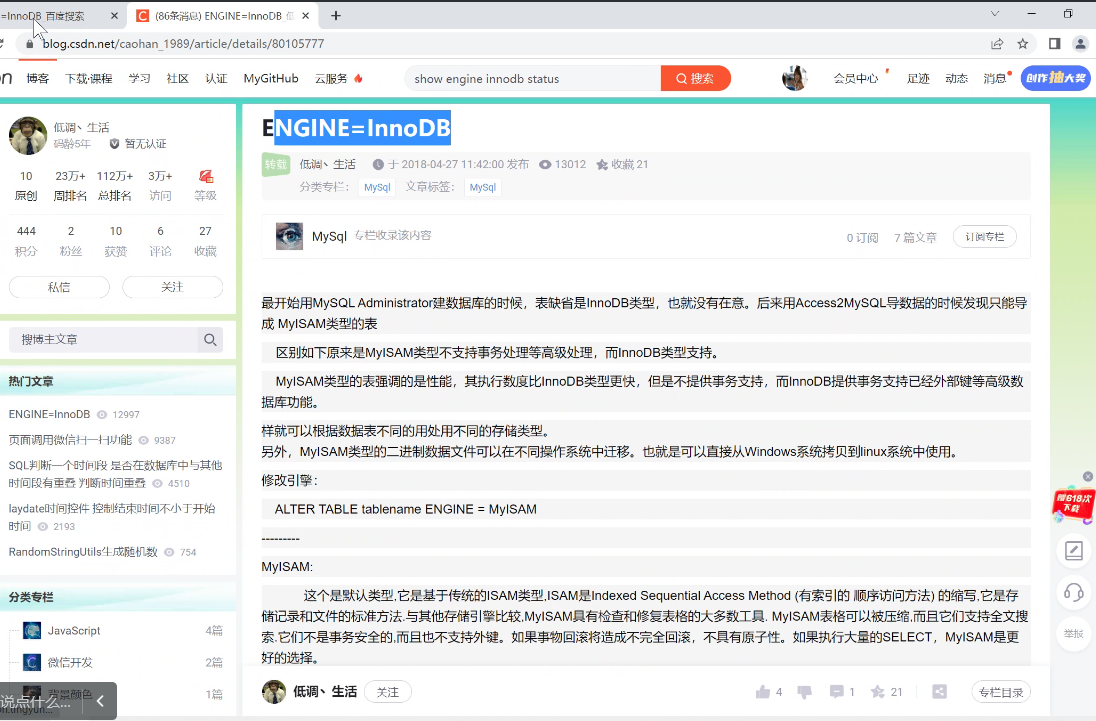
创建表
#创建一个学生表
create table student(
id int,                            #整数
name varchar(20),        #字符串
birthday date             #生日,最后没有逗号,日期
);
关键字存在的目的是为了避免关键字的冲突,name是例外,严谨起见,关键字建表使用``
查看表
#    查看某个数据库中的所有表
show tables;
#    查看表结构
desc student;
#    查看创建表的 SQL 语句
show create table student;

#运行结果:
CREATE TABLE `student` (
  `id` int(11) DEFAULT NULL,
  `name` varchar(20) DEFAULT NULL,
  `birthday` date DEFAULT NULL
) ENGINE=InnoDB DEFAULT CHARSET=utf8
修改表
# 快速创建一个表结构相同的表
create table student2 like student;
# 查看表结构
desc student2;
#    直接删除表
drop table student2;
#    判断表是否存在,如果存在则删除表
drop table if exists student2;
#    添加表列 ADD
alter table student add remark varchar(20);
#    修改列类型 MODIFY
alter table student modify remark char(50);
#    修改列名 CHANGE
alter table student change remark intro varchar(30);
#    删除列 DROP
alter table student drop intro;
# 修改表名
rename table student to student2;
#    将 student 表的编码修改成 gbk
alter table student character set gbk;#记得改回utf8
show create table student;
DML操作表中的数据
# 创建一张表
create table student2(
id int,
name varchar(20),
age int,
sex char(1),
address varchar(30)
)
#查看表结构
插入
desc student2;
# 插入所有的列,向学生表中
insert into student2(id,name,age,sex) values (1,'孙悟空',20,'男');
insert into student2(id,`name`,age,sex) values (2,'孙悟天',16,'男');
#插入所有列
insert into student2 values(3,'孙悟饭',18,'男','龟仙人洞中');
-- 如果只插入部分列,必须写列名(下面代码会报错)
-- insert into student2 values (3, '孙悟饭', 18, '男');

#插入数据时偷懒的做法(使用null占位,所有类型都能使用null)
insert into student2 values(3,'孙悟饭',18,'男',null);
所有的类型都可以使用null进行代替
字符和日期型数据应包含在单引号中
# 查看包含 character 开头的全局变量
show variables like 'character%';
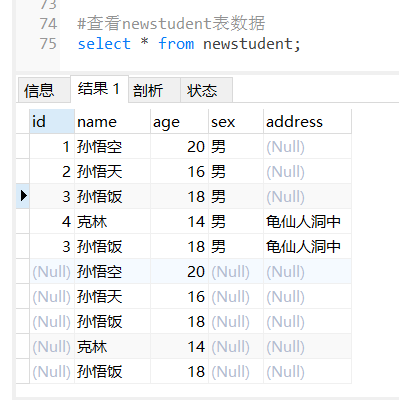
蠕虫复制
# 复制一个一模一样的表结构出来
create table newstudent like student2;

# 将 student2 表中的数据添加到 newstudent 表中
insert into newstudent select * from student2;

#    如果只想复制 student2 表中 name,age 字段数据到 newstudent 表中,两张表都写出相应的列名
insert into newstudent(name,age)    select name ,age from student2;
修改
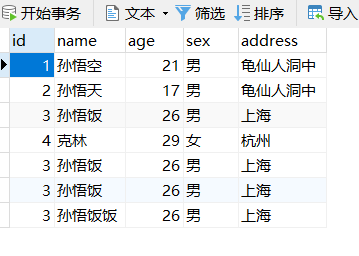
#不带条件修改数据,将所有的性别改成女
update student2 set sex = '女' , address = '龟仙人洞中';
update student2 set age = age + 1;#不支持+= ++等自加自减语法

#带条件修改数据,将 id 号为 2 的学生性别改成男
update student2 set sex = '男' where id = 2 ;
#一次修改多个列,把 id 为 3 的学生,年龄改成 26 岁,address 改成上海
update student2 set age = 26 ,address ='上海' where id = 3;

update student2 set age = 29 ,address = '杭州' ,sex = '女' where name ='克林';
删除
#不带条件删除数据
delete from newstudent;
#带条件删除数据,删除 id 为 1 的记录
#可以是数据回滚,也支持触发器
delete from student2 where id = 1 ;
#    使用 truncate 删除表中所有记录;
#truncate相当于删除表的结构,再创建一张表。是无法进行数据回滚的,也不支持数据库.,不属于DML操作,属于DDL操作
truncate table student2
truncate效率较高,但是使用的较少
DQL
查询
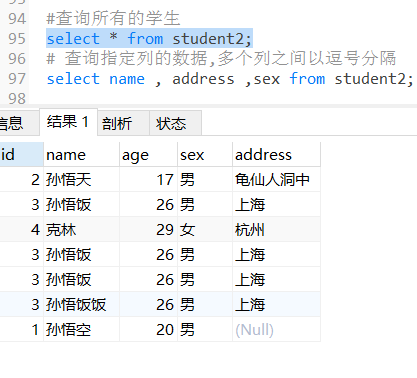
#查询所有的学生
select * from student2;
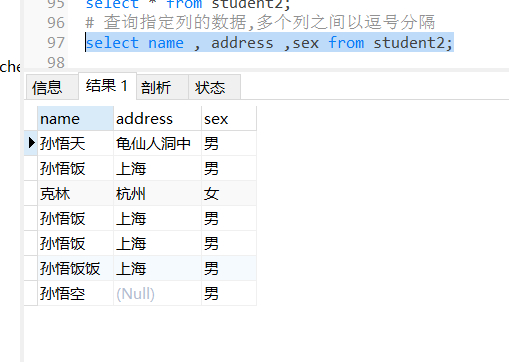
# 查询指定列的数据,多个列之间以逗号分隔
select name , address ,sex from student2;
别名
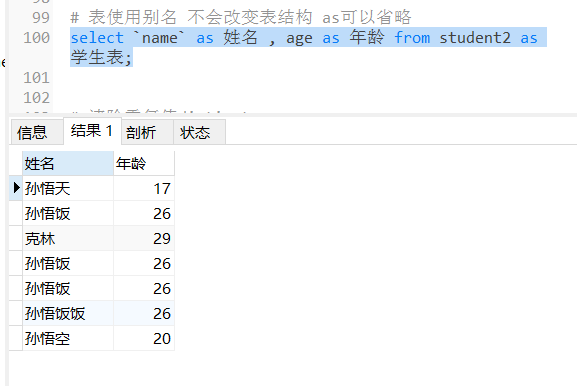
#    表使用别名 不会改变表结构 as可以省略
select `name` as 姓名 , age as 年龄 from student2 as 学生表;
清除重复值
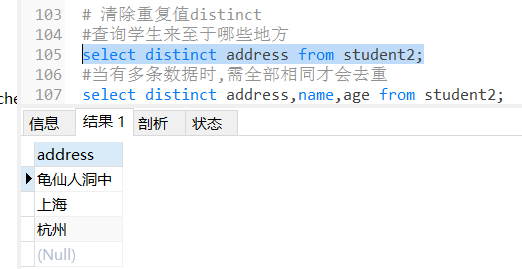
#    清除重复值distinct
#查询学生来至于哪些地方
select distinct address from student2;
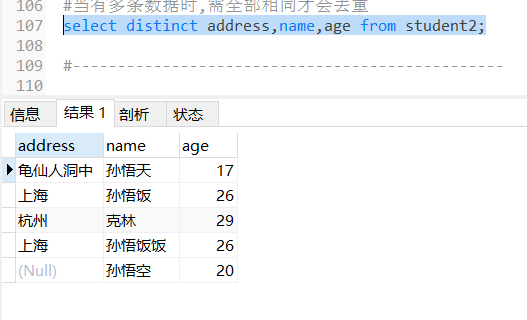
#当有多条数据时,需全部相同才会去重
select distinct address,name,age from student2;
查询结果参与运算
- SELECT 列名 1 + 固定值 FROM 表名;
- SELECT 列名 1 + 列名 2 FROM 表名;
```sql
创建学生表3
CREATE TABLE student3 ( id int, — 编号 name varchar(20), — 姓名 age int, — 年龄 sex varchar(5), — 性别 address varchar(100), — 地址 math int, — 数学 english int — 英语 );
插入数据
INSERT INTO student3(id,NAME,age,sex,address,math,english) VALUES (1,’马云’,55,’男’,’杭州’,66,78), (2,’马化腾’,45,’女’,’深圳’,98,87), (3,’马景涛’,55,’男’,’香港’,56,77), (4,’柳岩’,20,’女’,’湖南’,76,65), (5,’柳青’,20,’男’,’湖南’,86,NULL), (6,’刘德华’,57,’男’,’香港’,99,99), (7,’马德’,22,’女’,’香港’,99,99), (8,’德玛西亚’,18,’男’,’南京’,56,65);
查看表数据
select * from student3;
```sql
# 给所有的数学成绩加五分
select math,math+5 as 新成绩 from student3;

# 查询math+english的和
select * from student3;
select * ,(math+english) as 总成绩 from student3;

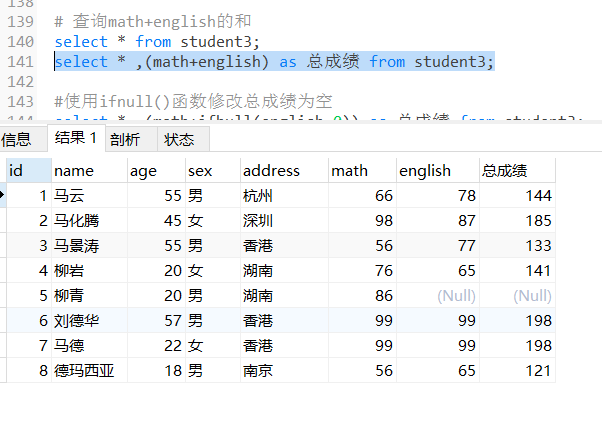
上面会出现math+english为空的情况,是因为+null,所以可以使用ifnull()函数进行判断
#使用ifnull()函数修改总成绩为空
select * ,(math+ifnull(english,0)) as 总成绩 from student3;

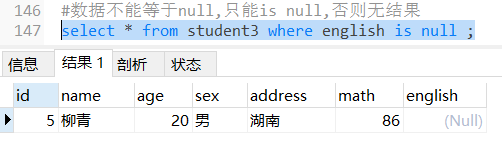
#数据不能等于null,只能is null,否则无结果
select * from student3 where english is null ;

条件查询
比较运算符
| 比较运算符 说明 | |
|---|---|
| >、<、<=、>=、=、<> | <>在 SQL 中表示不等于,在 mysql 中也可以使用!= 没有== |
| BETWEEN…AND | 在一个范围之内,如:between 100 and 200 相当于条件在 100 到 200 之间,包头又包尾 |
| IN(集合) | 集合表示多个值,使用逗号分隔 |
| LIKE ‘张%’ | 模糊查询 |
| IS NULL | 查询某一列为 NULL 的值,注:不能写=NULL |
#查询 math 分数大于 80 分的学生
select * from student3 where math > 88;

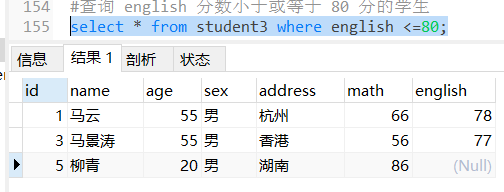
#查询 english 分数小于或等于 80 分的学生
select * from student3 where english <=80;

#查询 age 等于 20 岁的学生
select * from student3 where age = 20;

#查询 age 不等于 20 岁的学生,注:不等于有两种写法
select * from student3 where age <> 20;
select * from student3 where age != 20;

逻辑运算符
| 逻辑运算符 说明 | |
|---|---|
| and 或 && | 与,SQL 中建议使用前者,后者并不通用。 |
| or 或 || | 或 |
| not 或 ! | 非 |
#查询 age 大于 35 且性别为男的学生(两个条件同时满足)
select * from student3 where age > 35 and sex = '男';

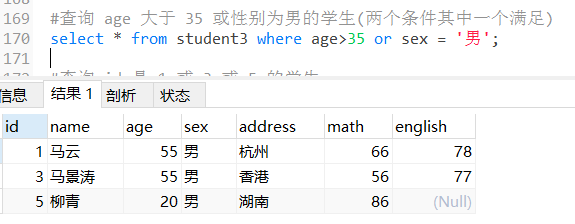
#查询 age 大于 35 或性别为男的学生(两个条件其中一个满足)
select * from student3 where age>35 or sex = '男';

#查询 id 是 1 或 3 或 5 的学生
select * from student3 where id=1 or id=3 or id=5;

#and和or一起混合运用 优先级 and > or
select * from student3 where age > 35 and sex = '男' or address='香港';

in关键字
#查询 id 是 1 或 3 或 5 的学生
select * from student3 where id in (1,3,5);

#查询 id 不是 1 或 3 或 5 的学生
select * from student3 where english not in(1,3,5);

select * from student3 where english is not null;

范围查询
#查询 english 成绩大于等于 77,且小于等于 90 的学生
select * from student3 where english>=77 and english<=90;#包头又包尾
select * from student3 where english between 77 and 90; #包头又包尾
like关键字
#LIKE 表示模糊查询
--     %    匹配任意多个字符串 0~N
--     _    匹配一个字符       1~1

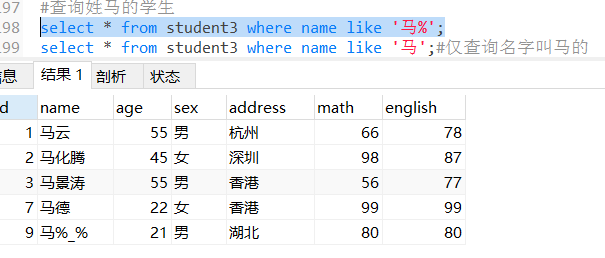
#查询姓马的学生
select * from student3 where name like '马%';
select * from student3 where name like '马';#仅查询名字叫马的

#查询姓名中包含'德'字的学生
select * from student3 where name like '%德%';

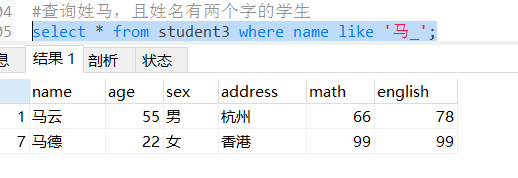
#查询姓马,且姓名有两个字的学生
select * from student3 where name like '马_';

select * from student3;
#假如有一个人叫做马%_% 应该怎么查询? 转义字符
select * from student3 where name like '马\%\_\%'
#mysql使用'\'反斜杠进行转义字符

sql server与oracle使用escape,mysql可以直接用’\’进行转义
转义前:select from user where name like ‘马%_%’,
转义后:select from user where name like ‘马\%_\%’ escape ‘/‘,意思就是说/之后的_不作为通配符

若有收获,就点个赞吧
0 人点赞


