表与表之间的关系
表与表之间的三种关系
| 表与表之间的三种关系 |
|---|
| 一对多:最常用的关系 部门和员工 |
| 多对多:学生选课表 和 学生表, 一门课程可以有多个学生选择,一个学生选择多门课程 |
| 一对一:相对使用比较少。员工表 简历表, 公民表 护照表 |
CREATE TABLE user_role (u_id INT,r_id INT,PRIMARY KEY ( u_id, r_id ),CONSTRAINT user_fk FOREIGN KEY ( u_id ) REFERENCES `user` ( u_id ),CONSTRAINT role_fk FOREIGN KEY ( r_id ) REFERENCES role ( r_id ))CREATE TABLE `user` (u_id INT, username VARCHAR ( 20 ),`password` VARCHAR ( 20 ),PRIMARY KEY ( u_id ))CREATE TABLE role (r_id INT, rolename VARCHAR ( 20 ),PRIMARY KEY ( r_id ))
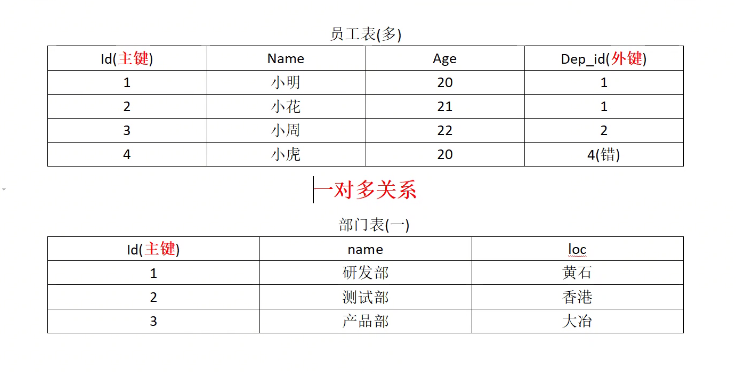
一对多关系一定要在多这一方创建外键
一个学生对应多门课, 一门课有多名同学来上
两个一对多关系 就是多对多关系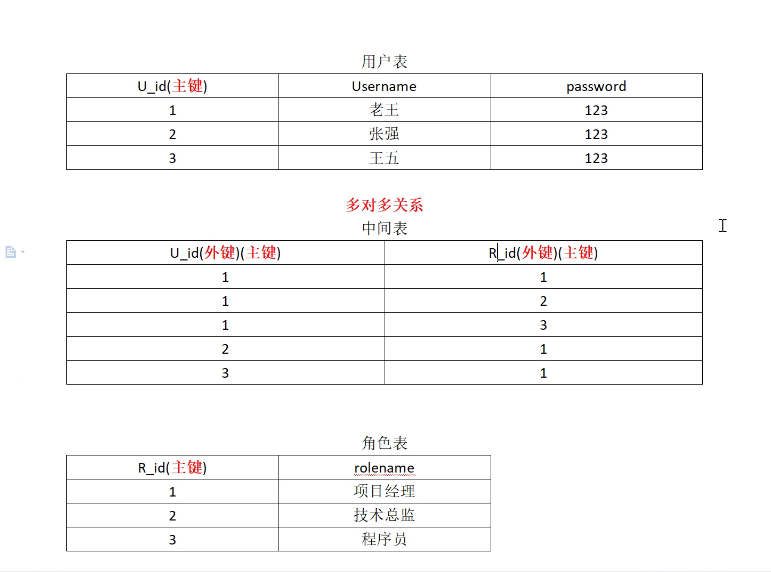
联合主键,
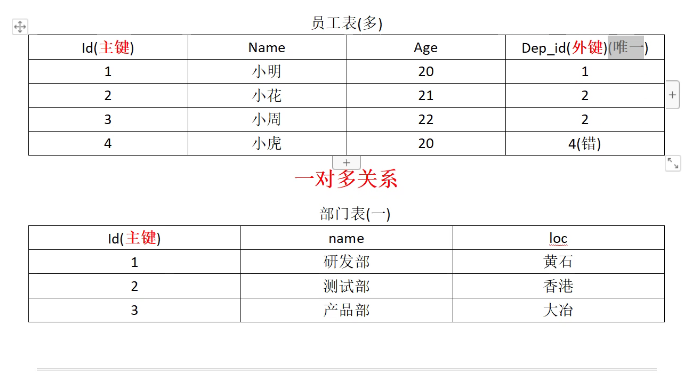 一对多关系中的多这一方加上唯一约束就变成了 1对1关系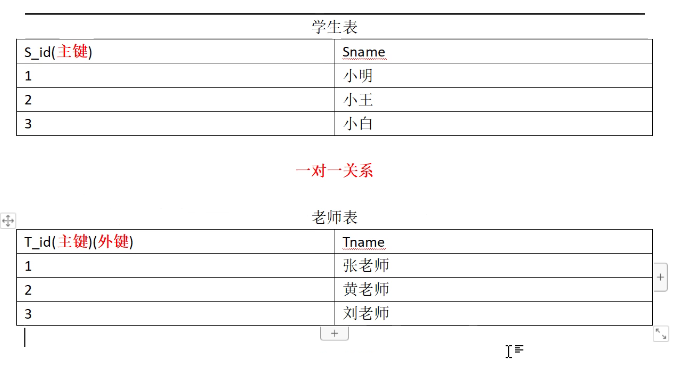
有几个学生就只能有几个老师
一对一外键要设置再主键上
数据库设计
| 范式 特点 | |
|---|---|
| 1NF | 原子性:表中每列不可再拆分。 |
| 2NF | 不产生局部依赖,一张表只描述一件事情 |
| 3NF | 不产生传递依赖,表中每一列都直接依赖于主键。而不是通过其它列间接依赖于主键。 |
1NF:表中每列不可再拆分
2NF: 没有局部依赖
3NF: 没用传递依赖
示例:学生信息表
| 学号 | 姓名 | 年龄 | 所在学院 | 学院地点 |
|---|---|---|---|---|
存在传递的决定关系:
学号->所在学院->学院地点
拆分成两张表
| 学号 | 姓名 | 年龄 | 所在学院的编号(外键) |
|---|---|---|---|
| 学院编号 | 所在学院 | 学院地点 |
|---|---|---|
设计数据库步骤
(1)信息收集
(2)确定数据
(3)建立实体
实体是E-R模型的基本对象,是现实世界中各种事物的抽象。凡是可以相互区别,并可以被识别的事、物、概念等均可认为是实体 .
(4)进行规范化
(5)编写SQL代码以创建数据库。
连接查询
# 创建部门表
create table dept(
id int primary key auto_increment, name varchar(20)
)
insert into dept (name) values ('开发部'),('市场部'),('财务部');

# 创建员工表
create table emp (
id int primary key auto_increment, name varchar(10),
gender char(1),        -- 性别
salary double,    -- 工资
join_date date,    -- 入职日期
dept_id int,
foreign key (dept_id) references dept(id) -- 外键,关联部门表(部门表的主键)
)

insert into emp(name,gender,salary,join_date,dept_id) values('孙悟空','男',7200,'2013-02-24',1);
insert into emp(name,gender,salary,join_date,dept_id) values('猪八戒','男',3600,'2010-12-02',2);
insert into emp(name,gender,salary,join_date,dept_id) values('唐僧','男',9000,'2008-08-08',2);
insert into emp(name,gender,salary,join_date,dept_id) values('白骨精','女',5000,'2015-10-07',3);
insert into emp(name,gender,salary,join_date,dept_id) values('蜘蛛精','女',4500,'2011-03-14',1);
笛卡尔积
#什么是笛卡尔积:
-- 需求:查询所有的员工和所有的部门
select * from emp,dept;#这种查询是错误的

-- 设置过滤条件 Column 'id' in where clause is ambiguous
select * from emp,dept where id = 5;
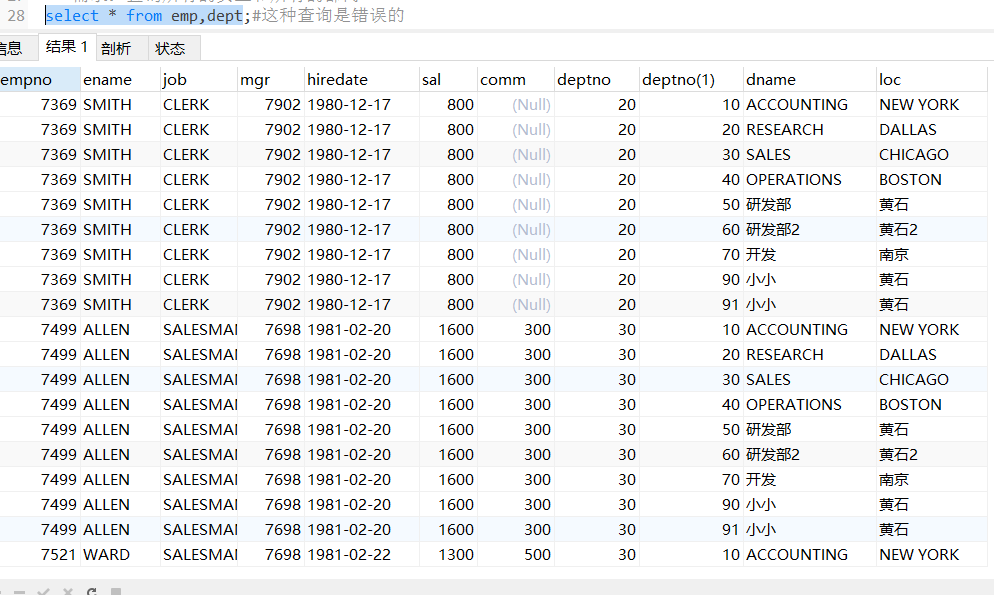
笛卡尔积会产生大量的冗余 可以通过下面的两种方式去除
隐式内连接
隐式内连接:看不到 JOIN关键字,条件使用 WHERE指定
SELECT 字段名 FROM 左表, 右表 WHERE 条件
-- 设置过滤条件 Column 'id' in where clause is ambiguous
select * from emp,dept where id = 5;

-- 隐式内连接查询
select * from emp,dept where emp.`dept_id` = dept.`id`;

-- 查询员工和部门的名字
select emp.`name`, dept.`name` from dept,emp where emp.`dept_id` = dept.`id`;
#内连接
-- 从表.外键=主表.主键
-- 隐式内连接查询
select * from emp,dept where emp.`dept_id` = dept.`id`;

显示内连接
显示内连接:使用 INNERJOIN … ON语句, 可以省略 INNER
SELECT字段名 FROM左表 [INNER]JOIN右表 ON条件
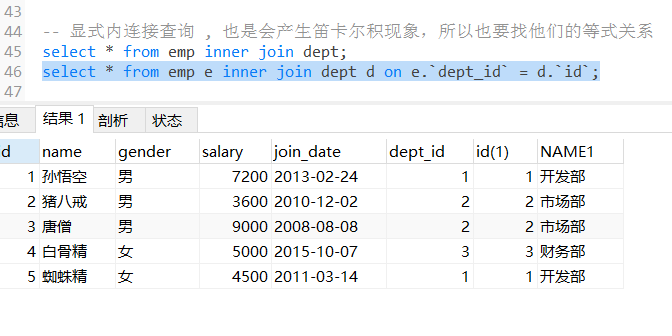
-- 显式内连接查询 , 也是会产生笛卡尔积现象,所以也要找他们的等式关系
select * from emp inner join dept;
#-----------------------------
select * from emp inner join dept on emp.dept_id = dept.id;
#上下两句代码形式上有些区别,但是在结果上没用区别
select * from emp,dept where emp.dept_id = dept.id;

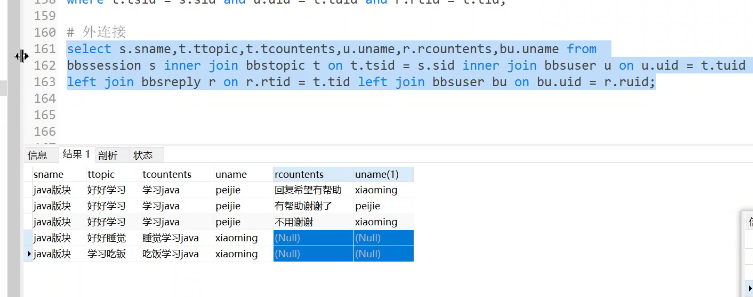
作业优化:
板块与回帖属于一对多关系, 事实上这个关系可以省略, 可以通过回帖找到板块,不需要这一层关系,可以进行优化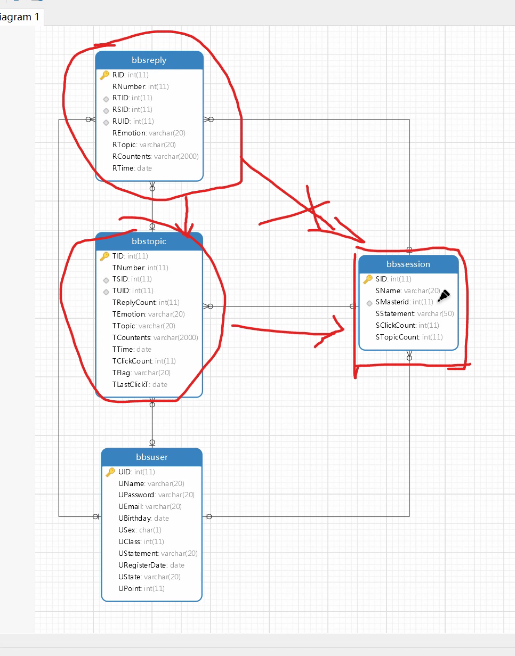
左外连接
左外连接:使用 LEFT OUTERJOIN … ON,OUTER可以省略
SELECT字段名 FROM左表 LEFT[OUTER]JOIN右表 ON条件 ```sql
左外连接
— 在部门表中增加一个销售部 insert into dept (name) values (‘销售部’);
select * from dept;
— 使用[显示]内连接查询
select * from dept d inner join emp e on d.id = e.dept_id;
— 使用左外连接查询[以左表为主表,右表为从表]
select * from dept d left join emp e on d.id = e.dept_id;
- 左外连接与显示内连接
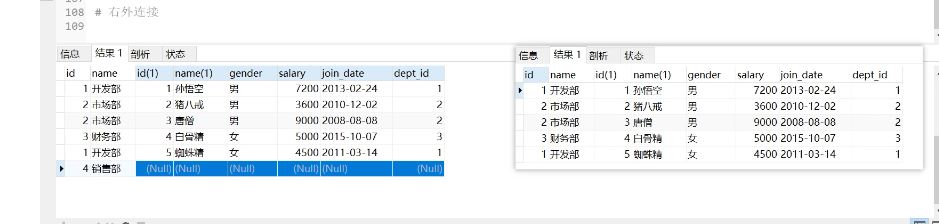<br />用左边表的记录去匹配右边表的记录,如果符合条件的则显示;否则,显示 NULL<br />可以理解为:在内连接的基础上保证左表的数据全部显示(左表是部门,右表员工)
<a name="DP3qw"></a>
### 右外连接
- 右外连接:使用 RIGHT OUTERJOIN ... ON,OUTER可以省略
SELECT字段名 FROM左表RIGHT[OUTER ]JOIN右表 ON条件
```sql
#右外连接
-- 在员工表中增加一个员工
insert into emp values (null, '沙僧','男',6666,'2013-12-05',null); select * from emp;
-- 使用内连接查询
select * from dept inner join emp on dept.`id` = emp.`dept_id`;
#右外连接[以右表为主表,左表为从表]
select * from dept d right join emp e on d.`id` = e.`dept_id`;
内连接与右外连接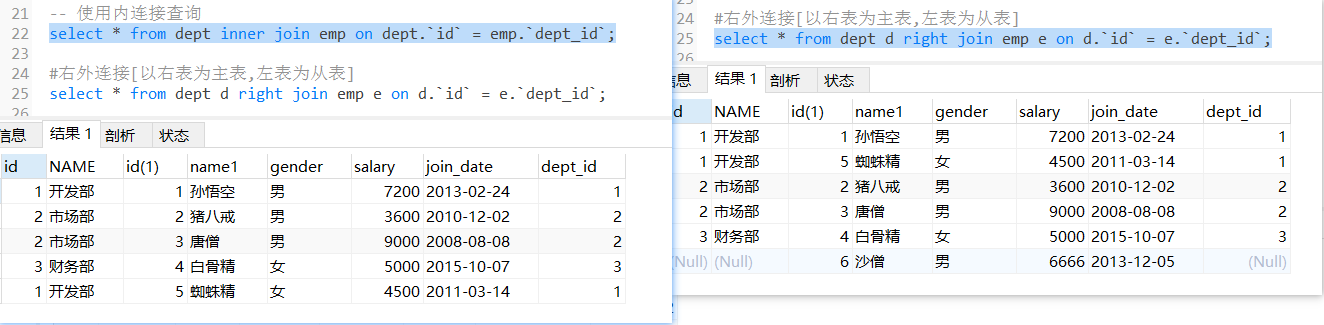
用右边表的记录去匹配左边表的记录,如果符合条件的则显示;否则,显示 NULL
可以理解为:在内连接的基础上保证右表的数据全部显示
全连接 (mysql不支持)
#全连接
select * from dept d full join emp e on d.`id` = e.`dept_id`;

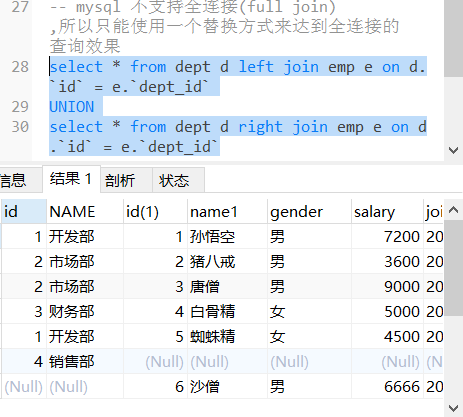
-- mysql 不支持全连接(full join) ,所以只能使用一个替换方式来达到全连接的 查询效果
select * from dept d left join emp e on d.`id` = e.`dept_id`
UNION
select * from dept d right join emp e on d.`id` = e.`dept_id`
子查询
https://blog.csdn.net/liming89/article/details/124649685?csdn_share_tail=%7B%22type%22%3A%22blog%22%2C%22rType%22%3A%22article%22%2C%22rId%22%3A%22124649685%22%2C%22source%22%3A%22unlogin%22%7D&ctrtid=sVu24
1) 一个查询的结果做为另一个查询的条件
2) 有查询的嵌套,内部的查询称为子查询
3) 子查询要使用括号
-- 需求: 查询开发部有哪些员工]
select emp.* from emp,dept where emp.dept_id = dept.id and dept.name ='开发部';#两表连查的方式

select * from emp;

-- 通过两条语句查询
select id from dept where name='开发部' ; select * from emp where dept_id = 1;
-- 使用子查询
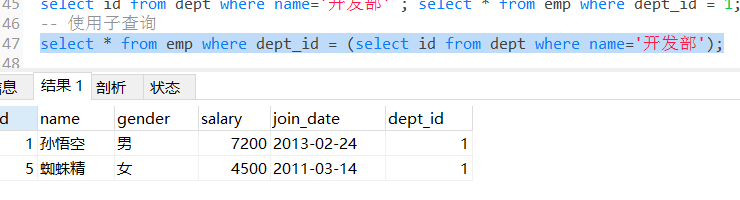
select * from emp where dept_id = (select id from dept where name='开发部');
子查询的三种情况
子查询的结果是一个值的时候
子查询结果只要是单行单列,肯定在 WHERE后面作为条件,父查询使用:比较运算符,如:> 、<、<>、= 等
SELECT查询字段 FROM表 WHERE字段=(子查询); ```sql
子查询的结果是一个值的时候
— 1) 查询最高工资是多少 select max(salary) from emp;
— 2) 根据最高工资到员工表查询到对应 的员工信息 select * from emp where salary = (select max(salary) from emp);
— 2) 到员工表查询小于平均的员工信息 select * from emp where salary < (select avg(salary) from emp);

<a name="Cdk14"></a>
#### 子查询结果是[多行单列]的时候
- 子查询结果是单例多行,结果集类似于一个数组,父查询使用 _IN_运算符
- SELECT查询字段 FROM表 WHERE字段 IN(子查询);
```sql
# 子查询结果是[多行单列]的时候
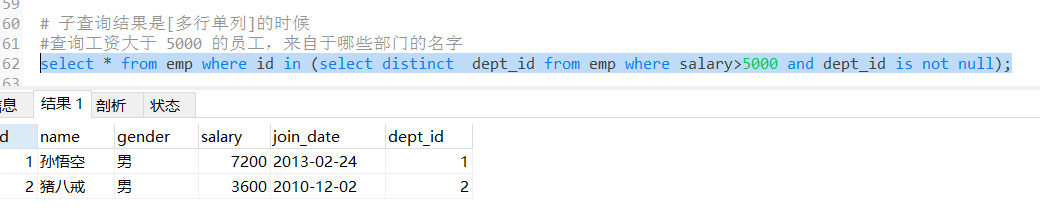
#查询工资大于 5000 的员工,来自于哪些部门的名字
select * from emp where id in (select distinct dept_id from emp where salary>5000 and dept_id is not null);
ANY & ALL
-- any , all
#只查询最高工资员工
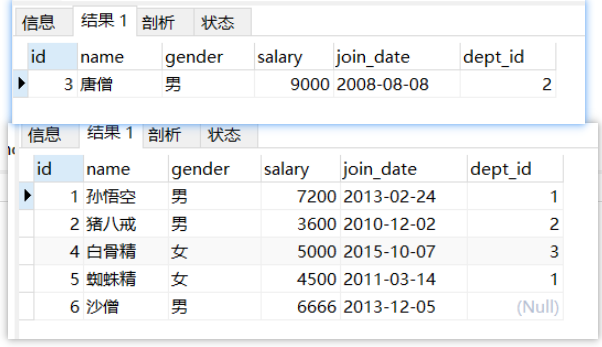
select * from emp where salary >= all(select salary from emp);

# 除了工资最高的员工,其他员工信息都能查询出来
select * from emp where salary < any( select salary from emp);
子查询结果是[多行多列]的时候
子查询结果只要是多列,肯定在 FROM 后面作为表
SELECT查询字段 FROM(子查询) 表别名 WHERE条件;
子查询作为表需要取别名,否则这张表没有名称则无法访问表中的字段
#子查询结果是[多行多列]的时候

-- 查询出 2011 年以后入职的员工信息,包括部门名称
-- 在员工表中查询 2011-1-1 以后入职的员工
select * from emp where join_date >='2011-1-1';

-- 查询所有的部门信息,与上面的虚拟表中的信息组合,找出所有部门 id 等于的 dept_id
select * from dept d, (select * from emp where join_date >='2011-1-1') e where d.`id`= e.dept_id ;

select * from emp inner join dept on emp.`dept_id` = dept.`id` where join_date >='2011-1-1';
select * from emp inner join dept on emp.`dept_id` = dept.`id` and join_date >='2011-1-1';
in与exists
#多行多列经典案例
#外表数据量大 , 并内表数据量小  使用in效率高. 反之使用 exists 效率更高
#内表大,外表小用exists
select * from emp e where exists (select * from dept d where e.dept_id = d.id and name in('开发部','财务部'));#使用not exists就是不在这两个部门的人

select * from  emp where exists ( select * from dept where id = 1);

select * from emp e where exists (select * from dept d where d.id = e.dept_id);


#工资最少的不输出
select * from emp e where exists
(select * from emp e2 where e.dept_id = e2.dept_id and e.salary > e2.salary)
 or
(select count(*) from emp e3 where e3.dept_id = e.dept_id GROUP BY dept_id HAVING count(*)=1)
#输出最小的工资
select * from emp e where not exists
(select * from emp e2 where e.dept_id = e2.dept_id and e.salary > e2.salary)

#查询所有的领导
select * from emp e where exists (select * from emp e2 where e.empno = e2.mgr);

#查询员工的工资等级(非等式连接查询)
select * from emp e , salgrade g where sal between losal and hisal;

若有收获,就点个赞吧
0 人点赞


