author:彭程
介绍
一主多从,可以缓解读的压力,但是一旦主宕机了,就不能写了,因此往往采用多主多从的配置,提高可用性
安装说明
本机linux版本:CentOS 7.9
Mysql版本:5.7.16
安装准备
- 两个启动的MySQL实例
实例1配置文件位置:/etc/my.cnf 实例1端口:3306 实例1主机ip:192.168.128.137
实例2配置文件位置:/data/mysql2/my.cnf 实例2端口:3307 实例2主机ip:192.168.128.137
文件配置
修改配置文件my.cnf
实例1配置文件增加以下配置
log-bin=mysql-binserver-id=3306auto_increment_increment=2auto_increment_offset=1log-slave-updatessync_binlog=1
实例2配置文件增加以下配置
log-bin=mysql-binserver-id=1003307auto_increment_increment=2auto_increment_offset=1log-slave-updatessync_binlog=1
配置说明
log-bin:开启bin-log
server-id:server-id必须唯一
auto_increment_increment:控制主键自增的自增步长,用于防止Master与Master之间复制出现重复自增字段值,
通常设置为服务器个数;
auto_increment_offset=1:设置自增起始值,注意auto_increment_offset的设置,不同的master设置不应该一
样,否则就容易引起主键冲突;
log-slave-update:主从同步配置项,应用链式复制服务器,保证多主多从数据一致;
sync_binlog:表示事务提交频率,默认是0,最安全的是设置为1;
- 查看bin-log,保证两个实例一致 ``` reset master; show master status; +—————————+—————+———————+—————————+—————————-+ | File | Position | Binlog_Do_DB | Binlog_Ignore_DB | Executed_Gtid_Set | +—————————+—————+———————+—————————+—————————-+ | mysql-bin.000001 | 154 | | | | +—————————+—————+———————+—————————+—————————-+
<a name="Q3hVE"></a>## 主节点配置- 在实例1中设置实例2为主节点
change master to master_host=’192.168.128.137’, master_user=’root’, master_password=’root’, master_port=3307, master_log_file=’mysql-bin.000001’, master_log_pos=154;
- 在实例2中设置实例1为主节点
change master to master_host=’192.168.128.137’, master_user=’root’, master_password=’root’, master_port=3306, master_log_file=’mysql-bin.000001’, master_log_pos=154;
<a name="Zmxy9"></a>
##
<a name="MBhP8"></a>
## 启动服务

- 启动服务
start slave;
- 验证集群状态
show slave status \G
如果Slave_IO_Running和Slave_SQL_Running的值为Yes,即表示复制功能配置正常;
* 1. row * Slave_IO_State: Waiting for master to send event Master_Host: 192.168.128.137 Master_User: root Master_Port: 3306 Connect_Retry: 60 Master_Log_File: mysql-bin.000001 Read_Master_Log_Pos: 865 Relay_Log_File: localhost-relay-bin.000002 Relay_Log_Pos: 770 Relay_Master_Log_File: mysql-bin.000001 Slave_IO_Running: Yes Slave_SQL_Running: Yes Replicate_Do_DB: Replicate_Ignore_DB: Replicate_Do_Table: Replicate_Ignore_Table: Replicate_Wild_Do_Table: Replicate_Wild_Ignore_Table: Last_Errno: 0 Last_Error: Skip_Counter: 0 Exec_Master_Log_Pos: 865 Relay_Log_Space: 981 Until_Condition: None Until_Log_File: Until_Log_Pos: 0 Master_SSL_Allowed: No Master_SSL_CA_File: Master_SSL_CA_Path: Master_SSL_Cert: Master_SSL_Cipher: Master_SSL_Key: Seconds_Behind_Master: 0 Master_SSL_Verify_Server_Cert: No Last_IO_Errno: 0 Last_IO_Error: Last_SQL_Errno: 0 Last_SQL_Error: Replicate_Ignore_Server_Ids: Master_Server_Id: 3306 Master_UUID: 5ab5bc2a-e8f8-11eb-ade0-000c2949185c Master_Info_File: /data/mysql2/data/master.info SQL_Delay: 0 SQL_Remaining_Delay: NULL Slave_SQL_Running_State: Slave has read all relay log; waiting for more updates Master_Retry_Count: 86400 Master_Bind: Last_IO_Error_Timestamp: Last_SQL_Error_Timestamp: Master_SSL_Crl: Master_SSL_Crlpath: Retrieved_Gtid_Set: Executed_Gtid_Set: Auto_Position: 0 Replicate_Rewrite_DB: Channel_Name: Master_TLS_Version: ```
验证
同一张表test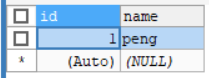
Client A:插入一行新数据,id自动增加2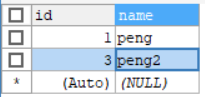
Client B:同时能更新数据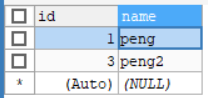

若有收获,就点个赞吧
0 人点赞


