- https://mp.umeng.com/analysis/62b9873d88ccdf4b7eaee1b1/conversion/custom-event">使用uniapp打包的H5页面做埋点(使用第三方平台 友盟+) link:https://mp.umeng.com/analysis/62b9873d88ccdf4b7eaee1b1/conversion/custom-event
使用uniapp打包的H5页面做埋点(使用第三方平台 友盟+) link:https://mp.umeng.com/analysis/62b9873d88ccdf4b7eaee1b1/conversion/custom-event
1.H5接入SDK文档,Link: https://developer.umeng.com/docs/147615/detail/290919
1.1 在当前的vue页面加入代码

(function(w, d, s, q, i) {w[q] = w[q] || [];var f = d.getElementsByTagName(s)[0],j = d.createElement(s);j.async = true;j.id = 'beacon-aplus';j.src = 'https://d.alicdn.com/alilog/mlog/aplus/' + i + '.js';f.parentNode.insertBefore(j, f);})(window, document, 'script', 'aplus_queue', '203467608');//集成应用的appKeyaplus_queue.push({action: 'aplus.setMetaInfo',arguments: ['appKey', '62b9873d88ccdf4b7eaee1b1']});aplus_queue.push({action: 'aplus.sendPV',arguments: [{is_auto: false}]});var pageEventConfig = {is_auto: true};//是否开启调试模式aplus_queue.push({action: 'aplus.setMetaInfo',arguments: ['DEBUG', true]});/******************************************************************/
1.2 .使用自定义事件
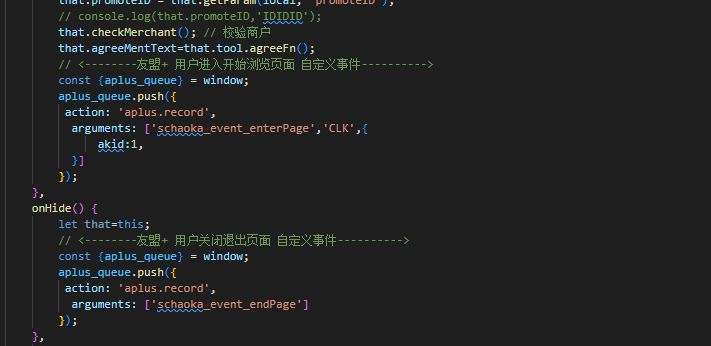
onHide() {let that=this;// <--------友盟+ 用户关闭退出页面 自定义事件---------->const {aplus_queue} = window;aplus_queue.push({action: 'aplus.record',arguments: ['schaoka_event_endPage']});},

若有收获,就点个赞吧
0 人点赞


