1. 字符串
1.1. 字符串的创建(JDK8)
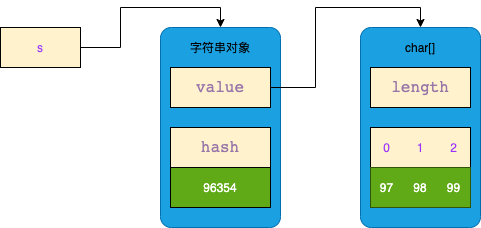
1.1.1. char[]数组创建
String s = new String(new char[]{'a', 'b', 'c'});
1.1.2. byte[]数组创建
String s = new String(new byte[]{97, 98, 99});
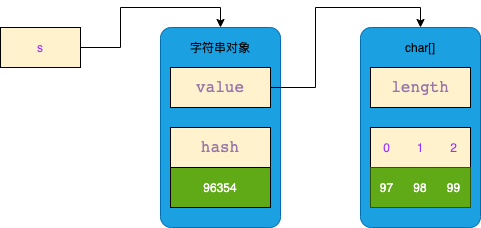
byte[] 会在构造时转换成 char[],区别在于字符集不一样(大小不一样)
按 GBK 字符集转换时,两个 byte 类型的 0xD5和 0xC5 被转换成了一个 char 类型的 0x5F20 (汉字【张】)。
String s = new String(new byte[]{(byte) 0xD5, (byte) 0xC5}, Charset.forName("gbk"));
按 UTF-8 字符集转换时,三个 byte 类型的 0xE5 、0xBC 和 0xA0 被转换成了一个 char 类型的 0x5F20 (汉字【张】)。
String s = new String(new byte[]{(byte) 0xE5, (byte) 0xBC, (byte) 0xA0}, Charset.forName("utf-8"));
1.1.3. int[]数组创建
有时候我们还需要用两个 char 表示一个字符,比如😂,用 unicode 编码表示为 0x1F602,存储范围已经超过了 char 能表示的最大值 0xFFF,因此需要使用 int[] 来构造这样的字符串。
String s = new String(new int[]{0x1F602}, 0, 1);
一个 int 类型的 0x1F602 被转换成了两个 char 类型的 0xD83D 和 0xDE02 (emoji【😂】)。
1.1.4. 从已有字符串创建
传入一个源字符串,创建一个新字符串。
public String(String original) {this.value = original.value;this.coder = original.coder;this.hash = original.hash;}
使用方法
String s1 = new String(new char[]{'a', 'b', 'c'});String s2 = new String(s1);
根据构造方法,两个 String 对象中的 value 引用同一个 char[] 数组。

1.1.5. 字面量创建
最常用的创建方式。
int i = 10; // 10是字面量String s = "abc"; // "abc"是字符串字面量
【非对象】
字面量在代码运行到它所在语句之前,它还不是字符串对象。
在上面的java代码被编译为class文件后,"abc" 存储于【类文件常量池】中。
【懒加载】
执行到字面量代码时,才会创建对象。
// 假设现在String类对象有100个System.out.println("a"); // 执行完后有String类对象有101个System.out.println("b"); // 执行完后有String类对象有102个System.out.println("c"); // 执行完后有String类对象有103个
【不重复】
相同类中的相同字面量,编译时【类文件常量池】中只有一个字面量,运行时只创建一个字符串对象。
String s1 = "abc";String s2 = "abc";System.out.println(s1 == s2); // true
不同类中的相同字面量,编译时【类文件常量池】中有多个字面量,运行时只创建一个字符串对象。
public class StringTest {public static void main(String[] args) {String s1 = "abc";String s2 = "abc";StringTest2.main(new String[]{s1, s2});}}public class StringTest2 {public static void main(String[] args) {String s = "abc";System.out.println(s == args[0]); // trueSystem.out.println(s == args[1]); // true}}
1.1.6. 拼接创建
使用加号运算符 + 将两个字符串拼接为一个新的字符串。
// ① 字面量 + 字面量String s1 = "a" + "b";// ② 字面量 + 常量final String x = "b";String s2 = "a" + x;// ③ 字面量 + 变量String x = "b";String s3 = "a" + x;// ④ 字面量 + 数字String s4 = "a" + 1;
从原理上看,①和②原理相同,③和④原理相同。
①:没有真正的拼接操作。在编译阶段,就已经把 "a" 和 "b" 串在一起了。
Constant pool:#1 = Methodref #4.#20 // java/lang/Object."<init>":()V#2 = String #21 // ab
②:没有真正的拼接操作。final 代表 x 的值不可改变,在编译阶段,其它引用 x 的地方都安全地被替换为 "b"。
Constant pool:#1 = Methodref #5.#22 // java/lang/0bject. "<init>":()V#2 = String #23 // b#3 = String #24 // ab
③:有真正的拼接操作。在编译阶段,加号运算符 + 会被替换成 StringBuilder 来进行字符串拼接。
Constant pool:#1 = Methodref #9.#26 // fava/1ang/0bject. "<init>":()V#2 = String #27 // b#3 = Class #28 // java/lang/StringBuilder#4 = Methodref #3.#26 // java/lang/StringBuilder. "<init>":()V#5 = String #29 // a
由于并没有真正意义上的字符串拼接操作,因此,源代码会被编译成 StringBuilder 执行。
String x = "b";String s3 = new StringBuilder().append("a").append(x).toString();
实际上, toString() 方法就是根据自身维护的 value 数组,创建一个新的 String 对象。
public final class StringBuilder extends AbstractStringBuilderimplements java.io.Serializable, Comparable<StringBuilder>, CharSequence {// 从AbstractStringBuilder继承的属性,阅读方便放在这里char[] value; // JDK 9 以后换成了 byte[] value;public String toString() {return new String(value, 0, count);}}
④:原理同③完全一样。
1.2. JDK 9 的变化
1.2.1. 内存结构的变化
为了节约内存,不再使用 char[] 存储字符,改为了 byte[] 存储。
① 如果字符串只有拉丁字符,使用 byte 表示只占用1个字节,而使用 char 表示会占用2个字节,因此能节约内存空间。
String s = new String(new byte[]{97, 98, 99});
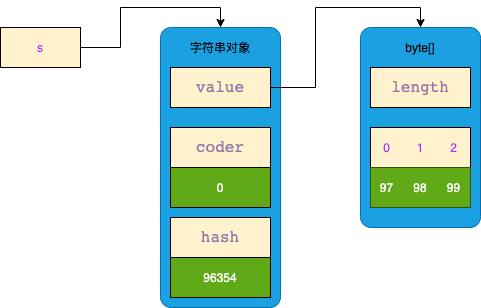
② 如果字符串只有中文字符,不能节约内存空间。
String s = new String(new byte[]{(byte) 0xD5, (byte) 0xC5}, Charset.forName("gbk"));

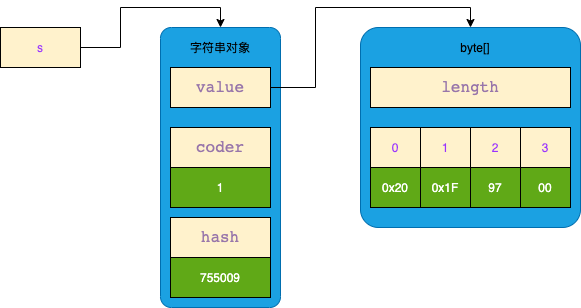
③ 如果字符串既有拉丁字符又有中文字符,拉丁字符也会被当做Unicode字符占用两个字节,因此不能节约内存空间。
String s = new String(new byte[]{(byte) 0xD5, (byte) 0xC5, 97}, Charset.forName("gbk"));
1.2.2. 拼接方式的变化
JDK 8 会把加号运算符 + 替换成 StringBuilder 来进行字符串拼接。而 JDK 9 则默认使用字节码指令 invokedynamic ,反射执行拼接方法来实现字符串拼接。
public static void main(String[] args) throws Throwable {String x = "b";// String s = "a"+ x;// 会生成如下等价的字节码// 编译器会提供lookup,用来查找MethodHandleMethodHandles.Lookup lookup = MethodHandles.lookup();CallSite callSite = StringConcatFactory.makeConcatWithConstants(lookup,// 方法名,不重要,编译器会自动生成"arbitrary",// 方法的签名,第一个String为返回值类型,之后是入参类型MethodType.methodType(String.class, String.class),// 具体处方格式,其中\1意思是变量的占位符,将来被x代替"a\1");// callSite.getTarget()返回的是MethodHandle对象,用来反射执行拼接方法String s = (String) callSite.getTarget().invoke(x);}
为什么搞这么麻烦! ! !主要是为了对字符串的拼接做各种扩展优化,多了扩展途径。其中最为重要的是 MethodHandle,它使用了策略模式生成,JDK提供的所有的策略可以在 StringConcatFactory.Strategy 中找到:
| 策略名 | 内部调用 | 解释 |
|---|---|---|
| BC_SB | 字节码拼接生成 StringBuilder 代码 | 等价于new StringBuilder() |
| BC_SB_SIZED | 字节码拼接生成 StringBuilder 代码 | 等价于new StringBuilder(n),n为预估大小 |
| BC_SB_SIZED_EXACT | 字节码拼接生成 StringBuilder 代码 | 等价于new StringBuilder(n),n为准确大小 |
| MH_SB_SIZED | MethodHandle 生成 StringBuilder 代码 | 等价于new StringBuilder(n),n为预估大小 |
| MH_SB_SIZED_EXACT | MethodHandle 生成 StringBuilder 代码 | 等价于new StringBuilder(n),n为准确大小 |
| MH_NLINE_SIZED_EXACT | MethodHandle 内部使用字节数组直接构造 String | 默认策略 |
如果想改变策略,可以在运行时添加 JVM 参数,例如将策略改为BC_SB
-Djava.lang.invoke.stringConcat=BC_SB-Djava.lang.invoke.stringConcat.debug=true-Djava.lang.invoke.stringConcat.dumpClasses=匿名类导出路径
1.2.3. 默认的拼接策略
默认策略为 MH_NLINE_SIZED_EXACT ,使用字节数组直接构造 String。
例如有下面的字符串拼接代码
String x = "b";String s = "a"+ x + "c"+ "d";
使用了 MH_NLINE_SIZED_EXACT 策略后,内部会执行如下等价调用
String x = "b";// 预先分配字符串需要的字节数组byte[] buf = new byte[4];// 创建新字符串,这时内部字节数组值为 [0,0,0,0]String s = StringConcatHelper.newString(buf, 0);// 执行【拼接】,字符串内部字节数组值为 [97,0,0,0]StringConcatHelper.prepend(1, buf, "a");// 执行【拼接】,字符串内部字节数组值为 [97,98,0,0]StringConcatHelper.prepend(2, buf, x);// 执行【拼接】,字符串内部字节数组值为 [97,98,99,100]StringConcatHelper.prepend(4, buf, "cd");// 到此【拼接完毕】
2. StringTable
2.1. 家养与野生
String 的六种创建方式中,除了字面量方式创建的字符串是家养的以外,其它方法创建的字符串都是野生的。
- 家养:字面量方式创建的字符串,会放入 StringTable 中,StringTable 管理的字符串,具有不重复的特性。
- 野生:而
char[],byte[],int[],String,以及+方式本质上都是使用new在堆中创建新的字符串对象,不会考虑字符串重复,对内存占用严重。
JDK 使用了 StringTable 来解决(数据结构上就是一个hash表),字符串对象就充当hash表中的key,key 的不重复性,是hash表的基本特性。
【示例代码】
String s1 = "abc"; // 家养String s2 = "abc"; // 家养String s3 = new String(new char[]{'a', 'b', 'c'}); // 野生String s4 = "a" + "bc"; // 家养String x = "a";String s5 = x + "bc"; // 野生System.out.println(s1 == s2); // trueSystem.out.println(s1 == s3); // falseSystem.out.println(s1 == s4); // trueSystem.out.println(s1 == s5); // false
2.2. StringTable 的存储位置
JDK1.6及以前:StringTable 在方法区中
JDK1.8及以后:StringTable 在堆内存中
2.3. intern() 方法
字符串提供了 intern() 方法来实现去重,让字符串对象有机会受到 StringTable 的管理。
// 尝试将调用者放入StringTablepublic native String intern();
2.3.1. StringTable 中已存在
intern() 总会返回 StringTable 中已存在的字符串对象。
String x = new String(new char[]{'a', 'b', 'c'}); // 野生String y = "abc"; // 家养,将"abc"加入到StringTable中String z = x.intern(); // StringTable中有"abc",则返回StringTable中的"abc"System.out.println(z == x); // falseSystem.out.println(z == y); // true
2.3.2. StringTable 中不存在(≥JDK7)
intern() 先把调用者加入到 StringTable 中,再返回 StringTable 中已存在的字符串对象。
String x = new String(new char[]{'a', 'b', 'c'}); // 野生String z = x.intern(); // StringTable没有"abc",则先加入x,再返回"abc"String y = "abc"; // StringTable中有"abc",则直接使用System.out.println(z == x); // trueSystem.out.println(z == y); // true
2.3.3. StringTable 中不存在(≤JDK6)
intern() 先把调用者复制一份,再加入到 StringTable 中,再返回 StringTable 中已存在的字符串对象。
String x = new String(new char[]{'a', 'b', 'c'}); // 野生String z = x.intern(); // StringTable没有"abc",则先加入"abc",再返回"abc"String y = "abc"; // StringTable中有"abc",则直接使用System.out.println(z == x); // falseSystem.out.println(z == y); // true
2.3.4. 原理
- 根据 char[] 和长度,计算 hash值。
- 根据 hash 值计算 hashtable 的桶下标。
- 检查字符串在 hashtable 中是否已存在:
- 如果已存在:直接返回。
- 如果不存在:创建一个新的字符串对象,并加入到 hashtable 中,最后返回。
2.4. G1 去重
在 JDK 8u20及以后,可以开启 G1 垃圾回收器并开启字符串去重功能。
-XX:+UseG1GC -XX:+UseStringDeduplication
原理是让多个字符串对象引用同一个 char[] 来达到节省内存的目的。

与调用 intern 去重相比,G1去重好处在于自动,但缺点是即使 char[] 不重复,但字符串对象本身还要占用一定内存(对象头、value引用、 hash),而 intern 去重是字符串对象只存一份,更省内存。
3. 面试题
① 判断输出
String str1 = "string"; // 家养String str2 = new String("string"); // 野生String str3 = str2.intern(); // 家养System.out.println(str1 == str2); // falseSystem.out.println(str1 == str3); // true
② 判断输出
String baseStr = "baseStr";final String baseFinalStr = "baseStr";String str1 = "baseStr01"; // 家养String str2 = "baseStr" + "01"; // 家养String str3 = baseStr + "01"; // 野生String str4 = baseFinalStr + "01"; // 家养String str5 = new String("baseStr01").intern(); // 野生变家养System.out.println(str1 == str2); // trueSystem.out.println(str1 == str3); // falseSystem.out.println(str1 == str4); // trueSystem.out.println(str1 == str5); // true
③ 判断输出(区分版本)
String str2 = new String("str") + new String("01");str2.intern(); // 1.6 复制一个副本添加;1.7 直接添加String str1 = "str01";System.out.println(str1 == str2); // 【1.6】false,【1.7】true
④ 判断输出
String str1 = "str01";String str2 = new String("str") + new String("01");str2.intern(); // str2本身不会变化,当用str3来接收返回值后,则str1==str3System.out.println(str1 == str2); // false
⑤ **String s = new String("xyz");** 创建了几个字符串对象?
2个。"xyz" 创建在 StringTable 中,new String() 创建在堆内存中。但是两者引用同一个 char[] 数组。
⑥ 判断输出
String str1 = "abc"; // 家养String str2 = "abc"; // 家养System.out.println(str1 == str2); // true
⑦ 判断输出
String str1 = new String("abc"); // 野生String str2 = new String("abc"); // 野生System.out.println(str1 == str2); // false
⑧ 判断输出
String str1 = "abc"; // 家养String str2 = "a";String str3 = "bc";String str4 = str2 + str3; // 野生,变量+变量,StringBuilder拼接System.out.println(str1 == str4); // false
⑨ 判断输出
String str1 = "abc"; // 家养final String str2 = "a";final String str3 = "bc";String str4 = str2 + str3; // 家养,常量+常量,编译阶段拼接System.out.println(str1 == str4); // true
⑩ 判断输出
String s = new String("abc");String str1 = "abc";String str2 = new String("abc");System.out.println(s == str1.intern()); // falseSystem.out.println(s == str2.intern()); // falseSystem.out.println(str1 == str2.intern()); // true

若有收获,就点个赞吧
0 人点赞


