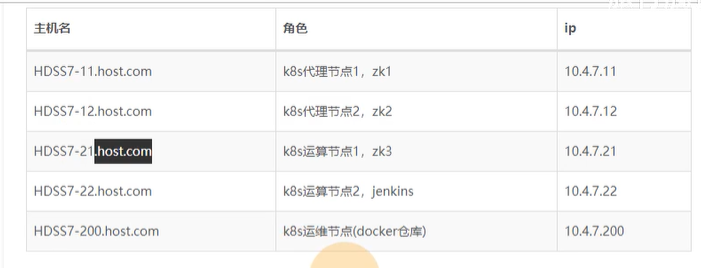
1、在10.4.7.11,10.4.7.12,10.4.7.21上配置java环境
1、下载jdk
1、下载jdk-8u221-linux.x64.tar.gz到/opt/src目录
2、解压到/usr/java目录:tar xf jdk-8u221-linux-x64.tar.gz -C /usr/java
3、制作软链接:ln -s /usr/java/jdk1.8.0_221 /usr/java/jdk
2、配置环境变量
vim /etc/profile
输入:
export JAVA_HOME=/usr/java/jdk
export PATH=$JAVA_HOME/bin:$JAVA_HOME/bin:$PATH
export CLASSPATH=$CLASSPATH:$JAVA_HOME/lib:$JAVA_HOME/lib/tools.jar
执行:source /etc/profile
验证:java -version
2、在10.4.7.11,10.4.7.12,10.4.7.21上安装zookeeper
https://archive.apache.org/dist/zookeeper/
1、下载zookeeper(/opt/src)
1、wget https://archive.apache.org/dist/zookeeper/zookeeper-3.4.14/zookeeper-3.4.14.tar.gz
2、解压到opt目录下:tar xf zookeeper-3.4.14.tar.gz -C /opt
3、制作软链接:ln -s /opt/zookeeper-3.4.14/ /opt/zookeeper
4、新建zookeeper日志目录
mkdir -pv /data/zookeeper/data /data/zookeeper/logs
2、创建配置文件
vi /opt/zookeeper/conf/zoo.cfg
输入:
# The number of milliseconds of each tick
tickTime=2000
# The number of ticks that the initial
# synchronization phase can take
initLimit=10
# The number of ticks that can pass between
# sending a request and getting an acknowledgement
syncLimit=5
# the directory where the snapshot is stored.
# do not use /tmp for storage, /tmp here is just
# example sakes.
dataDir=/data/zookeeper/data
dataLogDir=/data/zookeeper/logs
# the port at which the clients will connect
clientPort=2181
# the maximum number of client connections.
# increase this if you need to handle more clients
#maxClientCnxns=60
server.1=zk1.jack.com:2888:3888
server.2=zk2.jack.com:2888:3888
server.3=zk3.jack.com:2888:3888
#
# Be sure to read the maintenance section of the
# administrator guide before turning on autopurge.
#
# http://zookeeper.apache.org/doc/current/zookeeperAdmin.html#sc_maintenance
#
# The number of snapshots to retain in dataDir
#autopurge.snapRetainCount=3
# Purge task interval in hours
# Set to “0” to disable auto purge feature
#autopurge.purgeInterval=1
3、10.4.7.11上添加域名解析
vi /var/named/jack.com.zone
添加:
zk1 A 10.4.7.11
zk2 A 10.4.7.12
zk3 A 10.4.7.21
执行:systemctl restart named
验证:dig -t A zk1.jack.com @10.4.7.11 +short
4、配置成为集群
在三台zk主机上添加myid文件7-11为1,7-12的myid为2,7-21的为3,使之成为集群,为什么要这样改?请参考官方文档。
vi /data/zookeeper/data/myid
输入:1
5、启动zookeeper(10.4.7.11,10.4.7.12,10.4.7.21)
/opt/zookeeper/bin/zkServer.sh start
/opt/zookeeper/bin/zkServer.sh status
ps aux | grep zoo
netstat -nltp | grep 2181

若有收获,就点个赞吧
0 人点赞


