防火墙(一种在内核中的防火墙) 4表—>5链—>规则
自上而下匹配规则,拒绝或允许后不再向下匹配,最底部有默认规则。 拒绝的规则要往上放。
yum install -y iptables-services # 安装iptables管理服务systemctl stop firewalld # 停止自带的防火墙,C8或者ubantu有其他的systemctl disable firewalld # 禁止自带的防火墙自启
cat >>/etc/rc.local<<EOFmodprobe ip_tablesmodprobe iptable_filtermodprobe iptable_natmodprobe ip_conntrackmodprobe ip_conntrack_ftpmodprobe ip_nat_ftpmodprobe ipt_stateEOF
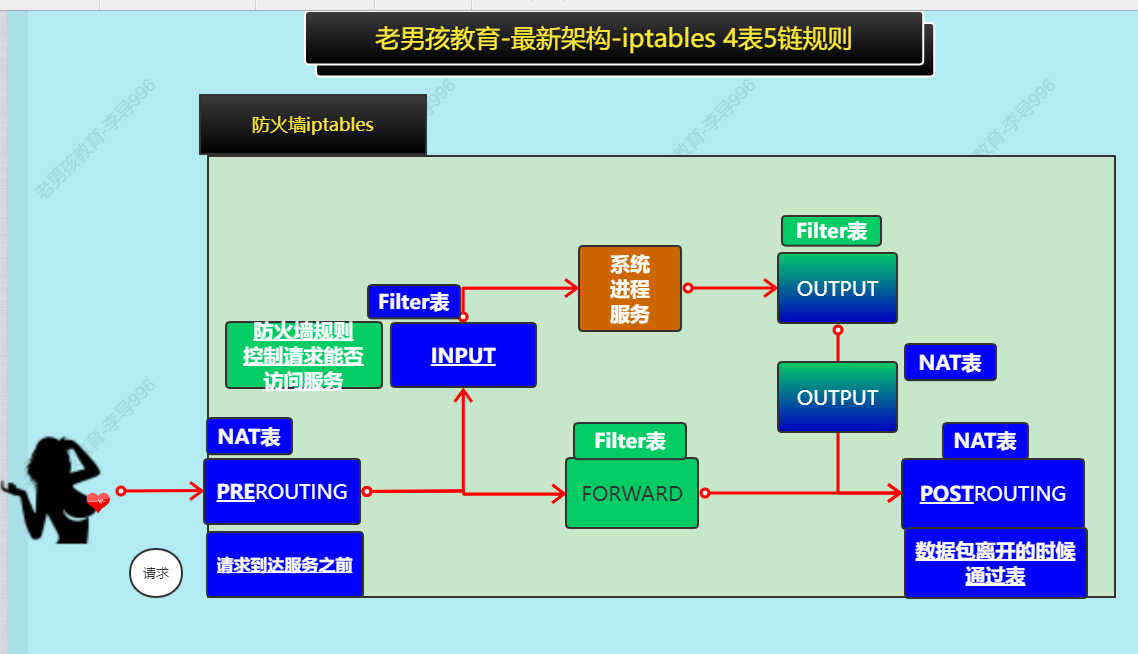
掌握:filter表中的input和output
熟悉:nat表中的prerouting和postrouting
| iptables |
|---|
| -nL 不要反向解析ip、端口,查看表中的规则 |
| -t filter/nat 指定表,默认filter |
| -A INPUT 给链追加规则 |
| -I 插入规则在顶部 |
| -D 删除规则 |
| -p tcp/icmp/udp/all 指定协议 |
| —dport 指定端口,需要和-p一起用 |
| —sport 源端口,默认全部 |
| -s 指定源ip,默认全部吧 |
| -d 指定目标ip,默认本机吧 |
| -m multiport 指定模块 |
| -i 输入的时候 从哪个网卡进来 |
| -o 输出的时候 从哪个网卡出去 |
| -j ACCEPT/DROP |
| —line-number |
| -F 清除所有规则 |
| -X 删除自定义链 |
| -Z 链的计数器清零 |
| ! 取反 |
filter表
屏蔽或允许 端口 ip
Input链
过滤进入主机的数据包
案例:
#拒绝用户访问22端口
iptables -t filter  -A INPUT -s 0.0.0.0/0  -p tcp --dport 22 -j DROP
#查看规则并加上序号
iptables -t filter  -nL   --line-number
#删除规则
iptables -t filter  -D INPUT  1   #根据序号删除
# 使用multiport模块一次性禁用多个端口
iptables -I INPUT -p tcp -m multiport --dport 80,443,22 -j ACCEPT
# 一次性禁用多个规律端口
iptables -I INPUT -p tcp --dport 1:21 -j DROP
# 禁止ping,--icmp-type 8就是ping   icmp是网络层协议,没有端口
iptables -t filter -I INPUT -p icmp --icmp-type 8 -j DROP
# 使用limit模块每6秒只能放行一个icmp请求,同一时间最多处理5个请求,默认就是5
iptables -I INPUT -p icmp -m limit --limit 10/minute --limit-burst 5 -j ACCEPT
# 将filter默认规则设置为拒绝,设置前需要先放行22端口,不然会连不上
iptables -P INPUT DROP
# 永久保存防火墙,重启后恢复
iptables-save >/etc/sysconfig/iptables
# 写入rc.local
iptables-restore <etc/sysconfig/iptables
防火墙生产环境配置
# 放行ssh,80,443
iptables -A INPUT  -p tcp --dport 22 -j ACCEPT
iptables -A INPUT -m multiport  -p tcp --dport 80,443 -j ACCEPT

# 让数据可以通过lo网卡进行输入或输出。
iptables -A INPUT  -i lo -j ACCEPT
iptables -A OUTPUT -o lo -j ACCEPT

# 限制只能通过未来通过vpn访问
iptables -A INPUT  -s vpn网段  -j ACCEPT

# 放行网站ping功能
iptables -A INPUT  -p icmp --icmp-type 8    -j ACCEPT

# 放行连接状态:RELATED,ESTABLISHED(启动连接,连接中)
iptables -A INPUT -m state --state RELATED,ESTABLISHED -j ACCEPT
iptables -A OUTPUT -m state --state RELATED,ESTABLISHED -j ACCEPT

# 修改链默认规则为拒绝
iptables -P INPUT DROP
NAT表
PRERPOUTING
案例:端口映射 外部访问防火墙的某个端口被转发到指定的机器的指定的端口上,不如vpn好
- 将内部机器的网关设置为防火墙内网ip,顺便加个DNS
开启内核中的转发功能
vim /etc/sysctl.conf
net.ipv4.ip_forward = 1
配置规则
#                                                  目标网络地址转换
iptables -t nat -A PREROUTING  -p tcp --dport 防火墙端口 -j DNAT --to-destination 172.16.1.x:xx
POSTROUTING
案例:共享上网 内部机器没有公网网卡和IP,通过防火墙上网下载软件,也可以直接内部用软件包下
将内部机器的网关设置为防火墙内网ip,顺便加个DNS
开启内核中的转发功能
vim /etc/sysctl.conf
net.ipv4.ip_forward = 1
配置规则
#                                                  源网络地址转换
iptables -t nat -A POSTROUTING -s 172.16.1.0/24 -j SNAT --to-source 防火墙公网ip

若有收获,就点个赞吧
0 人点赞


