彻底搞懂阻塞和非阻塞
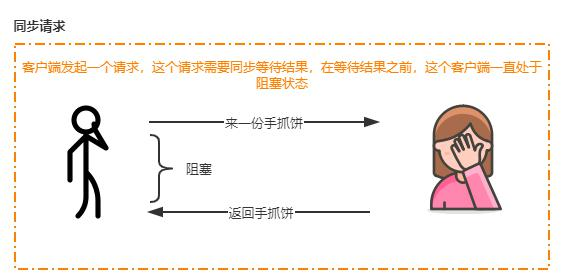
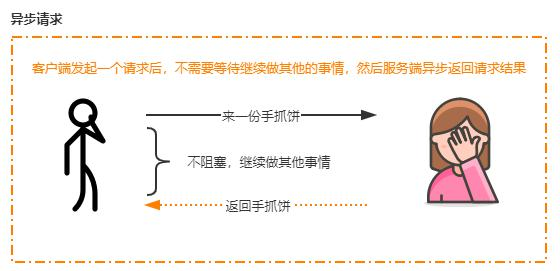
客户端发起请求后,如果是同步模式,那客户端就处于阻塞状态;
如果是异步模式,那客户端就处于非阻塞状态。
深入分析5种IO模型
阻塞IO
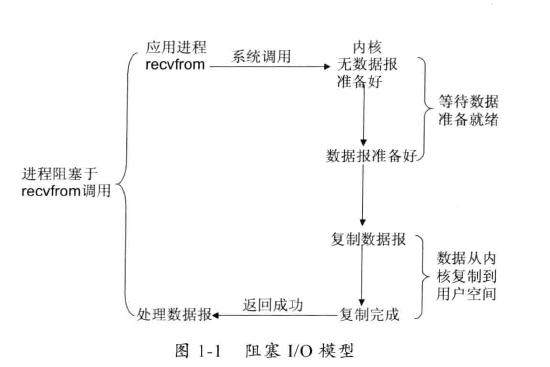
非阻塞IO
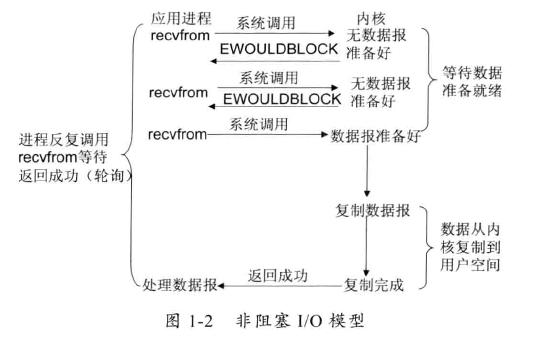
用户进程轮询去查看数据是否准备就绪。
如果有1000个socket连接,就要开1000个线程去轮询
IO复用、多路复用
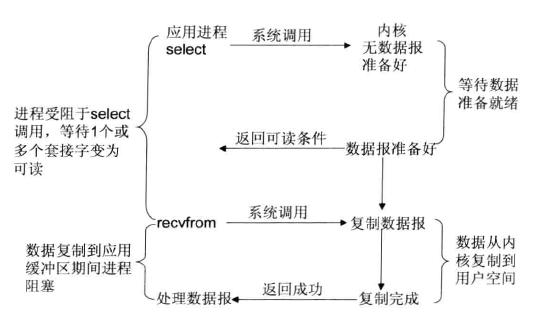
用户进程阻塞在select调用,select单个线程就可以不断轮询多个注册到上面的socket连接,
如果有io连接数据准备好了,select就会返回,用户进程就解除了阻塞,开始处理数据。
如果有1000个socket连接,只需要selectd单个线程去轮询。
select/poll
默认:10240 单个进程所打开的连接数fd()
——>会扫描所有的连接
epoll—>解决了上面的缺陷,有连接数据准备好后(事件驱动),再去通知客户端
1.对单个进程所打开的连接数没有限制。
2.利用每个fd上的callback函数来实现异步回调,
省略了轮询的开销
3.mmap(减少了内存复制),内核空间和用户空间共同映射的同一块内存。
有点像aio(伪aio)
mmap
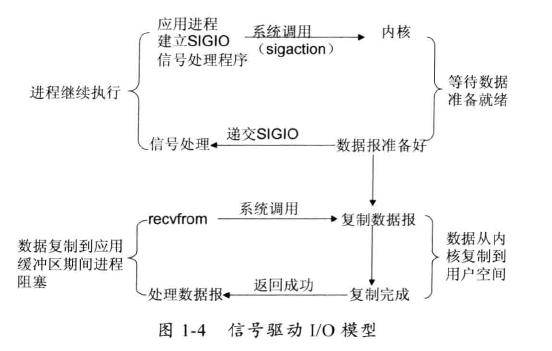
信号驱动
异步IO
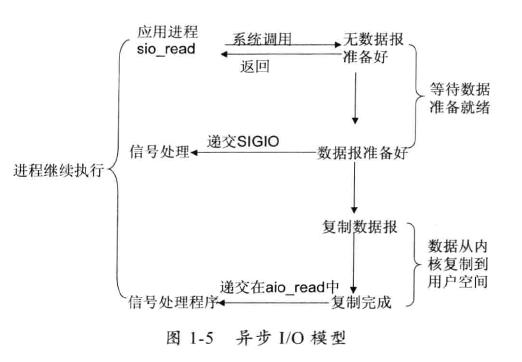
和epoll区别是,进程被通知数据准备好了,直接就
去用户空间拿数据,而epoll还要走,从内核空间复制
到用户空间的过程。
Netty 不看重Windows 上的使用,在Linux 系统上,AIO 的底层实现仍使用EPOLL,没有很好实现AIO,因此在性能上没有明显的优势,而且被JDK 封装了一层不容易深度优化
2.Netty 整体架构是reactor 模型, 而AIO 是proactor 模型, 混合在一起会非常混乱,把AIO 也改造成reactor 模型看起来是把epoll 绕个弯又绕回来
3.AIO 还有个缺点是接收数据需要预先分配缓存, 而不是NIO 那种需要接收时才需要分配缓存, 所以对连接数量非常大但流量小的情况, 内存浪费很多
4.Linux 上AIO 不够成熟,处理回调结果速度跟不到处理需求,比如外卖员太少,顾客太多,供不应求,造成处理速度有瓶颈
NIO的概述以及应用
什么是NIO
NIO从jdk1.4开始提测的,本意是New io,它的出现是为了弥补io的不足,提供了更高效的方式。
NIO的新特性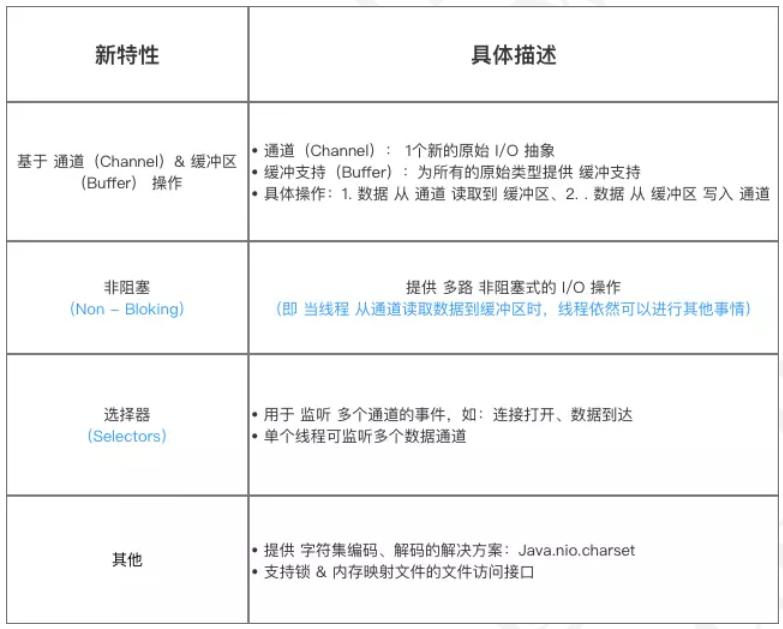
核心组件
通道(Channel):Java nio数据来源,可以是网络也可以是磁盘 。
缓冲区(Buffer):数据读写的中转区。
选择器(Selectors):异步IO的核心类,可以实现异步非阻塞io,
一个selectors可以管理多个通道Channel.
IO和NIO的区别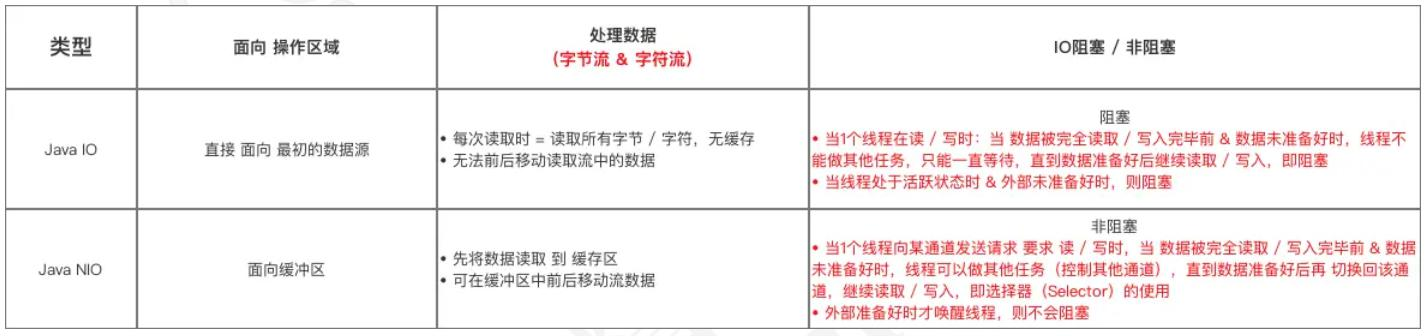
NIO详解Channel和Buffer
什么是Channel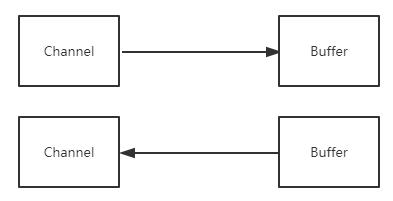
Channel的实现
FileChannel: 从文件中读取数据
DatagramChannel:通过UDP协议读写网络中的数据
SocketChannel:通过tcp协议读写网络中的数据
ServerSocketChannel:监听一个tcp连接,对于每一个新的
客户端连接都会创建一个SocketChannel.
什么是Buffer
buffer是一个对象,它包含了需要写入或者刚读出的数据,
最常用的缓冲区类型是ByteBuffer
public class NIOReadAndWriteDemo {public static void main(String[] args) {try(FileInputStream fis = new FileInputStream(new File("zdw.sql"));FileOutputStream fos = new FileOutputStream(new File("zdw1.sql"))){FileChannel fisChannel = fis.getChannel();FileChannel fosChannel = fos.getChannel();ByteBuffer buffer = ByteBuffer.allocate(10);int len = 0;int num=0;while ((len = fisChannel.read(buffer))!=-1){num++;//把数据读到了缓存区里面//把缓存区里面的数据写入到输出通道buffer.flip();//由读转化为写fosChannel.write(buffer);buffer.clear(); //清空缓冲区 再磁盘里面取数据}System.out.println("执行的次数:"+num);}catch (Exception e){e.printStackTrace();}}}
剖析缓冲区的内部细节
Buffer的本质
缓冲区本质是一块可以写入数据,以及从中读取数据的内存实际上也是一个byte[]数据
,只是在NIO中被封装成了NIO Buffer对象,并提供了一组方法来访问这个内存块。
有几个属性capacity ,position,limit.
初始状态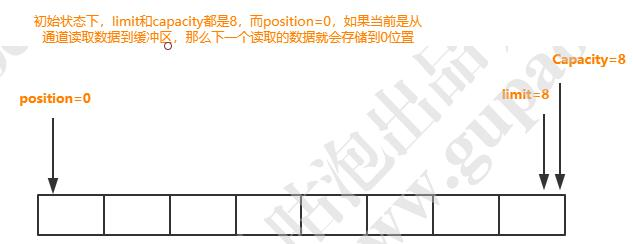
第一次读取数据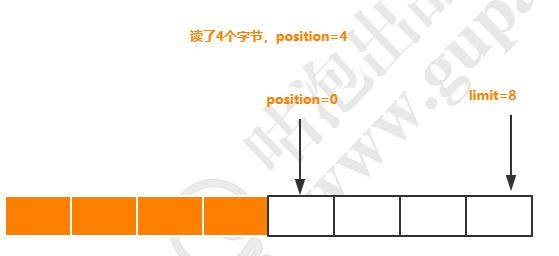
第二次读取数据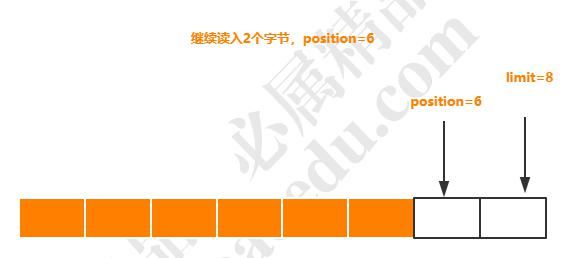
flip操作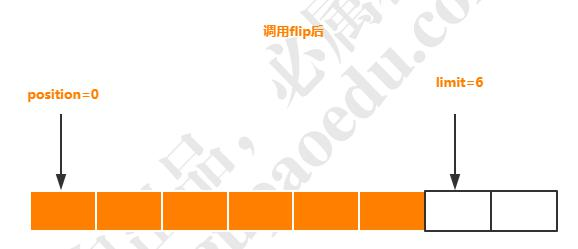
数据写出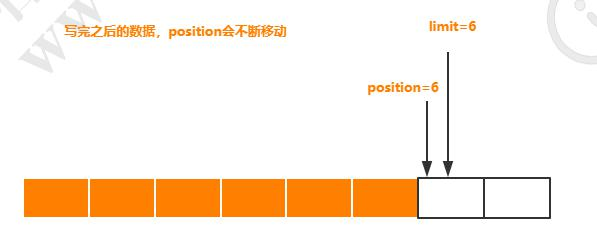
clear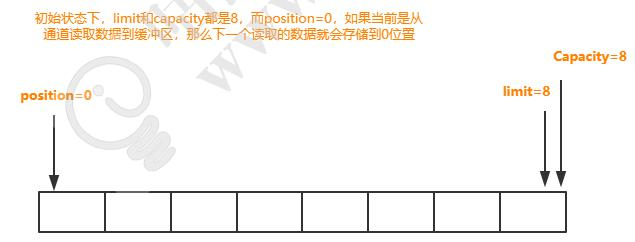
get方法
/*** Relative <i>get</i> method. Reads the byte at this buffer's* current position, and then increments the position.** @return The byte at the buffer's current position** @throws BufferUnderflowException* If the buffer's current position is not smaller than its limit*/public abstract byte get();
put方法
/*** Relative <i>put</i> method <i>(optional operation)</i>.** <p> Writes the given byte into this buffer at the current* position, and then increments the position. </p>** @param b* The byte to be written** @return This buffer** @throws BufferOverflowException* If this buffer's current position is not smaller than its limit** @throws ReadOnlyBufferException* If this buffer is read-only*/public abstract ByteBuffer put(byte b);
剖析零拷贝的原理
IO流的通信原理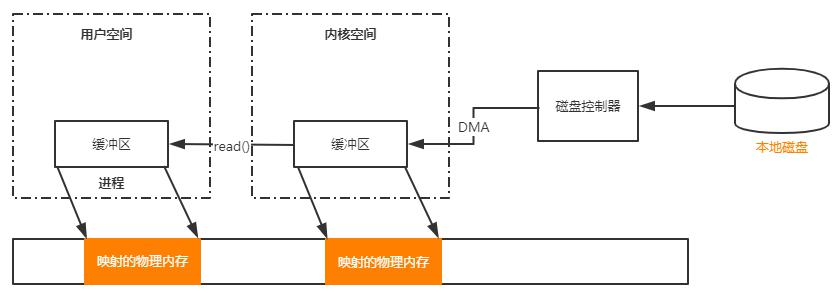
IO流程
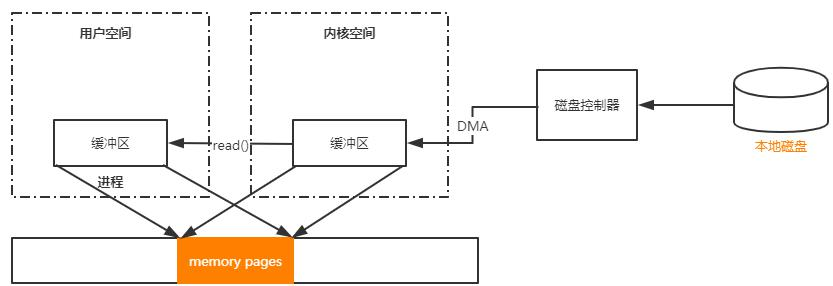
1.内核给磁盘控制器发命令说:我要读磁盘上的某某块磁盘上的数据
2.在DMA的控制下,把磁盘上的数据读入到内核缓冲区
3.内核把数据从内核缓冲区复制到用户缓存区
零拷贝的概念
零拷贝就是没有把数据从一个存储区域拷贝到另一个存储区域。
mmap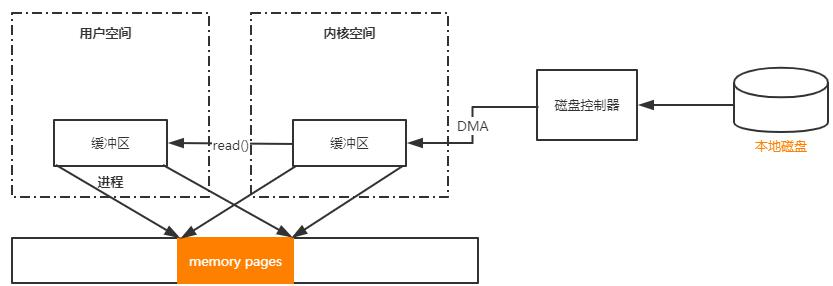
IO拷贝流程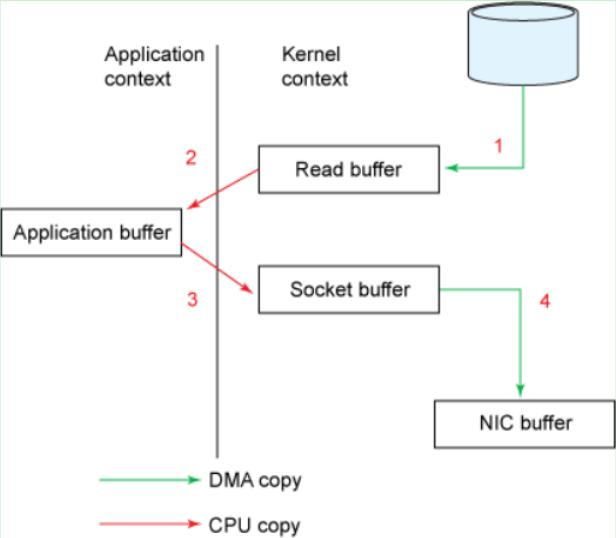
1.磁盘的数据拷贝到内核缓冲区
2.内核缓冲区的数据拷贝到用户缓冲区
3.用户缓冲区的数据拷贝到socket缓冲区
4.socket缓冲区拷贝到网卡缓冲区
零拷贝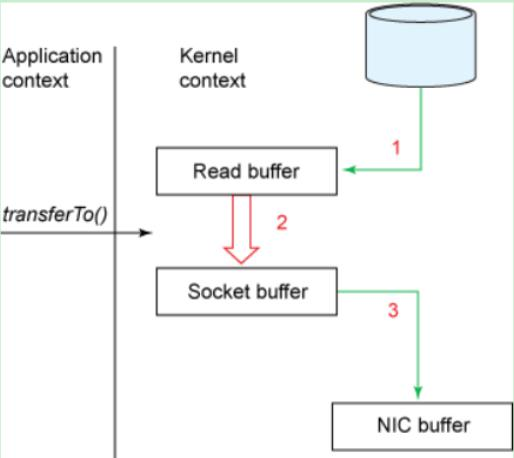
1.磁盘的数据拷贝到内核缓冲区
2.内核缓冲区直接就拷贝到socket缓冲区
3.socket缓冲区的数据拷贝到网卡缓冲区
mmap是零拷贝的一种实现。
NIO中的零拷贝
public class NIOmmapDemo {public static void main(String[] args) throws IOException {FileChannel readChannel = FileChannel.open(Paths.get("zdw.sql"), StandardOpenOption.READ);FileChannel writeChannel = FileChannel.open(Paths.get("zdw1.sql"), StandardOpenOption.READ,StandardOpenOption.WRITE);//定义通用缓冲区MappedByteBuffer data = readChannel.map(FileChannel.MapMode.READ_ONLY,0,readChannel.size());writeChannel.write(data);readChannel.close();writeChannel.close();}}
SocketChannel和ServerSocketChannel
public class NIOSocketClient01 {public static void main(String[] args) {try {SocketChannel socketChannel = SocketChannel.open();socketChannel.configureBlocking(false);//非阻塞模式下,这段代码并不一定是在建立连接之后再往下执行socketChannel.connect(new InetSocketAddress("localhost",8080));if (socketChannel.isConnectionPending()){socketChannel.finishConnect();}ByteBuffer byteBuffer = ByteBuffer.allocate(1024);byteBuffer.put("hello".getBytes());byteBuffer.flip();//转化为写模式socketChannel.write(byteBuffer);byteBuffer.clear();int r = socketChannel.read(byteBuffer);if (r>0){System.out.println("服务端返回消息:"+new String(byteBuffer.array(),"UTF-8"));}else {System.out.println("服务端数据还未返回");}//用作让当前线程不结束// System.in.read();}catch (Exception e){e.printStackTrace();}}}
public class NIOSocketServer01 {public static void main(String[] args) {try {ServerSocketChannel serverSocketChannel = ServerSocketChannel.open();serverSocketChannel.configureBlocking(false);//修改阻塞配置serverSocketChannel.socket().bind(new InetSocketAddress(8080));while (true){//解决了连接阻塞SocketChannel socketChannel = serverSocketChannel.accept();//修改阻塞配置后,此处就不再阻塞了,但可能为null//if (socketChannel!=null){System.out.println("有连接了!");ByteBuffer buffer = ByteBuffer.allocate(1024);//io阻塞的地方socketChannel.read(buffer);String str = new String(buffer.array());System.out.println("客户端说:"+str);//把数据写回客户端buffer.flip();//由读转化为写模式socketChannel.write(buffer);}else {// System.out.println("还没有连接过来");}}}catch (Exception e){e.printStackTrace();}}}
选择器Selector
什么是Selector
Selector(选择器,多路复用器)是Java NIO中能够检测一到多个NIO通道,是
否为诸如读写事件做好准备的组件。这样,一个单独的线程可以管理多个channel,
从而管理多个网络连接。
Selector工作流程
socketChannel和serverSocketChannel 建立连接后,都会注册到Selector,selector会轮询这些
socketChannel,
public class NIOSelectorServer {

    static Selector selector;

    public static void main(String[] args) {
        try{
            selector = Selector.open();
            ServerSocketChannel serverSocketChannel = ServerSocketChannel.open();
            serverSocketChannel.configureBlocking(false);
            serverSocketChannel.socket().bind(new InetSocketAddress(8080));
            //注册到selector
            serverSocketChannel.register(selector, SelectionKey.OP_ACCEPT);

            while (true){
                selector.select();//阻塞  进行监控
                Set<SelectionKey> selectionKeys = selector.selectedKeys();
                Iterator<SelectionKey> iterator = selectionKeys.iterator();
                while (iterator.hasNext()){
                    SelectionKey selectionKey = iterator.next();
                    iterator.remove();//避免重复处理
                    if (selectionKey.isAcceptable()){//连接事件
                        handleAccept(selectionKey);
                    }else if (selectionKey.isReadable()){//读事件
                        handleRead(selectionKey);
                    }
                }
            }

        }catch (Exception e){
            e.printStackTrace();
        }
    }

    private static void handleAccept(SelectionKey selectionKey) throws IOException {
        ServerSocketChannel serverSocketChannel = (ServerSocketChannel) selectionKey.channel();
        //这里一定不会阻塞
        SocketChannel socketChannel = serverSocketChannel.accept();
        socketChannel.configureBlocking(false);
        socketChannel.write(ByteBuffer.wrap("hello client,I ma nio server".getBytes()));
        //这里注册一个读事件
        socketChannel.register(selector,SelectionKey.OP_READ);
    }

    private static void handleRead(SelectionKey selectionKey) throws IOException {
        SocketChannel socketChannel = (SocketChannel) selectionKey.channel();
        ByteBuffer byteBuffer = ByteBuffer.allocate(1024);
        socketChannel.read(byteBuffer);
        System.out.println("server receive msg:"+new String(byteBuffer.array()));
    }
}
public class NIOSelectorClient {

    static Selector selector;

    public static void main(String[] args) {
        try{
            selector = Selector.open();
            SocketChannel socketChannel = SocketChannel.open();
            socketChannel.configureBlocking(false);
            socketChannel.connect(new InetSocketAddress(8080));
            //client 注册一个连接事件
            socketChannel.register(selector, SelectionKey.OP_CONNECT);
            while (true){
                selector.select();//进行监控
                Set<SelectionKey> selectionKeys = selector.selectedKeys();
                Iterator<SelectionKey> iterator = selectionKeys.iterator();
                while (iterator.hasNext()){
                    SelectionKey selectionKey = iterator.next();
                    iterator.remove();
                    if (selectionKey.isConnectable()){
                        handleConnect(selectionKey);
                    }else if (selectionKey.isReadable()){
                        handleRead(selectionKey);
                    }
                }

            }
        } catch (IOException e) {
            e.printStackTrace();
        }
    }

    private static void wakeup(){
        selector.wakeup();//唤醒select阻塞的线程
    }

    private static void handleConnect(SelectionKey selectionKey) throws IOException {
        SocketChannel socketChannel = (SocketChannel) selectionKey.channel();
        if (socketChannel.isConnectionPending()){
            socketChannel.finishConnect();
        }
        socketChannel.configureBlocking(false);
        socketChannel.write(ByteBuffer.wrap("Hello Server i am client".getBytes()));
        socketChannel.register(selector,SelectionKey.OP_READ);
    }

    private static void handleRead(SelectionKey selectionKey) throws IOException {
        SocketChannel socketChannel = (SocketChannel) selectionKey.channel();
        ByteBuffer byteBuffer = ByteBuffer.allocate(1024);
        socketChannel.read(byteBuffer);
        System.out.println("client receive msg:"+new String(byteBuffer.array()));
    }

}

若有收获,就点个赞吧
0 人点赞


