1.设置引用
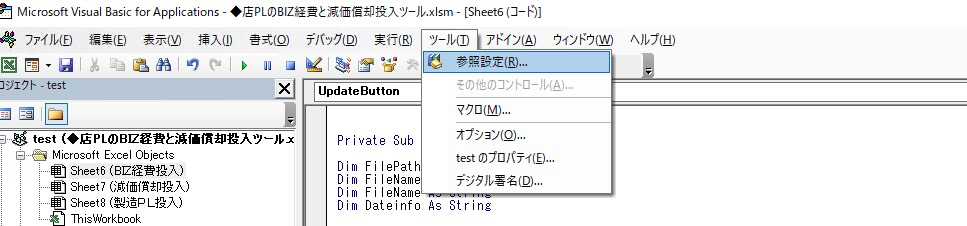

2.连接模块代码编写
Option Explicit'IPPublic Const strIP As String = "172.20.2.49"'用户名Public Const strUser As String = "admin"'密码Public Const strPasswd As String = "TREchina0"'数据库名称Public Const strDB As String = "StorePL"Public strSQL As StringPublic rst As New ADODB.RecordsetPublic Conn As New ADODB.ConnectionPublic Sub cnOpen()On Error GoTo ERR_ConDwhIf Conn Is Nothing ThenSet Conn = New ADODB.ConnectionEnd IfIf Conn.State = 0 ThenWith Conn.Provider = "SQLOLEDB.1".ConnectionString = "Persist Security Info=True;" & _"Data Source=" & strIP & ";" & _"Initial Catalog=" & strDB & ";" & _"User ID=" & strUser & ";" & _"Password=" & strPasswd.ConnectionTimeout = 10.CommandTimeout = 0.CursorLocation = adUseClient.OpenEnd WithEnd IfExit SubERR_ConDwh:MsgBox "无法接入数据库"EndEnd SubPublic Sub cnClose()Conn.CloseEnd Sub
3.使用
                Private Sub UpdateButton_Click()
        ModDBConnect.cnOpen

        strSQL = "exec F_STORE_DataImport '" & Range("C" & r).Value & "','" & FilePath & "'"

        rst.Open strSQL, Conn

        strSQL = "exec F_STORE_DataDistribute '" & Range("C" & r).Value & "'"

        rst.Open strSQL, Conn

        ModDBConnect.cnClose
        End Sub
BCP storepl.dbo.BizDocDetail_T in ‘+ ‘\172.20.1.43\青島共通\002.業務関係\PL_TEST’ + ‘\bizdata\’ + ‘BizDocData‘+CONVERT(varchar(10),@CmdDate,112)+’.tsv’ + ‘ -S172.20.2.49 -Uadmin -PTREchina0 -t \t -c -F2’
Range(“A2”).CopyFromRecordset rst

若有收获,就点个赞吧
0 人点赞


