注解的作用
- 注解+ APT 技术,生成 Java 文件。如DataBinding、Hilt、ButterKnife 等框架
- 注解+反射+动态代码
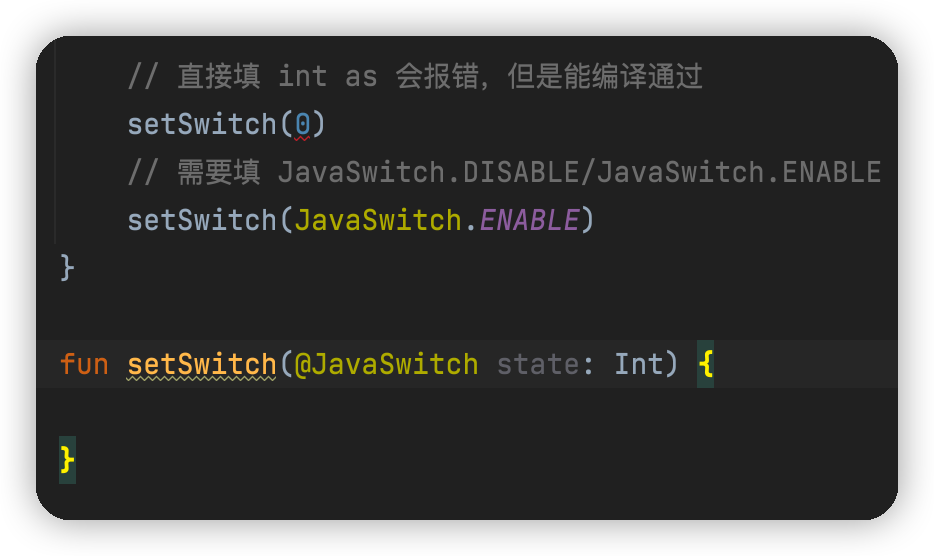
- 注解定义常量(代替枚举)或者限制函数里参数的范围(@DrawableRes、@StringRes等)
代替枚举
Java 代码
@IntDef({JavaSwitch.DISABLE, JavaSwitch.ENABLE})@Target(ElementType.PARAMETER)@Retention(AnnotationRetention.SOURCE)public @interface JavaSwitch {int DISABLE = 0;int ENABLE = 1;}
Kotlin 代码
@IntDef(KotlinSwitch.DISABLE, KotlinSwitch.ENABLE)@Target(AnnotationTarget.VALUE_PARAMETER)@Retention(AnnotationRetention.SOURCE)annotation class KotlinSwitch {companion object {const val DISABLE = 0const val ENABLE = 1}}

APT技术
这才是注解的『最终归宿』,全程 Annotation Processing Tool 即注解处理器。简单来讲:在编译期识别自定义的注解然后根据规则生成对应代码。如:ButterKnife
现在利用 APT 技术来实现 ButterKnife 的 BindView 功能(自动FindViewById)
- 创建一个 Java Module 名为 apt-test-annotation
- 创建一个 Java Module 名为 apt-test-processor
- 创建一个 Android Module 名为 apt-test-api

@Target(ElementType.FIELD)//能修饰参数@Retention(RetentionPolicy.CLASS)//表示注解只在源码中存在,编译成 class 之后,就没了public @interface BindView {int value();}
�在 apt-test-annotation 的 gradle 文件里需要引入
// 不引用无法执行注解执行器implementation 'com.google.auto.service:auto-service:1.0-rc6'annotationProcessor 'com.google.auto.service:auto-service:1.0-rc6'// 以及需要引用 apt-test-processor。因为注解处理需需要使用这个注解implementation project(path: ":apt-test-annotation")
重点是 AptTestAnnotationProcessor这个类
@AutoService(Processor.class)public class AptTestAnnotationProcessor extends AbstractProcessor {/*** 文件生成器*/private Filer mFiler;/*** 日志*/private Messager mMessager;@Overridepublic synchronized void init(ProcessingEnvironment processingEnv) {super.init(processingEnv);mFiler = processingEnv.getFiler();mMessager = processingEnv.getMessager();}@Overridepublic boolean process(Set<? extends TypeElement> set, RoundEnvironment roundEnv) {mMessager.printMessage(Diagnostic.Kind.NOTE, "注解处理器运行了");if (set == null || set.isEmpty()) {return false;}// 读取 BindView 注解Set<? extends Element> elementsAnnotatedWith = roundEnv.getElementsAnnotatedWith(BindView.class);// 存储每个Activity中的所有注解属性HashMap<String, List<VariableElement>> annotatedMap = new HashMap<>();if (elementsAnnotatedWith != null && !elementsAnnotatedWith.isEmpty()) {for (Element element : elementsAnnotatedWith) {// 转成属性节点VariableElement e = (VariableElement) element;// 获取上一个节点,也就是类名TypeElement typeElement = (TypeElement) e.getEnclosingElement();// 获取类名String activityName = typeElement.getSimpleName().toString();//缓存对应类的所有节点List<VariableElement> variableElementList = annotatedMap.get(activityName);if (variableElementList == null) {variableElementList = new ArrayList<>();annotatedMap.put(activityName, variableElementList);}// 缓存所有的属性注解节点variableElementList.add(e);}}if (annotatedMap.size() > 0) {Writer writer = null;for (String activityName : annotatedMap.keySet()) {// 得到类上的所有节点List<VariableElement> variableElements = annotatedMap.get(activityName);//得到包名String packageName = processingEnv.getElementUtils().getPackageOf(variableElements.get(0)).toString();// 自定义类名,仿造 ButterknifeString newClass = activityName + "_ViewBinding";try {// 创建java文件JavaFileObject javaFile = mFiler.createSourceFile(packageName + "." + newClass);// 写入代码writer = javaFile.openWriter();StringBuilder buffer = new StringBuilder();// 拼接代码buffer.append("package ").append(packageName).append(";\n");buffer.append("import android.view.View;\n");buffer.append("public class ").append(newClass).append("{\n");buffer.append("public ").append(newClass).append("(final ").append(packageName).append(".").append(activityName).append(" target){\n");for (VariableElement element : variableElements) {String fieldName = element.getSimpleName().toString();int resId = element.getAnnotation(BindView.class).value();// 执行findViewByIdbuffer.append("target.").append(fieldName).append("=target.findViewById(").append(resId).append(");\n");}buffer.append("}\n}");writer.write(buffer.toString());} catch (IOException e) {e.printStackTrace();} finally {try {if (writer != null) {writer.close();}} catch (IOException e) {e.printStackTrace();}}}}return true;}/*** 当前注解处理器支持的注解集合,如果支持,就会调用 process 方法** @return 支持的注解集合*/@Overridepublic Set<String> getSupportedAnnotationTypes() {HashSet<String> types = new HashSet<>();types.add(BindView.class.getCanonicalName());return types;}/*** 编译当前注解处理器的 JDK 版本** @return JDK 版本*/@Overridepublic SourceVersion getSupportedSourceVersion() {return SourceVersion.latestSupported();}}
�编译项目就会生成代码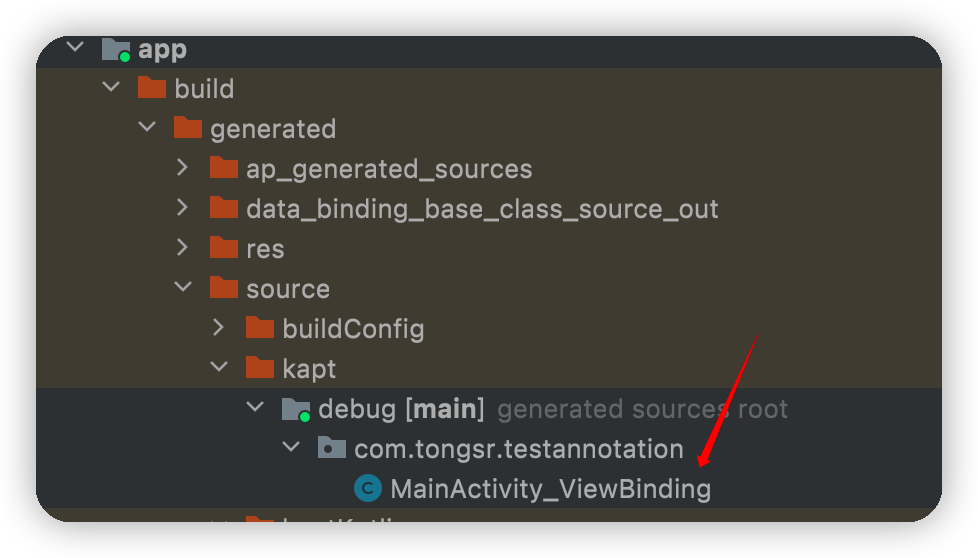
生成代码其实是靠 Filer 这个类,但是代码里的方式不太灵活。可以使用 JavaPoet 库来帮助生成代码
PS:在主模块别忘了引用三个 Module

若有收获,就点个赞吧
0 人点赞


