0. 回顾
上一篇,我们介绍了进程间通信,主进程通过 child_process 启动了 tsserver,
主进程通过 child.stdin.write 写内容,向子进程发消息。
child.stdin.write(`${JSON.stringify(openFile)}\n`);
子进程处理完业务逻辑之后,向自己进程的 stdout 发消息,
回调到主进程的 child.stdout.on data 事件监听函数中。
child.stdout.on('data', data => {console.log(data.toString());});
下文我们来跟踪一下这些消息的处理过程,看看有哪些值得注意的地方。
1. 启动调试
以上我们启动了两个 VSCode 实例,分别称为 client 端与 server 端,准备调试 tsserver。
我们看到 server 端的 .vscode/launch.json 是与项目无关的,因此,可以放到 TypeScript 源码仓库的调试配置中。
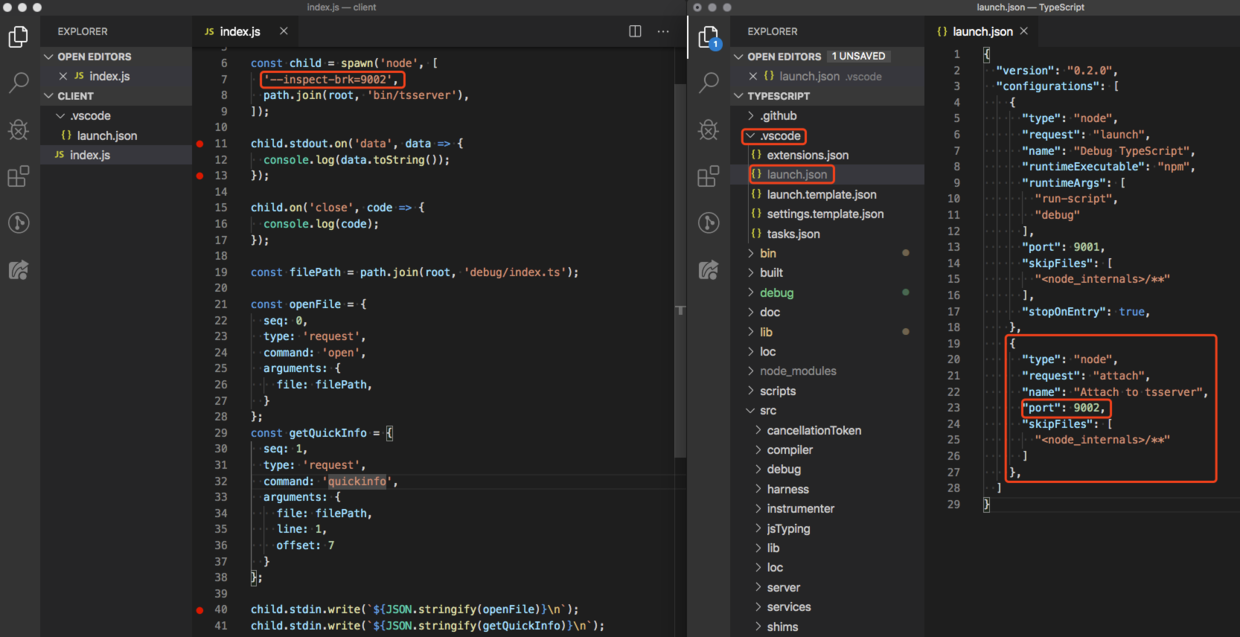
然后按以下步骤启动调试。
(1)client 端,按 F5 启动调试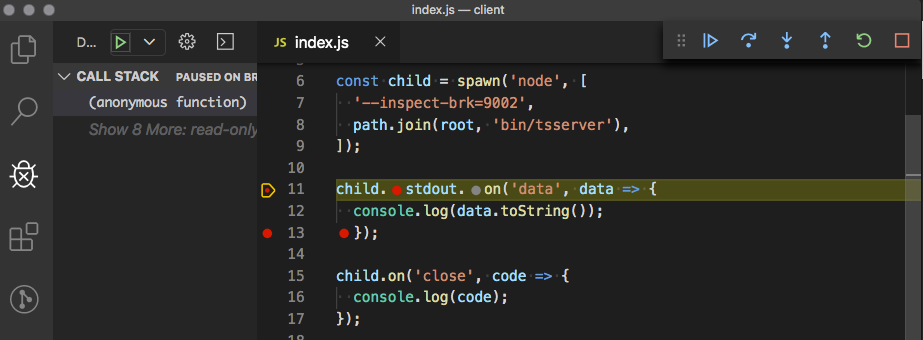
client 端执行完 spawn 后,tsserver 就启动了。
(2)server 端,按 F5 attach 到已经启动的 tsserver
我们看到两个 VSCode 实例,都停在了断点处。
(3)server 端 lib/tsserver 的调试,仍然会遇到无法进入 .ts 的问题
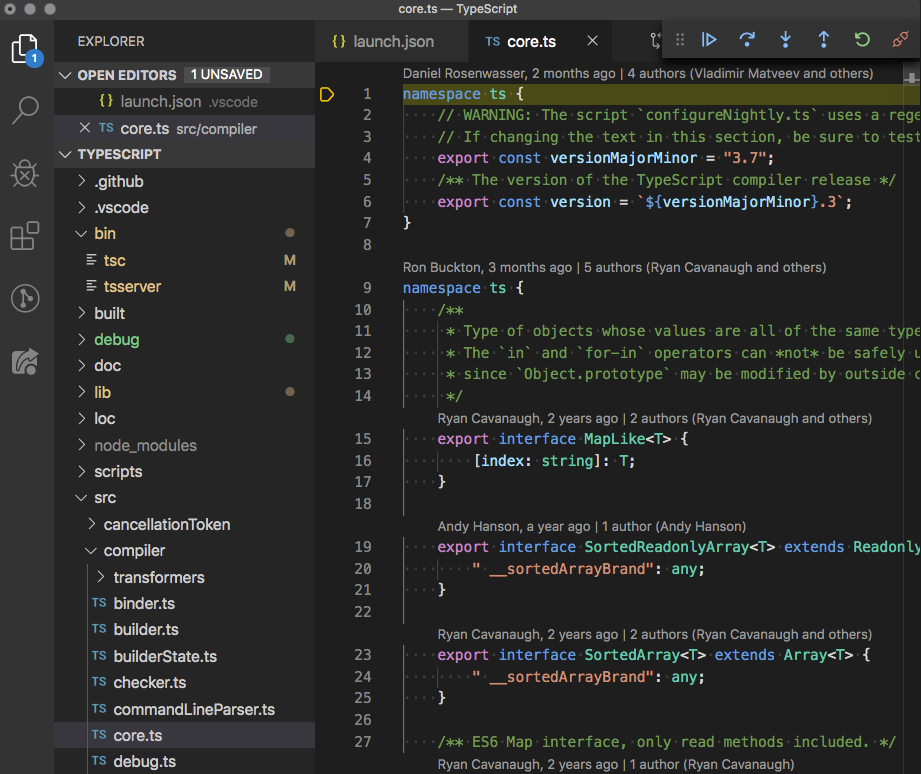
与第二篇一样,我们需要在 require 的时候,点击 Step Into,进入 src/compiler/core.ts#L1 中。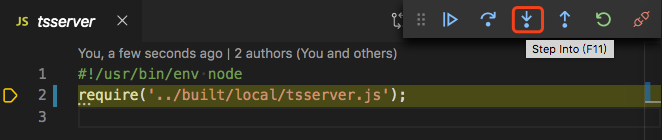
2. tsserver 启动事件
tsserver 启动后,在没有收到任何消息时,会先向主进程发送一条消息,
为了理解这条消息的发送逻辑是怎样的,我们需要将 client 端 child.stdin.write 的内容先注释掉。
client 端 index.js 的文件内容修改如下,
const path = require('path');const { spawn } = require('child_process');const root = '/Users/.../TypeScript'; // <- 这是 TypeScript 源码仓库的根目录const child = spawn('node', ['--inspect-brk=9002',path.join(root, 'bin/tsserver'),]);child.stdout.on('data', data => {console.log(data.toString());});child.on('close', code => {console.log(code);});// 注释掉了 child.stdin.write
然后我们启动 client 端,再 attach server 端。
通过 “灵犀一指”,我们断定 tsserver 会执行到这里。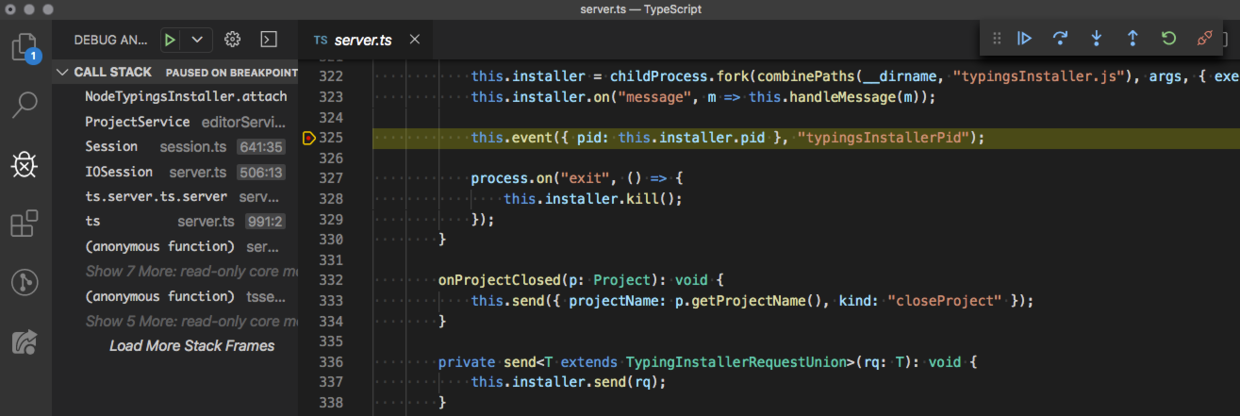
发生在 attach 函数中,src/tsserver/server.ts#L325,
class ... implements ITypingsInstaller {...attach(projectService: ProjectService) {...this.installer = childProcess.fork(combinePaths(__dirname, "typingsInstaller.js"), args, { execArgv });this.installer.on("message", m => this.handleMessage(m));this.event({ pid: this.installer.pid }, "typingsInstallerPid");...}...}
我们来分析调用栈,
bin/tsserver#L2,加载 ../built/local/tsserver.js 文件,
...require('../built/local/tsserver.js');
VSCode 根据 source map 反查到 src/tsserver/server.ts 文件。
src/tsserver/server.ts#L976,加载过程中会执行,new IOSession,
namespace ts.server {...const ioSession = new IOSession();...}
new IOSession 会调用父类 Session 的构造函数,src/tsserver/server.ts#L506,
class IOSession extends Session {...constructor() {...super({...});...}...}
export class Session implements EventSender {...constructor(opts: SessionOptions) {...this.projectService = new ProjectService(settings);...}...}
Session 构造函数中,会调用 new ProjectService,src/server/editorServices.ts#L430,
export class ProjectService {...constructor(opts: ProjectServiceOptions) {...this.typingsInstaller.attach(this);...}...}
接着调用了 this.typingsInstaller.attach,src/tsserver/server.ts#L282,
class NodeTypingsInstaller implements ITypingsInstaller {...attach(projectService: ProjectService) {...this.installer = childProcess.fork(combinePaths(__dirname, "typingsInstaller.js"), args, { execArgv });this.installer.on("message", m => this.handleMessage(m));this.event({ pid: this.installer.pid }, "typingsInstallerPid");...}...}
attach 函数中,又启动了一个子进程,为全局 TypeScript 缓存安装类型依赖。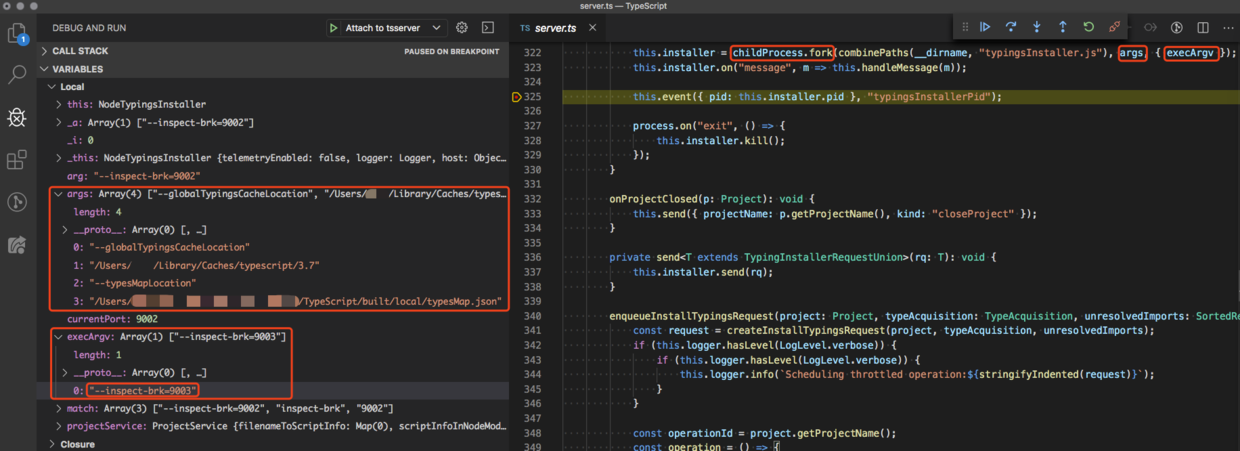
我们看到新启动的进程 --inspect-brk=9003,相当于这样调用,
$ node --inspect-brk=9003 /Users/.../TypeScript/built/local/typingsInstaller.js \--globalTypingsCacheLocation /Users/.../Library/Caches/typescript/3.7 \--typesMapLocation /Users/.../TypeScript/built/local/typesMap.json \
built/local/typingsInstaller.js 会在 /Users/.../Library/Caches/typescript/3.7 这个位置安装依赖。
这里的逻辑暂时先不用在意。
安装完依赖之后,attach 函数调用了 this.event,向 stdout 发消息。
由于主进程中监控了 tsserver 子进程的 stdout 事件。
所以,启动 tsserver 之后,主进程会先收到一条消息。
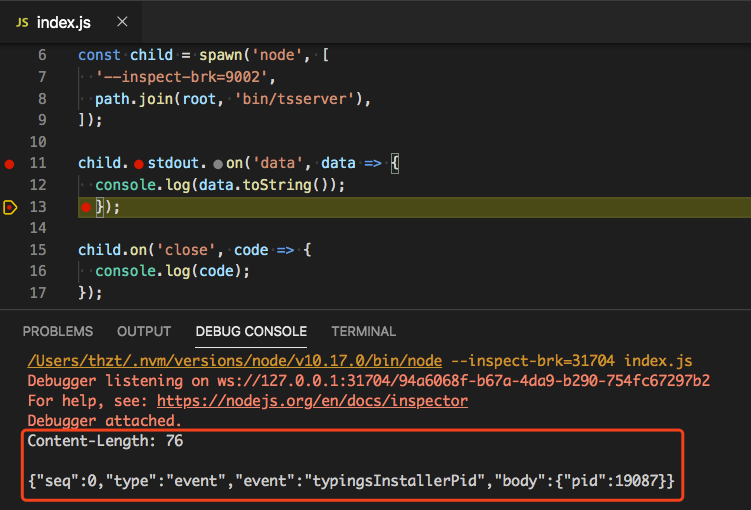
消息内容如下,
Content-Length: 76{"seq":0,"type":"event","event":"typingsInstallerPid","body":{"pid":19087}}
3. 与 tsserver 的交互
3.1 command: open
了解了 tsserver 的启动事件之后,client 端就不会被莫名其妙的一条消息搞糊涂了。
现在我们取消 client 端 index.js 中 child.stdin.write 相关的注释,与上一篇内容一致。
const path = require('path');const { spawn } = require('child_process');const root = '/Users/.../TypeScript'; // <- 这是 TypeScript 源码仓库的根目录const child = spawn('node', ['--inspect-brk=9002',path.join(root, 'bin/tsserver'),]);child.stdout.on('data', data => {console.log(data.toString());});child.on('close', code => {console.log(code);});const filePath = path.join(root, 'debug/index.ts');const openFile = {seq: 0,type: 'request',command: 'open',arguments: {file: filePath,}};const getQuickInfo = {seq: 1,type: 'request',command: 'quickinfo',arguments: {file: filePath,line: 1,offset: 7}};child.stdin.write(`${JSON.stringify(openFile)}\n`);child.stdin.write(`${JSON.stringify(getQuickInfo)}\n`);
重新启动 client 端,然后 attach server 端。
server 端启动事件执行完之后,我们继续运行 client 端到 child.stdin.write 位置。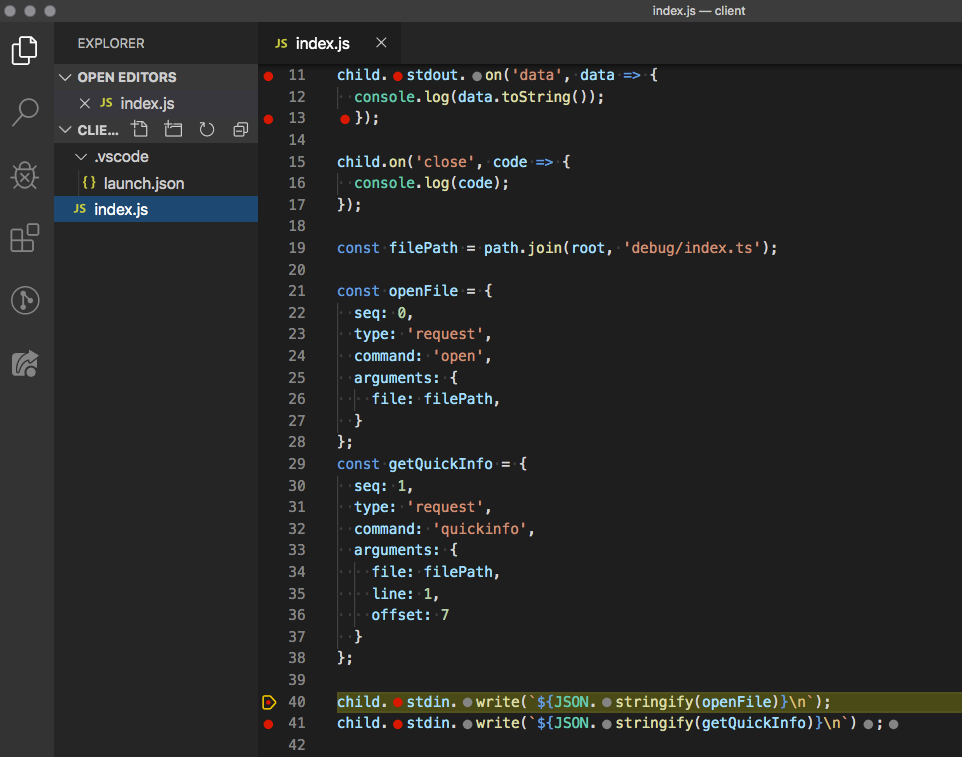
注意,child.stdin.write 尾部 \n 换行符。
然后我们去 server 端 src/tsserver/server.ts#L576 打个断点,
class IOSession extends Session {...listen() {rl.on("line", (input: string) => {const message = input.trim();this.onMessage(message);});...}}
client 端继续执行,就会发现 server 端跑到了断点中,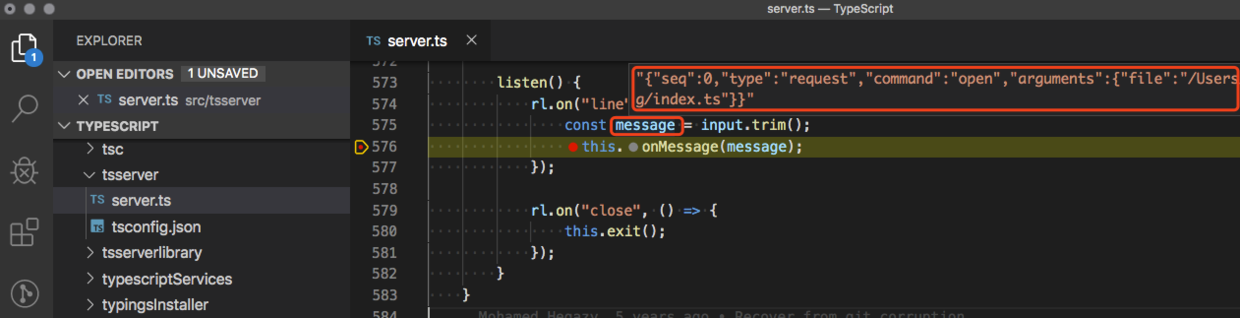
我们看到 message 的值正是 child.stdin.write 发送过来的。
接着 server 端会处理这个消息。
不幸的是,这段消息是一个 open command,
{seq: 0,type: 'request',command: 'open', // open 类型的 commandarguments: {file: filePath,}}
而 tsserver 对于 open command 并不会向主进程返回消息。
所以,主进程并不会收到任何消息。
我们在 server 端按 F5 让它跑完。
3.2 command: quickinfo
上文我们了解到 child.stdin.write 发送的一条 open command 并没有返回任何消息给主进程,
我们让 server 端代码继续执行了。
现在回到 client 端,继续执行下一条 child.stdin.write,
server 端立即收到了新消息,进入断点中,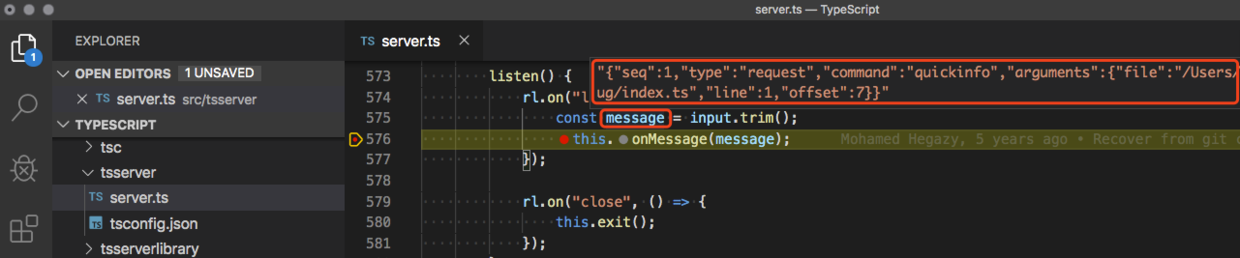
message 内容正好是 child.stdin.write 写入的内容。
{seq: 1,type: 'request',command: 'quickinfo', // quickinfo 类型的 commandarguments: {file: filePath,line: 1,offset: 7}}
这是一条 quickinfo command 执行完毕之后,tsserver 是会向主进程返回消息的。
我们来看会返回什么,于是 server 端按 F5 执行完。
client 端的断点会跑到 child.stdout.on data 事件中,并且会连续进入两次,
第一次,会打印 tsserver 启动事件发回的消息,
第二次,并不是打印 open command 的消息(因为它不返回消息),而是打印了 quickinfo command 返回的消息。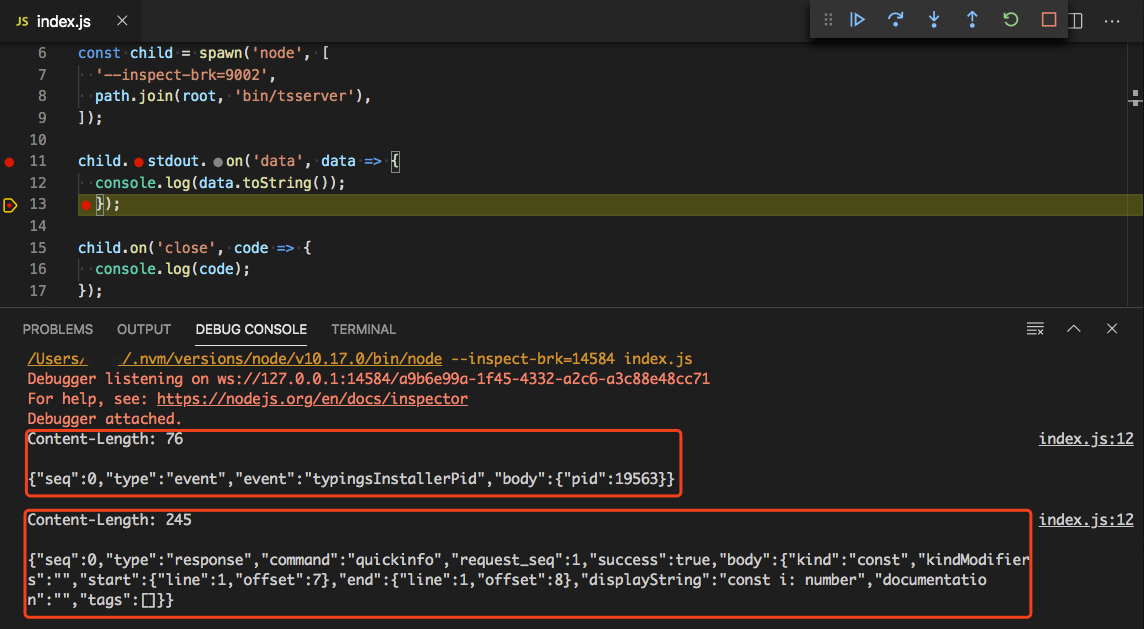
Content-Length: 76{"seq":0,"type":"event","event":"typingsInstallerPid","body":{"pid":19563}}Content-Length: 245{"seq":0,"type":"response","command":"quickinfo","request_seq":1,"success":true,"body":{"kind":"const","kindModifiers":"","start":{"line":1,"offset":7},"end":{"line":1,"offset":8},"displayString":"const i: number","documentation":"","tags":[]}}
最后,我们来看看 quickinfo command 返回了什么内容,
关键内容是 displayString 的内容,
const i: number
这正是我们在 debug/index.ts 文件中,鼠标悬停到 i 标识符上展示的内容,
const i: number = 1;
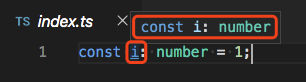
而我们传入的 quickinfo command 参数中,
{seq: 1,type: 'request',command: 'quickinfo',arguments: {file: filePath,line: 1, // 第 1 行offset: 7 // 第 7 个字符,刚好是 i}}
第 1 行(line: 1),第 7 个字符(offset: 7),刚好是 i。
总结
本文跟踪了 tsserver 启动事件,以及 open 和 quickinfo 两个 command 的消息交互过程。
tsserver 端的业务逻辑,我们没有详细追究。
但是留意到,tsserver 启动时,不接受任何消息,也会主动向主进程发送一条 typingsInstallerPid 消息,
Content-Length: 76{"seq":0,"type":"event","event":"typingsInstallerPid","body":{"pid":19087}}
其次,open command 并不会返回任何消息,
最后,quickinfo command 会返回 debug/index.ts 中变量 i 鼠标悬停上去展示的内容,
详见 displayString 的值。
Content-Length: 245{"seq":0,"type":"response","command":"quickinfo","request_seq":1,"success":true,"body":{"kind":"const","kindModifiers":"","start":{"line":1,"offset":7},"end":{"line":1,"offset":8},"displayString":"const i: number","documentation":"","tags":[]}}
参考

若有收获,就点个赞吧
0 人点赞


