1. 回顾
上一篇我们探索了 TypeScript 的符号查找过程,在判断一个符号 x 是否已定义时,
TypeScript 会沿着 ast 当前节点,通过 parent 属性往上找,
途中某些祖先节点,可能具有 locals 值,它保存了当前作用域中定义的所有变量。
如此这样,我们可以找到所有局部定义的词法变量。
全局变量也在 locals 中,位于 ast 的根节点中。
只不过,除了用户定义的全局变量之外,还包含 TypeScript 语言内置的一些全局变量。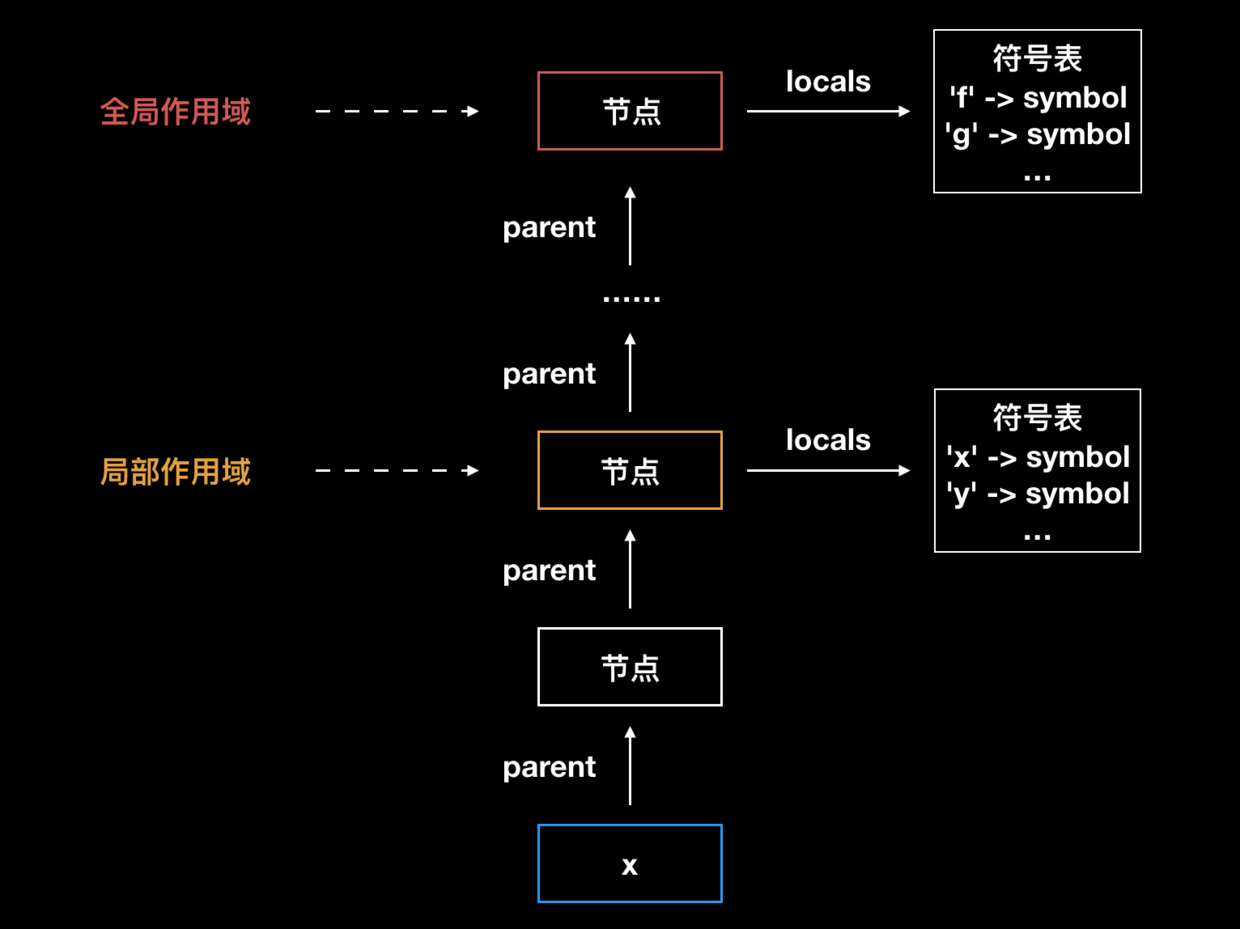
然而,上一篇篇尾也提到,
通过 ts.createProgram 创建的 program,是没有 locals 属性的,
各 ast 节点也没有 parent 属性相连,必须执行一次,program.getGlobalDiagnostics();。
program.getGlobalDiagnostics 到底做了哪些工作呢?
本文我们就探索一下其中的秘密。
2. 直击本质
在开始之前,请先按 github: debug-typescript 准备好调试环境。
为了简单起见,我们写入待编译的 debug/index.ts 的内容如下,
let _x;
然后在 src/compiler/binder.ts#L454 declareSymbol 函数中,
function declareSymbol(...) {...if (name === undefined) {...}else {...if (!symbol) {symbolTable.set(name, symbol = createSymbol(SymbolFlags.None, name));...}...}...}
打一个条件断点,
name === '_x'

启动调试,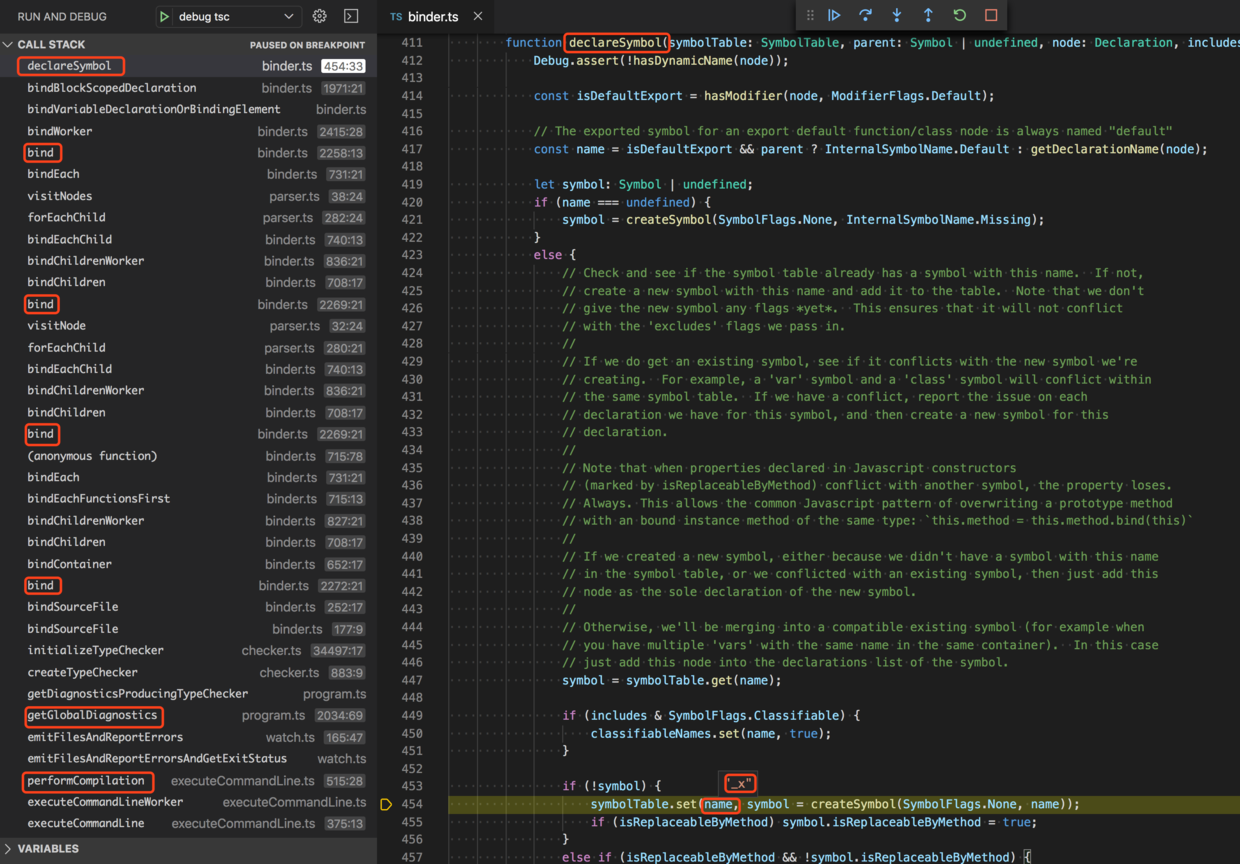
symbolTable.set(name, symbol = createSymbol(SymbolFlags.None, name));
这一步就是在符号表 symbolTable 中写入映射关系,key 为 name,值是一个 symbol。
在当前这个例子中,symbolTable 就是 ast 根节点 SourceFile 的 locals 值。
我们来看看 declareSymbol 是怎么被调用的,symbolTable 是怎么传进来的,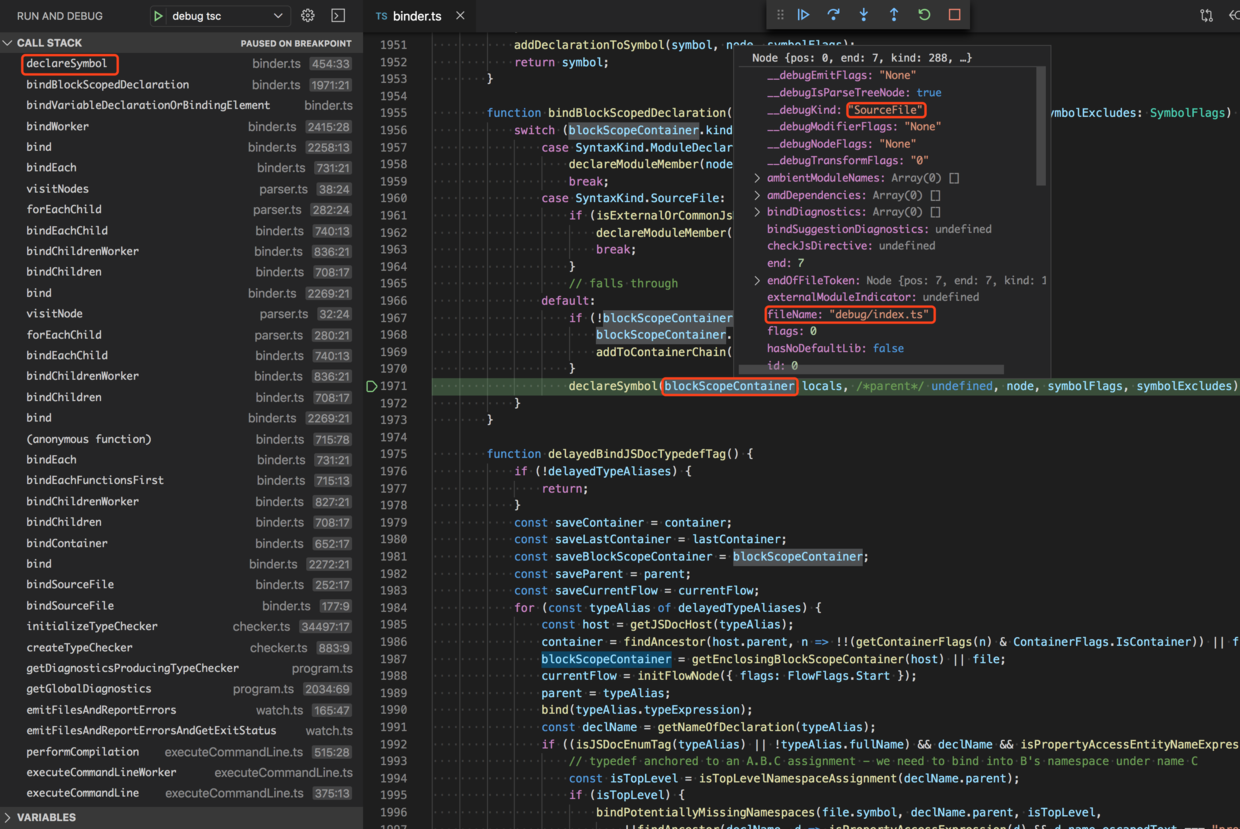
这个 blockScopeContainer 正是 ast 的根节点 SourceFile。
想必是 TypeScript 从根节点开始,往下搜索子节点,
遇到变量定义之后,就在表示变量生效范围的 container 上,添加一条符号映射关系。
let _x;
我们定义的是全局变量,
这个变量在整个 SourceFile 内部生效,或者说,作用域为 SourceFile。
因此,会在 SourceFile.locals 中添加一条符号映射关系。
2. 链路
(1)全局变量
那么 SourceFile.locals 是什么时候创建的呢?
TypeScript 又是怎样向下搜索子节点的呢?
这得从调用链路说起。
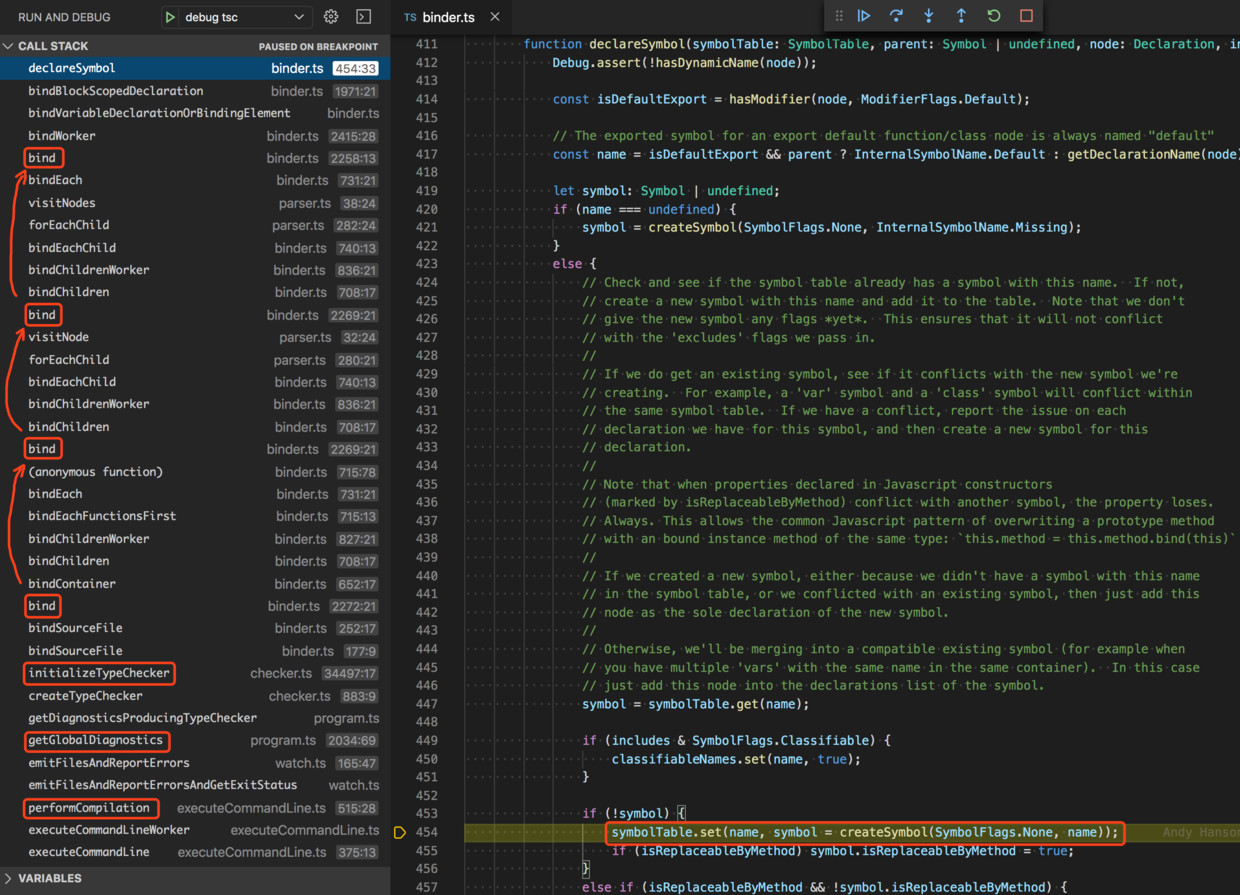
我们仔细看左侧的调用栈,会发现 bind 函数重复出现了多次,它被间接的递归调用了。bind 的作用就是处理当前节点,可是在处理的过程中,bindEachChild 又调用了 bind 自身。
这其实是一个 ast 的遍历过程。
bind 会遍历 ast 的所有节点,一旦发现变量定义,就在它的 container 中写入符号映射关系。
第一个 bind 调用了 bindContainer,正是在这里 TypeScript 为 container 添加了 locals 属性。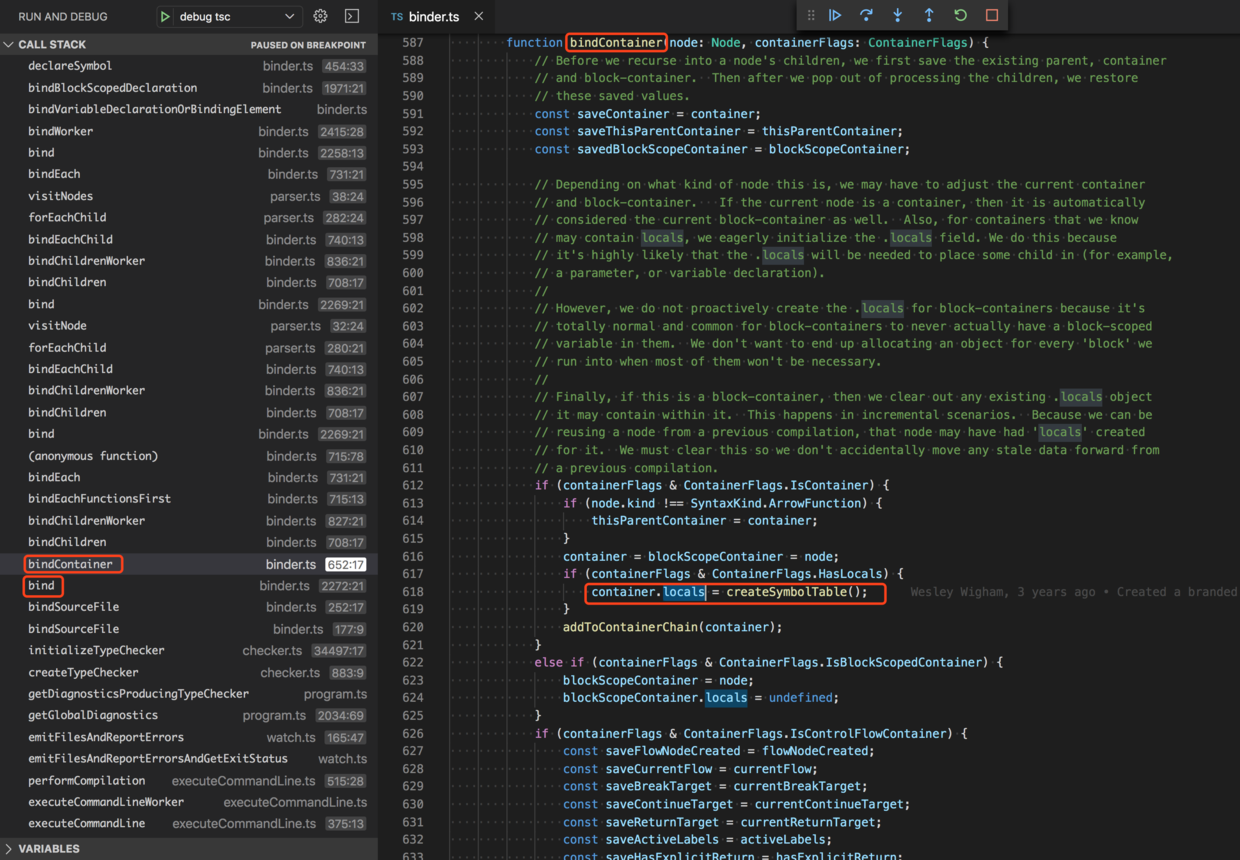
初始时它是一个空的符号表,createSymbolTable,src/compiler/utilities.ts#L46
export function createSymbolTable(symbols?: readonly Symbol[]): SymbolTable {const result = createMap<Symbol>() as SymbolTable;if (symbols) {for (const symbol of symbols) {result.set(symbol.escapedName, symbol);}}return result;}
我们示例中的 _x 是全局变量,因此写到了 SourceFile 中,
下面我们来看一下局部变量的 bind 链路。
(2)局部变量
修改 debug/index.ts 的内容如下,
function f() {function g() {let _x;}}
保持 declareSymbol 函数中 src/compiler/binder.ts#L454 位置的条件断点不变,
name === '_x'
再次启动调试,调用链路明显变长了。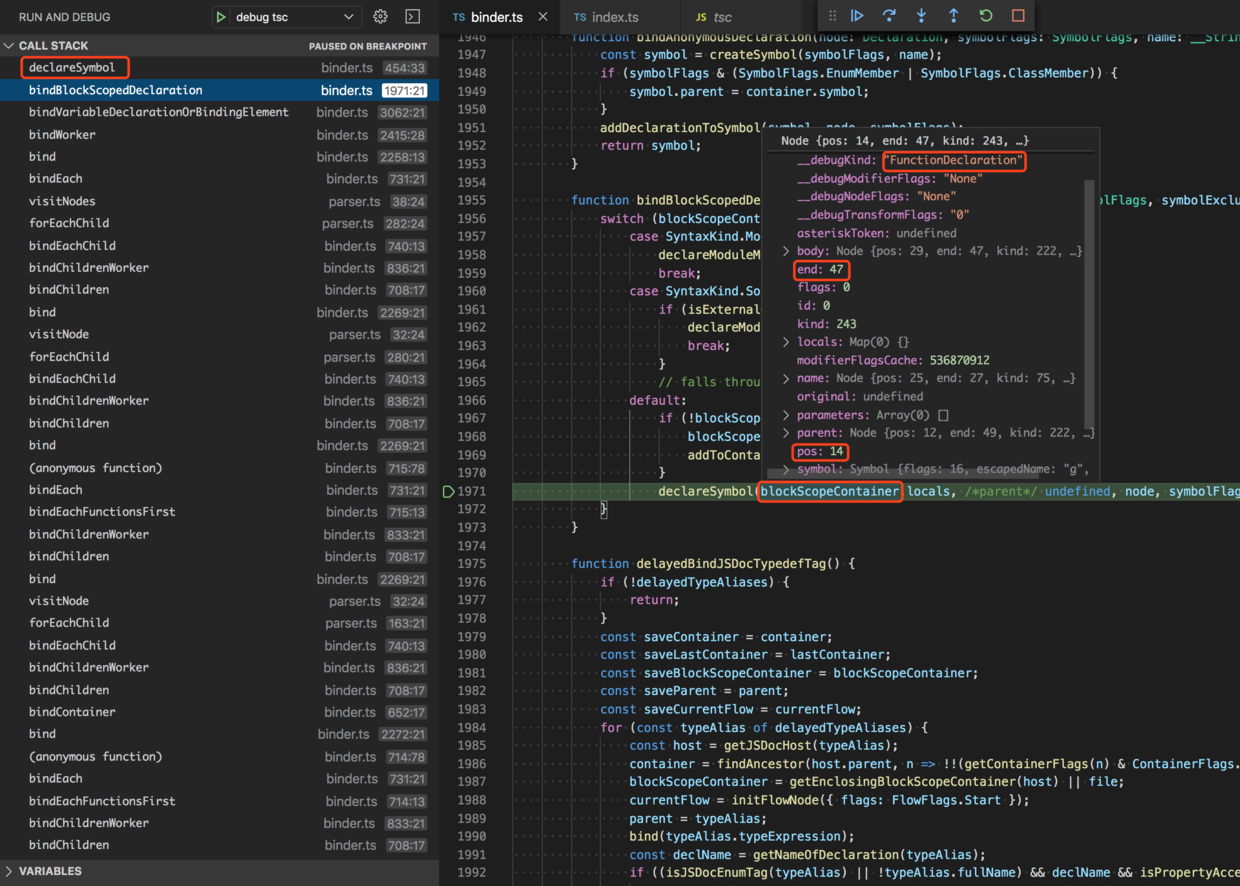
blockScopeContainer 不再是 SourceFile 节点了,而是 FunctionDeclaration 了。
节点范围如下,pos: 14,end: 47。
我们可以调用 blockScopeContainer.__debugGetText() 获取节点的内容,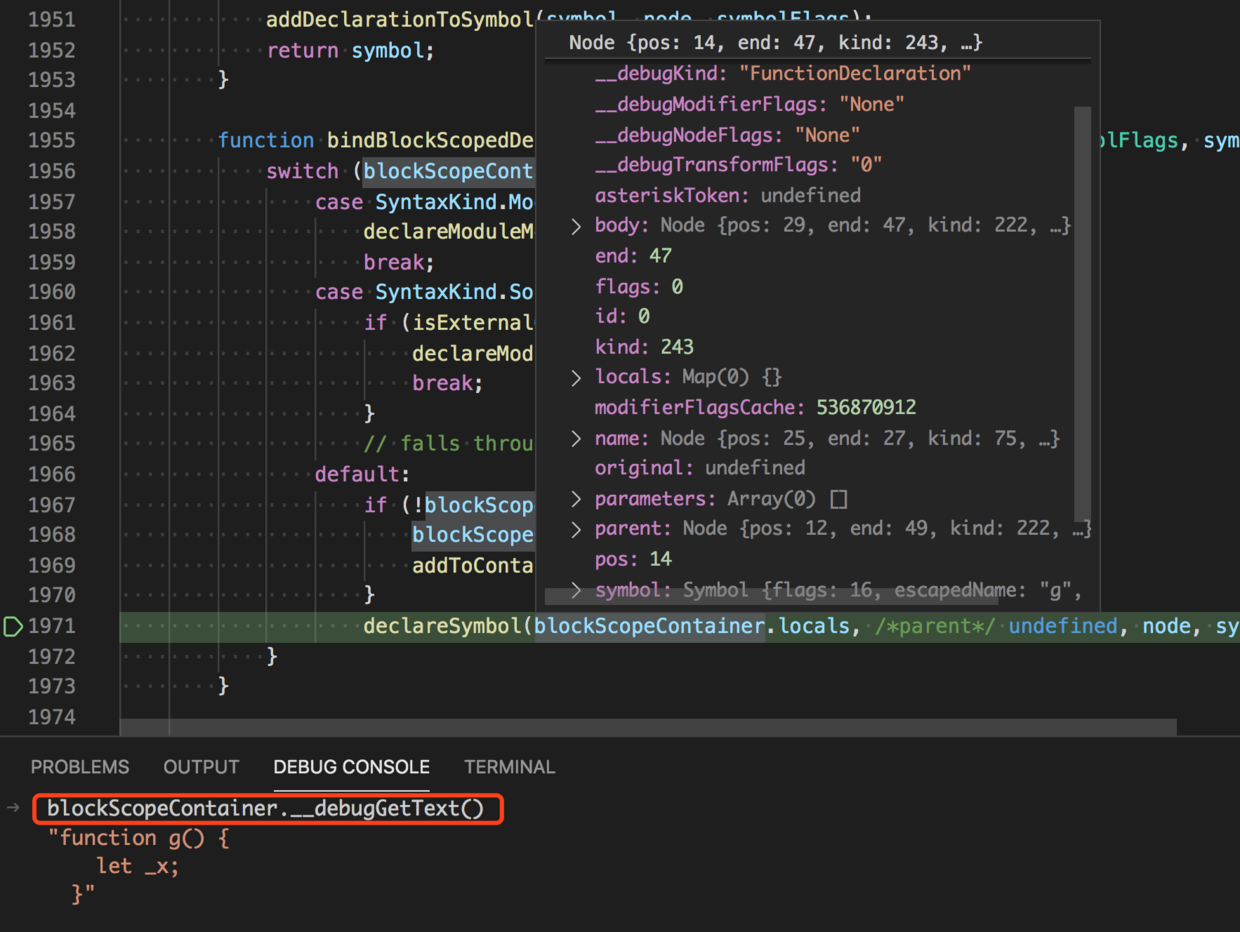
或者,使用 slice(14, 47) 截取一下源代码,
`function f() {function g() {let _x;}}`.slice(14, 47)执行结果:"function g() {let _x;}"
这正是 _x 是词法作用域范围,它在函数 g 中可见,而在函数 f 中( g 外的地方)不可见。
所以,与 _x 相关的符号映射关系,放在了 g 的 locals 中。
3. 后记
(1)parent 属性
我们知道原始的 ast 节点,除了没有 locals 信息之外,也没有 parent 属性,
实际上 parent 属性正是在 bind 函数开头 src/compiler/binder.ts#L2235 中设置的。
function bind(node: Node | undefined): void {if (!node) {return;}node.parent = parent;......if (...) {...if (...) {bindChildren(node);}else {bindContainer(node, containerFlags);}...}else if (...) {...}...}
node.parent = parent;
后面那个 parent 是外层函数 createBinder 中的变量,
这个 createBinder 函数有 3053 行,src/compiler/binder.ts#L183-L3235
(2)ts.bindSourceFile
上一篇末尾我们知道,原始的 ast 是不包含符号表信息的,
这样得到 sourceFile 的 locals 属性为 undefined。
const ts = require('typescript');

const main = filePath => {
  const rootNames = [filePath];
  const options = {};

  const program = ts.createProgram(rootNames, options);
  const sourceFile = program.getSourceFile(filePath);
  const { locals } = sourceFile;

  locals;  // undefined
};
后来意外的发现,添加 program.getGlobalDiagnostics(); 之后就有符号表了。
const ts = require('typescript');

const main = filePath => {
  const rootNames = [filePath];
  const options = {};

  const program = ts.createProgram(rootNames, options);

  program.getGlobalDiagnostics();  // 过程中计算了符号表

  const sourceFile = program.getSourceFile(filePath);
  const { locals } = sourceFile;

  locals;  // 有值了
};
当时我们并不知道其中发生了什么。
如今,通过本文的分析,我们已经知道 program.getGlobalDiagnostics(); 过程中发生了什么。
调用链路如下,
program.getGlobalDiagnostics
getDiagnosticsProducingTypeChecker
createTypeChecker
intializeTypeChecker
bindSourceFile
...
bind
...
bind
...
declareSymbol
其中,bindSourceFile src/compiler/binder.ts#L174 是一个关键函数,
正是它递归调用了一系列 bind,计算每个节点的符号表信息。
export function bindSourceFile(file: SourceFile, options: CompilerOptions) {
  performance.mark("beforeBind");
  perfLogger.logStartBindFile("" + file.fileName);
  binder(file, options);
  perfLogger.logStopBindFile();
  performance.mark("afterBind");
  performance.measure("Bind", "beforeBind", "afterBind");
}
除此之外,值得高兴的是,
这个 bindSourceFile 被 TypeScript 导出了,外部也可以通过 ts.bindSourceFile 调用它。
因此,我们就可以把 program.getGlobalDiagnostics(); 换成更精确的写法了,
const ts = require('typescript');

const main = filePath => {
  const rootNames = [filePath];
  const options = {};

  const program = ts.createProgram(rootNames, options);
  const sourceFile = program.getSourceFile(filePath);

  ts.bindSourceFile(sourceFile, options);  // 计算符号表信息

  const { locals } = sourceFile;

  locals;  // 有值
};
参考

若有收获,就点个赞吧
0 人点赞


